
1. ആമുഖം
Thank you for choosing the Radioddity HD-1 Walkie Talkie. This robust and versatile two-way radio is designed for reliable communication in various environments, from construction sites to outdoor adventures. Featuring IP67 waterproofing, dustproof capabilities, and a shock-resistant design, the HD-1 ensures durability and performance. This manual provides essential information for proper setup, operation, and maintenance of your device.
2. പാക്കേജ് ഉള്ളടക്കം
Upon opening your Radioddity HD-1 package, please verify that all the following items are included:
- 2 x Radioddity HD-1 Radiotelephones
- 2 x Rechargeable Li-ion Batteries (2400 mAh)
- 1 x ചാർജിംഗ് ഡോക്ക്
- 2 x ബെൽറ്റ് ക്ലിപ്പുകൾ
- 2 x ലാനിയാർഡുകൾ
- 1 x യുഎസ്ബി-സി ചാർജിംഗ് കേബിൾ
- 1 x പവർ അഡാപ്റ്റർ

Image: Radioddity HD-1 Walkie Talkie package contents, showing two yellow and black radios, two rechargeable batteries, a dual charging dock, a USB-C cable, a power adapter, two belt clips, and two lanyards.
3. ഉൽപ്പന്നം കഴിഞ്ഞുview
3.1 പ്രധാന സവിശേഷതകൾ
- IP67 വാട്ടർപ്രൂഫ് & ഡസ്റ്റ് പ്രൂഫ്: Resists water immersion (30 minutes at 1 meter) and dust particles. Floats if dropped in water.
- Robust & Durable Design: Constructed from resistant PC+TPE material, designed to withstand drops and harsh conditions.
- License-Free PMR: 16 PMR channels and 159 CTCSS/DCS codes for private and secure communications.
- One-Key Group Call: Simplifies team communication.
- ദീർഘകാല ബാറ്ററി: 2400 mAh Li-ion battery provides 1-2 days of use and 4-5 days standby.
- ഇരട്ട ചാർജിംഗ് ഓപ്ഷനുകൾ: Recharge directly via USB-C or using the included charging dock.
- വൈബ്രേറ്റ് അലേർട്ട്: Notifies you of incoming calls even in noisy environments.
- VOX മോഡ്: Hands-free communication with 9 sensitivity levels.
- SOS പ്രവർത്തനം: അടിയന്തര അലേർട്ട് സവിശേഷത.
3.2 ഘടകങ്ങളും നിയന്ത്രണങ്ങളും
Familiarize yourself with the main components and controls of your Radioddity HD-1 walkie talkie:
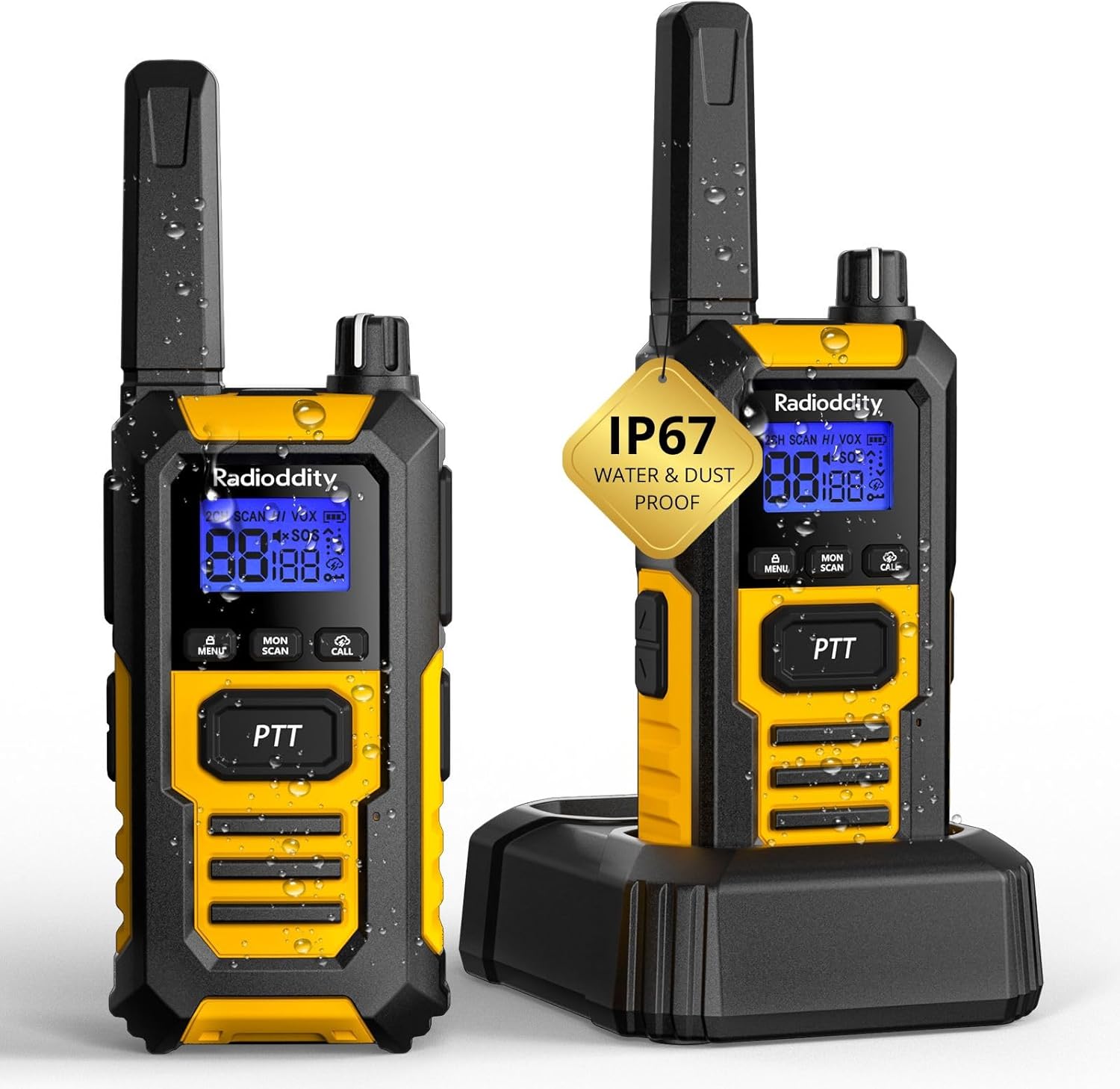
ചിത്രം: മുൻഭാഗം view of the Radioddity HD-1 Walkie Talkie, highlighting the display, PTT button, menu, scan, call, and lamp buttons, and the speaker grille.
- ആൻ്റിന: സിഗ്നലുകൾ കൈമാറുന്നതിനും സ്വീകരിക്കുന്നതിനും.
- പവർ/വോളിയം നോബ്: പവർ ഓൺ ചെയ്യാനും വോളിയം കൂട്ടാനും ഘടികാരദിശയിൽ തിരിക്കുക; വോളിയം കുറയ്ക്കാനും പവർ ഓഫ് ചെയ്യാനും എതിർ ഘടികാരദിശയിൽ തിരിക്കുക.
- ചാനൽ സെലക്ടർ നോബ്: Rotate to change channels.
- PTT (പുഷ്-ടു-ടോക്ക്) ബട്ടൺ: അയയ്ക്കാൻ അമർത്തിപ്പിടിക്കുക, സ്വീകരിക്കാൻ വിടുക.
- മെനു ബട്ടൺ: Accesses the menu for settings adjustments.
- അപ്പ്/ഡൗൺ ബട്ടണുകൾ: Navigate menu options and adjust values.
- സ്കാൻ ബട്ടൺ: ചാനൽ സ്കാനിംഗ് ആരംഭിക്കുന്നു.
- മോണിറ്റർ ബട്ടൺ: ദുർബലമായ സിഗ്നലുകൾ ശ്രദ്ധിക്കുന്നതിനായി സ്ക്വെൽച്ച് താൽക്കാലികമായി പ്രവർത്തനരഹിതമാക്കുന്നു.
- കോൾ ബട്ടൺ: Sends a call tone to other radios.
- Lamp ബട്ടൺ: Activates the LED torch.
- SOS ബട്ടൺ: Activates the emergency alert.
- യുഎസ്ബി-സി പോർട്ട്: നേരിട്ട് ചാർജ് ചെയ്യുന്നതിന്.
- ഹെഡ്സെറ്റ് ജാക്ക്: ബാഹ്യ ഓഡിയോ ആക്സസറികൾ ബന്ധിപ്പിക്കുന്നതിന്.
4. സജ്ജീകരണം
4.1 ബാറ്ററി ഇൻസ്റ്റാളേഷൻ
- വാക്കി ടോക്കി ഓഫാക്കിയിട്ടുണ്ടെന്ന് ഉറപ്പാക്കുക.
- റേഡിയോയുടെ പിൻഭാഗത്ത് ബാറ്ററി കമ്പാർട്ട്മെന്റ് കവർ കണ്ടെത്തുക.
- കവർ താഴേക്ക് നീക്കി അത് ഉയർത്തുക.
- Insert the Li-ion battery pack, ensuring the contacts align correctly with the terminals inside the compartment.
- ബാറ്ററി കവർ മാറ്റി അത് ശരിയായ സ്ഥാനത്ത് ക്ലിക്ക് ചെയ്യുന്നതുവരെ മുകളിലേക്ക് സ്ലൈഡ് ചെയ്യുക.
4.2 ബാറ്ററി ചാർജ് ചെയ്യുന്നു
Your Radioddity HD-1 offers two convenient charging methods:
- ചാർജിംഗ് ഡോക്ക് ഉപയോഗിച്ച്:
- ചാർജിംഗ് ഡോക്കിലേക്ക് പവർ അഡാപ്റ്റർ ബന്ധിപ്പിച്ച് ഒരു പവർ ഔട്ട്ലെറ്റിലേക്ക് പ്ലഗ് ചെയ്യുക.
- Place the walkie talkie (with battery installed) into the charging slot of the dock. Ensure proper contact.
- The charging indicator light on the dock will illuminate (usually red) to show charging is in progress. It will turn green when fully charged.
- USB-C പോർട്ട് ഉപയോഗിക്കുന്നു:
- Open the rubber cover protecting the USB-C port on the side of the radio.
- Connect the USB-C charging cable to the radio and a compatible USB power source (e.g., power adapter, computer USB port).
- The battery icon on the radio's display will indicate charging status.
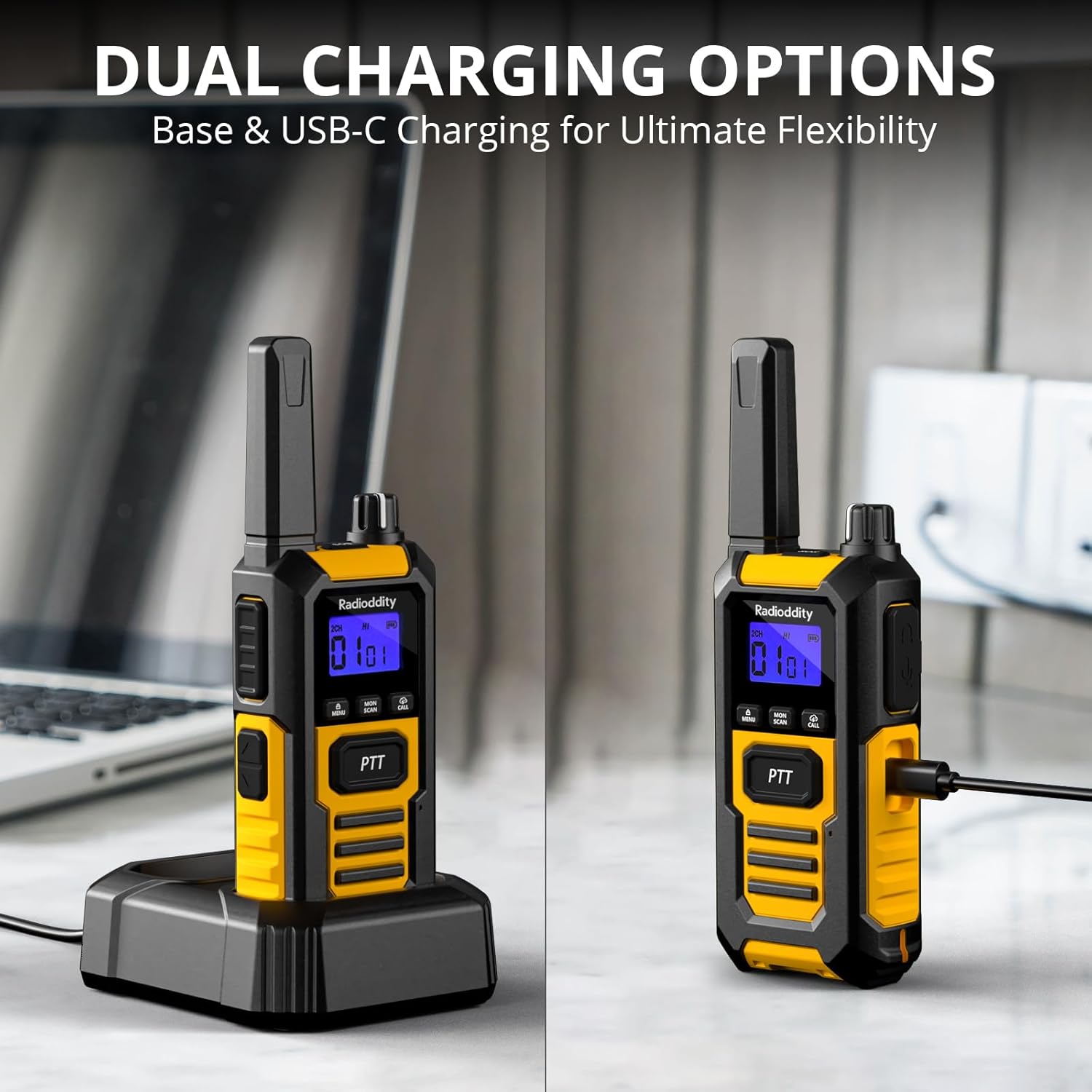
Image: The Radioddity HD-1 Walkie Talkie demonstrating its dual charging capabilities. One radio is placed in a charging dock, while another is shown connected directly via a USB-C cable.
5. പ്രവർത്തന നിർദ്ദേശങ്ങൾ
5.1 പവർ ഓൺ/ഓഫ്, വോളിയം ക്രമീകരണം
- പവർ ഓൺ: ഒരു ക്ലിക്ക് കേൾക്കുകയും ഡിസ്പ്ലേ പ്രകാശിക്കുകയും ചെയ്യുന്നതുവരെ പവർ/വോളിയം നോബ് ഘടികാരദിശയിൽ തിരിക്കുക.
- പവർ ഓഫ്: ഒരു ക്ലിക്ക് കേൾക്കുന്നതുവരെയും ഡിസ്പ്ലേ ഓഫാകുന്നതുവരെയും പവർ/വോളിയം നോബ് എതിർ ഘടികാരദിശയിൽ തിരിക്കുക.
- വോളിയം ക്രമീകരണം: Once powered on, rotate the Power/Volume knob clockwise to increase volume or counter-clockwise to decrease it.
5.2 ചാനൽ തിരഞ്ഞെടുക്കൽ
To communicate with other walkie talkies, ensure all devices are set to the same channel and CTCSS/DCS code (if used).
- Rotate the Channel Selector knob to choose your desired channel (1-16).
- The selected channel number will be displayed on the screen.
5.3 പ്രക്ഷേപണവും സ്വീകരണവും (PTT)
- പ്രക്ഷേപണം ചെയ്യാൻ, അമർത്തിപ്പിടിക്കുക പിടി റേഡിയോയുടെ വശത്തുള്ള ബട്ടൺ അമർത്തി മൈക്രോഫോണിൽ വ്യക്തമായി സംസാരിക്കുക.
- റിലീസ് ചെയ്യുക പിടി പ്രക്ഷേപണം നിർത്തി സ്വീകരിക്കൽ മോഡിലേക്ക് മടങ്ങാനുള്ള ബട്ടൺ.
5.4 VOX (വോയ്സ് ഓപ്പറേറ്റഡ് എക്സ്ചേഞ്ച്)
VOX mode allows for hands-free transmission. When activated, the radio will automatically transmit when it detects your voice.
- അമർത്തുക മെനു മെനുവിൽ പ്രവേശിക്കാനുള്ള ബട്ടൺ.
- Use the Up/Down buttons to navigate to the VOX setting.
- അമർത്തുക മെനു again to select. Use Up/Down to choose a sensitivity level (1-9, with 9 being most sensitive).
- അമർത്തുക മെനു സ്ഥിരീകരിക്കാനും പുറത്തുകടക്കാനും.
5.5 കോൾ ടോൺ
അതേ ചാനലിലെ മറ്റ് റേഡിയോകളിലേക്ക് ഒരു കേൾക്കാവുന്ന അലേർട്ട് അയയ്ക്കുക.
- അമർത്തുക വിളിക്കൂ button to send a pre-set call tone.
5.6 കീപാഡ് ലോക്ക്
ക്രമീകരണങ്ങളിൽ ആകസ്മികമായ മാറ്റങ്ങൾ തടയുന്നു.
- കീപാഡ് ലോക്ക് ചെയ്യാൻ, അമർത്തിപ്പിടിക്കുക മെനു ഡിസ്പ്ലേയിൽ ലോക്ക് ഐക്കൺ ദൃശ്യമാകുന്നതുവരെ ബട്ടൺ അമർത്തുക.
- അൺലോക്ക് ചെയ്യാൻ, അമർത്തിപ്പിടിക്കുക മെനു ലോക്ക് ഐക്കൺ അപ്രത്യക്ഷമാകുന്നതുവരെ വീണ്ടും ബട്ടൺ അമർത്തുക.
5.7 സ്കാൻ ഫംഗ്ഷൻ
Automatically scans active channels to find ongoing conversations.
- അമർത്തുക സ്കാൻ ചെയ്യുക button to activate channel scanning. The radio will cycle through channels until an active one is found.
- സ്കാൻ ചെയ്യുന്നത് നിർത്താൻ, അമർത്തുക സ്കാൻ ചെയ്യുക വീണ്ടും ബട്ടൺ.
5.8 LED ടോർച്ച്
കുറഞ്ഞ വെളിച്ചത്തിൽ ഇന്റഗ്രേറ്റഡ് എൽഇഡി ടോർച്ച് പ്രകാശം പ്രദാനം ചെയ്യുന്നു.
- അമർത്തുക Lamp button to turn the LED torch on.
- അമർത്തുക Lamp അത് ഓഫാക്കാൻ വീണ്ടും ബട്ടൺ.
5.9 എമർജൻസി എസ്ഒഎസ്
Activates an audible and visual emergency alert.
- അമർത്തിപ്പിടിക്കുക SOS button (usually a dedicated orange button on the side) to activate the emergency alert. The radio will emit a loud siren and flash its LED.
- To deactivate, press any button or power cycle the radio.

Image: A Radioddity HD-1 Walkie Talkie with an illuminated red siren icon, indicating the active SOS emergency alert function.
5.10 ഗ്രൂപ്പ് കോൾ
The one-key group call feature allows for quick communication with pre-defined groups.
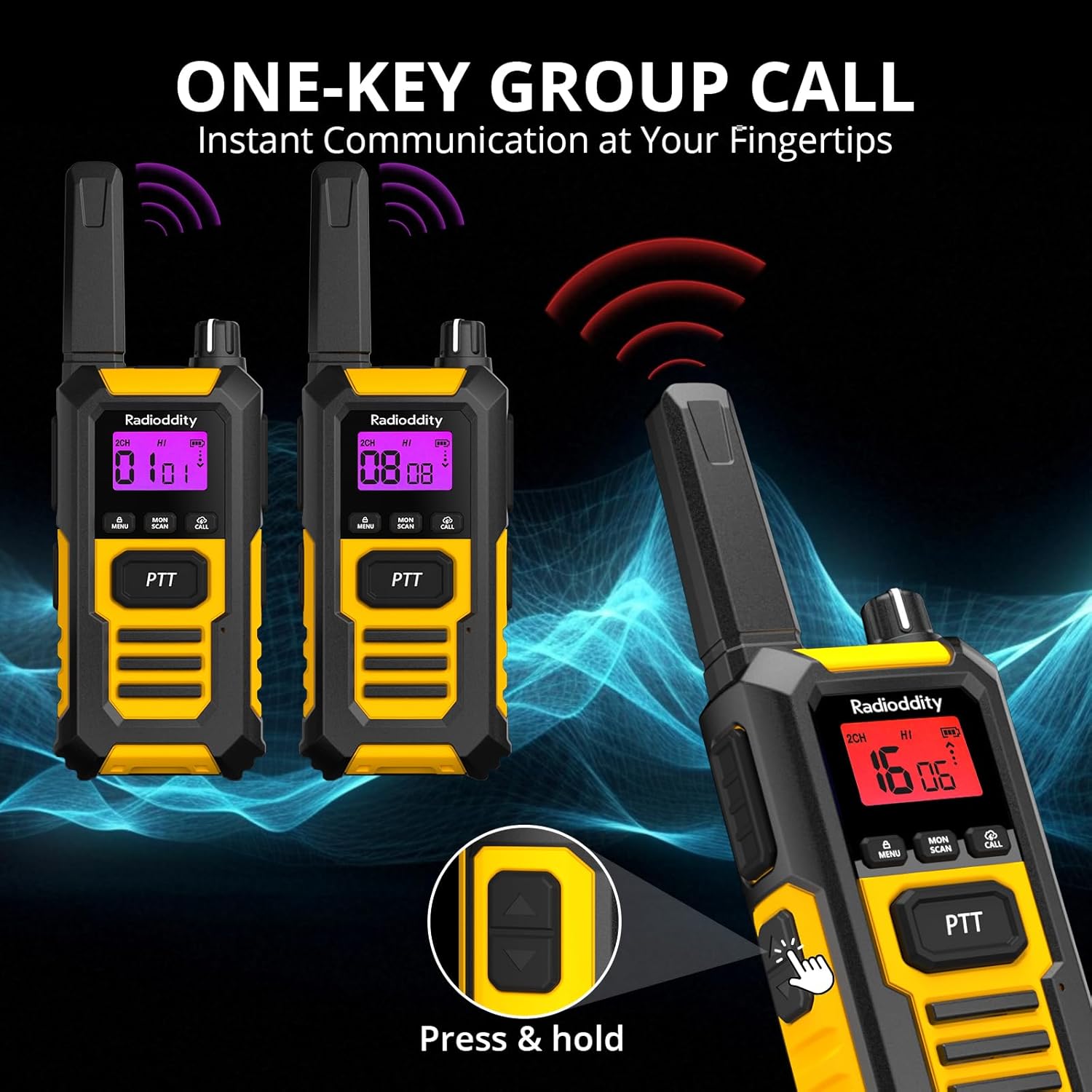
Image: Multiple Radioddity HD-1 Walkie Talkies showing the one-key group call feature, with radio signals emanating from the devices.
6 സ്പെസിഫിക്കേഷനുകൾ
| ഫീച്ചർ | സ്പെസിഫിക്കേഷൻ |
|---|---|
| മോഡൽ നമ്പർ | HD-1 |
| ബ്രാൻഡ് | റേഡിയോഡിഡിറ്റി |
| നിറം | മഞ്ഞ |
| ചാനലുകളുടെ എണ്ണം | 16 |
| ഫ്രീക്വൻസി സ്പെക്ട്രം | PMR446 |
| പരമാവധി സംഭാഷണ ശ്രേണി | 3 Kilometers (variable based on terrain) |
| വാല്യംtage | 3.7 വോൾട്ട് |
| ജല പ്രതിരോധ നില | IP67 (ജലപ്രൂഫ്) |
| ബാറ്ററി തരം | 2400 mAh ലിഥിയം-അയോൺ |
| ശരാശരി ബാറ്ററി ലൈഫ് | 24 Hours (usage), 4-5 Days (standby) |
| കണക്റ്റിവിറ്റി പ്രോട്ടോക്കോൾ | PMR446 |
| അനുയോജ്യമായ ഉപകരണങ്ങൾ | Other PMR446 radios, standard 2-pin audio accessories |
7. Durability and Resistance
The Radioddity HD-1 is built to endure challenging conditions, undergoing rigorous testing to ensure reliability.
7.1 IP67 വാട്ടർപ്രൂഫ്, ഡസ്റ്റ് പ്രൂഫ്
The HD-1 is certified IP67, meaning it is fully protected against dust ingress and can withstand immersion in water up to 1 meter for 30 minutes. Its floating design prevents loss during water activities.

Image: Two Radioddity HD-1 Walkie Talkies partially submerged and floating in water, with water droplets around them, illustrating their IP67 waterproof and floating capabilities.
Video: Demonstrates the IP67 waterproof and floating capabilities of a walkie talkie. The device is submerged in water and shown to float, highlighting its resistance to water damage.
7.2 Shockproof and Drop-Resistant
The robust PC+TPE construction ensures the HD-1 can withstand impacts and drops from up to 2 meters, making it ideal for demanding environments.

Image: A Radioddity HD-1 Walkie Talkie standing upright on a rugged, rocky surface, with small rocks scattering around it, emphasizing its shockproof and durable construction.
Video: Shows various durability tests performed on a walkie talkie, including drop tests from 2 meters onto concrete, rotation tests in a drum, temperature resistance tests from -20°C to +60°C, button press endurance tests, and a compression test under a vehicle wheel, demonstrating its robust construction.
വീഡിയോ: ഒരു ചെറിയ പ്രീview വീഡിയോ ഷോasing the robust and resistant features of rechargeable walkie talkies, highlighting their durability in various conditions.
8. പരിപാലനം
- വൃത്തിയാക്കൽ: ഒരു സോഫ്റ്റ് ഉപയോഗിക്കുക, ഡിamp റേഡിയോയുടെ പുറംഭാഗം വൃത്തിയാക്കാൻ തുണി ഉപയോഗിക്കുക. കഠിനമായ രാസവസ്തുക്കളോ ലായകങ്ങളോ ഉപയോഗിക്കരുത്.
- ബാറ്ററി കെയർ: ബാറ്ററി ലൈഫ് പരമാവധിയാക്കാൻ, ആദ്യ ഉപയോഗത്തിന് മുമ്പ് ബാറ്ററി പൂർണ്ണമായും ചാർജ് ചെയ്യുക. അമിതമായി ചാർജ് ചെയ്യുന്നതോ ബാറ്ററി ഇടയ്ക്കിടെ പൂർണ്ണമായും കളയുന്നതോ ഒഴിവാക്കുക. ദീർഘനേരം ഉപയോഗിക്കാത്തപ്പോൾ റേഡിയോയും ബാറ്ററിയും തണുത്തതും വരണ്ടതുമായ സ്ഥലത്ത് സൂക്ഷിക്കുക.
- സംഭരണം: ഉയർന്ന താപനിലയിൽ നിന്ന് മാറി, വരണ്ടതും പൊടിയില്ലാത്തതുമായ ഒരു അന്തരീക്ഷത്തിൽ വാക്കി ടോക്കി സൂക്ഷിക്കുക.
- വാട്ടർ എക്സ്പോഷർ: After exposure to water, ensure all ports are properly sealed and dry the radio thoroughly before charging or using.
9. പ്രശ്നപരിഹാരം
| പ്രശ്നം | സാധ്യമായ കാരണം | പരിഹാരം |
|---|---|---|
| റേഡിയോ പവർ ഓൺ ചെയ്യുന്നില്ല | കുറഞ്ഞതോ ഡെഡ് ബാറ്ററിയോ; തെറ്റായി ഇൻസ്റ്റാൾ ചെയ്ത ബാറ്ററി. | ബാറ്ററി ചാർജ് ചെയ്യുക; ബാറ്ററി ശരിയായി ഇൻസ്റ്റാൾ ചെയ്തിട്ടുണ്ടെന്ന് ഉറപ്പാക്കുക. |
| മറ്റ് റേഡിയോകളുമായി ആശയവിനിമയം നടത്താൻ കഴിയില്ല | Different channels/codes; out of range; low battery. | Verify all radios are on the same channel and CTCSS/DCS code; move closer; charge battery. |
| മോശം ഓഡിയോ നിലവാരം അല്ലെങ്കിൽ സ്റ്റാറ്റിക് | Weak signal; interference; too far from other radios. | Move to an open area; check for obstructions; adjust squelch level. |
| VOX പ്രവർത്തിക്കുന്നില്ല | VOX സെൻസിറ്റിവിറ്റി വളരെ കുറവാണ്; VOX പ്രവർത്തനരഹിതമാക്കി. | Increase VOX sensitivity; enable VOX in the menu. |
10. വാറൻ്റിയും പിന്തുണയും
Radioddity products are designed for reliability and performance. For warranty information, technical support, or service inquiries, please refer to the warranty card included in your package or visit the official Radioddity webസൈറ്റ്. വാങ്ങിയതിന്റെ തെളിവായി നിങ്ങളുടെ വാങ്ങൽ രസീത് സൂക്ഷിക്കുക.