
ആമുഖം
Thank you for choosing the CNAPXAIA C10 Instant Kids Camera. This camera is designed to provide a fun and creative photography experience for children aged 3 to 12. It combines digital photography with ink-free instant printing, allowing children to capture memories and print them instantly. This manual provides detailed instructions for safe and effective use of your camera.
സുരക്ഷാ വിവരങ്ങൾ: ചെറിയ ഭാഗങ്ങൾ കാരണം 3 വയസ്സിന് താഴെയുള്ള കുട്ടികൾക്ക് അനുയോജ്യമല്ല.
ബോക്സിൽ എന്താണുള്ളത്
പായ്ക്ക് അൺപാക്ക് ചെയ്യുമ്പോൾ, എല്ലാ ഇനങ്ങളും ഉണ്ടെന്ന് ഉറപ്പാക്കുക:
- CNAPXAIA C10 Instant Kids Camera
- 3 Rolls of Print Paper
- 6 Coloring Pens
- ലാനിയാർഡ്
- USB-C ചാർജിംഗ് കേബിൾ
- 32GB Memory Card (pre-installed or separate)

Figure 1: Camera and Included Accessories
ഉൽപ്പന്നം കഴിഞ്ഞുview
ക്യാമറ ഘടകങ്ങൾ
The CNAPXAIA C10 camera features a compact design with intuitive controls for children.
- 2.4 ഇഞ്ച് HD സ്ക്രീൻ: വേണ്ടി viewing photos, videos, and navigating menus.
- ക്യാമറ ലെൻസ്: ഫോട്ടോകളും വീഡിയോകളും എടുക്കുന്നതിന്.
- പ്രിന്റ് ഔട്ട്പുട്ട് സ്ലോട്ട്: അച്ചടിച്ച ഫോട്ടോകൾ പുറത്തുവരുന്നിടം.
- നിയന്ത്രണ ബട്ടണുകൾ: Power, Shutter, Navigation, Menu, Print.
- യുഎസ്ബി-സി പോർട്ട്: ചാർജിംഗിനും ഡാറ്റ കൈമാറ്റത്തിനും.
- മൈക്രോ എസ്ഡി കാർഡ് സ്ലോട്ട്: For memory expansion (32GB card included).

ചിത്രം 2: മുൻഭാഗം View ക്യാമറയുടെ
സജ്ജമാക്കുക
1. ക്യാമറ ചാർജ് ചെയ്യുന്നു
- Connect the provided USB-C cable to the camera's USB-C port.
- Plug the other end of the cable into a standard USB power adapter (not included) or a computer's USB port.
- The charging indicator light will illuminate. The camera is fully charged when the light turns off or changes color (refer to screen indicator).
- A full charge provides approximately 3-4 hours of continuous use.
2. മെമ്മറി കാർഡ് ചേർക്കുന്നു
The camera comes with a 32GB Micro SD card. Locate the Micro SD card slot on the side of the camera. Insert the card with the gold contacts facing down until it clicks into place. To remove, push the card in gently until it springs out.
3. Loading Print Paper
The camera uses ink-free thermal print paper. Follow these steps to load a new roll:
- ഘട്ടം 1: Open the paper compartment cover on the side of the camera.
- ഘട്ടം 2: Insert a new roll of print paper into the compartment, ensuring the paper feeds out from the top and a small portion extends beyond the slot.
- ഘട്ടം 3: Close the paper compartment cover firmly until it clicks.
- ഘട്ടം 4: The camera is now ready to print.

Figure 3: Loading Print Paper
പ്രവർത്തന നിർദ്ദേശങ്ങൾ
1. പവർ ഓൺ/ഓഫ്
ക്യാമറ ഓൺ അല്ലെങ്കിൽ ഓഫ് ചെയ്യാൻ പവർ ബട്ടൺ അമർത്തിപ്പിടിക്കുക.
2. ഫോട്ടോ എടുക്കൽ
- Turn on the camera. It will typically start in photo mode.
- Frame your shot using the 2.4-inch screen.
- ഒരു ഫോട്ടോ എടുക്കാൻ ഷട്ടർ ബട്ടൺ അമർത്തുക.
- After taking a photo, you will have the option to print it immediately or save it to the memory card.
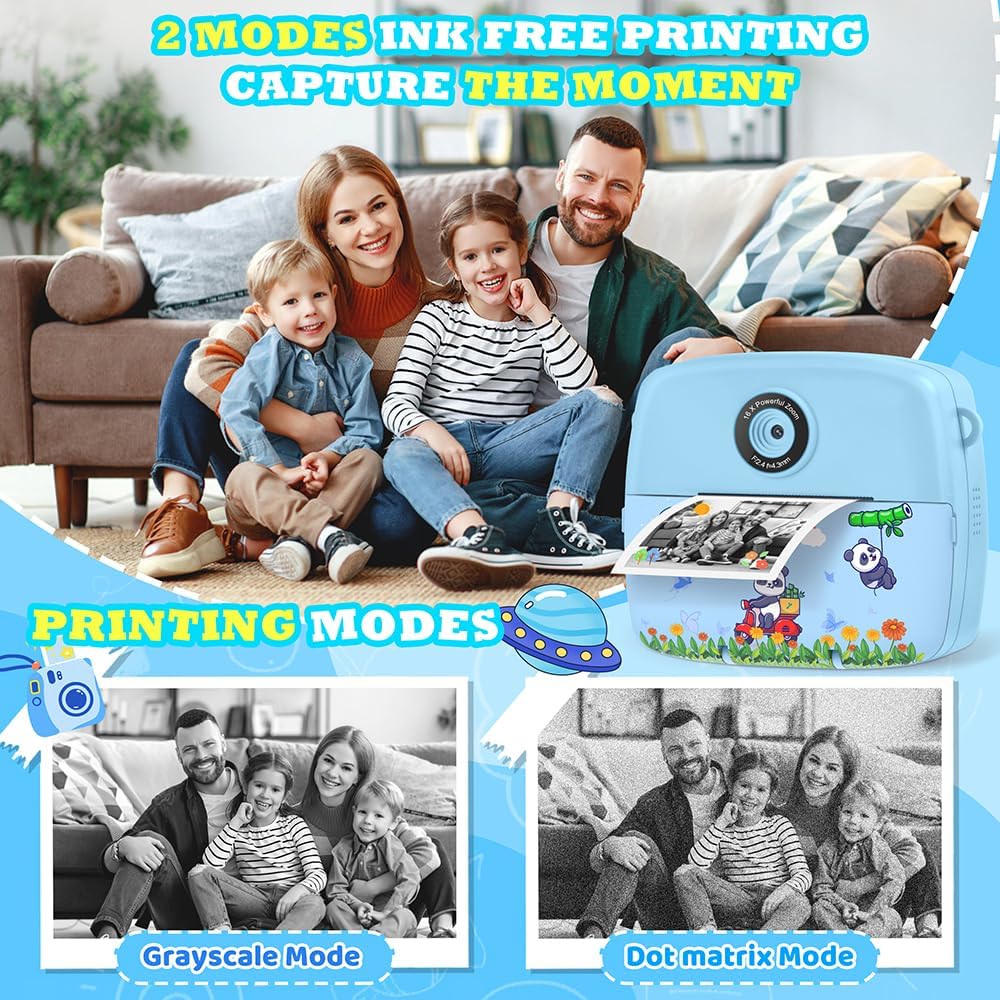
Figure 4: Ink-Free Printing Modes
3. വീഡിയോകൾ റെക്കോർഡുചെയ്യുന്നു
- From the main menu, navigate to the video recording mode.
- Press the Shutter button to start recording. A red 'REC' indicator will appear on the screen.
- Press the Shutter button again to stop recording. Videos are saved in 1080P resolution to the memory card.

Figure 5: Video Recording and Special Features
4. Using Filters, Frames, and Stickers
The camera offers various creative options:
- ഫിൽട്ടറുകൾ: Apply different color effects to your photos.
- ഫ്രെയിമുകൾ: Add decorative borders to your pictures (12 photo frames available).
- സ്റ്റിക്കറുകൾ: Overlay fun graphics onto your images (6 stickers available).
- Mirror Effects: Experiment with 8 different mirror effects.
Access these options through the camera's menu while in photo mode. Use the navigation buttons to select and apply your desired effect before taking a picture.

Figure 6: Creative Photo Options
5. Time-Lapse Photography
Capture sequences of photos over time. Select the time-lapse mode from the menu and choose intervals of 2, 5, or 10 seconds between shots.
6. ഡിജിറ്റൽ സൂം
The camera features up to 16x digital zoom. Use the zoom buttons (usually up/down navigation) to adjust the magnification before taking a photo or recording a video.
7. Burst Shooting
For capturing fast-moving subjects, activate burst shooting mode. The camera can take up to 5 frames per second (FPS).
8. Games and MP3 Player
The camera includes 5 puzzle games for entertainment and an MP3 player function. Access these features through the main menu.

Figure 7: Learning and Entertainment Features
9. Coloring Printed Photos (Graffiti DIY)
Use the included coloring pens to add a personal touch to your black and white instant prints.

Figure 8: DIY Coloring Activity
മെയിൻ്റനൻസ്
1. ക്യാമറ വൃത്തിയാക്കൽ
Wipe the camera body with a soft, dry cloth. Do not use liquid cleaners or solvents. For the lens, use a specialized lens cleaning cloth.
2. Replacing Print Paper
When the print quality degrades or no paper is dispensed, it's time to replace the paper roll. Refer to the "Loading Print Paper" section under Setup for detailed instructions.
3. ബാറ്ററി പരിചരണം
To prolong battery life, avoid fully discharging the camera frequently. Charge the camera regularly, even if not in use for extended periods.
ട്രബിൾഷൂട്ടിംഗ്
| പ്രശ്നം | സാധ്യമായ കാരണം | പരിഹാരം |
|---|---|---|
| ക്യാമറ ഓണാകുന്നില്ല. | കുറഞ്ഞ ബാറ്ററി. | Charge the camera using the USB-C cable. |
| ഫോട്ടോകൾ/വീഡിയോകൾ എടുക്കാൻ കഴിയില്ല. | മെമ്മറി കാർഡ് നിറഞ്ഞു അല്ലെങ്കിൽ ശരിയായി ചേർത്തിട്ടില്ല. | Check memory card insertion. Delete unnecessary files or replace the card. |
| ഫോട്ടോകൾ പ്രിന്റ് ചെയ്യുന്നില്ല. | No print paper or paper loaded incorrectly. | Ensure print paper is loaded correctly and there is enough paper. Refer to "Loading Print Paper". |
| Screen frozen or unresponsive. | സോഫ്റ്റ്വെയർ തകരാർ. | Hold the power button for 10 seconds to force a restart. If unresponsive, let the battery drain completely and then recharge. |
| Distorted audio from speaker. | സ്പീക്കർ തകരാറ്. | This may indicate a hardware issue. Contact customer support if the problem persists. |
സ്പെസിഫിക്കേഷനുകൾ
| ഫീച്ചർ | വിശദാംശങ്ങൾ |
|---|---|
| മോഡൽ നമ്പർ | C10 |
| അളവുകൾ | 11 x 5 x 9 സെ.മീ |
| ഭാരം | 200 ഗ്രാം |
| സ്ക്രീൻ വലിപ്പം | 2.4 ഇഞ്ച് എൽസിഡി |
| വീഡിയോ റെസല്യൂഷൻ | 1080P |
| ഫോട്ടോ റെസല്യൂഷൻ | 3 MP (Effective 12 MP) |
| സൂം ചെയ്യുക | 16x ഡിജിറ്റൽ സൂം |
| സംഭരണം | 32GB Micro SD Card (included), expandable up to 32GB |
| ബാറ്ററി തരം | 1 ലിഥിയം പോളിമർ (ഉൾപ്പെട്ടിരിക്കുന്നു) |
| ചാർജിംഗ് ഇൻ്റർഫേസ് | USB-C |
| പ്രിൻ്റിംഗ് ടെക്നോളജി | Ink-free thermal printing |
| പിന്തുണച്ചു File ഫോർമാറ്റുകൾ | JPEG (images), MP4 (videos) |
| തുടർച്ചയായ ഷൂട്ടിംഗ് വേഗത | 5 FPS |
| പ്രായം ശുപാർശ | 3-12 വർഷം |
വാറൻ്റിയും പിന്തുണയും
For warranty information or technical support, please refer to the contact details provided with your purchase or visit the official CNAPXAIA webസൈറ്റ്. വാറന്റി ക്ലെയിമുകൾക്കായി നിങ്ങളുടെ വാങ്ങലിന്റെ തെളിവ് സൂക്ഷിക്കുക.