
ROUUO M02

ROUUO Wireless Smart Meat Thermometer User Manual
മോഡൽ: M02
ആമുഖം
Thank you for choosing the ROUUO Wireless Smart Meat Thermometer. This advanced cooking thermometer is designed to provide precise temperature monitoring for perfect grilling, smoking, oven roasting, and air frying. With its dual probes, long-range Bluetooth and WiFi connectivity, and smart alerts, you can monitor your cooking with ease and confidence.

Image: The ROUUO Wireless Smart Meat Thermometer system, showing the charging base with two probes and a smartphone screen displaying the connected app interface with temperature readings.
ബോക്സിൽ എന്താണുള്ളത്
- 1 X Meat Thermometer (Charging Base)
- 2 എക്സ് പ്രോബ്സ്
- 1 X USB-C കേബിൾ
- 1 X ഉപയോക്തൃ മാനുവൽ

Image: All components included in the product package: the main thermometer unit, two individual probes, a USB-C charging cable, and the user manual.
സജ്ജമാക്കുക
1 ഉപകരണം ചാർജ് ചെയ്യുന്നു
Before first use, fully charge the thermometer base and probes. Connect the included USB-C cable to the charging port on the base and to a standard USB power adapter (not included). The base delivers 35+ hours of use from just a 20-minute charge for the probes, or hours of operation from a 1-minute quick charge.

Image: Diagram illustrating the USB Type-C charging process for the thermometer base and probes, detailing charging times and battery life for both components.
2. ആപ്പ് ഡൗൺലോഡും ജോടിയാക്കലും
Download the ROUUO app from your smartphone's app store. Once installed, open the app and follow the on-screen instructions to pair your thermometer. The device supports both Bluetooth and 2.4GHz WiFi connectivity, offering a range up to 200ft for remote monitoring.
3. Inserting Probes
Carefully insert the ultra-thin probes into the thickest part of the meat, avoiding bones. The dual probes allow you to monitor two different dishes or two different parts of a large cut simultaneously.
പ്രവർത്തന നിർദ്ദേശങ്ങൾ
1. Smart Temperature Monitoring
The ROUUO app provides real-time internal temperature updates. You can set preset stable temperatures for various types of meat and doneness levels. The app will provide time reminders and smart alerts when your target temperature is reached.

Image: A smartphone screen displaying the ROUUO app, showing real-time temperature data, target temperature settings, and a temperature graph, with an image of a user monitoring cooking remotely.
2. Using Dual Probes
With two independent probes, you can monitor two distinct temperatures simultaneously. This is ideal for cooking different meats at once or for large roasts that require monitoring at multiple points. The probes offer a response time of 1 second with +/-1°F accuracy.
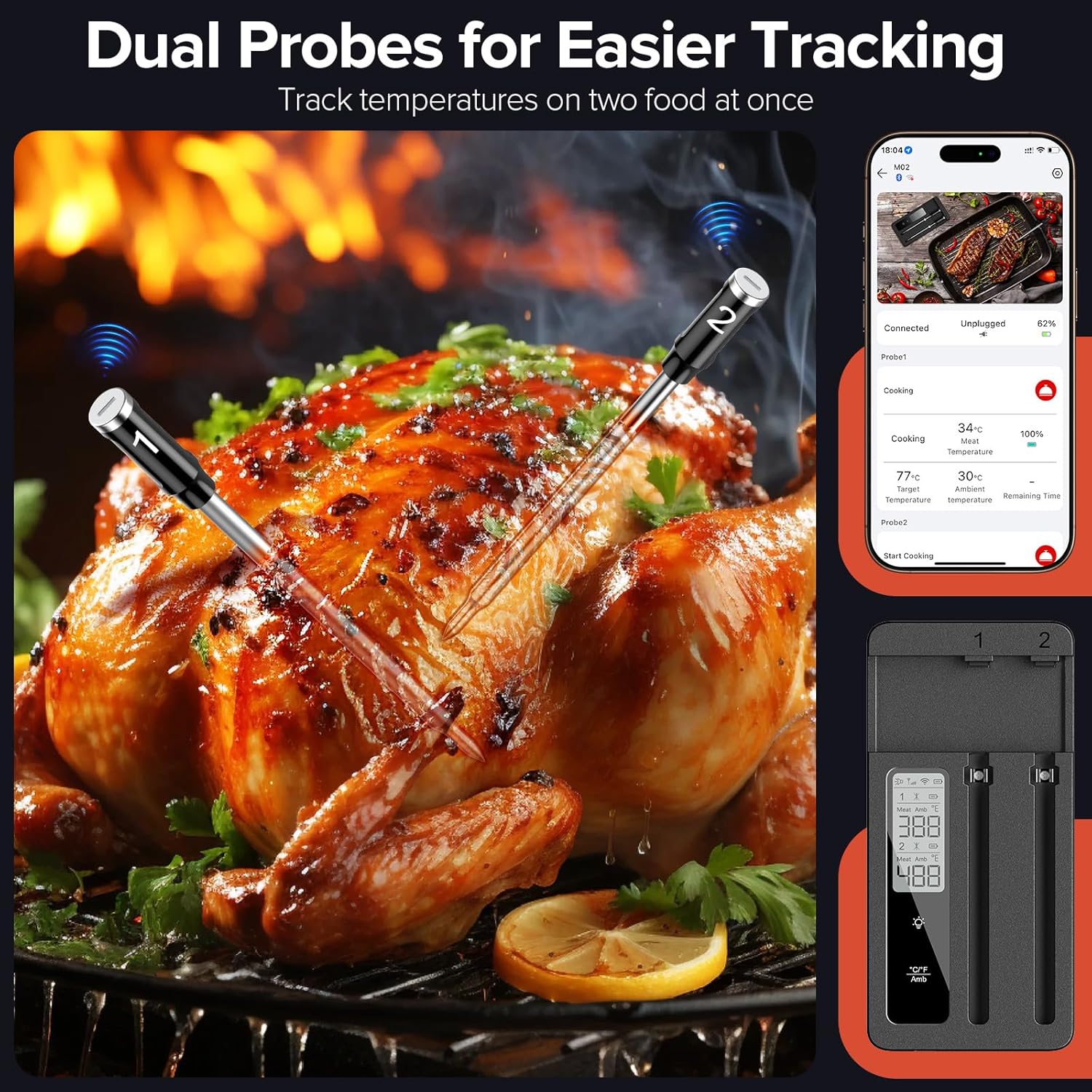
Image: A roasted chicken with two ROUUO probes inserted, demonstrating the dual probe functionality for tracking multiple temperatures simultaneously. The thermometer base and app screen are also shown.
3. Connectivity and Range
The thermometer utilizes both Bluetooth (up to 130ft) and 2.4G WiFi (up to 200ft) for extended range monitoring. This allows you to move freely around your home or yard while keeping an eye on your cooking progress through the app.

Image: An illustration detailing the connectivity options of the ROUUO thermometer, showing the probes, connection base, and app, along with their respective Bluetooth (130ft) and Wi-Fi (200ft) ranges.
മെയിൻ്റനൻസ്
1. വൃത്തിയാക്കൽ
The probes are IP67 waterproof and dishwasher-safe, making cleanup effortless. After each use, clean the probes thoroughly under flushing water or place them in the dishwasher. Wipe the main thermometer base with a damp തുണി; അടിത്തറ വെള്ളത്തിൽ മുക്കരുത്.

Image: A ROUUO probe submerged in water, highlighting its IP67 waterproof rating and ease of cleaning. Also shown are the built-in magnet for refrigerator attachment and the tabletop stand for the base unit.
2. സംഭരണം
Store the thermometer and probes in a cool, dry place when not in use. The base features a built-in magnet for convenient storage on metallic surfaces like a refrigerator, and it can also be used with its tabletop stand.
ട്രബിൾഷൂട്ടിംഗ്
- പവർ ഇല്ല/ചാർജ് ചെയ്യില്ല: Ensure the USB-C cable is securely connected to both the thermometer base and a working power source. Check if the power adapter is functioning correctly.
- Connectivity Issues (Bluetooth/WiFi):
- Ensure your smartphone's Bluetooth and WiFi are enabled.
- Make sure the thermometer base is within range (130ft for Bluetooth, 200ft for WiFi).
- ആപ്പ് കൂടാതെ/അല്ലെങ്കിൽ നിങ്ങളുടെ സ്മാർട്ട്ഫോൺ പുനരാരംഭിക്കുക.
- If issues persist, try resetting the thermometer (refer to app for specific reset instructions if available).
- കൃത്യമല്ലാത്ത താപനില വായനകൾ:
- മാംസത്തിന്റെ ഏറ്റവും കട്ടിയുള്ള ഭാഗത്ത് പ്രോബ് ശരിയായി ചേർത്തിട്ടുണ്ടെന്ന് ഉറപ്പാക്കുക, അസ്ഥികൾ ഒഴിവാക്കുക.
- Verify that the probe tip is fully submerged in the food.
- Clean the probes thoroughly after each use to prevent residue buildup affecting accuracy.
- ആപ്പ് പ്രതികരിക്കുന്നില്ല: Close the app completely and reopen it. If the problem continues, try reinstalling the app.
സ്പെസിഫിക്കേഷനുകൾ
| മോഡലിൻ്റെ പേര് | M02 |
| കണക്റ്റിവിറ്റി ടെക്നോളജി | Bluetooth, 2.4GHz WiFi |
| ഡിസ്പ്ലേ തരം | ഡിജിറ്റൽ |
| പ്രത്യേക ഫീച്ചർ | Fast Reading System, Dual Probes, Long Range Monitoring, Smart Alerts, IP67 Waterproof Probes |
| ബാറ്ററി തരം | 12V (ഉൾപ്പെടുത്തിയിരിക്കുന്നു) |
| അന്വേഷണ കൃത്യത | +/-1°F |
| അന്വേഷണ പ്രതികരണ സമയം | 1 സെക്കൻഡ് |
| Waterproof Rating (Probes) | IP67 |
| അളവുകൾ (പാക്കേജ്) | 6.85 x 4.13 x 1.14 ഇഞ്ച് |
| ഭാരം (പാക്കേജ്) | 12.31 ഔൺസ് |
| നിർമ്മാതാവ് | ROUUO |
വാറൻ്റിയും പിന്തുണയും
ROUUO products come with a standard 1-year limited warranty from the date of purchase, covering defects in materials and workmanship. This warranty does not cover damage caused by misuse, accident, unauthorized modification, or normal wear and tear.
For technical support, warranty claims, or general inquiries, please contact our customer service team:
- ഇമെയിൽ: support@rouuo.com
- Webസൈറ്റ്: www.rouuo.com (for FAQs and product registration)
Please have your model number (M02) and purchase date ready when contacting support.
Ask a question about this manual
Ask about setup, troubleshooting, compatibility, parts, safety, or missing instructions. Manuals+ will review the question and use this page’s manual context to help answer it.