
1. ആമുഖം
This manual provides essential instructions for the safe and effective use of your xbvxzvbn replacement battery, designed for Narwal J3 YJCC012 BP4S2PPM5D series cleaning robots. Please read this manual thoroughly before installation and operation to ensure optimal performance and longevity of the battery.
2 സുരക്ഷാ വിവരങ്ങൾ
Observe the following safety precautions to prevent damage to the battery, the cleaning robot, and to avoid personal injury:
- ബാറ്ററി ഡിസ്അസംബ്ലിംഗ് ചെയ്യുകയോ, പഞ്ചർ ചെയ്യുകയോ, പരിഷ്കരിക്കുകയോ ചെയ്യരുത്.
- Avoid exposing the battery to extreme temperatures, direct sunlight, or fire.
- ബാറ്ററി വെള്ളത്തിൽ നിന്നും ഈർപ്പത്തിൽ നിന്നും അകറ്റി നിർത്തുക.
- Use only the original charging equipment provided with your Narwal cleaning robot.
- ബാറ്ററിയിൽ കേടുപാടുകൾ, വീക്കം അല്ലെങ്കിൽ ചോർച്ച എന്നിവയുടെ ലക്ഷണങ്ങൾ കണ്ടാൽ, ഉടൻ ഉപയോഗം നിർത്തി ശരിയായി സംസ്കരിക്കുക.
- കുട്ടികൾക്കും വളർത്തുമൃഗങ്ങൾക്കും ലഭ്യമാകാതെ സൂക്ഷിക്കുക.
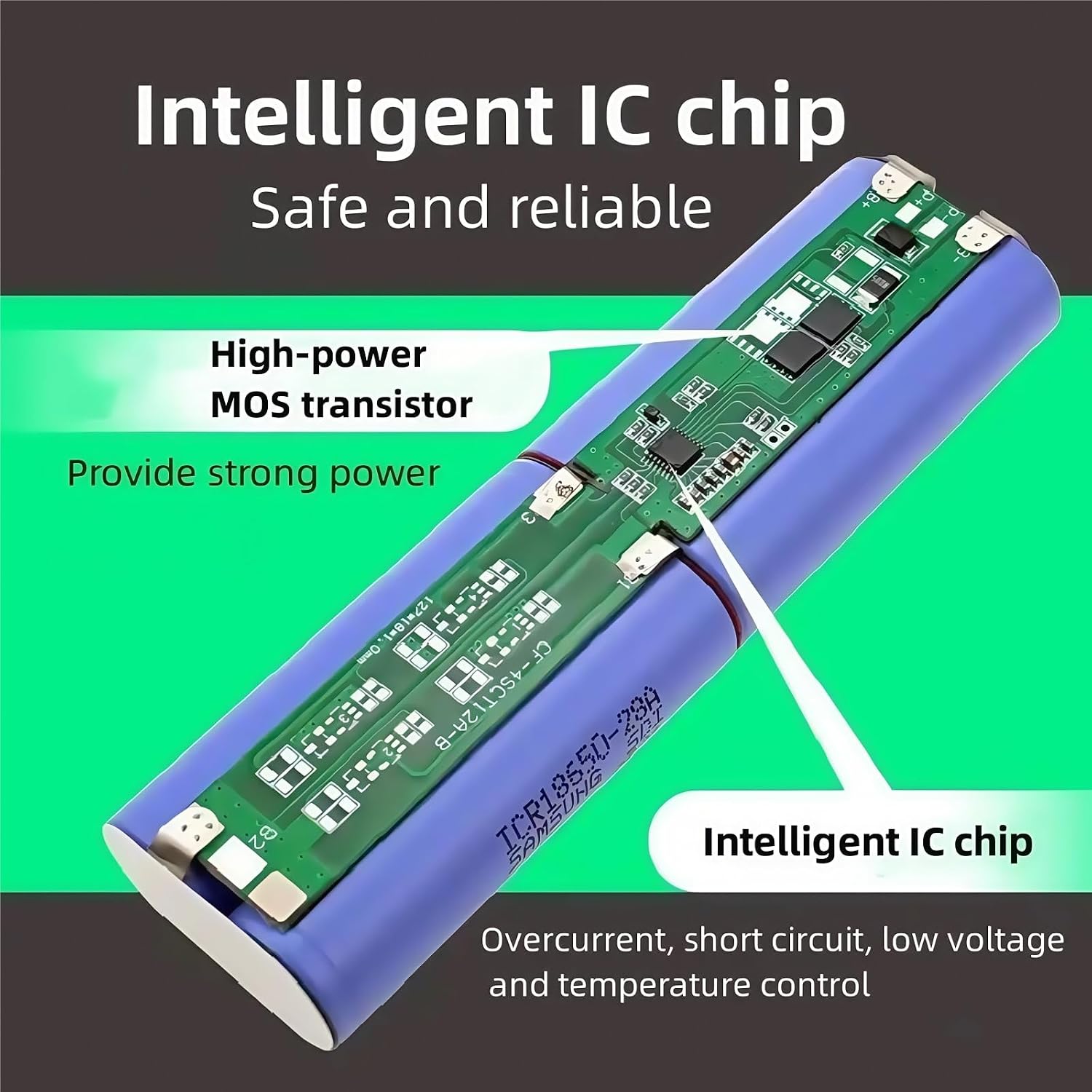
ചിത്രം 1: Internal components of the battery, highlighting the intelligent IC chip for overcurrent, short-circuit, low voltage, and temperature control, and a high-power MOS transistor for strong power delivery.
The battery features built-in over-current, over-charge, over-voltage, over-temperature, and short-circuit protection circuits to enhance safety during operation and charging.
3. ഉൽപ്പന്നം കഴിഞ്ഞുview
This high-capacity lithium-ion replacement battery is specifically designed for Narwal J3 YJCC012 BP4S2PPM5D series floor scrubber vacuum cleaners. It offers extended operating times, reducing the need for frequent recharges during cleaning cycles.

ചിത്രം 2: The replacement battery, clearly indicating its compatibility with Narwal J3 YJCC012 BP4S2PPM5D models.
4. സജ്ജീകരണവും ഇൻസ്റ്റാളേഷനും
Before installing the new battery, ensure your Narwal cleaning robot is powered off and unplugged from its charging station. Refer to your Narwal J3 YJCC012 BP4S2PPM5D cleaning robot's original user manual for specific instructions on accessing and replacing its battery compartment.
- Locate the battery compartment on your cleaning robot.
- Carefully remove the old battery, disconnecting any connectors.
- Insert the new xbvxzvbn replacement battery, ensuring the connectors are properly aligned and securely attached.
- ബാറ്ററി കമ്പാർട്ട്മെൻ്റ് സുരക്ഷിതമായി അടയ്ക്കുക.
- Place the robot on its charging station to initiate the first charge.
5. പ്രവർത്തന നിർദ്ദേശങ്ങൾ
For optimal performance and battery life, follow these operating guidelines:
- പ്രാരംഭ ഉപയോഗം: It is recommended to completely drain the battery and then fully charge it during the first 11 charge-discharge cycles. This process can significantly improve the overall life of the battery.
- ചാർജിംഗ്: Always charge the battery using the original charging station or adapter for your Narwal J3 YJCC012 BP4S2PPM5D robot.
- Cool-down Period: After heavy or prolonged use, allow the battery to cool down for 15-30 minutes before placing the robot back on the charger. This helps maintain battery health and ensures efficient charging.
- സംഭരണം: If storing the robot for an extended period, ensure the battery is partially charged (around 50%) and store it in a cool, dry place. Avoid storing a fully discharged or fully charged battery for long durations.
6. പരിപാലനം
ശരിയായ അറ്റകുറ്റപ്പണി നിങ്ങളുടെ ബാറ്ററിയുടെ ആയുസ്സ് വർദ്ധിപ്പിക്കുന്നു:
- Regularly clean the charging contacts on both the robot and the charging station to ensure a good connection.
- അങ്ങേയറ്റത്തെ താപനിലയിലേക്ക് ബാറ്ററി തുറന്നുകാട്ടുന്നത് ഒഴിവാക്കുക.
- Do not allow the battery to remain fully discharged for extended periods.
7. പ്രശ്നപരിഹാരം
If you encounter issues with your replacement battery, consider the following:
- Robot not powering on: Ensure the battery is correctly installed and fully charged. Check the charging contacts for cleanliness.
- കുറഞ്ഞ പ്രവർത്തന സമയം: This can be normal over time. Ensure you are following the recommended charging and discharging cycles, especially during initial use. Allow the battery to cool before charging after heavy use.
- ചാർജിംഗ് പ്രശ്നങ്ങൾ: Verify the charging station is powered and the robot is properly seated. Clean charging contacts.
If problems persist, consult the Narwal J3 YJCC012 BP4S2PPM5D cleaning robot's original manual or contact customer support.
8 സ്പെസിഫിക്കേഷനുകൾ

ചിത്രം 3: എ വിശദമായി view of the battery's label, displaying technical specifications and certifications.
| ഫീച്ചർ | വിശദാംശങ്ങൾ |
|---|---|
| മോഡൽ അനുയോജ്യത | Narwal J3 YJCC012 BP4S2PPM5D |
| നാമമാത്ര വോളിയംtage | 14.4V |
| ശേഷി ഓപ്ഷനുകൾ | 6800mAh, 8800mAh, 9900mAh |
| ബാറ്ററി തരം | ലിഥിയം-അയൺ |
| ഭാരം | ഏകദേശം 50 ഗ്രാം |
| സംരക്ഷണ സവിശേഷതകൾ | Over-current, Over-charge, Over-voltage, Over-temperature, Short-circuit |
9. വാറൻ്റിയും പിന്തുണയും
For warranty information or technical support regarding your xbvxzvbn replacement battery, please contact the seller directly through your purchase platform. Keep your purchase receipt or order number handy for faster service.