
1. ആമുഖം
വാങ്ങിയതിന് നന്ദി.asing the JVC XS-N1154B Bluetooth Speaker. This manual provides essential information for the safe and efficient operation of your device. Please read it thoroughly before use and retain it for future reference.
2 സുരക്ഷാ വിവരങ്ങൾ
- സ്പീക്കറിനെ തീവ്രമായ താപനിലയിലോ, നേരിട്ടുള്ള സൂര്യപ്രകാശത്തിലോ, ഉയർന്ന ആർദ്രതയിലോ തുറന്നുകാട്ടരുത്.
- സ്പീക്കറെ ശക്തമായ ആഘാതങ്ങൾക്ക് വിധേയമാക്കുകയോ താഴെയിടുകയോ ചെയ്യുന്നത് ഒഴിവാക്കുക.
- സ്പീക്കർ ഡിസ്അസംബ്ലിംഗ് ചെയ്യാനോ പരിഷ്കരിക്കാനോ ശ്രമിക്കരുത്. ഇത് വാറന്റി അസാധുവാക്കും.
- Keep the speaker away from water and liquids, despite its waterproof rating, to prevent damage to internal components.
- നിർദ്ദിഷ്ട ചാർജിംഗ് കേബിളും പവർ അഡാപ്റ്ററും മാത്രം ഉപയോഗിക്കുക.
- മൃദുവായതും ഉണങ്ങിയതുമായ തുണി ഉപയോഗിച്ച് സ്പീക്കർ വൃത്തിയാക്കുക. അബ്രസീവ് ക്ലീനറുകളോ ലായകങ്ങളോ ഉപയോഗിക്കരുത്.
3. പാക്കേജ് ഉള്ളടക്കം
പാക്കേജിൽ എല്ലാ ഇനങ്ങളും ഉണ്ടെന്ന് ഉറപ്പാക്കുക:
- JVC XS-N1154B Bluetooth Speaker
- ചാർജിംഗ് കേബിൾ
- ഉപയോക്തൃ മാനുവൽ
- റിമോട്ട് കൺട്രോൾ (ഉൾപ്പെടുത്തിയാൽ)
4. ഉൽപ്പന്നം കഴിഞ്ഞുview
സ്പീക്കറിന്റെ ഘടകങ്ങളും നിയന്ത്രണങ്ങളും സ്വയം പരിചയപ്പെടുത്തുക.
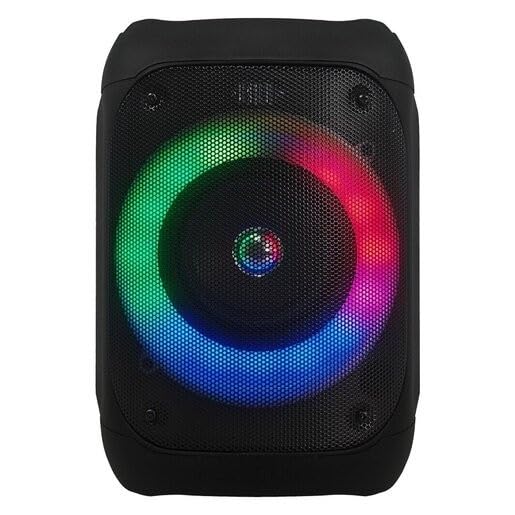
ചിത്രം 1: ഫ്രണ്ട് view of the JVC XS-N1154B Bluetooth Speaker, showcasing the speaker grille and integrated music-activated LED lights.
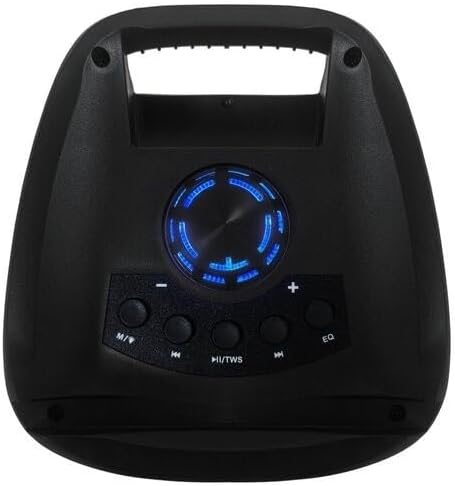
ചിത്രം 2: മുകളിൽ view of the JVC XS-N1154B Bluetooth Speaker, displaying the control panel with various buttons and the volume knob.
നിയന്ത്രണ പാനൽ പ്രവർത്തനങ്ങൾ:
- പവർ ബട്ടൺ: സ്പീക്കർ ഓണാക്കുകയോ ഓഫാക്കുകയോ ചെയ്യുന്നു.
- മോഡ് (എം) ബട്ടൺ: Switches between Bluetooth, USB, SD Card, and FM Radio modes.
- Play/Pause (►||) / TWS Button: Plays or pauses audio. Long press for TWS (True Wireless Stereo) pairing.
- Previous Track (◀◀) Button: Skips to the previous track or tunes down in FM mode.
- Next Track (►►) Button: Skips to the next track or tunes up in FM mode.
- ഇക്യു ബട്ടൺ: ഇക്വലൈസർ പ്രീസെറ്റുകളിലൂടെ കടന്നുപോകുന്നു.
- വോളിയം നോബ്: Rotates to adjust the volume level.
5. സജ്ജീകരണം
5.1 സ്പീക്കർ ചാർജ് ചെയ്യുന്നു
- സ്പീക്കറിന്റെ ചാർജിംഗ് പോർട്ടിലേക്ക് ചാർജിംഗ് കേബിൾ ബന്ധിപ്പിക്കുക.
- കേബിളിന്റെ മറ്റേ അറ്റം അനുയോജ്യമായ ഒരു USB പവർ അഡാപ്റ്ററിലേക്ക് (ഉൾപ്പെടുത്തിയിട്ടില്ല) അല്ലെങ്കിൽ ഒരു പവർഡ് USB പോർട്ടിലേക്ക് പ്ലഗ് ചെയ്യുക.
- ചാർജ് ചെയ്യുമ്പോൾ ചാർജിംഗ് ഇൻഡിക്കേറ്റർ ലൈറ്റ് പ്രകാശിക്കും, സാധാരണയായി ചുവപ്പ് നിറത്തിൽ.
- Once fully charged, the indicator light may change color (e.g., turn off or turn blue/green). Disconnect the speaker from the power source.
5.2 പവർ ഓൺ/ഓഫ്
- പവർ ഓണാക്കാൻ: Press and hold the Power button until the speaker powers on and you hear an audible prompt.
- പവർ ഓഫ് ചെയ്യാൻ: Press and hold the Power button again until the speaker powers off.
6. പ്രവർത്തന നിർദ്ദേശങ്ങൾ
6.1 ബ്ലൂടൂത്ത് ജോടിയാക്കൽ
- Ensure the speaker is powered on and in Bluetooth mode. If not, press the Mode (M) button to switch to Bluetooth mode. The speaker will indicate it is ready for pairing (e.g., a blinking LED or audible prompt).
- നിങ്ങളുടെ മൊബൈൽ ഉപകരണത്തിൽ (സ്മാർട്ട്ഫോൺ, ടാബ്ലെറ്റ്, ലാപ്ടോപ്പ്), ബ്ലൂടൂത്ത് പ്രവർത്തനക്ഷമമാക്കി ലഭ്യമായ ഉപകരണങ്ങൾക്കായി തിരയുക.
- Select "JVC XS-N1154B" from the list of devices.
- Once paired, the speaker will provide an audible confirmation, and the Bluetooth indicator light will become solid.
- ഇപ്പോൾ നിങ്ങളുടെ ഉപകരണത്തിൽ നിന്ന് സ്പീക്കറിലൂടെ ഓഡിയോ പ്ലേ ചെയ്യാൻ കഴിയും.
6.2 യുഎസ്ബി/എസ്ഡി കാർഡ് പ്ലേബാക്ക്
- Insert a USB flash drive or an SD card (with supported audio files) into the corresponding port on the speaker.
- The speaker will automatically switch to USB or SD card mode and begin playing audio. If not, press the Mode (M) button to select the correct input.
- Use the Previous Track (◀◀), Next Track (►►), and Play/Pause (►||) buttons to control playback.
6.3 എഫ്എം റേഡിയോ പ്രവർത്തനം
- എഫ്എം റേഡിയോ മോഡിലേക്ക് മാറാൻ മോഡ് (എം) ബട്ടൺ അമർത്തുക.
- To auto-scan and save available stations, press and hold the Play/Pause (►||) button. The speaker will scan and store stations automatically.
- Use the Previous Track (◀◀) and Next Track (►►) buttons to navigate between saved FM stations.
6.4 LED ലൈറ്റ് മോഡുകൾ
The speaker features music-activated LED lights. These lights typically synchronize with the audio playback. There may be an additional button or a combination of buttons to cycle through different light modes or to turn them off. Refer to the remote control section for specific controls if available.
6.5 വോളിയം നിയന്ത്രണം
Rotate the Volume Knob on the top panel clockwise to increase volume and counter-clockwise to decrease volume.
6.6 റിമോട്ട് കൺട്രോൾ ഉപയോഗം
If your package includes a remote control, it provides convenient access to various functions:
- ശക്തി: ഓൺ/ഓഫ്
- മോഡ്: Switch input sources (Bluetooth, USB, SD, FM)
- വോളിയം +/-: വോളിയം ക്രമീകരിക്കുക
- പ്ലേ/താൽക്കാലികമായി നിർത്തുക: പ്ലേബാക്ക് നിയന്ത്രിക്കുക
- മുമ്പത്തെ അടുത്തത്: Skip tracks/stations
- EQ: Change equalizer presets
- എൽഇഡി: Control LED light modes (if applicable)
7. പരിപാലനം
7.1 വൃത്തിയാക്കൽ
Wipe the speaker's exterior with a soft, dry, lint-free cloth. Do not use liquid cleaners, sprays, or solvents, as these may damage the finish or internal components. Ensure all ports are dry before use, especially given its waterproof nature.
7.2 സംഭരണം
When not in use for extended periods, store the speaker in a cool, dry place, away from direct sunlight and extreme temperatures. It is recommended to charge the battery periodically to maintain its lifespan.
8. പ്രശ്നപരിഹാരം
| പ്രശ്നം | സാധ്യമായ കാരണം | പരിഹാരം |
|---|---|---|
| സ്പീക്കർ പവർ ഓൺ ചെയ്യുന്നില്ല. | ബാറ്ററി തീർന്നു. | സ്പീക്കർ പൂർണ്ണമായും ചാർജ് ചെയ്യുക. |
| ശബ്ദമില്ല. | Volume is too low or muted. Device not paired correctly. | Increase volume. Re-pair Bluetooth device. Check audio source. |
| ബ്ലൂടൂത്ത് ജോടിയാക്കൽ പരാജയപ്പെട്ടു. | സ്പീക്കർ ജോടിയാക്കൽ മോഡിലല്ല. ഉപകരണം വളരെ ദൂരെയാണ്. ഇടപെടൽ. | Ensure speaker is in Bluetooth pairing mode. Move device closer. Turn off other Bluetooth devices. |
| USB/SD കാർഡ് പ്ലേ ചെയ്യുന്നില്ല. | തെറ്റാണ് file ഫോർമാറ്റ്. കാർഡ്/ഡ്രൈവ് ശരിയായി ചേർത്തിട്ടില്ല. | ഓഡിയോ ഉറപ്പാക്കുക files are in a supported format. Reinsert the USB drive/SD card. Press Mode button to select correct input. |
| എഫ്എം റേഡിയോ റിസപ്ഷൻ മോശമാണ്. | ദുർബലമായ സിഗ്നൽ. | മികച്ച സ്വീകരണമുള്ള ഒരു സ്ഥലത്തേക്ക് സ്പീക്കർ മാറ്റിസ്ഥാപിക്കുക. |
9 സ്പെസിഫിക്കേഷനുകൾ
- മോഡൽ: XS-N1154B
- ബ്രാൻഡ്: ജെ.വി.സി
- കണക്റ്റിവിറ്റി: ബ്ലൂടൂത്ത്, യുഎസ്ബി, എസ്ഡി കാർഡ്
- റേഡിയോ: ഡിജിറ്റൽ എഫ്എം റേഡിയോ
- പവർ ഔട്ട്പുട്ട്: 4 വാട്ട്സ്
- ഓഡിയോ putട്ട്പുട്ട് മോഡ്: സ്റ്റീരിയോ
- നിയന്ത്രണ രീതി: റിമോട്ട്
- മെറ്റീരിയൽ: പ്ലാസ്റ്റിക്
- വാട്ടർപ്രൂഫ്: അതെ
- ഊർജ്ജ സ്രോതസ്സ്: ബാറ്ററി പവർ
- അളവുകൾ: ഏകദേശം 18.6D x 18.9W x 25.5H സെ.മീ.
- ഭാരം: ഏകദേശം 1.2 കി.ഗ്രാം
- അനുയോജ്യമായ ഉപകരണങ്ങൾ: ലാപ്ടോപ്പ്, സ്മാർട്ട്ഫോൺ
10. വാറൻ്റിയും പിന്തുണയും
10.1 വാറൻ്റി വിവരങ്ങൾ
This JVC XS-N1154B Bluetooth Speaker comes with a 1 വർഷത്തെ വാറൻ്റി വാങ്ങിയ തീയതി മുതൽ. സാധാരണ ഉപയോഗത്തിലുള്ള നിർമ്മാണ വൈകല്യങ്ങളും പ്രവർത്തനക്ഷമതയും ഈ വാറന്റി ഉൾക്കൊള്ളുന്നു. ദുരുപയോഗം, അപകടങ്ങൾ, അനധികൃത പരിഷ്കാരങ്ങൾ, അല്ലെങ്കിൽ സാധാരണ തേയ്മാനം എന്നിവ മൂലമുണ്ടാകുന്ന നാശനഷ്ടങ്ങൾക്ക് ഇത് പരിരക്ഷ നൽകുന്നില്ല.
10.2 ഉപഭോക്തൃ പിന്തുണ
For technical assistance, warranty claims, or further inquiries, please contact JVC customer support through their official website or the retailer where the product was purchased. Please have your product model number (XS-N1154B) and proof of purchase ready when contacting support.