
ടി&ജി ടിജി112
T&G TG112 പോർട്ടബിൾ ബ്ലൂടൂത്ത് സ്പീക്കർ ഉപയോക്തൃ മാനുവൽ
മോഡൽ: TG112
ആമുഖം
The T&G TG112 Portable Bluetooth Speaker is designed to provide high-quality audio in a compact and durable form factor. Featuring seamless Bluetooth connectivity, multi-source playback options, and a long-lasting battery, it is suitable for various indoor and outdoor listening environments. This manual provides detailed instructions for setup, operation, and maintenance of your TG112 speaker.
സുരക്ഷാ വിവരങ്ങൾ
ഈ ഉൽപ്പന്നം ഉപയോഗിക്കുന്നതിന് മുമ്പ് ദയവായി എല്ലാ സുരക്ഷാ നിർദ്ദേശങ്ങളും വായിച്ച് മനസ്സിലാക്കുക. ഭാവിയിലെ റഫറൻസിനായി ഈ മാനുവൽ സൂക്ഷിക്കുക.
- ഉയർന്ന താപനിലയിലോ നേരിട്ടുള്ള സൂര്യപ്രകാശത്തിലോ ദീർഘനേരം സ്പീക്കറിനെ തുറന്നുകാട്ടരുത്.
- സ്പീക്കർ ഡിസ്അസംബ്ലിംഗ് ചെയ്യുകയോ നന്നാക്കുകയോ പരിഷ്കരിക്കുകയോ ചെയ്യരുത്. ഇത് വാറന്റി അസാധുവാക്കുകയും സുരക്ഷാ അപകടങ്ങൾ ഉണ്ടാക്കുകയും ചെയ്തേക്കാം.
- Keep the speaker away from water and liquids, even though it is waterproof, excessive exposure or submersion should be avoided.
- നിർദ്ദിഷ്ട ചാർജിംഗ് കേബിളും പവർ അഡാപ്റ്ററും മാത്രം ഉപയോഗിക്കുക.
- മൃദുവായതും ഉണങ്ങിയതുമായ തുണി ഉപയോഗിച്ച് സ്പീക്കർ വൃത്തിയാക്കുക. അബ്രസീവ് ക്ലീനറുകളോ ലായകങ്ങളോ ഉപയോഗിക്കരുത്.
- സ്പീക്കറെ ശക്തമായ ആഘാതങ്ങൾക്ക് വിധേയമാക്കുകയോ താഴെയിടുകയോ ചെയ്യുന്നത് ഒഴിവാക്കുക.
പാക്കേജ് ഉള്ളടക്കം
പാക്കേജിൽ എല്ലാ ഇനങ്ങളും ഉണ്ടെന്ന് ഉറപ്പാക്കുക:
- T&G TG112 Portable Bluetooth Speaker
- Power Cable (USB charging cable)
- ഉപയോക്തൃ മാനുവൽ (ഈ പ്രമാണം)
ഉൽപ്പന്നം കഴിഞ്ഞുview
Familiarize yourself with the various parts and controls of your TG112 speaker.

ചിത്രം 1: ഫ്രണ്ട് view of the T&G TG112 speaker, showcasing its cylindrical design, blue fabric grille, and orange carrying handle. The T&G logo is visible on the front.
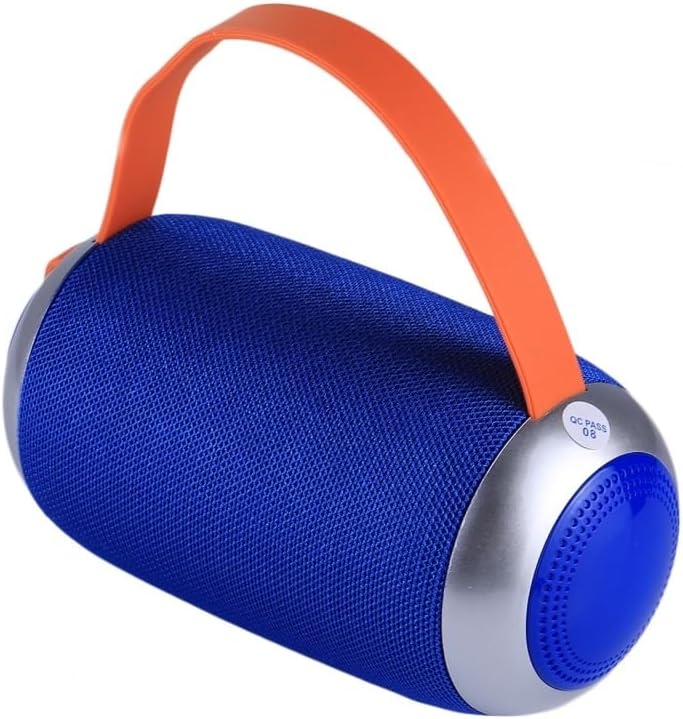
ചിത്രം 2: വശം view of the T&G TG112 speaker, highlighting the control panel with buttons for power, volume, mode selection, and playback controls. The charging port and input slots are typically located near these controls.
നിയന്ത്രണ പാനൽ പ്രവർത്തനങ്ങൾ:
- പവർ ബട്ടൺ: സ്പീക്കർ ഓൺ/ഓഫ് ചെയ്യാൻ അമർത്തിപ്പിടിക്കുക.
- മോഡ് ബട്ടൺ (M): Short press to switch between Bluetooth, FM Radio, AUX-IN, and TF Card/USB modes.
- പ്ലേ/പോസ് ബട്ടൺ (▶⏸): Short press to play or pause audio. In call mode, press to answer/end calls.
- ശബ്ദം കുറയ്ക്കുക / മുമ്പത്തെ ട്രാക്ക് (-): മുമ്പത്തെ ട്രാക്കിനായി ഹ്രസ്വമായി അമർത്തുക. ശബ്ദം കുറയ്ക്കാൻ ദീർഘനേരം അമർത്തുക.
- വോളിയം കൂട്ടുക / അടുത്ത ട്രാക്ക് (+): അടുത്ത ട്രാക്കിനായി ഷോർട്ട് പ്രസ്സ് ചെയ്യുക. വോളിയം കൂട്ടാൻ ദീർഘനേരം അമർത്തുക.
- USB പോർട്ട്: യുഎസ്ബി ഡിസ്ക് പ്ലേബാക്കിനായി.
- ടിഎഫ് കാർഡ് സ്ലോട്ട്: TF (മൈക്രോ എസ്ഡി) കാർഡ് പ്ലേബാക്കിനായി.
- ഓക്സ്-ഇൻ പോർട്ട്: 3.5mm ഓഡിയോ കേബിൾ ഉപയോഗിക്കുന്ന വയർഡ് ഓഡിയോ കണക്ഷന്.
- DC 5V ചാർജിംഗ് പോർട്ട്: സ്പീക്കർ ചാർജ് ചെയ്തതിന്.
സജ്ജമാക്കുക
1. സ്പീക്കറിൽ നിന്ന് നിരക്ക് ഈടാക്കുന്നു
- Connect the provided power cable to the DC 5V charging port on the speaker.
- കേബിളിന്റെ മറ്റേ അറ്റം ഒരു USB പവർ അഡാപ്റ്ററുമായി (ഉൾപ്പെടുത്തിയിട്ടില്ല) അല്ലെങ്കിൽ ഒരു കമ്പ്യൂട്ടറിന്റെ USB പോർട്ടുമായി ബന്ധിപ്പിക്കുക.
- ചാർജ് ചെയ്യുമ്പോൾ ചാർജിംഗ് ഇൻഡിക്കേറ്റർ ലൈറ്റ് പ്രകാശിക്കുകയും പൂർണ്ണമായി ചാർജ് ചെയ്യുമ്പോൾ ഓഫാകുകയും ചെയ്യും.
- പൂർണ്ണമായി ചാർജ് ചെയ്യുന്നതിന് സാധാരണയായി 2-3 മണിക്കൂർ എടുക്കും.
2. പവർ ഓൺ/ഓഫ്
- പവർ ഓണാക്കാൻ: കേൾക്കാവുന്ന ഒരു പ്രോംപ്റ്റ് കേൾക്കുന്നത് വരെ ഏകദേശം 3 സെക്കൻഡ് നേരത്തേക്ക് പവർ ബട്ടൺ അമർത്തിപ്പിടിക്കുക.
- പവർ ഓഫ് ചെയ്യാൻ: കേൾക്കാവുന്ന ഒരു പ്രോംപ്റ്റ് കേൾക്കുന്നത് വരെ ഏകദേശം 3 സെക്കൻഡ് നേരത്തേക്ക് പവർ ബട്ടൺ അമർത്തിപ്പിടിക്കുക.
പ്രവർത്തന നിർദ്ദേശങ്ങൾ
1. ബ്ലൂടൂത്ത് ജോടിയാക്കൽ
- Ensure the speaker is powered on and in Bluetooth mode. If not, short press the "M" (Mode) button to switch to Bluetooth mode. The speaker will emit a pairing tone, and the Bluetooth indicator light will flash.
- നിങ്ങളുടെ ഉപകരണത്തിൽ (സ്മാർട്ട്ഫോൺ, ടാബ്ലെറ്റ് മുതലായവ) ബ്ലൂടൂത്ത് പ്രവർത്തനക്ഷമമാക്കുക.
- ഇതിനായി തിരയുക "TG112" in the list of available Bluetooth devices.
- Select "TG112" to connect. Once successfully paired, the speaker will emit a confirmation tone, and the Bluetooth indicator light will stop flashing and remain solid.
- ഉപകരണം പരിധിക്കുള്ളിലായിരിക്കുകയും ബ്ലൂടൂത്ത് പ്രവർത്തനക്ഷമമാക്കുകയും ചെയ്താൽ, സ്പീക്കർ ഓണാക്കുമ്പോൾ അവസാനം ജോടിയാക്കിയ ഉപകരണത്തിലേക്ക് യാന്ത്രികമായി വീണ്ടും കണക്റ്റുചെയ്യും.
2. ഓക്സ്-ഇൻ മോഡ്
- 3.5mm ഓഡിയോ കേബിളിന്റെ ഒരു അറ്റം (ഉൾപ്പെടുത്തിയിട്ടില്ല) സ്പീക്കറിലെ AUX-IN പോർട്ടുമായി ബന്ധിപ്പിക്കുക.
- മറ്റേ അറ്റം നിങ്ങളുടെ ഉപകരണത്തിന്റെ ഓഡിയോ ഔട്ട്പുട്ട് ജാക്കുമായി ബന്ധിപ്പിക്കുക.
- The speaker will automatically switch to AUX-IN mode, or you may need to press the "M" (Mode) button to select it.
- നിങ്ങളുടെ കണക്റ്റുചെയ്ത ഉപകരണത്തിൽ നിന്ന് പ്ലേബാക്കും വോളിയവും നിയന്ത്രിക്കുക.
3. TF Card / USB Disk Playback
- Insert a TF (MicroSD) card or USB disk containing MP3 audio files into the respective slot on the speaker.
- സ്പീക്കർ സ്റ്റോറേജ് ഉപകരണം സ്വയമേവ കണ്ടെത്തി ഓഡിയോ പ്ലേ ചെയ്യാൻ തുടങ്ങും. files. If not, press the "M" (Mode) button to switch to the correct mode.
- Use the Play/Pause, Previous Track (-), and Next Track (+) buttons to control playback.
4. എഫ്എം റേഡിയോ മോഡ്
- എഫ്എം റേഡിയോ മോഡിലേക്ക് മാറാൻ "എം" (മോഡ്) ബട്ടൺ അമർത്തുക.
- To auto-scan and save available stations, short press the Play/Pause button. The speaker will scan and store stations automatically.
- സേവ് ചെയ്ത സ്റ്റേഷനുകൾക്കിടയിൽ നാവിഗേറ്റ് ചെയ്യാൻ മുൻ ട്രാക്ക് (-), അടുത്ത ട്രാക്ക് (+) ബട്ടണുകൾ ഉപയോഗിക്കുക.
- For better FM reception, connect the charging cable to the DC 5V port; it acts as an antenna.
5. ഹാൻഡ്സ്-ഫ്രീ കോളിംഗ്
- ബ്ലൂടൂത്ത് വഴി സ്മാർട്ട്ഫോണുമായി ബന്ധിപ്പിക്കുമ്പോൾ, ഹാൻഡ്സ് ഫ്രീ കോളുകൾക്കായി സ്പീക്കർ ഉപയോഗിക്കാം.
- ഒരു കോളിന് ഉത്തരം നൽകാൻ: പ്ലേ/പോസ് ബട്ടൺ ഹ്രസ്വമായി അമർത്തുക.
- ഒരു കോൾ അവസാനിപ്പിക്കാൻ: പ്ലേ/പോസ് ബട്ടൺ ഹ്രസ്വമായി അമർത്തുക.
- ഒരു കോൾ നിരസിക്കാൻ: പ്ലേ/പോസ് ബട്ടൺ അമർത്തിപ്പിടിക്കുക.
മെയിൻ്റനൻസ്
- വൃത്തിയാക്കൽ: Wipe the speaker's surface with a soft, dry, lint-free cloth. Do not use liquid cleaners, aerosols, or solvents.
- സംഭരണം: ദീർഘനേരം ഉപയോഗിക്കാത്തപ്പോൾ, നേരിട്ടുള്ള സൂര്യപ്രകാശത്തിൽ നിന്നും കടുത്ത താപനിലയിൽ നിന്നും മാറി തണുത്തതും വരണ്ടതുമായ സ്ഥലത്ത് സ്പീക്കർ സൂക്ഷിക്കുക.
- ബാറ്ററി കെയർ: To prolong battery life, fully charge the speaker before first use and recharge it at least once every three months if not used regularly. Avoid completely draining the battery frequently.
ട്രബിൾഷൂട്ടിംഗ്
| പ്രശ്നം | സാധ്യമായ കാരണം | പരിഹാരം |
|---|---|---|
| സ്പീക്കർ ഓണാക്കുന്നില്ല. | കുറഞ്ഞ ബാറ്ററി. | സ്പീക്കർ പൂർണ്ണമായും ചാർജ് ചെയ്യുക. |
| ശബ്ദമില്ല. | ശബ്ദം വളരെ കുറവാണ്; തെറ്റായ മോഡ്; ഉപകരണം കണക്റ്റുചെയ്തിട്ടില്ല. | Increase volume; switch to correct mode (Bluetooth, AUX, etc.); ensure device is paired/connected. |
| ബ്ലൂടൂത്ത് ജോടിയാക്കൽ പരാജയപ്പെട്ടു. | സ്പീക്കർ ജോടിയാക്കൽ മോഡിൽ ഇല്ല; ഉപകരണം ബ്ലൂടൂത്ത് ഓഫാണ്; സ്പീക്കറിൽ നിന്ന് വളരെ അകലെയാണ്. | Ensure speaker is in Bluetooth pairing mode; turn on device Bluetooth; move device closer (within 10m/33ft); clear previous pairings on device. |
| മോശം എഫ്എം റേഡിയോ സ്വീകരണം. | Weak signal; no antenna. | Connect the charging cable to act as an external antenna; try repositioning the speaker. |
| വികലമായ ശബ്ദം. | വോളിയം വളരെ കൂടുതലാണ്; ബാറ്ററി കുറവാണ്; തടസ്സം. | Decrease volume; charge speaker; move away from other electronic devices. |
സ്പെസിഫിക്കേഷനുകൾ
| മോഡലിൻ്റെ പേര് | TG112 |
| ബ്രാൻഡ് | ടി&ജി |
| കണക്റ്റിവിറ്റി ടെക്നോളജി | ബ്ലൂടൂത്ത് |
| വയർലെസ് കമ്മ്യൂണിക്കേഷൻ ടെക്നോളജി | ബ്ലൂടൂത്ത് |
| ബ്ലൂടൂത്ത് ശ്രേണി | 10 മീറ്റർ വരെ (33 അടി) |
| സ്പീക്കർ തരം | ഔട്ട്ഡോർ |
| പ്രത്യേക സവിശേഷതകൾ | Bass Boost, Portable, Waterproof |
| പവർ ഉറവിടം | ബാറ്ററി പവർ |
| ബാറ്ററി ശേഷി | 1200mAh |
| സ്പീക്കർ പരമാവധി ഔട്ട്പുട്ട് പവർ | 5 വാട്ട്സ് |
| ഫ്രീക്വൻസി പ്രതികരണം | 20 KHz |
| ഉൽപ്പന്ന അളവുകൾ | 6"D x 3.46"W x 6"H (16.5 x 8.8 x 8.8 സെ.മീ) |
| ഇനത്തിൻ്റെ ഭാരം | 15.7 ഔൺസ് (447 ഗ്രാം) |
| മെറ്റീരിയൽ | പ്ലാസ്റ്റിക് |
| നിറം | നീല |
| ഉൾപ്പെടുത്തിയ ഘടകങ്ങൾ | പവർ കേബിൾ |
| മാതൃരാജ്യം | ചൈന |
വാറൻ്റിയും പിന്തുണയും
For warranty information or technical support, please refer to the product packaging or contact the retailer where the product was purchased. Specific warranty terms may vary by region and retailer.
Ask a question about this manual
Ask about setup, troubleshooting, compatibility, parts, safety, or missing instructions. Manuals+ will review the question and use this page’s manual context to help answer it.