
1. ആമുഖം
The Mi iFindU Smart Anti-Loss Device is a compact and efficient Bluetooth tracker designed to help you keep track of your valuable items. With its long battery life and wide compatibility, it provides peace of mind by allowing you to easily locate misplaced belongings using your smartphone.

Figure 1: The Mi iFindU Smart Anti-Loss Device, a compact white circular tracker with the distinctive Mi logo.
2. പാക്കേജ് ഉള്ളടക്കം
- 1 x Mi iFindU Smart Anti-Loss Device (White)
- 1 x Protective Case (Black)
- 1 x Keychain Attachment
- 1 x CR2032 ബാറ്ററി (മുൻകൂട്ടി ഇൻസ്റ്റാൾ ചെയ്തത്)
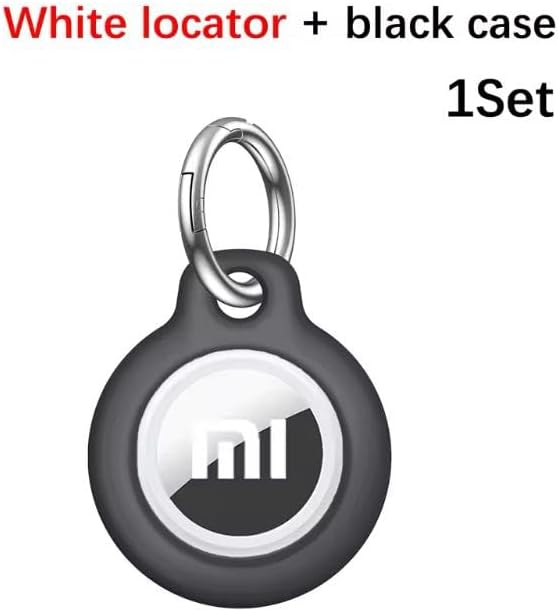
Figure 2: The Mi iFindU device shown with its black protective case and convenient keychain attachment.
3. സജ്ജീകരണ ഗൈഡ്
3.1. ബാറ്ററി ഇൻസ്റ്റാളേഷൻ
The CR2032 battery is typically pre-installed. If replacement is needed, gently open the device casing, insert a new CR2032 battery with the positive (+) side facing up, and close the casinഗ്രാം സുരക്ഷിതമായി.
3.2. ആപ്പ് ഡൗൺലോഡും ഇൻസ്റ്റാളേഷനും
- Scan the QR code provided in the product packaging or search for the "iFindU" app in your device's app store (Google Play Store for Android, Apple App Store for iOS).
- Download and install the application on your smartphone.
- ഒരു അക്കൗണ്ട് സൃഷ്ടിക്കുന്നതിനോ ലോഗിൻ ചെയ്യുന്നതിനോ ആപ്പ് തുറന്ന് ഓൺ-സ്ക്രീൻ നിർദ്ദേശങ്ങൾ പാലിക്കുക.
3.3. ഉപകരണ ജോടിയാക്കൽ
- നിങ്ങളുടെ സ്മാർട്ട്ഫോണിൽ ബ്ലൂടൂത്ത് പ്രവർത്തനക്ഷമമാക്കിയിട്ടുണ്ടെന്ന് ഉറപ്പാക്കുക.
- Press and hold the button on the Mi iFindU device until you hear a beep or see an indicator light flash, signifying it is in pairing mode.
- In the iFindU app, select the option to "Add Device" or "Scan for Devices".
- Select the Mi iFindU device from the list of discovered Bluetooth devices.
- Once paired, the app will confirm the connection, and the device will be ready for use.
4. പ്രവർത്തന നിർദ്ദേശങ്ങൾ
4.1. Locating Items
To find an item attached to your Mi iFindU device:
- Open the iFindU app on your smartphone.
- Select the specific Mi iFindU device you wish to locate from the list of connected devices.
- Tap the "Ring" or "Locate" button within the app. The Mi iFindU device will emit an audible alarm, helping you pinpoint its location.
4.2. Anti-Loss Alert
The device can alert you if you move too far away from your tracked item:
- Enable the anti-loss alert feature in the iFindU app settings for each device.
- If the Bluetooth connection between your smartphone and the Mi iFindU device is lost (e.g., you walk out of range), both your phone and the tracker will sound an alarm to notify you.
4.3. Two-Way Finding
You can also use the Mi iFindU device to find your phone:
- Double-press the button on the Mi iFindU device.
- Your smartphone will ring, even if it's on silent mode, helping you locate it quickly.
5. പരിപാലനം
5.1. വൃത്തിയാക്കൽ
Wipe the device with a soft, dry cloth. Do not use harsh chemicals or abrasive cleaners, as they may damage the surface.
5.2. ബാറ്ററി മാറ്റിസ്ഥാപിക്കൽ
The Mi iFindU device uses a standard CR2032 coin cell battery. When the battery is low, the app may notify you, or the device's performance may diminish. To replace:
- ഉപകരണം ശ്രദ്ധാപൂർവ്വം തുറക്കുക casing (refer to section 3.1).
- പഴയ ബാറ്ററി നീക്കം ചെയ്യുക.
- പോസിറ്റീവ് (+) വശം മുകളിലേക്ക് അഭിമുഖീകരിക്കുന്ന ഒരു പുതിയ CR2032 ബാറ്ററി ഇടുക.
- സി അടയ്ക്കുകasing firmly.
6. പ്രശ്നപരിഹാരം
| പ്രശ്നം | സാധ്യമായ കാരണം | പരിഹാരം |
|---|---|---|
| Device not connecting to phone. | Bluetooth is off; device out of range; low battery; app issue. | Ensure Bluetooth is on. Move device closer to phone. Check/replace battery. Restart app/phone. |
| Device not ringing. | Device out of range; low battery; app volume low. | Move device closer. Replace battery. Check app sound settings. |
| ചെറിയ ബാറ്ററി ലൈഫ്. | Frequent use; old battery. | Reduce frequency of ringing. Replace with a new, high-quality CR2032 battery. |
| Anti-loss alert not working. | Feature disabled; app not running in background. | Enable anti-loss alert in app settings. Ensure app has background permissions. |
7 സ്പെസിഫിക്കേഷനുകൾ
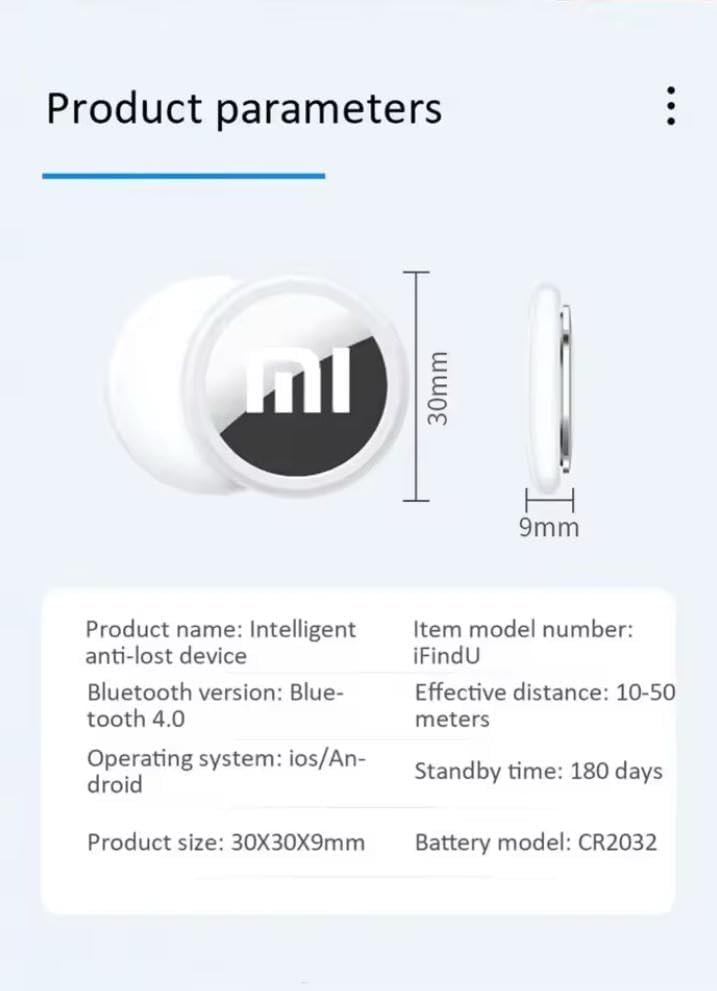
Figure 3: Diagram illustrating the product dimensions and key parameters.
- മോഡൽ: iFindU
- അളവുകൾ: 30 x 30 x 9 mm (L x W x T)
- ഭാരം: 10 ഗ്രാം
- കണക്റ്റിവിറ്റി: ബ്ലൂടൂത്ത് 4.0
- ഫലപ്രദമായ ശ്രേണി: 10-50 meters (depending on environment)
- ബാറ്ററി തരം: CR2032 (ഉൾപ്പെടുന്നു)
- ബാറ്ററി ലൈഫ് (സ്റ്റാൻഡ്ബൈ): 180 ദിവസം വരെ
- അനുയോജ്യമായ ഓപ്പറേറ്റിംഗ് സിസ്റ്റങ്ങൾ: iOS, Android
- നിയന്ത്രണ രീതി: മൊബൈൽ ആപ്ലിക്കേഷൻ
- മെറ്റീരിയൽ: പ്ലാസ്റ്റിക്
- നിർമ്മാതാവ്: Xiaomi
- മാതൃരാജ്യം: ചൈന
8. വാറൻ്റിയും പിന്തുണയും
For warranty information and technical support, please refer to the documentation provided with your purchase or contact the retailer/manufacturer directly. Specific warranty terms may vary by region and seller.