
1. ആമുഖം
This manual provides instructions for the installation, operation, and maintenance of your Arlo Essential Spotlight Camera. This wireless security camera offers 1080p HD video, color night vision, two-way audio, and direct Wi-Fi connectivity for comprehensive outdoor surveillance.
2. ബോക്സിൽ എന്താണുള്ളത്?
ഇൻസ്റ്റാളേഷനുമായി മുന്നോട്ടുപോകുന്നതിനുമുമ്പ് എല്ലാ ഘടകങ്ങളും നിലവിലുണ്ടെന്ന് ഉറപ്പാക്കുക.
- ആർലോ എസൻഷ്യൽ സ്പോട്ട്ലൈറ്റ് ക്യാമറ
- മതിൽ മൗണ്ട്
- മൗണ്ടിംഗ് സ്ക്രൂകളും വാൾ ആങ്കറുകളും
- പവർ അഡാപ്റ്റർ (കോർഡഡ് ഇലക്ട്രിക്)
- ദ്രുത ആരംഭ ഗൈഡ്
3. സജ്ജീകരണം
3.1. ഫിസിക്കൽ ഇൻസ്റ്റലേഷൻ
The Arlo Essential Spotlight Camera is designed for outdoor use and comes with a wall mount for secure placement.
- ഒരു ലൊക്കേഷൻ തിരഞ്ഞെടുക്കുക: ആവശ്യമുള്ള ഫീൽഡ് നൽകുന്ന ഒരു ഔട്ട്ഡോർ സ്ഥലം തിരഞ്ഞെടുക്കുക view (130 degrees) and has access to a power outlet. Ensure the camera is positioned to cover critical areas without obstructions.
- ക്യാമറ ഘടിപ്പിക്കുക:
- Attach the wall mount to your chosen surface using the provided screws and wall anchors.
- Securely attach the camera to the wall mount.
- Adjust the camera angle to achieve optimal coverage.
- പവർ ബന്ധിപ്പിക്കുക: Plug the power adapter into the camera and then into a suitable outdoor power outlet. The camera operates on corded electric power.

Image: Arlo Essential Spotlight Camera mounted on a wall, demonstrating its compact design and placement.
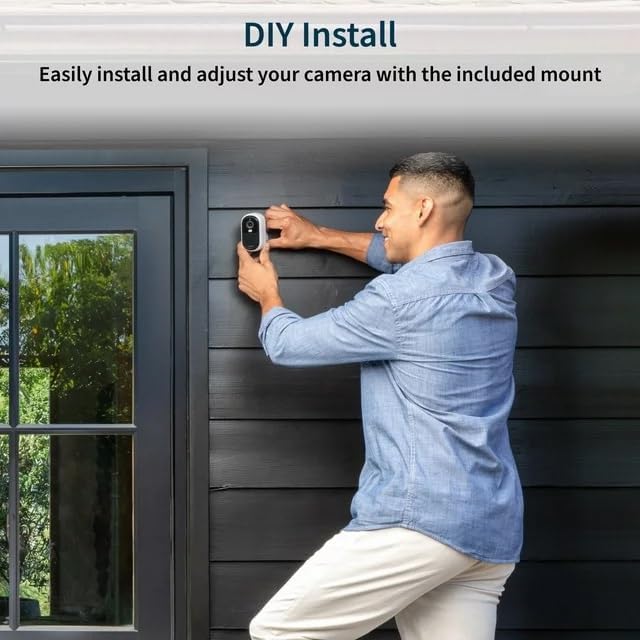
Image: A person installing the Arlo Essential Spotlight Camera on an exterior wall, illustrating the DIY installation process.
3.2. ആപ്പ് ഇൻസ്റ്റാളേഷനും വൈഫൈ കണക്ഷനും
The Arlo Essential Spotlight Camera connects directly to your Wi-Fi network and is managed via the Arlo Secure App.
- Arlo Secure ആപ്പ് ഡൗൺലോഡ് ചെയ്യുക: Download and install the Arlo Secure App from your smartphone's app store (available for iOS and Android).
- ഒരു അക്കൗണ്ട് സൃഷ്ടിക്കുക: Open the app and follow the on-screen instructions to create a new Arlo account or log in to an existing one.
- നിങ്ങളുടെ ക്യാമറ ചേർക്കുക:
- In the app, tap the '+' icon or select "Add Device".
- Choose "Cameras" and then select "Essential Spotlight Camera".
- Follow the app's prompts to connect your camera to your 2.4 GHz Wi-Fi network. This typically involves scanning a QR code with the camera or manually entering network details.
- ടെസ്റ്റ് കണക്ഷൻ: Once connected, verify that you can view live video from your camera within the Arlo Secure App.
4. ക്യാമറ പ്രവർത്തിപ്പിക്കുക
4.1. 1080p HD Video and Field of View
The camera records and streams video in 1080p High Definition, providing clear and detailed footage. It features a 130-degree field of view to minimize blind spots.

Image: A smartphone screen showing the 130-degree field of view captured by the Arlo Essential Spotlight Camera, highlighting its wide coverage.
4.2. കളർ നൈറ്റ് വിഷൻ
The integrated spotlight enables color night vision, allowing you to see more details in low-light conditions compared to traditional infrared night vision.

Image: A split image demonstrating the difference between Color Night Vision and Traditional Night Vision, showing clearer details with color.
4.3. ടു-വേ ഓഡിയോ
Utilize the built-in microphone and speaker for two-way communication. This feature includes noise cancellation for clearer audio interactions with visitors or to deter intruders.

Image: A smartphone displaying a live feed from the Arlo camera, with speech bubbles indicating two-way audio communication with a person outside a door.
4.4. മോഷൻ ഡിറ്റക്ഷനും അലേർട്ടുകളും
The camera features motion detection that triggers recording and sends real-time notifications to your smartphone via the Arlo Secure App. You can customize motion zones and sensitivity settings within the app.
Image: A hand holding a smartphone displaying a notification from the Arlo app, indicating motion detection and offering options for live video or siren activation.
4.5. Integrated Spotlight and Siren
The camera includes an integrated spotlight that can be activated automatically upon motion detection or manually via the app. An integrated siren can also be triggered to deter unwanted visitors.
5. പരിപാലനം
5.1. കാലാവസ്ഥാ പ്രതിരോധം
The Arlo Essential Spotlight Camera is designed with a weather-resistant casing to withstand various outdoor conditions, including heat, cold, rain, and sun. Ensure all connections are secure to maintain its weather resistance.

Image: The Arlo Essential Spotlight Camera shown with water droplets, illustrating its weather-resistant design against rain.
5.2. വൃത്തിയാക്കൽ
Periodically clean the camera lens and housing to ensure optimal video clarity. Use a soft, damp cloth. Avoid abrasive cleaners or solvents that could damage the camera's finish or lens.
6. പ്രശ്നപരിഹാരം
| ഇഷ്യൂ | സാധ്യമായ പരിഹാരം |
|---|---|
| ക്യാമറ വൈഫൈയിലേക്ക് കണക്റ്റ് ചെയ്യുന്നില്ല |
|
| മോശം വീഡിയോ നിലവാരം |
|
| ചലനം കണ്ടെത്തൽ അലേർട്ടുകളൊന്നുമില്ല |
|
| ടു-വേ ഓഡിയോ പ്രശ്നങ്ങൾ |
|
7 സ്പെസിഫിക്കേഷനുകൾ
| ഫീച്ചർ | വിശദാംശങ്ങൾ |
|---|---|
| മോഡലിൻ്റെ പേര് | ആർലോ എസൻഷ്യൽ സ്പോട്ട്ലൈറ്റ് ക്യാമറ |
| വീഡിയോ ക്യാപ്ചർ റെസല്യൂഷൻ | 1080p HD |
| ഫീൽഡ് View | 130 ഡിഗ്രി |
| നൈറ്റ് വിഷൻ | Color Night Vision (with integrated spotlight) |
| ഓഡിയോ | നോയിസ് റദ്ദാക്കലോടുകൂടിയ ടു-വേ ഓഡിയോ |
| കണക്റ്റിവിറ്റി | Direct Wi-Fi (2.4 GHz) |
| പവർ ഉറവിടം | കോർഡഡ് ഇലക്ട്രിക് |
| ഇൻഡോർ/ഔട്ട്ഡോർ ഉപയോഗം | ഔട്ട്ഡോർ |
| മൗണ്ടിംഗ് തരം | മതിൽ മൗണ്ട് |
| അനുയോജ്യമായ ഉപകരണങ്ങൾ | Smartphone (via Arlo Secure App) |
| ഇനത്തിന്റെ അളവുകൾ (L x W x H) | 2.7 x 2 x 1 ഇഞ്ച് |
| ഇനത്തിൻ്റെ ഭാരം | 4 ഔൺസ് |
8. വാറൻ്റിയും പിന്തുണയും
For detailed warranty information, please refer to the warranty card included with your product or visit the official Arlo website. For technical support, troubleshooting assistance, or to access additional resources, please visit ആർലോ പിന്തുണ or contact Arlo customer service directly.