
1. ഉൽപ്പന്നം കഴിഞ്ഞുview
The Baseus Mini MagSafe Powerbank 5000 mAh is a compact, Qi2 certified portable charger designed for convenience and efficiency. It features a 5000 mAh capacity, 20W Power Delivery (PD) via USB-C, and 15W wireless charging. The integrated foldable stand allows for hands-free viewing while charging. Its strong magnetic attachment ensures secure connection to compatible devices.
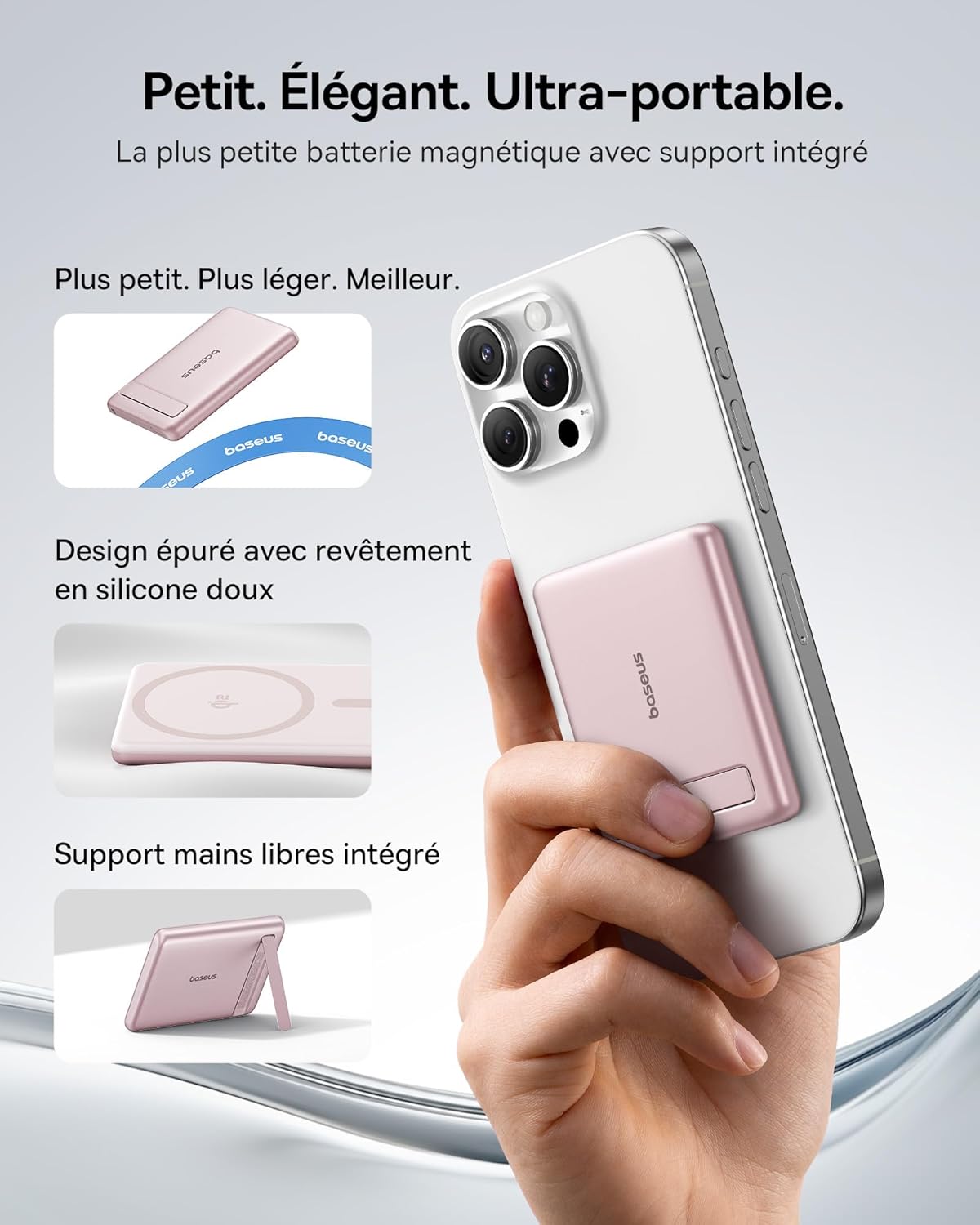
Image: The Baseus Mini MagSafe Powerbank securely attached to an iPhone, demonstrating its compact form factor and the convenience of the integrated kickstand for hands-free use.
2. പാക്കേജ് ഉള്ളടക്കം
- Baseus Mini MagSafe Powerbank (Model: PPKPC-0520S)
- USB-C to USB-C Charging Cable (30 cm)
- ഉപയോക്തൃ മാനുവൽ

Image: The Baseus Mini MagSafe Powerbank and its accompanying USB-C charging cable, highlighting the included accessories.
3. ഉൽപ്പന്ന സവിശേഷതകൾ
- Compact and Premium Design: Smaller than a credit card with a 5000 mAh capacity, featuring a thin aluminum casing and soft-touch silicone finish. Ergonomic curved edges enhance grip, and an LED display indicates battery status.
- Qi2 ഫാസ്റ്റ് ചാർജിംഗ്: Provides up to 15W wireless fast charging for iPhones and other Qi2-compatible devices. Qi2 technology ensures secure magnetic alignment for faster and more reliable power delivery.
- സംയോജിത മടക്കാവുന്ന സ്റ്റാൻഡ്: The built-in aluminum kickstand allows for hands-free viewing in both portrait and landscape modes while your phone charges wirelessly.
- ശക്തമായ കാന്തിക അറ്റാച്ച്മെന്റ്: Equipped with N52 rubidium magnets offering 3500 GS magnetic power, ensuring a secure lock for instant charging without obstructing the camera lens.
- Wired and Wireless Charging with Advanced Cooling: Charge two devices simultaneously via wireless and USB-C. A three-layer cooling system maintains optimal temperature during extended use.

Image: An iPhone receiving 15W wireless fast charging from the Baseus MagSafe Powerbank, demonstrating the Qi2 certification and efficient power transfer.
4. സജ്ജീകരണം
- പ്രാരംഭ ചാർജ്: Before first use, fully charge the power bank using the included USB-C cable and a compatible power adapter (not included). The LED indicators will show the charging progress.
- പവർ ഓൺ: The power bank typically activates automatically when a device is attached or connected. Some models may have a power button to initiate charging.
5. പ്രവർത്തന നിർദ്ദേശങ്ങൾ
5.1 പവർ ബാങ്ക് ചാർജ് ചെയ്യുന്നു
- Connect the included USB-C cable to the power bank's USB-C port.
- Connect the other end of the cable to a USB-C power adapter (e.g., 20W PD charger) or a computer's USB-C port.
- The LED indicators will illuminate to show the current battery level and charging status.
5.2 Wireless Charging (MagSafe/Qi2)
- Ensure your device is compatible with MagSafe or Qi2 wireless charging (e.g., iPhone 12 series and newer).
- Align the back of your compatible device with the magnetic surface of the power bank. The magnets will snap into place, ensuring proper alignment.
- Wireless charging will begin automatically. The LED indicators may show charging activity.
5.3 വയേർഡ് ചാർജിംഗ് (USB-C)
- Connect your device to the power bank's USB-C port using a compatible USB-C to USB-C cable (or your device's charging cable).
- Wired charging will begin automatically, supporting up to 20W Power Delivery.
5.4 മടക്കാവുന്ന സ്റ്റാൻഡ് ഉപയോഗം
- Gently pull out the integrated kickstand from the back of the power bank.
- Place your wirelessly charging device onto the power bank.
- നിങ്ങൾ ആഗ്രഹിക്കുന്ന രീതിയിൽ സ്റ്റാൻഡ് ക്രമീകരിക്കുക viewing angle for portrait or landscape orientation.

Image: The Baseus MagSafe Powerbank simultaneously charging two iPhones, one via USB-C cable and another wirelessly, demonstrating its dual-charging capability.
6. പരിപാലനം
- വൃത്തിയാക്കൽ: മൃദുവായതും ഉണങ്ങിയതുമായ തുണി ഉപയോഗിച്ച് പവർ ബാങ്ക് തുടയ്ക്കുക. കഠിനമായ രാസവസ്തുക്കളോ ഉരച്ചിലുകളോ ഉള്ള വസ്തുക്കൾ ഉപയോഗിക്കുന്നത് ഒഴിവാക്കുക.
- സംഭരണം: നേരിട്ടുള്ള സൂര്യപ്രകാശവും കടുത്ത താപനിലയും ഏൽക്കാത്ത തണുത്തതും വരണ്ടതുമായ സ്ഥലത്ത് പവർ ബാങ്ക് സൂക്ഷിക്കുക.
- ബാറ്ററി കെയർ: മികച്ച ബാറ്ററി ലൈഫിനായി, പതിവായി ഉപയോഗിക്കുന്നില്ലെങ്കിൽ, കുറഞ്ഞത് മൂന്ന് മാസത്തിലൊരിക്കലെങ്കിലും പവർ ബാങ്ക് പൂർണ്ണമായും ചാർജ് ചെയ്ത് ഡിസ്ചാർജ് ചെയ്യുക.
- തുള്ളികൾ ഒഴിവാക്കുക: ആന്തരിക ഘടകങ്ങളെ തകരാറിലാക്കുന്ന വീഴ്ചകളിൽ നിന്നും ആഘാതങ്ങളിൽ നിന്നും ഉപകരണത്തെ സംരക്ഷിക്കുക.
7. പ്രശ്നപരിഹാരം
- ഉപകരണം ചാർജ് ചെയ്യുന്നില്ല:
- പവർ ബാങ്ക് ആവശ്യത്തിന് ചാർജ്ജ് ചെയ്തിട്ടുണ്ടെന്ന് ഉറപ്പാക്കുക.
- Check cable connections for wired charging.
- For wireless charging, ensure proper alignment and that your device is Qi2/MagSafe compatible. Remove any thick phone cases that might interfere.
- വേഗത കുറഞ്ഞ ചാർജിംഗ്:
- Ensure you are using a compatible cable and power adapter for optimal charging speeds (e.g., PD 20W for wired, Qi2 for wireless).
- ഒന്നിലധികം ഉപകരണങ്ങൾ ഒരേസമയം ചാർജ് ചെയ്യുന്നത് വ്യക്തിഗത ചാർജിംഗ് വേഗത കുറച്ചേക്കാം.
- കാന്തിക ബന്ധം ദുർബലമാണ്:
- Ensure your phone or case has MagSafe compatibility.
- Remove any non-MagSafe compatible cases or accessories that might block the magnetic connection.
- Power bank overheating:
- While the power bank has advanced cooling, prolonged high-power usage can generate heat. If it becomes excessively hot, disconnect it and allow it to cool down.
- നേരിട്ടുള്ള സൂര്യപ്രകാശത്തിലോ അടച്ചിട്ട സ്ഥലങ്ങളിലോ ചാർജ് ചെയ്യുന്നത് ഒഴിവാക്കുക.
8 സ്പെസിഫിക്കേഷനുകൾ
| മോഡൽ നമ്പർ | PPKPC-0520S |
| ബാറ്ററി തരം | ലിഥിയം പോളിമർ |
| ശേഷി | 5000 mAh |
| വയേർഡ് ഔട്ട്പുട്ട് (USB-C) | 20W വരെ പവർ ഡെലിവറി (PD) |
| വയർലെസ് ഔട്ട്പുട്ട് | 15W വരെ (Qi2 സർട്ടിഫൈഡ്) |
| ഇൻപുട്ട് വോളിയംtage | 20 വോൾട്ട് (പരമാവധി) |
| അളവുകൾ (L x W x H) | 10 x 6.7 x 0.9 സെ.മീ |
| ഭാരം | 180 ഗ്രാം |
| അനുയോജ്യമായ ഉപകരണങ്ങൾ | Smartphones (iPhone 12-17 Pro/Pro Max, Android compatible) |
| വയർലെസ് ചാർജിംഗ് സ്റ്റാൻഡേർഡ് | Qi |

Image: The Baseus Mini MagSafe Powerbank positioned next to an iPhone and a soda can, illustrating its ultra-compact and portable size.
9 സുരക്ഷാ വിവരങ്ങൾ
ഉൽപ്പന്നത്തിന് കേടുപാടുകൾ സംഭവിക്കാതിരിക്കാനോ സ്വയം പരിക്കേൽക്കാതിരിക്കാനോ ദയവായി ഈ സുരക്ഷാ മാർഗ്ഗനിർദ്ദേശങ്ങൾ വായിച്ച് പിന്തുടരുക:
- പവർ ബാങ്കിനെ വെള്ളം, ഈർപ്പം അല്ലെങ്കിൽ തീവ്രമായ താപനില എന്നിവയിൽ തുറന്നുകാട്ടരുത്.
- Avoid disassembling, puncturing, or modifying the device.
- കുട്ടികൾക്ക് ലഭ്യമാകാതെ സൂക്ഷിക്കുക.
- പവർ ബാങ്കിന് വ്യക്തമായ കേടുപാടുകൾ സംഭവിച്ചിട്ടുണ്ടാകുകയോ വീർത്തിരിക്കുകയോ ചെയ്താൽ ഉപയോഗിക്കരുത്.
- പ്രാദേശിക ചട്ടങ്ങൾക്കനുസൃതമായി ഉൽപ്പന്നം ഉത്തരവാദിത്തത്തോടെ വിനിയോഗിക്കുക.
10. വാറൻ്റിയും പിന്തുണയും
This Baseus Mini MagSafe Powerbank comes with a 2 വർഷത്തെ വാറൻ്റി വാങ്ങിയ തീയതി മുതൽ. സാധാരണ ഉപയോഗത്തിലുള്ള നിർമ്മാണ വൈകല്യങ്ങളും പ്രവർത്തനക്ഷമതയും ഈ വാറന്റി ഉൾക്കൊള്ളുന്നു.
For technical support, warranty claims, or any product-related inquiries, please contact Baseus customer service through the retailer where you purchased the product or visit the official Baseus webബന്ധപ്പെടാനുള്ള വിവരങ്ങൾക്കുള്ള സൈറ്റ്.

Image: A display of various iPhone models and Android devices, all compatible with the Baseus MagSafe Powerbank, highlighting its broad device compatibility.