
1. ആമുഖം
The BOSEAN BH-W01 is a portable 3-in-1 Electromagnetic Field (EMF) meter designed for detecting Electric Field (EF), Magnetic Field (MF), and Radio Frequency (RF) radiation. This device features an integrated sensor for accurate signal capture and a 2.4-inch TFT color display for intuitive data visualization. It is suitable for use in various environments, including homes, offices, computer rooms, and communication base stations, to identify and manage radiation sources.

ചിത്രം 1: ഫ്രണ്ട് view of the BOSEAN BH-W01 Portable 3-in-1 EMF Meter, showing its display and control buttons.
2. ഉൽപ്പന്ന സവിശേഷതകൾ
- 3-in-1 EMF Detection: Measures Electric Field (EF), Magnetic Field (MF), and Radio Frequency (RF) with high precision.
- അവബോധജന്യമായ ഡിസ്പ്ലേ: Features a 2.4-inch TFT color screen for real-time, maximum, and average value display, along with dynamic line graphs for trend visualization.
- ഒന്നിലധികം അലാറം മോഡുകൾ: Supports audible, LED light, vibration, and on-screen alarms. Numeric values and curves change color when thresholds are exceeded.
- വിശാലമായ ആപ്ലിക്കേഷൻ: Suitable for measuring radiation levels from electronic devices like mobile phones, routers, microwaves, and identifying excessive radiation sources in various environments.
- റീചാർജ് ചെയ്യാവുന്ന ബാറ്ററി: Equipped with an 1800mAh Lithium-ion battery, rechargeable via Type-C port.
- യാന്ത്രിക ഷട്ട്ഡൗൺ: Configurable auto-shutdown timer (e.g., 15 minutes) to conserve battery.

ചിത്രം 2: Illustration of the BOSEAN BH-W01's 3-in-1 measurement capabilities for Electric Field (EF), Magnetic Field (MF), and Radio Frequency (RF).
3. സജ്ജീകരണവും ചാർജിംഗും
3.1 പ്രാരംഭ ചാർജിംഗ്
ആദ്യ ഉപയോഗത്തിന് മുമ്പ്, ഉപകരണം പൂർണ്ണമായും ചാർജ് ചെയ്യുക.
- Locate the Type-C charging port on the side or bottom of the device.
- Connect the provided Type-C USB cable to the device and the other end to a standard USB power adapter (not included) or a computer USB port.
- The charging indicator on the display will show the charging status. Allow the device to charge until the battery icon indicates a full charge.

ചിത്രം 3: The BOSEAN BH-W01 features a Type-C charging port and an 1800mAh rechargeable battery.
3.2 പവർ ഓൺ/ഓഫ്
- പവർ ഓണാക്കാൻ, അമർത്തിപ്പിടിക്കുക Hold/Power ഡിസ്പ്ലേ പ്രകാശിക്കുന്നത് വരെ ബട്ടൺ അമർത്തുക.
- പവർ ഓഫ് ചെയ്യുന്നതിന്, അമർത്തിപ്പിടിക്കുക Hold/Power ഡിസ്പ്ലേ ഓഫാക്കുന്നതുവരെ ബട്ടൺ.
4. ഓപ്പറേഷൻ
4.1 ഡിസ്പ്ലേ മനസ്സിലാക്കുന്നു
The 2.4-inch TFT color display provides comprehensive information about the measured fields. Refer to the diagram below for an explanation of each indicator and function.

ചിത്രം 4: Detailed diagram of the BOSEAN BH-W01 display interface and button functions.
| ഇല്ല. | ഫംഗ്ഷൻ | ഇല്ല. | ഫംഗ്ഷൻ |
|---|---|---|---|
| 1 | Sound Alarm Icon (Mute icon appears if alarm is off) | 9 | Real-Time Magnetic Field (MF) Measurement |
| 2 | Alarm Light Icon | 10 | Real-Time Radio Frequency (RF) Measurement |
| 3 | Vibration Alarm Icon | 11 | Alarm Status Indicators: Low, Medium, High |
| 4 | Auto Shutdown Timer Icon | 12 | Graph Display Icon |
| 5 | Hold (Data Hold) | 13 | Real-Time Measurement Value |
| 6 | ബാറ്ററി നില | 14 | Average Measurement Value |
| 7 | ചാർജിംഗ് ഇൻഡിക്കേറ്റർ | 15 | Maximum Measurement Value |
| 8 | Real-Time Electric Field (EF) Measurement | 16 | Real-Time Curve Chart |
4.2 മെഷർമെന്റ് മോഡുകൾ
The device automatically measures EF, MF, and RF simultaneously.
- Electric Field (EF): Measures in V/m (Volts per meter). Range: 1 ~ 1999 V/m.
- Magnetic Field (MF): Measures in mG (milligauss) or µT (microtesla). Range: 0.1 ~ 1999.9 mG / 0.01 ~ 99.99 µT.
- റേഡിയോ ഫ്രീക്വൻസി (RF): Measures in mW/m² (milliwatts per square meter). Range: 0.1 ~ 999.9 mW/m².

ചിത്രം 5: Common sources of Electric Field (EF), Magnetic Field (MF), and Radio Frequency (RF) radiation.
4.3 ബട്ടൺ പ്രവർത്തനങ്ങൾ
- യൂണിറ്റ് ബട്ടൺ: Press to cycle through measurement units for Magnetic Field (mG/µT) or to adjust other unit-related settings if available.
- Hold/Power Button:
- Short press: Activates/deactivates Data Hold function, freezing the current readings on the display.
- Long press: Powers the device on or off.
- മോഡ് ബട്ടൺ: Press to cycle through display modes (e.g., real-time values, graph display) or to adjust alarm settings.
4.4 Interpreting Readings and Alarms
The device displays real-time, average, and maximum values. The color of the numeric values and curves will change to indicate different radiation levels (e.g., green for low, yellow for medium, red for high).
- അലാറം പരിധി: The device has pre-set thresholds for low, medium, and high radiation levels. When a measured value exceeds a threshold, the corresponding alarm (audible, LED, vibration, screen color change) will activate.
- ഓവർലോഡ് അലാറം: If the electromagnetic radiation exceeds the measurable range, an overload alarm will be triggered.
- ബാറ്ററി മുന്നറിയിപ്പ്: The device continuously monitors battery status and provides alerts for low power.
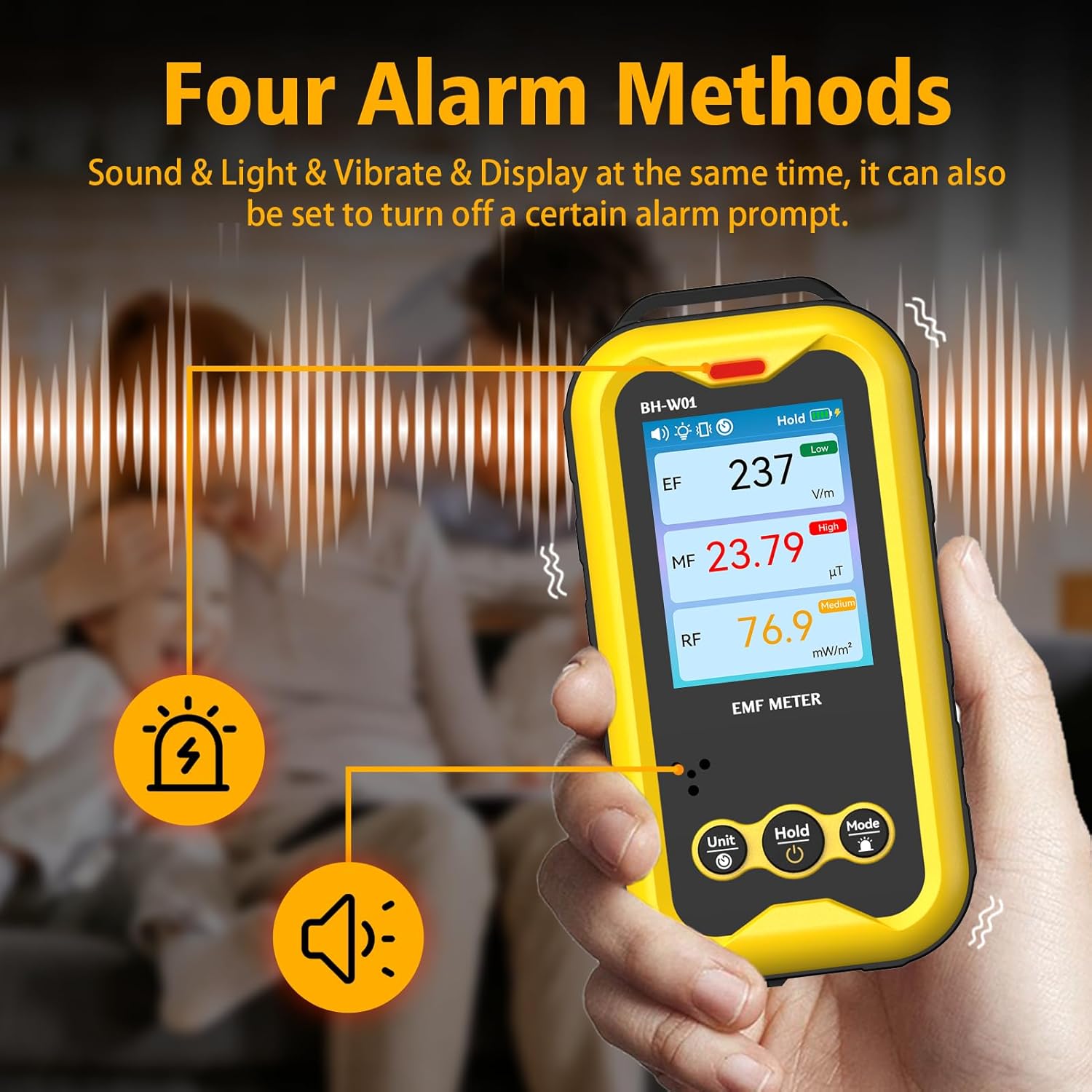
ചിത്രം 6: The BOSEAN BH-W01 offers four distinct alarm methods: sound, light, vibration, and display changes.
4.5 Real-Time Curve Chart
The device can display a real-time curve chart (Figure 4, item 16) to visualize the dynamic changes in magnetic field strength over time. This feature helps in observing trends and identifying intermittent radiation sources.
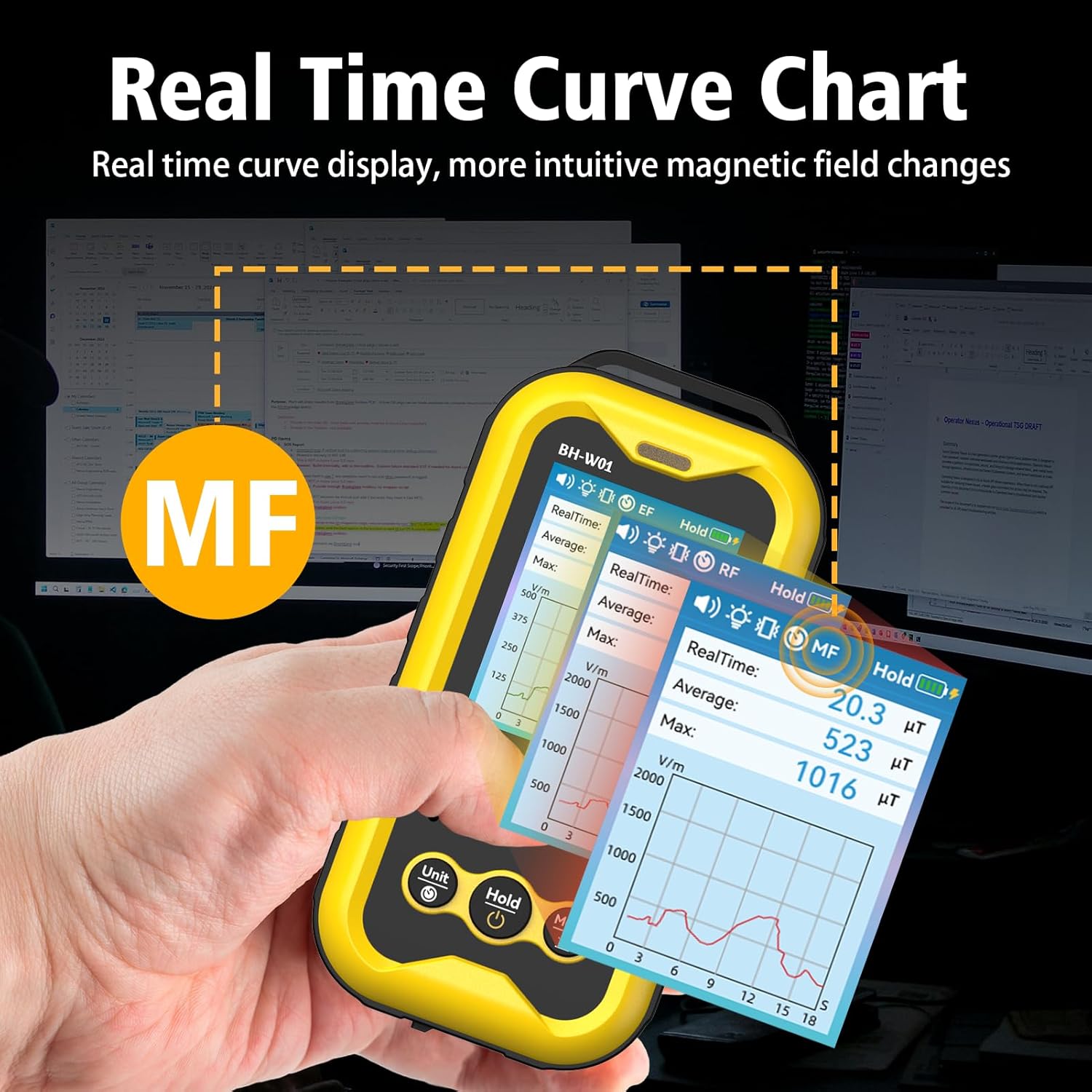
ചിത്രം 7: The real-time curve chart provides a visual representation of magnetic field changes over time.
5. പരിപാലനം
- വൃത്തിയാക്കൽ: ഉപകരണം വൃത്തിയാക്കാൻ മൃദുവായതും ഉണങ്ങിയതുമായ തുണി ഉപയോഗിക്കുക. അബ്രസീവ് ക്ലീനറുകളോ ലായകങ്ങളോ ഉപയോഗിക്കരുത്.
- സംഭരണം: നേരിട്ടുള്ള സൂര്യപ്രകാശത്തിൽ നിന്നും കടുത്ത താപനിലയിൽ നിന്നും മാറി തണുത്തതും വരണ്ടതുമായ സ്ഥലത്ത് ഉപകരണം സൂക്ഷിക്കുക.
- ബാറ്ററി കെയർ: To prolong battery life, avoid fully discharging the battery frequently. If storing for an extended period, charge the device to approximately 50% and recharge every few months.
- ആഘാതം ഒഴിവാക്കുക: Protect the device from drops and strong impacts, which can damage internal components.
6. പ്രശ്നപരിഹാരം
- ഉപകരണം പവർ ഓൺ ചെയ്യുന്നില്ല:
- ബാറ്ററി ചാർജ്ജ് ചെയ്തിട്ടുണ്ടെന്ന് ഉറപ്പാക്കുക. ടൈപ്പ്-സി കേബിൾ ഉപയോഗിച്ച് ഉപകരണം ഒരു പവർ സ്രോതസ്സുമായി ബന്ധിപ്പിക്കുക.
- Press and hold the Power button for several seconds.
- കൃത്യമല്ലാത്ത വായനകൾ:
- Ensure the device is held steadily during measurement. Rapid movements can affect accuracy.
- Keep the device away from strong magnetic fields or other electronic devices that might interfere with readings, unless those are the intended measurement targets.
- The device's calibration is based on manual operation; hold it by hand for best results.
- അലാറങ്ങൾ പ്രവർത്തിക്കുന്നില്ല:
- Check the alarm settings using the Mode button to ensure they are enabled.
- Verify that the measured values exceed the set thresholds.
- ഡിസ്പ്ലേ ശൂന്യമാണ് അല്ലെങ്കിൽ നിശ്ചലമാണ്:
- Try restarting the device by holding the Power button.
- പ്രശ്നം നിലനിൽക്കുകയാണെങ്കിൽ, ഉപഭോക്തൃ പിന്തുണയുമായി ബന്ധപ്പെടുക.
7 സ്പെസിഫിക്കേഷനുകൾ
| പരാമീറ്റർ | മൂല്യം |
|---|---|
| മോഡൽ നമ്പർ | BH-W01 |
| ബ്രാൻഡ് | BOSEAN (Manufacturer) / GLXY (Sub-brand/Distributor) |
| അളവുകൾ (L x W x H) | 6.5 x 2.7 x 12.7 സെ.മീ |
| ഭാരം | 240 ഗ്രാം |
| Electric Field (EF) Range | 1 V/m മുതൽ 1999 V/m വരെ |
| Magnetic Field (MF) Range | 0.1 mG to 1999.9 mG (0.01 µT to 99.99 µT) |
| Radio Frequency (RF) Range | 0.1 mW/m² to 999.9 mW/m² |
| പ്രദർശിപ്പിക്കുക | 2.4-ഇഞ്ച് TFT കളർ സ്ക്രീൻ |
| പവർ ഉറവിടം | 1 ലിഥിയം-അയൺ ബാറ്ററി (ഉൾപ്പെട്ടിരിക്കുന്നു) |
| ബാറ്ററി ശേഷി | 1800mAh |
| ചാർജിംഗ് പോർട്ട് | ടൈപ്പ്-സി യുഎസ്ബി |
| യാന്ത്രിക ഷട്ട്ഡൗൺ | Configurable (e.g., 15 minutes) |
8 സുരക്ഷാ വിവരങ്ങൾ
- Do not attempt to open or modify the device. This may void the warranty and pose safety risks.
- ഉപകരണം വെള്ളത്തിൽ നിന്നും മറ്റ് ദ്രാവകങ്ങളിൽ നിന്നും അകറ്റി നിർത്തുക.
- ഉപകരണം തീവ്രമായ താപനിലയിലോ ഉയർന്ന ആർദ്രതയിലോ എത്തിക്കുന്നത് ഒഴിവാക്കുക.
- Dispose of the battery and device according to local regulations. Do not dispose of in household waste.
- This device is for informational measurement purposes only and should not be used as a substitute for professional safety assessments or medical advice.
9. വാറൻ്റിയും പിന്തുണയും
Specific warranty details are typically provided with the product packaging or by the retailer at the time of purchase. For technical support, warranty claims, or further assistance, please refer to the contact information provided by your seller or the manufacturer, BOSEAN.
Manufacturer: BOSEAN
Model: BH-W01