
TOPTRO TP1
TOPTRO TP1 സ്മാർട്ട് പ്രൊജക്ടർ ഉപയോക്തൃ മാനുവൽ
മോഡൽ: TP1
ആമുഖം
This manual provides detailed instructions for the operation, maintenance, and troubleshooting of your TOPTRO TP1 Smart Projector. Please read this manual thoroughly before using the product to ensure proper function and longevity.
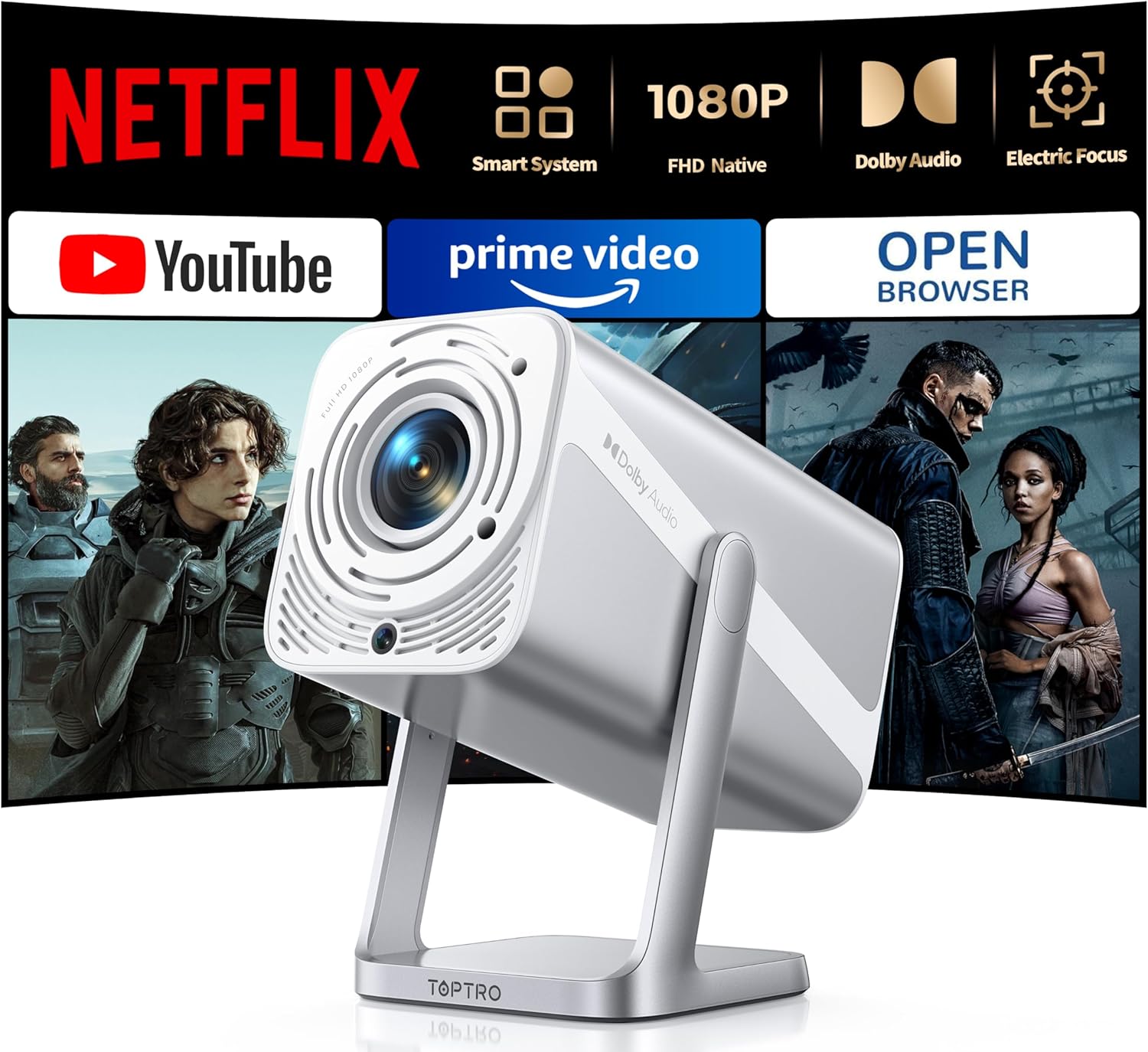
Image: The TOPTRO TP1 Smart Projector, a compact and portable device designed for versatile projection.
ബോക്സിൽ എന്താണുള്ളത്
പാക്കേജിംഗിൽ എല്ലാ ഇനങ്ങളും ഉണ്ടെന്ന് ഉറപ്പാക്കുക:
- Portable mini projector x 1
- റിമോട്ട് കൺട്രോൾ x 1
- എച്ച്ഡിഎംഐ കേബിൾ x 1
- അഡാപ്റ്റർ x 1
- ഉപയോക്തൃ മാനുവൽ x 1
- ക്ലീനിംഗ് കിറ്റ് x 1
- ദ്രുത ആരംഭ ഗൈഡ് x 1
ഉൽപ്പന്നം കഴിഞ്ഞുview ഫീച്ചറുകളും
The TOPTRO TP1 Smart Projector is designed for a comprehensive entertainment experience, offering advanced features in a compact form factor.
പ്രധാന സവിശേഷതകൾ:
- നെറ്റ്ഫ്ലിക്സ് ഔദ്യോഗികമായി ലൈസൻസ് ചെയ്തത്: Breaks through HDCP restrictions, pre-loaded with Netflix, YouTube, and Prime Video. Supports OTA updates.
- Immersive Dolby Sound: Features Dolby technology and 2x10W speakers for 3D surround sound. Includes HDMI ARC and two-way Bluetooth 5.2.
- Native FHD 1080P & 4K Support: Delivers true native 1080p resolution, up to 600 ANSI lumens brightness, 4K video decoding, and HDR10 support with a 20000:1 contrast ratio.
- Smart Electric Focus & Auto Keystone: Automatic electric focus and 4D/4P keystone correction for clear, rectangular images. Supports 100%-50% digital zoom.
- 360° Adjustable Stand & Short Throw: Integrated 360° rotatable stand for multi-angle projection. Lightweight (2.4lb) with a 1.1:1 throw ratio, projecting 50-200 inches from short distances.
- No-Lag WiFi 6 & Universal Compatibility: Supports WiFi 6 and 2.4G dual-band WiFi for stable connections. Compatible with Miracast, DLNA, AirPlay, HDMI, USB, and 3.5mm Audio Jack interfaces.

Image: The projector's interface displaying pre-installed streaming applications like Netflix, YouTube, and Prime Video, highlighting its official licensing.

Image: A visual comparison demonstrating the superior clarity and detail of the TOPTRO TP1's native 1080P resolution compared to a 720P projector.

Image: An illustration of the projector's immersive Dolby Audio experience, with sound waves emanating from the device and filling a room.

Image: Depiction of the projector's WiFi 6 and two-way Bluetooth 5.2 capabilities, showing seamless connection to external speakers and mobile devices for screen mirroring.

Image: A diagram illustrating the automatic electric focus and auto vertical keystone correction features, ensuring a perfectly clear and rectangular image without manual adjustments.

Image: The projector positioned to project onto a ceiling, demonstrating its 360-degree adjustable stand for flexible viewകോണുകൾ.
സജ്ജമാക്കുക
- അൺപാക്ക് ചെയ്യുന്നു: പാക്കേജിംഗിൽ നിന്ന് എല്ലാ ഘടകങ്ങളും ശ്രദ്ധാപൂർവ്വം നീക്കം ചെയ്യുക. ഭാവിയിലെ സംഭരണത്തിനോ ഗതാഗതത്തിനോ വേണ്ടി യഥാർത്ഥ പാക്കേജിംഗ് സൂക്ഷിക്കുക.
- പ്ലേസ്മെൻ്റ്: Position the projector on a stable, flat surface. Utilize the 360° adjustable stand to achieve the desired projection angle (e.g., wall, ceiling). Ensure adequate ventilation around the device.
- പവർ കണക്ഷൻ: Connect the provided power adapter to the projector's power input and then to a power outlet.
- പ്രാരംഭ പവർ ഓൺ: ഉപകരണം ഓണാക്കാൻ പ്രൊജക്ടറിലോ റിമോട്ട് കൺട്രോളിലോ പവർ ബട്ടൺ അമർത്തുക.
- യാന്ത്രിക ക്രമീകരണങ്ങൾ: The projector will automatically perform electric focus and auto vertical keystone correction to optimize the image clarity and shape.
- നെറ്റ്വർക്ക് കണക്ഷൻ: Navigate to the network settings and connect to your WiFi 6 or 2.4G network for access to streaming applications and updates.
പ്രവർത്തന നിർദ്ദേശങ്ങൾ
Navigation and Interface:
Use the remote control to navigate the projector's smart interface. The home screen provides access to pre-installed applications such as Netflix, YouTube, and Prime Video. Additional applications can be downloaded via the APP Assistant or OPEN BROWSER.
ബാഹ്യ ഉപകരണങ്ങൾ ബന്ധിപ്പിക്കുന്നു:
- എച്ച്ഡിഎംഐ: Connect devices like TV sticks, Roku, laptops, or gaming consoles (Switch, PS5) using the HDMI cable to the HDMI ARC port.
- USB: Insert USB drives into the USB port for media playback. Note: Some 4K videos may not play over USB due to format compatibility; built-in streaming apps are recommended for 4K content.
- ബ്ലൂടൂത്ത്: Utilize two-way Bluetooth 5.2 to pair with mobile devices (iOS/Android) for screen mirroring or connect to external Bluetooth speakers/AirPods for enhanced audio.
- 3.5mm ഓഡിയോ ജാക്ക്: വയർഡ് ഹെഡ്ഫോണുകളോ ബാഹ്യ സ്പീക്കറുകളോ ബന്ധിപ്പിക്കുക.
സ്ക്രീൻ മിററിംഗ്:
The projector supports Miracast, DLNA, and AirPlay for seamless screen mirroring from compatible devices. Access these functions through the projector's application menu.
ചിത്ര ക്രമീകരണം:
- ഇലക്ട്രിക് ഫോക്കസ്: The projector automatically adjusts focus. If manual adjustment is needed, use the remote control.
- ഓട്ടോ ലംബ കീസ്റ്റോൺ: This feature automatically corrects image distortion.
- ഡിജിറ്റൽ സൂം: Adjust the screen size from 100% to 50% using the zoom function on the remote control without moving the projector.
മെയിൻ്റനൻസ്
- ലെൻസ് ക്ലീനിംഗ്: Use the provided cleaning kit or a soft, lint-free cloth to gently wipe the projector lens. Avoid abrasive materials or harsh chemicals.
- പൊടി നീക്കം: പ്രൊജക്ടറിന്റെ പ്രകടനത്തെയും ആയുസ്സിനെയും ബാധിച്ചേക്കാവുന്ന പൊടിപടലങ്ങൾ തടയാൻ പതിവായി വെന്റുകൾ വൃത്തിയാക്കുക. മൃദുവായ ബ്രഷ് അല്ലെങ്കിൽ കംപ്രസ് ചെയ്ത വായു ഉപയോഗിക്കുക.
- സംഭരണം: ദീർഘനേരം ഉപയോഗത്തിലില്ലാത്തപ്പോൾ, പ്രൊജക്ടർ തണുത്തതും വരണ്ടതുമായ സ്ഥലത്ത് സൂക്ഷിക്കുക, അതിന്റെ യഥാർത്ഥ പാക്കേജിംഗിലോ ഒരു സംരക്ഷണ കേസിലോ നല്ലത്.
- സോഫ്റ്റ്വെയർ അപ്ഡേറ്റുകൾ: Ensure the projector's software is kept up-to-date through regular OTA (Over-The-Air) updates to maintain security and stability.
ട്രബിൾഷൂട്ടിംഗ്
| ഇഷ്യൂ | സാധ്യമായ കാരണം | പരിഹാരം |
|---|---|---|
| ഒരു ചിത്രവും പ്രൊജക്റ്റ് ചെയ്തിട്ടില്ല. | പവർ കേബിൾ വിച്ഛേദിച്ചു; ഇൻപുട്ട് ഉറവിടം തിരഞ്ഞെടുത്തിട്ടില്ല; ലെൻസ് ക്യാപ്പ് ഓണാണ്. | Check power connection; Select correct input source (HDMI, USB); Remove lens cap. |
| Image blurry or out of focus | Automatic focus issue; Projector too close/far from screen. | Allow auto-focus to complete; Manually adjust focus if needed; Adjust projection distance. |
| ചിത്രം വികലമാക്കി (ട്രപസോയിഡ് ആകൃതി) | കീസ്റ്റോൺ തിരുത്തൽ ആവശ്യമാണ്. | Allow auto keystone correction to complete; Manually adjust keystone if necessary. |
| ശബ്ദമോ കുറഞ്ഞ വോളിയമോ ഇല്ല | Volume too low; External audio device not connected properly; Muted. | Increase volume; Check audio cable connections; Unmute device. |
| വൈഫൈ/ബ്ലൂടൂത്ത് കണക്റ്റ് ചെയ്യാൻ കഴിയുന്നില്ല | Incorrect password; Device out of range; Interference. | Verify password; Move projector closer to router/device; Reduce interference. |
| Netflix/Streaming app issues (black screen, not loading) | Network issues; App cache; App update needed. | Check internet connection; Clear app cache/data; Update app via OTA or APP Assistant. |
For further assistance, please refer to the video tutorials available on YouTube by searching for "@TOPTRO-R" or contact customer support.
സ്പെസിഫിക്കേഷനുകൾ
| ഫീച്ചർ | വിശദാംശങ്ങൾ |
|---|---|
| ബ്രാൻഡ് | ടോപ്ട്രോ |
| മോഡൽ നമ്പർ | TP1 |
| ഡിസ്പ്ലേ റെസല്യൂഷൻ | Native 1920 x 1080 (FHD), 4K Support |
| തെളിച്ചം | 600 ആൻസി ലുമെൻസ് |
| കോൺട്രാസ്റ്റ് റേഷ്യോ | 20000:1 |
| പ്രത്യേക സവിശേഷതകൾ | Netflix Officially Licensed, Dolby Audio, 360° Rotatable Stand, Electric Focus, Auto Keystone, HDR10 |
| കണക്റ്റിവിറ്റി ടെക്നോളജി | Wi-Fi 6, USB, Bluetooth 5.2 (Two-way), 3.5mm Audio Jack, HDMI ARC |
| സ്പീക്കറുകൾ | 2 x 10W |
| പ്രൊജക്ഷൻ വലിപ്പം | 50 മുതൽ 200 ഇഞ്ച് വരെ |
| ത്രോ അനുപാതം | 1.1:1 |
| ഡിജിറ്റൽ സൂം | 100%-50% |
| ഇനത്തിൻ്റെ ഭാരം | 2.2 പൗണ്ട് |
| ഉൽപ്പന്ന അളവുകൾ | 4.57 x 4.8 x 9.45 ഇഞ്ച് |
വാറൻ്റിയും പിന്തുണയും
TOPTRO is committed to providing excellent customer service and product reliability.
- വാറൻ്റി: The TOPTRO TP1 Smart Projector comes with a 3-year repair coverage.
- തിരികെ നൽകൽ നയം: Enjoy a 2-year hassle-free return policy.
- സാങ്കേതിക സഹായം: Lifetime technical assistance is available.
- ബന്ധപ്പെടുക: For any inquiries or support, please contact service@toptro.com.
- ഓൺലൈൻ ഉറവിടങ്ങൾ: Quick start guides and video tutorials are available on YouTube by searching for "@TOPTRO-R". A detailed electronic manual is also available on the TOPTRO official webസൈറ്റ്.

Image: The TOPTRO brand logo, representing quality and customer commitment.
Ask a question about this manual
Ask about setup, troubleshooting, compatibility, parts, safety, or missing instructions. Manuals+ will review the question and use this page’s manual context to help answer it.