
1. ആമുഖം
This manual provides essential information for setting up, operating, and maintaining your DOOGEE Tab A9 Pro Android 15 Tablet. Please read it thoroughly to ensure proper usage and to maximize your device's capabilities.
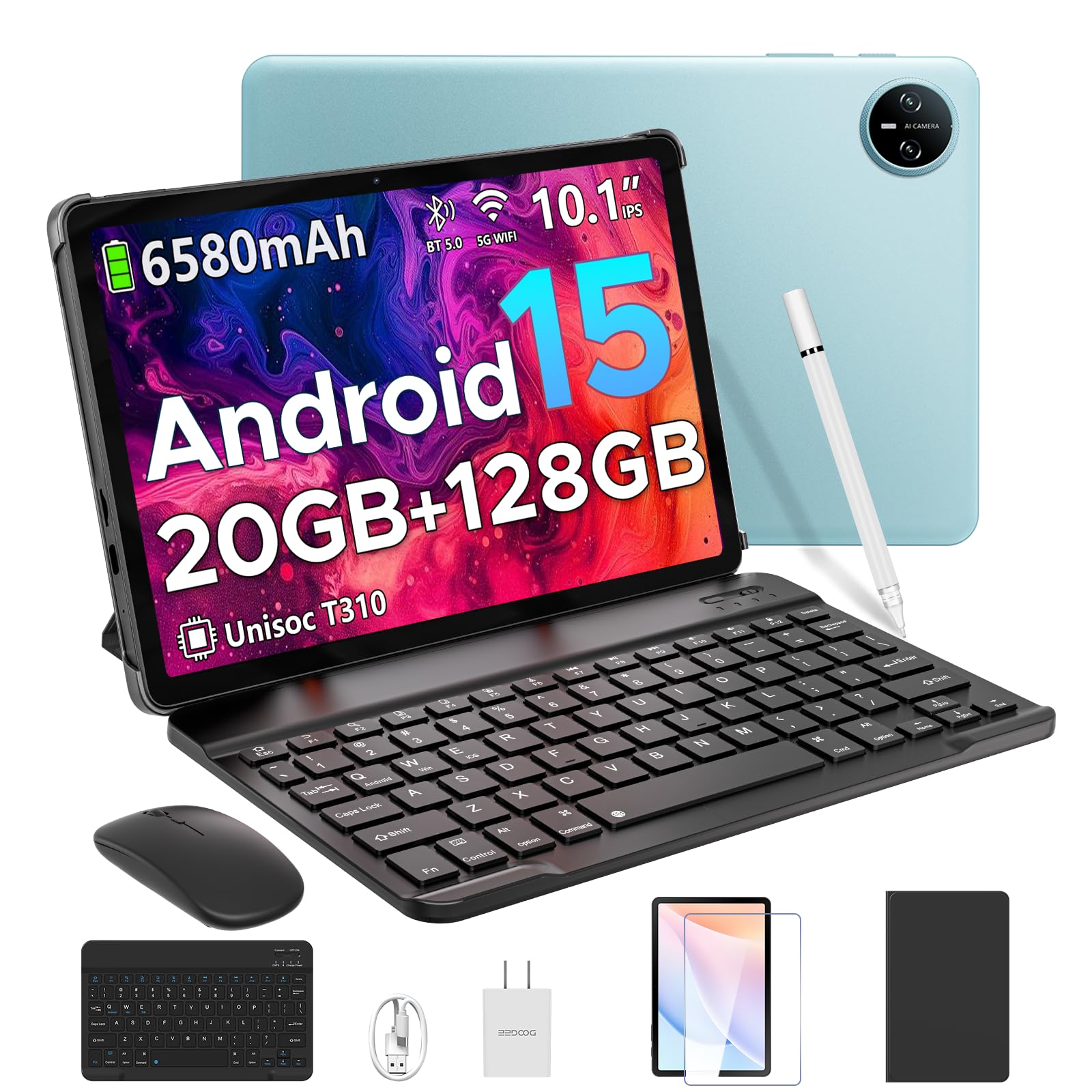
Image 1.1: The DOOGEE Tab A9 Pro Tablet.
2. ബോക്സിൽ എന്താണുള്ളത്?
Your DOOGEE Tab A9 Pro package includes the following items:
- DOOGEE Tab A9 Pro Tablet (x1)
- ടൈപ്പ്-സി യുഎസ്ബി കേബിൾ (x1)
- ചാർജർ (x1)
- മാനുവൽ (x1)
- വാറന്റി കാർഡ് (x1)
- Bluetooth Keyboard (VIP Edition)
- Bluetooth Mouse (VIP Edition)
- Stylus (VIP Edition)
- Leather Protective Cover (VIP Edition)
- Tempered Film (VIP Edition)

Image 2.1: All items included in the DOOGEE Tab A9 Pro package.
3. ഉൽപ്പന്നം കഴിഞ്ഞുview
The DOOGEE Tab A9 Pro features a sleek design with essential components for user interaction and connectivity.
3.1 ശാരീരിക സവിശേഷതകൾ
- ഡിസ്പ്ലേ: 10.1-inch IPS HD Ultra-Clear Display.
- ക്യാമറകൾ: 8MP Main Camera (rear) and 5MP Front Camera.
- ഓഡിയോ: High-Quality Dual Speakers and a 3.5mm Audio Jack.
- തുറമുഖങ്ങൾ: Type-C USB port for charging and data transfer.
- ബട്ടണുകൾ: Power button and volume controls located on the side.

ചിത്രം 3.1: പിൻഭാഗം view of the DOOGEE Tab A9 Pro, highlighting the camera module.

ചിത്രം 3.2: വശം view of the tablet, illustrating the power button, volume controls, and ports.
വീഡിയോ 3.1: ഒരു ചെറിയ വീഡിയോ പ്രദർശനംasing the ultra-thin body and design of the DOOGEE Tab A9 Pro.
4. സജ്ജീകരണം
4.1 പ്രാരംഭ ചാർജിംഗ്
Before first use, fully charge your tablet using the provided Type-C USB cable and charger. The battery indicator on the screen will show charging progress.
4.2 പവർ ഓൺ/ഓഫ്
- പവർ ഓണാക്കാൻ: Press and hold the power button until the DOOGEE logo appears.
- പവർ ഓഫ് ചെയ്യാൻ: പവർ ബട്ടൺ അമർത്തിപ്പിടിക്കുക, തുടർന്ന് സ്ക്രീനിൽ ദൃശ്യമാകുന്ന ഓപ്ഷനുകളിൽ നിന്ന് 'പവർ ഓഫ്' തിരഞ്ഞെടുക്കുക.
4.3 പ്രാരംഭ സജ്ജീകരണ വിസാർഡ്
Upon first power-on, follow the on-screen instructions to complete the initial setup, including language selection, Wi-Fi connection, and Google account login.
5. ഓപ്പറേറ്റിംഗ് സിസ്റ്റം (ആൻഡ്രോയിഡ് 15)
The DOOGEE Tab A9 Pro runs on the Android 15 operating system, offering a smart, fluid, and secure user experience with enhanced privacy features.

Image 5.1: Visual representation of the Android 15 system interface.
വീഡിയോ 5.1: ഒരു ഓവർview of the DOOGEE Tab A9 Pro running Android 15.
6. പ്രകടനവും സംഭരണവും
The tablet is designed for smooth operation and ample സംഭരണ ശേഷി.
6.1 പ്രോസസർ
Powered by the energy-efficient Unisoc T310 octa-core processor, the tablet ensures seamless performance for various tasks.

Image 6.1: Diagram illustrating the Unisoc T310 Quad-Core Processor.
6.2 RAM and Storage
The tablet features 20GB of RAM (4GB physical + 16GB virtual) and 128GB of internal storage. Storage can be expanded up to 2TB using a microSD card (sold separately).

Image 6.2: Visual representation of the tablet's RAM and ROM configuration.
7. ഡിസ്പ്ലേയും ഓഡിയോയും
Experience vibrant visuals and clear sound with your tablet.
7.1 ഡിസ്പ്ലേ
The 10.1-inch IPS HD display offers wide viewing angles and a resolution of 1280x800 for an immersive visual experience.

Image 7.1: The 10.1-inch IPS HD display with key specifications.
7.2 ഓഡിയോ
Built-in dual speakers deliver clear and dynamic sound for movies, music, and video calls.

Image 7.2: Illustration of the tablet's dual speaker system.
8. ക്യാമറകൾ
Capture moments and conduct video calls with the integrated cameras.
8.1 പ്രധാന ക്യാമറ
The 8MP main camera allows you to take sharp photos.

Image 8.1: Close-up of the 8MP main camera on the tablet's rear.
8.2 ഫ്രണ്ട് ക്യാമറ
The 5MP front camera is suitable for selfies and video calls.

Image 8.2: The 5MP front camera in use for a video call.
9. കണക്റ്റിവിറ്റി
വിവിധ വയർലെസ് ഓപ്ഷനുകളുമായി ബന്ധം നിലനിർത്തുക.
9.1 വൈഫൈ
Supports 2.4G/5G dual-band Wi-Fi for smooth, high-speed internet access.

Image 9.1: Features of WiFi 5 connectivity on the tablet.
9.2 ബ്ലൂടൂത്ത്
Equipped with Bluetooth 5.0 for connecting wireless accessories.
9.3 ജിപിഎസ്
Built-in GPS provides accurate navigation for travel and outdoor activities.
10 ആക്സസറികൾ
The DOOGEE Tab A9 Pro comes with a suite of accessories to enhance its functionality.
10.1 ബ്ലൂടൂത്ത് കീബോർഡ്
Connect the Bluetooth keyboard for a desktop-like typing experience, ideal for productivity tasks.

Image 10.1: The tablet connected to its Bluetooth keyboard for efficient typing.
10.2 Mouse and Stylus
The included mouse and stylus further enhance navigation and interaction, especially for note-taking and creative tasks.

Image 10.2: The tablet shown with its accompanying keyboard and mouse.

Image 10.3: The tablet being used with the stylus for precise input.
10.3 സംരക്ഷണ കേസ്
The protective case shields your tablet from drops and scratches and can also function as a stand.

Image 10.4: The tablet securely placed within its protective case.
11. ബാറ്ററി മാനേജ്മെന്റ്
The tablet is equipped with a high-capacity battery for extended use.
11.1 ബാറ്ററി ശേഷി
Features a long-lasting 6580mAh battery, providing hours of power for various activities without frequent recharging.

Image 11.1: Diagram showing the 6580mAh battery inside the tablet.
Video 11.1: A video highlighting the large battery capacity of the DOOGEE Tab A9 Pro.
12. സുരക്ഷാ സവിശേഷതകൾ
Protect your device and data with built-in security options.
12.1 ഫേസ് അൺലോക്ക്
Effortlessly unlock your tablet using facial recognition technology.

Image 12.1: Illustration of the facial recognition unlock feature.
12.2 Fortified Privacy Shield
Android 15 provides enhanced privacy controls, robust data encryption, timely security patches, and proactive app screening for unbreakable security.

ചിത്രം 12.2: കഴിഞ്ഞുview of Android 15's privacy features.
13. Multitasking & Productivity
Optimize your workflow and entertainment with these features.
13.1 Split-Screen Multitasking
Run two applications simultaneously side-by-side for enhanced productivity.

Image 13.1: The tablet displaying two apps in split-screen mode.
13.2 Built-in WPS Office
The tablet comes with WPS Office pre-installed, providing PC-level productivity for documents, spreadsheets, and presentations (Note: WPS Office feature may be unavailable in certain regions).

Image 13.2: The tablet showcasing WPS Office applications.
Video 13.1: A video demonstrating the DOOGEE Tab A9 Pro's capabilities for learning and work.
14. പരിപാലനം
14.1 വൃത്തിയാക്കൽ
ടാബ്ലെറ്റിന്റെ സ്ക്രീനും ബോഡിയും വൃത്തിയാക്കാൻ മൃദുവായ, ലിന്റ് രഹിത തുണി ഉപയോഗിക്കുക. കഠിനമായ രാസവസ്തുക്കളോ ഉരച്ചിലുകളോ ഉള്ള വസ്തുക്കൾ ഉപയോഗിക്കുന്നത് ഒഴിവാക്കുക.
14.2 സോഫ്റ്റ്വെയർ അപ്ഡേറ്റുകൾ
മികച്ച പ്രകടനം, സുരക്ഷ, പുതിയ സവിശേഷതകളിലേക്കുള്ള ആക്സസ് എന്നിവ ഉറപ്പാക്കാൻ സിസ്റ്റം അപ്ഡേറ്റുകൾ പതിവായി പരിശോധിച്ച് ഇൻസ്റ്റാൾ ചെയ്യുക. ഇതിലേക്ക് നാവിഗേറ്റ് ചെയ്യുക ക്രമീകരണങ്ങൾ > സിസ്റ്റം > സിസ്റ്റം അപ്ഡേറ്റ് അപ്ഡേറ്റുകൾ പരിശോധിക്കാൻ.
15. പ്രശ്നപരിഹാരം
നിങ്ങളുടെ ടാബ്ലെറ്റിൽ നിങ്ങൾ നേരിട്ടേക്കാവുന്ന സാധാരണ പ്രശ്നങ്ങൾ ഈ വിഭാഗം അഭിസംബോധന ചെയ്യുന്നു.
15.1 ടാബ്ലെറ്റ് ഓണാക്കുന്നില്ല
- ടാബ്ലെറ്റ് ആവശ്യത്തിന് ചാർജ്ജ് ചെയ്തിട്ടുണ്ടെന്ന് ഉറപ്പാക്കുക. കുറഞ്ഞത് 30 മിനിറ്റെങ്കിലും ചാർജറുമായി ബന്ധിപ്പിക്കുക.
- നിർബന്ധിതമായി റീബൂട്ട് ചെയ്യാൻ പവർ ബട്ടൺ 10-15 സെക്കൻഡ് അമർത്തിപ്പിടിക്കുക.
15.2 മന്ദഗതിയിലുള്ള പ്രകടനം
- ആവശ്യമില്ലാത്ത പശ്ചാത്തല ആപ്ലിക്കേഷനുകൾ അടയ്ക്കുക.
- പതിവായി ഉപയോഗിക്കുന്ന ആപ്പുകൾക്കായി കാഷെ ഡാറ്റ മായ്ക്കുക.
- Ensure sufficient storage space is available. Delete old files or transfer them to external storage.
- ടാബ്ലെറ്റ് പുനരാരംഭിക്കുക.
15.3 വൈ-ഫൈ കണക്റ്റിവിറ്റി പ്രശ്നങ്ങൾ
- നിങ്ങളുടെ വൈഫൈ റൂട്ടറും ടാബ്ലെറ്റും പുനരാരംഭിക്കുക.
- Forget the Wi-Fi network and reconnect.
- നിങ്ങൾ വൈഫൈ സിഗ്നലിന്റെ പരിധിയിലാണെന്ന് ഉറപ്പാക്കുക.
15.4 ആക്സസറികൾ കണക്റ്റുചെയ്യുന്നില്ല
- Ensure Bluetooth is enabled on the tablet and the accessory.
- Check if the accessory is charged and in pairing mode.
- Refer to the accessory's individual manual for specific pairing instructions.
16 സ്പെസിഫിക്കേഷനുകൾ
| ഫീച്ചർ | സ്പെസിഫിക്കേഷൻ |
|---|---|
| ബ്രാൻഡ് | ഡോഗി |
| മോഡലിൻ്റെ പേര് | TABA9PRO |
| ഇനം മോഡൽ നമ്പർ | ടാബ് എ9 പ്രോ |
| ഓപ്പറേറ്റിംഗ് സിസ്റ്റം | ആൻഡ്രോയിഡ് 15 |
| സ്റ്റാൻഡിംഗ് സ്ക്രീൻ ഡിസ്പ്ലേ വലുപ്പം | 10.1 ഇഞ്ച് |
| സ്ക്രീൻ റെസല്യൂഷൻ | 1280*800 HD |
| പരമാവധി സ്ക്രീൻ റെസല്യൂഷൻ | 1280*800 പിക്സലുകൾ |
| പ്രോസസ്സർ ബ്രാൻഡ് | യൂണിസോക്ക് |
| ഗ്രാഫിക്സ് കോപ്രൊസസർ | മാലി-G52 1-കോർ-2EE |
| മെമ്മറി സ്റ്റോറേജ് കപ്പാസിറ്റി | 128 ജിബി (മൈക്രോ എസ്ഡി വഴി 2 ടിബി വരെ വികസിപ്പിക്കാം) |
| റാം | 20GB (4GB ഫിസിക്കൽ + 16GB വെർച്വൽ) |
| വയർലെസ് തരം | 802.11ac, 802.11n (2.4G/5G Dual-band WiFi) |
| ബ്ലൂടൂത്ത് | 5.0 |
| ബാറ്ററി ശേഷി | 6580mAh ലിഥിയം പോളിമർ (ഉൾപ്പെടുത്തിയിരിക്കുന്നു) |
| ശരാശരി ബാറ്ററി ലൈഫ് | Up to 2 years (estimated lifespan) |
| ഇനത്തിൻ്റെ ഭാരം | 1.05 പൗണ്ട് |
| ഉൽപ്പന്ന അളവുകൾ | 9.55 x 6.33 x 0.31 ഇഞ്ച് |
| നിറം | Blue (other colors available) |
| ആദ്യ തീയതി ലഭ്യമാണ് | ഏപ്രിൽ 23, 2025 |
17. വാറണ്ടിയും പിന്തുണയും
17.1 വാറൻ്റി വിവരങ്ങൾ
Your DOOGEE Tab A9 Pro comes with a 2-Year Limited Warranty. Please refer to the included Warranty Card for detailed terms and conditions.
17.2 ഉപഭോക്തൃ പിന്തുണ
For any questions or technical assistance, please contact our support team. We aim to respond within 24 hours.
- ഓൺലൈൻ പിന്തുണ: 24/7 ലഭ്യമാണ്.
- റിട്ടേണുകൾ: 30-day money-back guarantee and free returns.