
DOOGEE A9PRO+-V
DOOGEE Tab A9 Pro+ (2025) User Manual
Model: A9PRO+-V GRAY
1. ആമുഖം
This manual provides detailed instructions for the proper use and maintenance of your DOOGEE Tab A9 Pro+ (2025) 11-inch Tablet. Please read this manual thoroughly before operating the device to ensure optimal performance and longevity. The DOOGEE Tab A9 Pro+ is designed for versatile use, from productivity tasks to entertainment, featuring the latest Android 15 OS and a powerful octa-core processor.
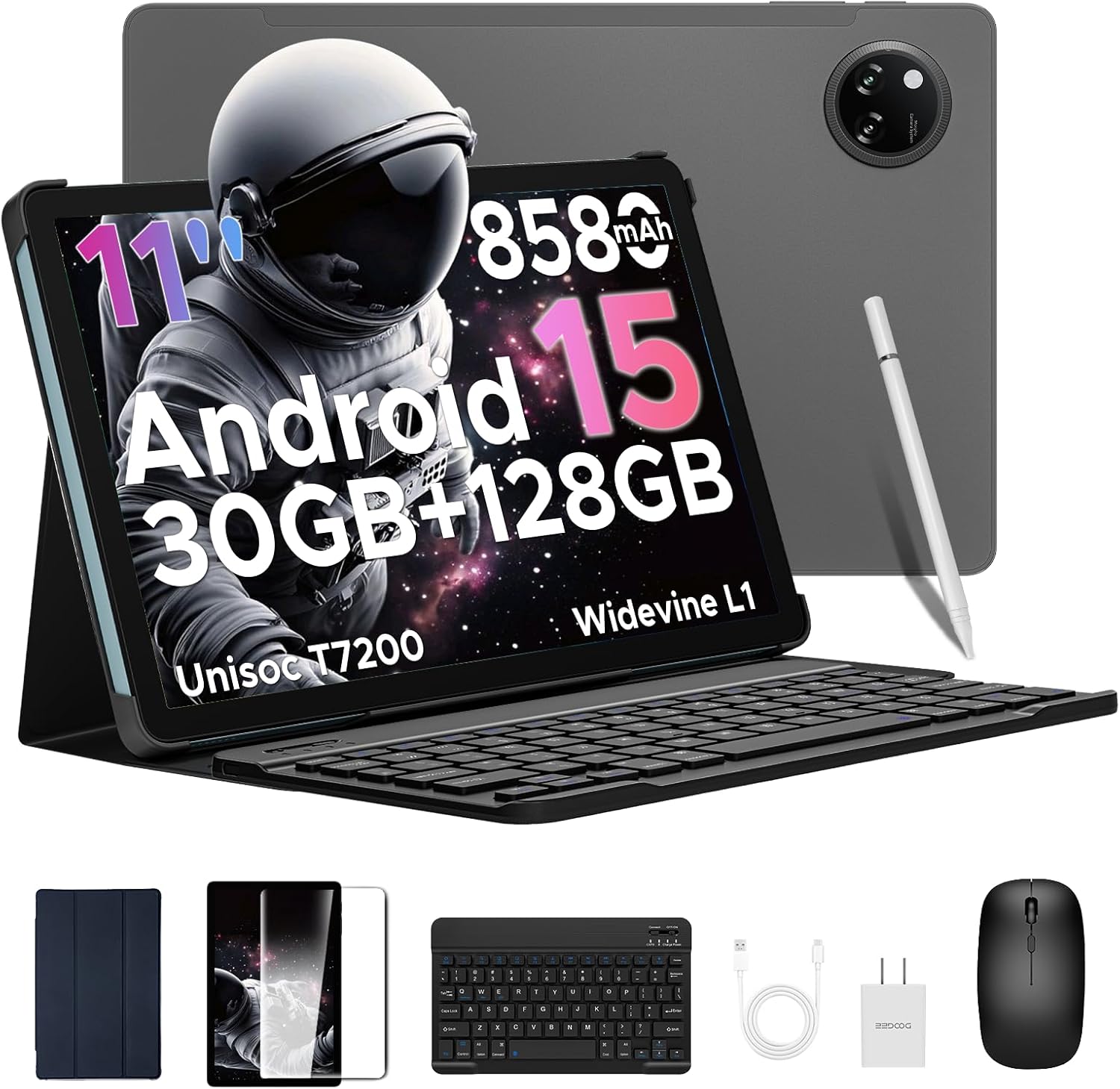
Image: The DOOGEE Tab A9 Pro+ tablet shown with its included accessories: a Bluetooth keyboard, mouse, stylus, and protective case.
2. സജ്ജീകരണം
2.1 പാക്കേജ് ഉള്ളടക്കം
പാക്കേജിൽ എല്ലാ ഇനങ്ങളും ഉണ്ടെന്ന് ഉറപ്പാക്കുക:
- DOOGEE Tab A9 Pro+ Tablet
- ബ്ലൂടൂത്ത് കീബോർഡ്
- ബ്ലൂടൂത്ത് മൗസ്
- സ്റ്റൈലസ് പേന
- സ്ക്രീൻ പ്രൊട്ടക്ടർ (മുമ്പ് പ്രയോഗിച്ചതോ വേറിട്ടതോ)
- സംരക്ഷണ കേസ്
- യുഎസ്ബി ടൈപ്പ്-സി കേബിൾ
- പവർ അഡാപ്റ്റർ
- ഉപയോക്തൃ മാനുവൽ (ഈ പ്രമാണം)

Image: A visual representation of the DOOGEE Tab A9 Pro+ package contents, including the tablet, keyboard, mouse, stylus, charger, and cables.
2.2 പ്രാരംഭ ചാർജിംഗ്
Before first use, fully charge the tablet using the provided USB Type-C cable and power adapter. The charging indicator will show progress. A full charge ensures optimal battery calibration.
2.3 പവർ ഓൺ/ഓഫ്
- പവർ ഓൺ: Press and hold the Power button (located on the side) until the DOOGEE logo appears.
- പവർ ഓഫ്: പവർ ബട്ടൺ അമർത്തിപ്പിടിക്കുക, തുടർന്ന് സ്ക്രീനിലെ ഓപ്ഷനുകളിൽ നിന്ന് 'പവർ ഓഫ്' തിരഞ്ഞെടുക്കുക.
- പുനരാരംഭിക്കുക: പവർ ബട്ടൺ അമർത്തിപ്പിടിക്കുക, തുടർന്ന് ഓപ്ഷനുകളിൽ നിന്ന് 'പുനരാരംഭിക്കുക' തിരഞ്ഞെടുക്കുക.
2.4 കണക്റ്റിംഗ് ആക്സസറികൾ
The DOOGEE Tab A9 Pro+ comes with a Bluetooth keyboard, mouse, and stylus for enhanced productivity.
- ബ്ലൂടൂത്ത് കീബോർഡ്/മൗസ്:
- Turn on the keyboard/mouse.
- ടാബ്ലെറ്റിൽ, പോകുക ക്രമീകരണങ്ങൾ > കണക്റ്റുചെയ്ത ഉപകരണങ്ങൾ > ബ്ലൂടൂത്ത്.
- ബ്ലൂടൂത്ത് പ്രവർത്തനക്ഷമമാക്കി ലഭ്യമായ ഉപകരണങ്ങൾക്കായി തിരയുക.
- Select the keyboard/mouse from the list and follow on-screen pairing instructions.
- സ്റ്റൈലസ് പേന: The stylus typically connects automatically or requires no pairing for basic functions. Refer to specific stylus instructions if advanced features require pairing.

Image: A diagram illustrating the various accessories that come with the tablet, including a tempered film, leather protective cover, Bluetooth mouse, and Bluetooth keyboard.
2.5 Initial Android 15 Setup
ആദ്യമായി പവർ-ഓൺ ചെയ്യുമ്പോൾ, പ്രാരംഭ സജ്ജീകരണം പൂർത്തിയാക്കാൻ ഓൺ-സ്ക്രീൻ നിർദ്ദേശങ്ങൾ പാലിക്കുക:
- നിങ്ങളുടെ ഭാഷയും പ്രദേശവും തിരഞ്ഞെടുക്കുക.
- ഒരു Wi-Fi നെറ്റ്വർക്കിലേക്ക് കണക്റ്റുചെയ്യുക.
- നിങ്ങളുടെ Google അക്കൗണ്ട് ഉപയോഗിച്ച് സൈൻ ഇൻ ചെയ്യുക അല്ലെങ്കിൽ പുതിയൊരെണ്ണം സൃഷ്ടിക്കുക.
- Review നിബന്ധനകളും വ്യവസ്ഥകളും അംഗീകരിക്കുക.
- Set up screen lock (PIN, pattern, password, or Face ID).

Image: The Android 15 system logo displayed on the tablet screen, highlighting the device's operating system.
3. നിങ്ങളുടെ ടാബ്ലെറ്റ് പ്രവർത്തിപ്പിക്കൽ
3.1 ഡിസ്പ്ലേ സവിശേഷതകൾ
The DOOGEE Tab A9 Pro+ features an 11-inch Full HD 90Hz display with a resolution of 1280x800 pixels, providing a smooth and vivid visual experience. It supports Widevine L1 for high-definition streaming content.

Image: The tablet's 11-inch IPS HD Ultra-Clear Display, showcasing its 1280x800 resolution and 90Hz refresh rate for an enchanting visual experience.
3.2 പ്രകടനവും സംഭരണവും
Powered by the Unisoc T7200 Octa-Core processor, the tablet offers robust performance for multitasking and gaming. It comes with 30GB of RAM (6GB physical + 24GB virtual) and 128GB of internal storage, expandable up to 2TB via microSD/TF card (sold separately).

ചിത്രം: വിശദമായ ഒരു ചിത്രം view of the Unisoc T7200 Octa-Core Processor, emphasizing its role in boosting speed and efficiency.

Image: A visual representation of the tablet's memory and storage capabilities, highlighting 30GB RAM and 128GB ROM for massive storage and less lag.
3.3 ക്യാമറ ഉപയോഗം
The tablet is equipped with a 13MP main camera and a 5MP front camera, suitable for capturing photos, video calls, and online meetings.
- ഫോട്ടോ എടുക്കുന്നു: ക്യാമറ ആപ്പ് തുറന്ന് നിങ്ങളുടെ ഷോട്ട് ഫ്രെയിം ചെയ്യുക, ഷട്ടർ ബട്ടൺ ടാപ്പ് ചെയ്യുക.
- വീഡിയോ റെക്കോർഡിംഗ്: Switch to video mode in the Camera app and tap to start/stop recording.
- Selfies & Video Calls: Use the 5MP front camera for clear self-portraits and engaging video chats.

Image: The 13MP Main Camera, designed to capture every detail with clarity, shown with exampലെ ഫോട്ടോകൾ.

Image: The Ultra-Clear 5MP Front Camera, ideal for perfect selfies and video calls, depicted with a group video call in progress.
3.4 ഓഡിയോ സവിശേഷതകൾ
Experience immersive sound with high-fidelity dual speakers. A standard 3.5mm audio jack is also available for wired headphones.

Image: The Premium 1217 BOX Dual Speakers, providing a crystal-clear sound experience, illustrated with sound waves emanating from the tablet.

Image: The standard 3.5mm Audio Jack, ensuring stable and distortion-free audio transmission, shown with a user listening to music.
3.5 കണക്റ്റിവിറ്റി
The tablet supports 2.4G/5G dual-band WiFi for stable internet connection and Bluetooth 5.0 for wireless accessories. Built-in GPS, Glonass, Galileo, and Beidou ensure precise navigation.

Image: Faster WiFi 5 capabilities, providing seamless connectivity across 2.4G/5G bands, depicted with a speed-line background.

Image: The Precise Navigation System, featuring GPS, Glonass, Galileo, and Beidou, shown with a user navigating in a car.
3.6 സുരക്ഷാ സവിശേഷതകൾ
The tablet supports Face Unlock for effortless and secure access.

Image: Facial Recognition Unlock in action, providing effortless access to the tablet.
3.7 Productivity and Display Modes
Enhance your productivity with built-in PC-level WPS Office and efficient split-screen multitasking. The tablet also offers Eye-Caring Mode, Dark Mode, and Anti-Flicker Mode for comfortable viewing.

Image: Built-in PC-level WPS Office, enabling seamless productivity on the go, shown with various office applications.

Image: Efficient Split-Screen Multitasking, transforming complexity into simplicity, demonstrated with two applications open side-by-side.

Image: Eye-Caring Mode and Dark Mode features, designed to protect eyes and soften light for night use, respectively.

Image: Anti-Flicker Mode, providing enhanced visual comfort by reducing screen flickering.
4. പരിപാലനം
4.1 ബാറ്ററി കെയർ
The tablet is equipped with an 8580mAh high-capacity battery, supporting 10W fast charging and 5W reverse charging.
- ഉയർന്ന താപനില (ചൂടോ തണുപ്പോ) ഒഴിവാക്കുക, കാരണം അവ ബാറ്ററിയുടെ ആയുസ്സ് കുറയ്ക്കും.
- ബാറ്ററി പതിവായി പൂർണ്ണമായും തീർന്നുപോകാൻ അനുവദിക്കരുത്.
- Use only the provided charger or certified compatible chargers.
- ദീർഘകാല സംഭരണത്തിനായി, ടാബ്ലെറ്റ് ഏകദേശം 50-60% വരെ ചാർജ് ചെയ്ത് പവർ ഓഫ് ചെയ്യുക.

Image: The 8580mAh High-Capacity Battery, illustrating its long battery life and lasting enjoyment, along with charging specifications.
4.2 ഉപകരണം വൃത്തിയാക്കുന്നു
- സ്ക്രീനും ബോഡിയും വൃത്തിയാക്കാൻ മൃദുവായ, ലിന്റ് രഹിത തുണി ഉപയോഗിക്കുക.
- കഠിനമായ പാടുകൾക്ക്, ചെറുതായി dampen വെള്ളമുള്ള തുണി അല്ലെങ്കിൽ ഒരു സ്ക്രീൻ ക്ലീനർ.
- കഠിനമായ രാസവസ്തുക്കൾ, ഉരച്ചിലുകൾ ഉള്ള വസ്തുക്കൾ, എയറോസോൾ സ്പ്രേകൾ എന്നിവ ഉപയോഗിക്കുന്നത് ഒഴിവാക്കുക.
4.3 സോഫ്റ്റ്വെയർ അപ്ഡേറ്റുകൾ
നിങ്ങളുടെ ടാബ്ലെറ്റിൽ ഏറ്റവും പുതിയ സവിശേഷതകൾ, സുരക്ഷാ പാച്ചുകൾ, പ്രകടന മെച്ചപ്പെടുത്തലുകൾ എന്നിവ ഉറപ്പാക്കാൻ സോഫ്റ്റ്വെയർ അപ്ഡേറ്റുകൾ പതിവായി പരിശോധിച്ച് ഇൻസ്റ്റാൾ ചെയ്യുക. പോകുക ക്രമീകരണങ്ങൾ > സിസ്റ്റം > സിസ്റ്റം അപ്ഡേറ്റ്.
4.4 സ്റ്റോറേജ് മാനേജ്മെൻ്റ്
The built-in Memory Manager helps you keep your tablet running smoothly by allowing you to delete junk files, duplicate items, and large downloads to free up space.
- അനാവശ്യമായതും കാഷെ പതിവായി മായ്ക്കുക files.
- ഉപയോഗിക്കാത്ത ആപ്ലിക്കേഷനുകൾ അൺഇൻസ്റ്റാൾ ചെയ്യുക.
- വലിയ ആവശ്യങ്ങൾക്ക് ക്ലൗഡ് സ്റ്റോറേജ് ഉപയോഗിക്കുക files to free up local space.
5. പ്രശ്നപരിഹാരം
| പ്രശ്നം | സാധ്യമായ പരിഹാരം |
|---|---|
| ടാബ്ലെറ്റ് ഓണാക്കുന്നില്ല. | ബാറ്ററി ചാർജ്ജ് ചെയ്തിട്ടുണ്ടെന്ന് ഉറപ്പാക്കുക. ചാർജർ കണക്റ്റ് ചെയ്ത് വീണ്ടും പവർ ചെയ്യാൻ ശ്രമിക്കുന്നതിന് മുമ്പ് കുറച്ച് മിനിറ്റ് കാത്തിരിക്കുക. |
| സ്ക്രീൻ പ്രതികരിക്കുന്നില്ല. | പവർ ബട്ടൺ ഏകദേശം 10-15 സെക്കൻഡ് അമർത്തിപ്പിടിച്ചുകൊണ്ട് നിർബന്ധിതമായി റീബൂട്ട് ചെയ്യുക. |
| വൈഫൈ കണക്ഷൻ പ്രശ്നങ്ങൾ. | ടാബ്ലെറ്റും നിങ്ങളുടെ വൈഫൈ റൂട്ടറും പുനരാരംഭിക്കുക. ക്രമീകരണങ്ങളിൽ നെറ്റ്വർക്ക് മറന്ന് വീണ്ടും കണക്റ്റുചെയ്യുക. |
| ആപ്പുകൾ ക്രാഷ് ചെയ്യുകയോ പതുക്കെ പ്രവർത്തിക്കുകയോ ചെയ്യുന്നു. | Close background apps. Clear app cache (Settings > Apps > [App Name] > Storage > Clear cache). Ensure sufficient storage space. |
| ആക്സസറികൾ (കീബോർഡ്/മൗസ്) കണക്റ്റ് ചെയ്യുന്നില്ല. | Ensure accessories are charged and in pairing mode. Re-pair them via Bluetooth settings. |
6 സ്പെസിഫിക്കേഷനുകൾ
| ഫീച്ചർ | വിശദാംശങ്ങൾ |
|---|---|
| മോഡൽ | TABA9PRO+ |
| ഓപ്പറേറ്റിംഗ് സിസ്റ്റം | ആൻഡ്രോയിഡ് 15 |
| പ്രോസസ്സർ | യൂണിസോക്ക് T7200 ഒക്ടാ-കോർ (1.6 GHz) |
| ഡിസ്പ്ലേ വലിപ്പം | 11 ഇഞ്ച് |
| പരമാവധി സ്ക്രീൻ റെസല്യൂഷൻ | 1280*800 Pixels (90Hz) |
| റാം | 30GB (6GB Basic + 24GB Extended) |
| ആന്തരിക സംഭരണം | 128 ജിബി ഫ്ലാഷ് മെമ്മറി |
| വികസിപ്പിക്കാവുന്ന സംഭരണം | Up to 2TB (microSD/TF card) |
| ബാറ്ററി ശേഷി | 8580mAh |
| മുൻ ക്യാമറ | 5എംപി |
| പിൻ ക്യാമറ | 13എംപി |
| കണക്റ്റിവിറ്റി | 2.4G/5G WiFi, Bluetooth 5.0, GPS |
| അളവുകൾ (LxWxH) | 10.1 x 6.64 x 0.31 ഇഞ്ച് |
| ഇനത്തിൻ്റെ ഭാരം | 1.41 പൗണ്ട് (664 ഗ്രാം) |
7. ഔദ്യോഗിക ഉൽപ്പന്ന വീഡിയോ
ഒരു വിഷ്വൽ ഓവറിനായി ഔദ്യോഗിക ഉൽപ്പന്ന വീഡിയോ കാണുകview of the DOOGEE Tab A9 Pro+ (2025) tablet's features and capabilities.
Video: DOOGEE Tab A9 Pro+ (2025) 11 inch Tablet with Keyboard --The Latest Android 15 OS. This video provides a comprehensive look at the tablet's design, features, and user experience.
8. വാറൻ്റിയും പിന്തുണയും
DOOGEE offers comprehensive support for your Tab A9 Pro+ (2025) tablet:
- വാറൻ്റി: ഉൽപ്പന്നം 2 വർഷത്തെ പരിമിത വാറന്റിയോടെയാണ് വരുന്നത്.
- തിരികെ നൽകൽ നയം: Enjoy a 30-day money-back guarantee and free returns.
- കസ്റ്റമർ സർവീസ്: Online support is available 24/7. If you have any questions, please reach out to the seller for assistance. Responses are typically provided within 24 hours.
Ask a question about this manual
Ask about setup, troubleshooting, compatibility, parts, safety, or missing instructions. Manuals+ will review the question and use this page’s manual context to help answer it.