
RASTKY RASTKYxhm9bnta1g
RASTKY Smart Voice Translator User Manual
Model: RASTKYxhm9bnta1g
1. ആമുഖം
Thank you for choosing the RASTKY Smart Voice Translator. This device is designed to facilitate seamless communication across language barriers, offering high-accuracy online, offline, and photo translation capabilities. Its portable design and intuitive interface make it an ideal companion for travelers, language learners, and anyone needing quick and reliable translation.
This manual provides detailed instructions on how to set up, operate, and maintain your translator to ensure optimal performance and longevity.
2 സുരക്ഷാ വിവരങ്ങൾ
Please read all safety instructions carefully before using the device to prevent damage or injury.
- ഉപകരണത്തെ തീവ്രമായ താപനിലയിലോ, നേരിട്ടുള്ള സൂര്യപ്രകാശത്തിലോ, ഉയർന്ന ആർദ്രതയിലോ തുറന്നുകാട്ടരുത്.
- ശക്തമായ ആഘാതങ്ങൾക്ക് ഉപകരണം ഇടുകയോ ഇടുകയോ ചെയ്യുന്നത് ഒഴിവാക്കുക.
- ഉപകരണം സ്വയം വേർപെടുത്താനോ നന്നാക്കാനോ ശ്രമിക്കരുത്. യോഗ്യതയുള്ള സേവന ഉദ്യോഗസ്ഥരെ ബന്ധപ്പെടുക.
- ഉപകരണം വെള്ളത്തിൽ നിന്നും മറ്റ് ദ്രാവകങ്ങളിൽ നിന്നും അകറ്റി നിർത്തുക.
- Use only the provided or approved charging cable and adapter.
- പ്രാദേശിക നിയന്ത്രണങ്ങൾ അനുസരിച്ച് ഉപകരണവും അതിന്റെ ബാറ്ററിയും ഉത്തരവാദിത്തത്തോടെ നിർമാർജനം ചെയ്യുക.
3. ഉൽപ്പന്നം കഴിഞ്ഞുview
Familiarize yourself with the components and controls of your RASTKY Smart Voice Translator.

ചിത്രം 3.1: മുൻഭാഗം View
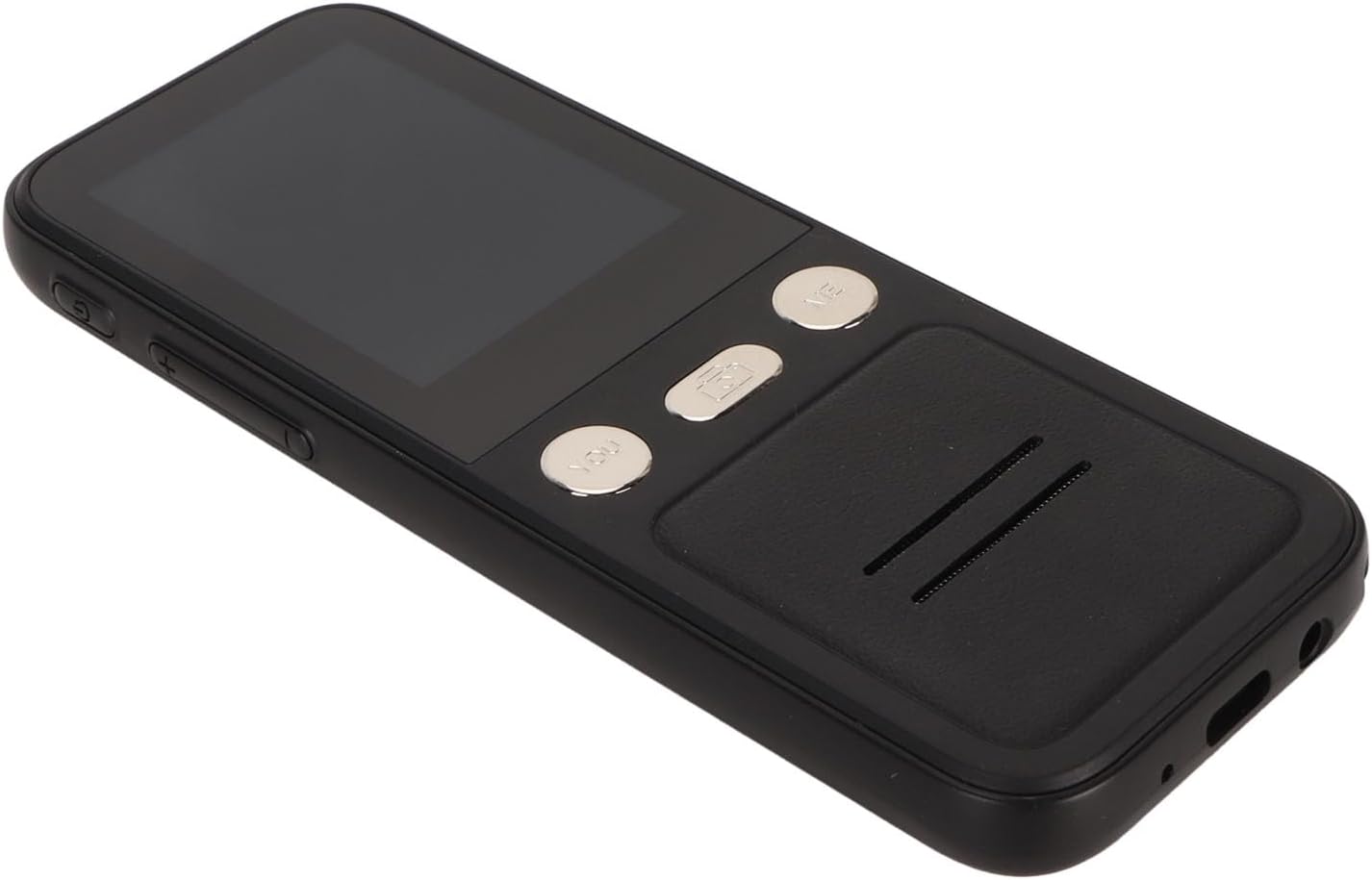
This image shows the front of the RASTKY Smart Voice Translator, featuring the 2.4-inch touch screen, the "YOU" button (left), the camera button (center), and the "ME" button (right). Below the buttons is the speaker grille.
ചിത്രം 3.2: വശം View
This image displays the side of the translator, highlighting the power button and volume control buttons located on the left side of the device.

ചിത്രം 3.3: മുന്നിലും പിന്നിലും View
This image presents both the front and back of the translator. The back shows the "SMART CAMERA" lens and text indicating "charge Type-c USB=1.0Amax", along with compliance markings.

Figure 3.4: Bottom Ports
ഒരു ക്ലോസപ്പ് view of the bottom of the device, showing the USB Type-C charging port and a 3.5mm headphone jack.
3.1. ഉപകരണ ഘടകങ്ങൾ
- 2.4 ഇഞ്ച് ടച്ച് സ്ക്രീൻ: For navigation and displaying translations.
- "YOU" Button: Press and hold to speak your language for translation.
- "ME" Button: Press and hold for the other person to speak their language for translation.
- ക്യാമറ ബട്ടൺ: Activates the 5MP camera for photo translation.
- പവർ ബട്ടൺ: ഉപകരണം ഓൺ/ഓഫ് ആക്കി സ്ക്രീൻ ലോക്ക്/അൺലോക്ക് ചെയ്യുന്നു.
- വോളിയം ബട്ടണുകൾ: ഓഡിയോ ഔട്ട്പുട്ട് വോളിയം ക്രമീകരിക്കുന്നു.
- സ്പീക്കർ: വിവർത്തനം ചെയ്ത ഓഡിയോ ഔട്ട്പുട്ടുകൾ.
- മൈക്രോഫോൺ: Captures speech for translation.
- യുഎസ്ബി ടൈപ്പ്-സി പോർട്ട്: ഉപകരണം ചാർജ് ചെയ്യുന്നതിനായി.
- 3.5 എംഎം ഹെഡ്ഫോൺ ജാക്ക്: For private listening of translations.
4. സജ്ജീകരണം
4.1 ഉപകരണം ചാർജ് ചെയ്യുന്നു
Before first use, fully charge your translator. A full charge typically takes approximately 2-3 hours.
- Connect the provided USB Type-C cable to the charging port at the bottom of the device.
- USB കേബിളിന്റെ മറ്റേ അറ്റം അനുയോജ്യമായ ഒരു USB പവർ അഡാപ്റ്ററുമായി (ഉൾപ്പെടുത്തിയിട്ടില്ല) അല്ലെങ്കിൽ കമ്പ്യൂട്ടറിന്റെ USB പോർട്ടുമായി ബന്ധിപ്പിക്കുക.
- സ്ക്രീനിലെ ചാർജിംഗ് ഇൻഡിക്കേറ്റർ ചാർജിംഗ് സ്റ്റാറ്റസ് കാണിക്കും.

Figure 4.1: Device and Charging Cable
This image shows the RASTKY Smart Voice Translator alongside its USB Type-C charging cable, illustrating the components included for charging.
4.2. പവർ ഓൺ/ഓഫ്
- പവർ ഓണാക്കാൻ: Press and hold the Power button (located on the side) for approximately 3 seconds until the screen lights up.
- പവർ ഓഫ് ചെയ്യാൻ: Press and hold the Power button for approximately 3 seconds. A power-off menu will appear on the screen. Select "Power Off" to shut down the device.
- സ്ക്രീൻ ലോക്ക്/അൺലോക്ക്: സ്ക്രീൻ ലോക്ക് ചെയ്യാനോ അൺലോക്ക് ചെയ്യാനോ പവർ ബട്ടൺ അൽപ്പനേരം അമർത്തുക.
4.3. പ്രാരംഭ സജ്ജീകരണവും വൈഫൈ കണക്ഷനും
Upon first power-on, you may be prompted to select your preferred language and connect to a Wi-Fi network. A Wi-Fi connection is recommended for the most accurate and comprehensive translation services, including access to 112 online languages.
- Follow the on-screen prompts to select your system language.
- നാവിഗേറ്റ് ചെയ്യുക ക്രമീകരണങ്ങൾ > വൈഫൈ.
- Select your desired Wi-Fi network from the list and enter the password if required.
- കണക്റ്റ് ചെയ്തുകഴിഞ്ഞാൽ, സ്റ്റാറ്റസ് ബാറിൽ വൈഫൈ ഐക്കൺ ദൃശ്യമാകും.
5. പ്രവർത്തന നിർദ്ദേശങ്ങൾ
5.1. Online Voice Translation (112 Languages)
This mode provides the highest accuracy and widest range of languages.
- Ensure the device is connected to Wi-Fi.
- On the main translation screen, select the source language (your language) and the target language (the language you want to translate to) by tapping on the language names at the top of the screen.
- To speak your language, press and hold the "YOU" button (left button). Speak clearly into the microphone. Release the button when you finish speaking.
- The device will display and speak the translation in the target language.
- To have the other person speak, press and hold the "ME" button (right button). They should speak clearly into the microphone. Release the button when they finish speaking.
- The device will display and speak the translation in your language.
5.2. Offline Voice Translation (10 Languages)
The device supports 10 default offline languages. Additional offline language packs can be downloaded via Wi-Fi for use without an internet connection.
- Default Offline Languages: Simplified Chinese, Traditional Chinese, English, German, Spanish, French, Japanese, Korean, Russian, and Thai.
- To Download More Offline Languages: Connect to Wi-Fi, navigate to ക്രമീകരണങ്ങൾ > ഓഫ്ലൈൻ വിവർത്തനം, and select the language packs you wish to download.
- Once downloaded, the offline translation process is similar to online translation, using the "YOU" and "ME" buttons.
5.3. Photo Translation (43 Languages)
The 5MP camera allows you to translate text from images, such as signs, menus, or documents.
- Ensure the device is connected to Wi-Fi for optimal photo translation accuracy.
- ടാപ്പ് ചെയ്യുക ക്യാമറ ബട്ടൺ on the device's front panel or select the Photo Translation option from the main menu on the screen.
- Point the camera at the text you wish to translate. Ensure the text is well-lit and clear within the frame.
- Tap the capture button on the screen to take a photo.
- The device will process the image and display the translated text on the screen. You can select the source and target languages for photo translation.
5.4. ഭാഷ തിരഞ്ഞെടുക്കൽ
To change the translation languages:
- On the main translation screen, tap on the language displayed for "YOU" (your language) to open the language list. Select your desired language.
- Tap on the language displayed for "ME" (the other person's language) to open the language list. Select their desired language.
- For photo translation, language selection options will appear within the photo translation interface.
6. പരിപാലനം
Proper care will extend the life of your RASTKY Smart Voice Translator.
- വൃത്തിയാക്കൽ: Use a soft, dry, lint-free cloth to clean the device. For stubborn smudges on the screen, slightly dampവെള്ളം അല്ലെങ്കിൽ സ്ക്രീൻ ക്ലീനർ ഉപയോഗിച്ച് തുണി വൃത്തിയാക്കുക. കഠിനമായ രാസവസ്തുക്കളോ ഉരച്ചിലുകളോ ഉള്ള വസ്തുക്കൾ ഉപയോഗിക്കരുത്.
- സംഭരണം: ദീർഘനേരം ഉപയോഗിക്കാത്തപ്പോൾ നേരിട്ടുള്ള സൂര്യപ്രകാശത്തിൽ നിന്നും തീവ്രമായ താപനിലയിൽ നിന്നും മാറി തണുത്തതും വരണ്ടതുമായ സ്ഥലത്ത് ഉപകരണം സൂക്ഷിക്കുക.
- ബാറ്ററി കെയർ: ബാറ്ററി ലൈഫ് നിലനിർത്താൻ, ബാറ്ററി ഇടയ്ക്കിടെ പൂർണ്ണമായും ഡിസ്ചാർജ് ചെയ്യുന്നത് ഒഴിവാക്കുക. തുടർച്ചയായ ഉപയോഗത്തിലല്ലെങ്കിൽ പോലും ഉപകരണം പതിവായി ചാർജ് ചെയ്യുക.
7. പ്രശ്നപരിഹാരം
If you encounter issues with your translator, refer to the following common problems and solutions.
| പ്രശ്നം | സാധ്യമായ കാരണം | പരിഹാരം |
|---|---|---|
| ഉപകരണം പവർ ഓണാക്കുന്നില്ല. | ബാറ്ററി കുറവാണ്; ഉപകരണം ഫ്രീസുചെയ്തു. | Charge the device for at least 30 minutes. If still unresponsive, press and hold the Power button for 10-15 seconds to force a restart. |
| വിവർത്തനം കൃത്യമല്ല അല്ലെങ്കിൽ വേഗത കുറവാണ്. | Poor Wi-Fi connection; unclear speech; incorrect language selection. | Ensure a stable Wi-Fi connection. Speak clearly and at a moderate pace. Verify that the correct source and target languages are selected. |
| ഫോട്ടോ വിവർത്തനം പ്രവർത്തിക്കുന്നില്ല. | Poor lighting; blurry image; text not recognized. | Ensure adequate lighting. Hold the device steady to avoid blur. Make sure the text is within the camera frame and clearly legible. |
| സ്പീക്കറിൽ നിന്ന് ശബ്ദമില്ല. | Volume too low; speaker obstructed. | Increase the volume using the volume buttons. Check if anything is blocking the speaker grille. |
| Wi-Fi-ലേക്ക് കണക്റ്റ് ചെയ്യാൻ കഴിയില്ല. | തെറ്റായ പാസ്വേഡ്; പരിധിക്ക് പുറത്താണ്; നെറ്റ്വർക്ക് പ്രശ്നം. | Double-check the Wi-Fi password. Move closer to the Wi-Fi router. Restart your router and the translator. |
8 സ്പെസിഫിക്കേഷനുകൾ
Technical specifications for the RASTKY Smart Voice Translator.
- മോഡൽ: RASTKYxhm9bnta1g
- സ്ക്രീൻ വലിപ്പം: 2.4 ഇഞ്ച് ടച്ച് സ്ക്രീൻ
- റെസലൂഷൻ: 240 x 320
- ബാറ്ററി ശേഷി: 1500mAh (ബിൽറ്റ്-ഇൻ)
- തുടർച്ചയായ പ്ലേബാക്ക്: 6 മണിക്കൂറോ അതിൽ കൂടുതലോ
- റാം: 1 ജിബി
- ROM: 8 ജിബി
- ക്യാമറ: 5MP Pixels
- നെറ്റ്വർക്കിംഗ് രീതി: WIFI Networking
- ഡാറ്റ ഇന്റർഫേസ്: ടൈപ്പ് സി ഇന്റർഫേസ്
- സംസാരം തിരിച്ചറിയൽ: For Google SR
- Translation Engine: For Google, for iFlytek
- Online Supported Languages: 112
- Offline Supported Languages: 10 (Simplified Chinese, Traditional Chinese, English, German, Spanish, French, Japanese, Korean, Russian, Thai)
- ഫോട്ടോ വിവർത്തന ഭാഷകൾ: 43
- അളവുകൾ: ഏകദേശം 6.69 x 3.15 x 1.57 ഇഞ്ച്
- ഭാരം: ഏകദേശം 8 ഔൺസ്
9. വാറൻ്റിയും പിന്തുണയും
RASTKY products are manufactured to the highest quality standards. For warranty information and customer support, please refer to the warranty card included with your purchase or visit the official RASTKY website. Please have your model number (RASTKYxhm9bnta1g) and purchase details ready when contacting support.
കൂടുതൽ സഹായത്തിന്, നിങ്ങൾക്ക് നിങ്ങളുടെ റീട്ടെയിലറെ ബന്ധപ്പെടാവുന്നതാണ്.
Ask a question about this manual
Ask about setup, troubleshooting, compatibility, parts, safety, or missing instructions. Manuals+ will review the question and use this page’s manual context to help answer it.