
1. ആമുഖം
This manual provides instructions for the installation and proper use of the Ygpmoiki SIM and Micro SD Card Tray Replacement. This product is designed specifically for the Motorola Moto Edge 2024 smartphone, compatible with models XT2405-1 and XT2405V. It allows for the secure housing of a single SIM card and a Micro SD card within your device.
2. പാക്കേജ് ഉള്ളടക്കം
നിങ്ങളുടെ പാക്കേജിൽ എല്ലാ ഇനങ്ങളും ഉണ്ടെന്ന് ദയവായി പരിശോധിക്കുക:
- 1x SIM Tray Card Holder for Motorola Moto Edge 2024 (XT2405-1, XT2405V) - Black
- 1x Card Ejector Pin
3. സജ്ജീകരണവും ഇൻസ്റ്റാളേഷനും
The installation of the SIM and Micro SD card tray is a straightforward process. Please follow these steps carefully to ensure proper function and to avoid damage to your device.
3.1 സുരക്ഷാ മുൻകരുതലുകൾ
- Always power off your Motorola Moto Edge 2024 device completely before attempting to remove or insert the SIM tray.
- Use only the provided card ejector pin or a similar thin, blunt tool. Do not use sharp objects that could damage the tray or the phone's internal components.
- Handle the SIM tray and cards with clean, dry hands to prevent contamination.
3.2 ഇൻസ്റ്റലേഷൻ ഘട്ടങ്ങൾ
- ഉപകരണം ഓഫാക്കുക: Ensure your Motorola Moto Edge 2024 is completely powered off.
- Locate SIM Tray Slot: Identify the small hole next to the SIM tray slot on the side of your phone.
- എജക്റ്റ് ട്രേ: Insert the card ejector pin into the small hole and gently push until the tray pops out slightly. Do not force it.
- Remove Old Tray (if applicable): Carefully pull out the old SIM tray from the slot.
- Prepare New Tray: Place your Nano-SIM card and/or Micro SD card into the new Ygpmoiki replacement tray. Ensure the cards are correctly oriented according to the tray's markings and fit snugly. Refer to the images below for correct card placement.

Figure 1: Correct placement of the SIM card in the tray. Note the 'THIS SIDE UP' marking.
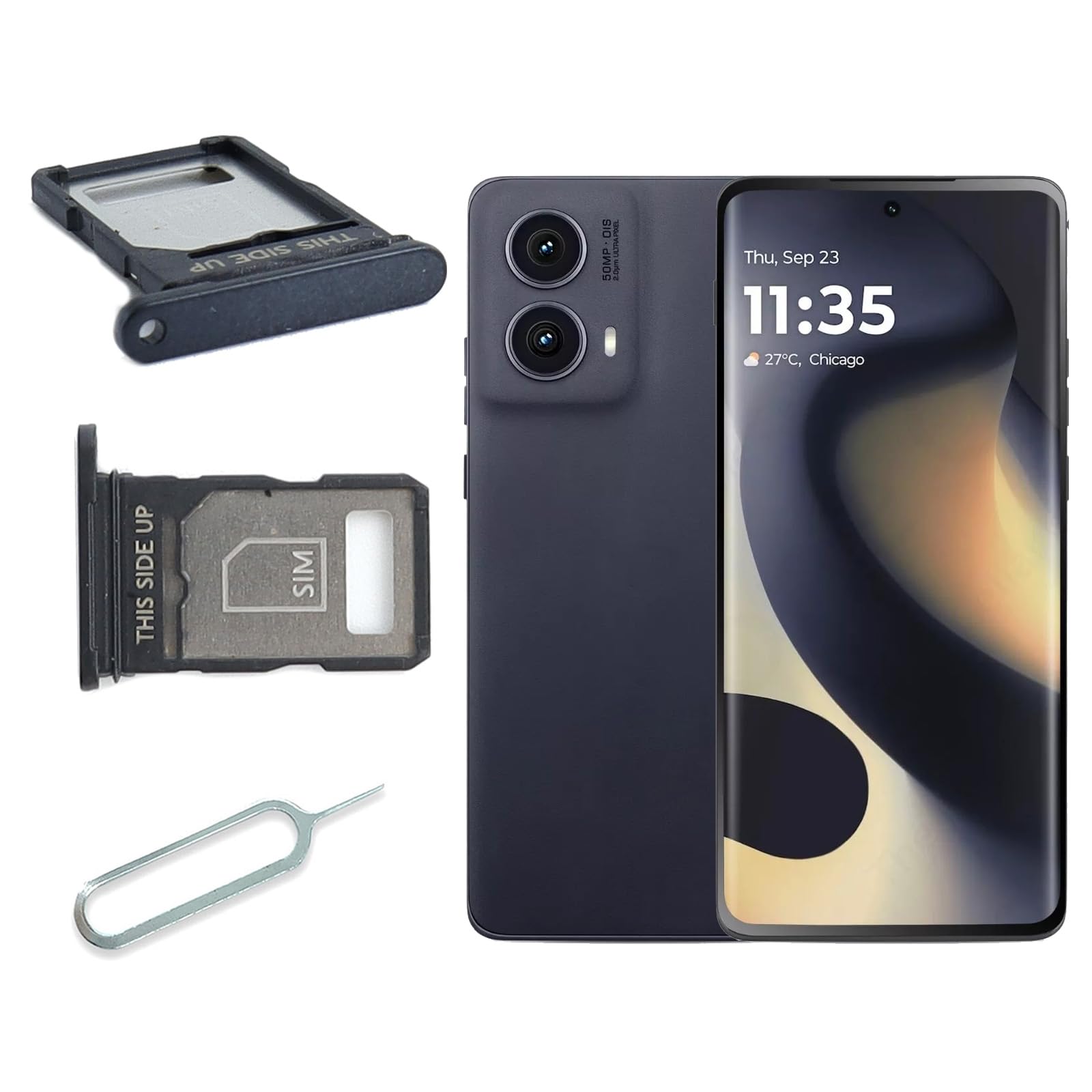
ചിത്രം 2: View of the SIM tray showing the Micro SD card slot.
- Insert New Tray: Carefully slide the new tray, with the cards inserted, back into the phone's slot. Ensure it slides in smoothly and is flush with the phone's body. Do not force it.
- പവർ ഓൺ ഉപകരണം: Once the tray is securely in place, power on your Motorola Moto Edge 2024.
- തിരിച്ചറിയൽ പരിശോധിക്കുക: After the phone boots up, check your phone's settings to confirm that the SIM card (for network connectivity) and Micro SD card (for storage) are recognized.
3.3 ഇൻസ്റ്റലേഷൻ വീഡിയോ ഗൈഡ്
ഇൻസ്റ്റലേഷൻ പ്രക്രിയയെക്കുറിച്ചുള്ള ഒരു വിഷ്വൽ ഗൈഡിനായി, ദയവായി താഴെയുള്ള വീഡിയോ പരിശോധിക്കുക:
Video 1: Demonstration of SIM card tray replacement for Motorola Moto Edge 2024. This video illustrates the steps for removing and inserting the SIM tray.
4. Operating the SIM/Micro SD Card Tray
The SIM/Micro SD card tray is a passive component designed to hold your cards. Its operation primarily involves correct card placement during installation.
4.1 Inserting Cards
- Ensure the Nano-SIM card is placed in the designated SIM slot with the gold contacts facing downwards and the notched corner aligned correctly.
- If using a Micro SD card, place it in the dedicated Micro SD card slot, ensuring it sits flat and securely.
- The tray is designed for a single SIM card and a single Micro SD card. Do not attempt to insert multiple cards into a single slot or force cards into incorrect positions.
5. പരിപാലനം
The SIM/Micro SD card tray requires minimal maintenance. Follow these guidelines to prolong its lifespan and ensure reliable performance:
- വൃത്തിയായി സൂക്ഷിക്കു: Periodically inspect the tray for dust or debris. If necessary, gently wipe it with a soft, dry, lint-free cloth. Avoid using liquids or abrasive cleaners.
- വളയുന്നത് ഒഴിവാക്കുക: Do not bend or apply excessive force to the tray, as this can deform it and prevent proper insertion or card retention.
- സുരക്ഷിതമായി സംഭരിക്കുക: If the tray is removed for an extended period, store it in a clean, dry, and safe place to prevent loss or damage.
6. പ്രശ്നപരിഹാരം
If you encounter issues with your SIM/Micro SD card tray, consider the following troubleshooting steps:
- ട്രേ യോജിക്കുന്നില്ല: Ensure the tray is oriented correctly. Do not force it. If it still doesn't fit, inspect the tray and the phone's slot for any obstructions or damage.
- SIM/SD Card Not Recognized:
- Remove the tray and re-insert the SIM/SD card, ensuring it is seated correctly and securely in its slot.
- Restart your phone after re-inserting the tray.
- Verify that the SIM card is active with your mobile carrier and that the Micro SD card is not corrupted.
- Test with a different, known-working SIM or Micro SD card if available, to rule out card issues.
- Damaged Tray: If the tray appears bent, cracked, or otherwise damaged, it may need to be replaced.
7 സ്പെസിഫിക്കേഷനുകൾ
| ഫീച്ചർ | വിശദാംശങ്ങൾ |
|---|---|
| അനുയോജ്യമായ മോഡൽ | Motorola Moto Edge 2024 (XT2405-1, XT2405V) |
| നിറം | കറുപ്പ് |
| മെറ്റീരിയൽ | Plastic/Metal Composite |
| ഉൽപ്പന്ന അളവുകൾ | 1.13 x 0.61 x 0.04 ഇഞ്ച് |
| ഇനത്തിൻ്റെ ഭാരം | 0.353 ഔൺസ് |
| ഉൾപ്പെടുന്നു | 1x SIM Tray Card Holder, 1x Card Ejector Pin |
8. വാറൻ്റിയും പിന്തുണയും
Warranty information for this specific product is not provided in the available product details. For any warranty claims, technical support, or further assistance, please contact the seller directly through the platform where the purchase was made. Ensure you retain your proof of purchase for any support inquiries.