
1. ആമുഖം
വാങ്ങിയതിന് നന്ദി.asing the Greadio CD-W16 Multifunction Portable CD Player. This device offers a comprehensive audio experience with multiple playback options including CD, cassette, FM radio, Bluetooth 5.1, USB, AUX, and TF/SD card. Designed for ease of use and portability, it features a rechargeable battery, remote control, and high-quality stereo sound. Please read this manual carefully to ensure proper operation and to fully enjoy all the features of your new audio system.
2 സുരക്ഷാ വിവരങ്ങൾ
- തീയോ വൈദ്യുതാഘാതമോ തടയാൻ യൂണിറ്റ് മഴയിലോ ഈർപ്പത്തിലോ തുറന്നുകാട്ടരുത്.
- സി തുറക്കരുത്.asing. യോഗ്യതയുള്ള ഉദ്യോഗസ്ഥർക്ക് മാത്രം സേവനം റഫർ ചെയ്യുക.
- താപ സ്രോതസ്സുകൾക്ക് സമീപമോ നേരിട്ടുള്ള സൂര്യപ്രകാശത്തിലോ യൂണിറ്റ് സ്ഥാപിക്കുന്നത് ഒഴിവാക്കുക.
- നിർദ്ദിഷ്ട പവർ അഡാപ്റ്ററും കേബിളുകളും മാത്രം ഉപയോഗിക്കുക.
- കുട്ടികൾക്ക് ലഭ്യമാകാതെ സൂക്ഷിക്കുക.
3. പാക്കേജ് ഉള്ളടക്കം
- Greadio CD-W16 CD Radio Cassette Player x 1
- AUX കേബിൾ x 1
- ടൈപ്പ്-സി കേബിൾ x 1
- വിദൂര നിയന്ത്രണം x 1
- ഉപയോക്തൃ മാനുവൽ x 1
4. ഉൽപ്പന്നം കഴിഞ്ഞുview
The Greadio CD-W16 is a versatile audio system designed for various listening preferences. It combines classic and modern features in a compact, portable design.
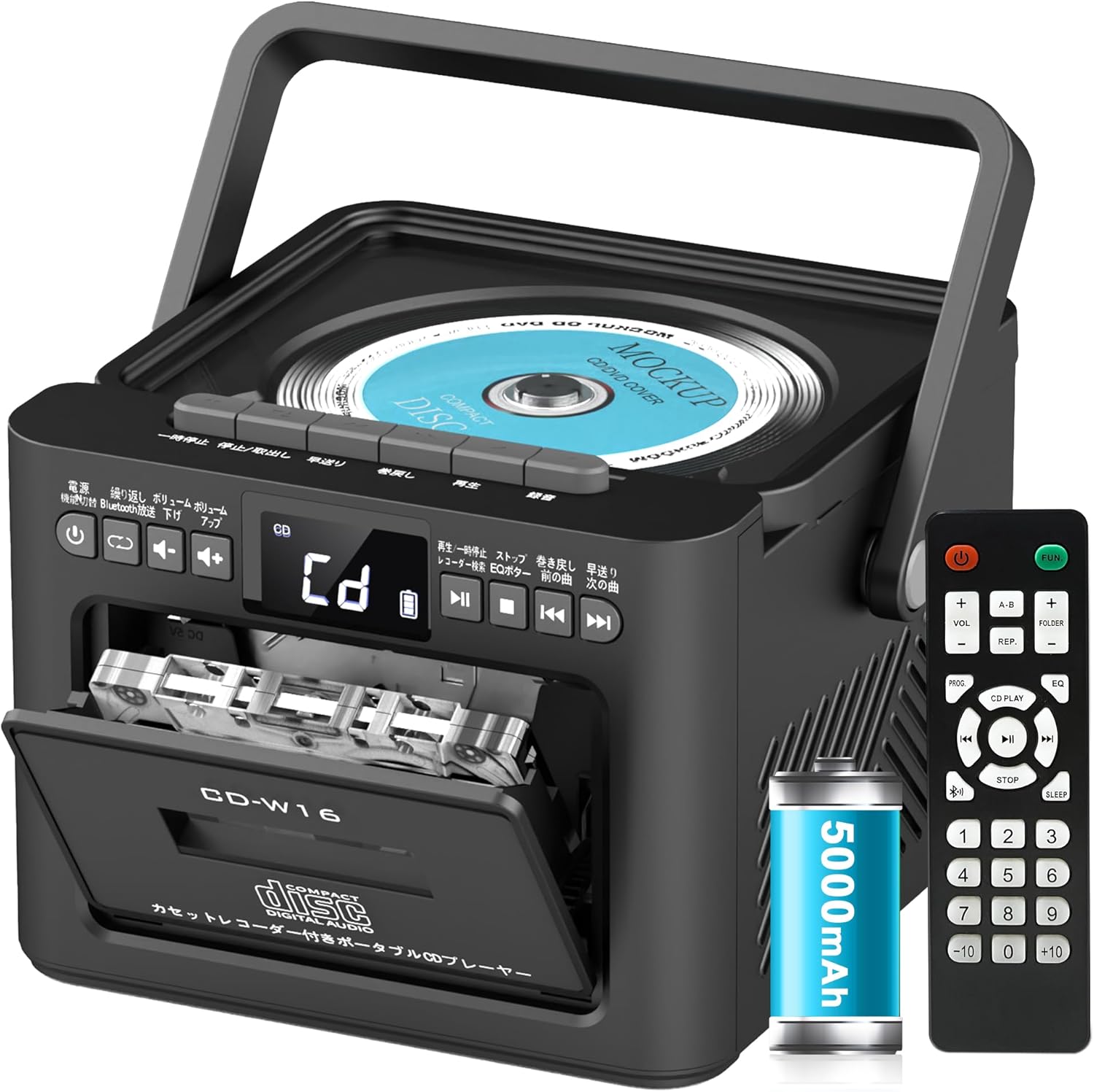
പ്രധാന സവിശേഷതകളിൽ ഇവ ഉൾപ്പെടുന്നു:
- CD Player (CD, CD-R, CD-RW compatible)
- Cassette Player & Recorder
- എഫ്എം റേഡിയോ (76-108MHz)
- Bluetooth 5.1 (Transmitter & Receiver)
- USB പ്ലേബാക്ക്
- AUX ഇൻപുട്ട്
- TF/SD Card Playback
- 5000mAh റീചാർജ് ചെയ്യാവുന്ന ബാറ്ററി
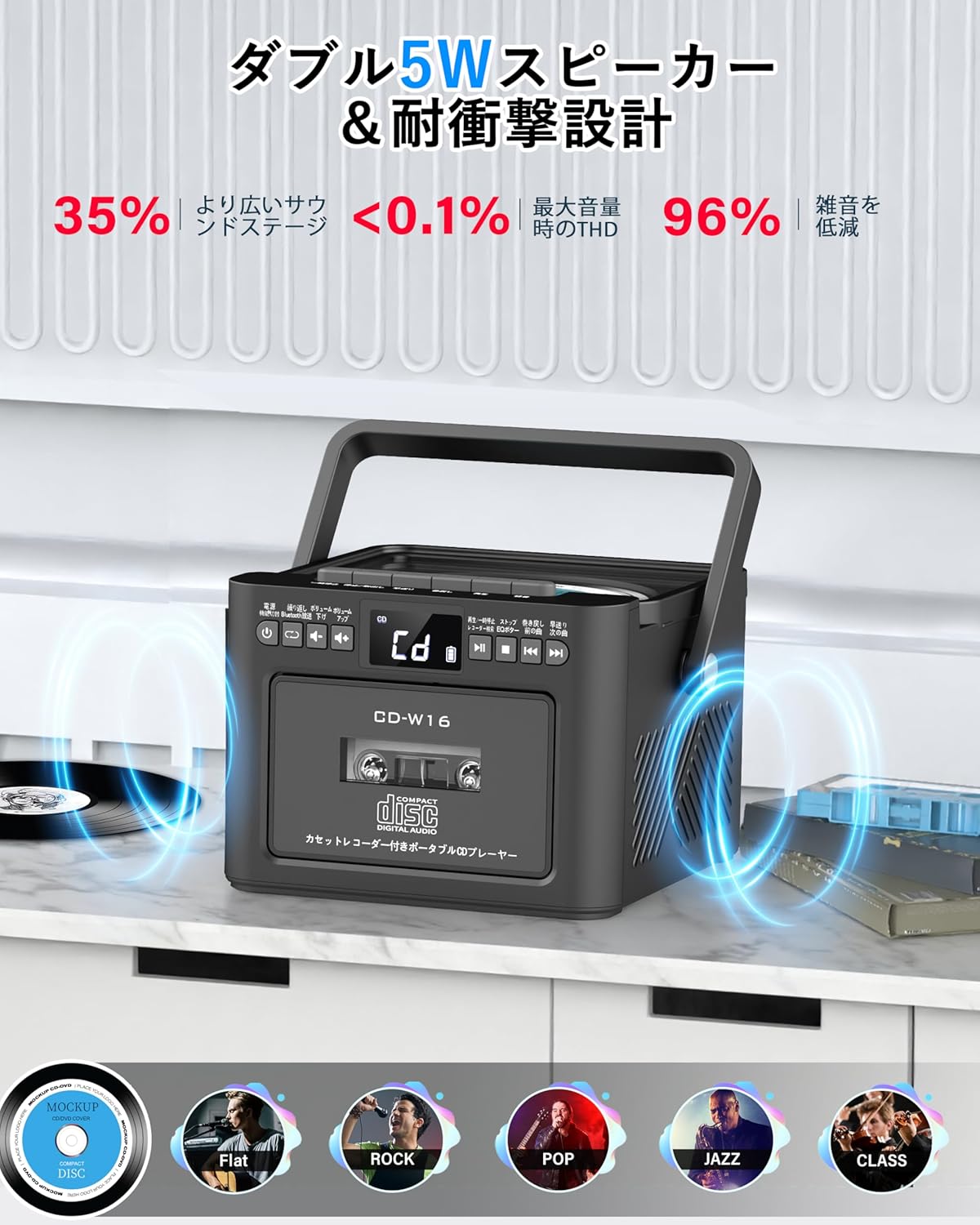
- ഡ്യുവൽ 5W സ്റ്റീരിയോ സ്പീക്കറുകൾ
- റിമോട്ട് കൺട്രോൾ
- സ്ലീപ്പ് ടൈമർ
- 5 EQ സൗണ്ട് മോഡുകൾ

5. സജ്ജീകരണം
5.1 ബാറ്ററി ചാർജ് ചെയ്യുന്നു
The Greadio CD-W16 is equipped with a built-in 5000mAh rechargeable battery. To charge the device:
- Connect the provided Type-C cable to the charging port on the unit.
- Connect the other end of the Type-C cable to a 5V/2A USB power adapter (not included).
- The charging indicator will illuminate. A full charge takes approximately 3 hours and provides up to 16 hours of playback.

5.2. പവർ ഓൺ/ഓഫ്
To power on or off the CD player:
- അമർത്തിപ്പിടിക്കുക പവർ ബട്ടൺ on the unit or the remote control for 2 seconds.
- പകരമായി, ഹ്രസ്വമായി അമർത്തുക പവർ ബട്ടൺ on the remote control to toggle the CD player on/off.
6. പ്രവർത്തന നിർദ്ദേശങ്ങൾ
6.1. General Controls (Remote Control)
The remote control provides convenient access to all functions. Refer to the video below for a demonstration of remote control operations.
- പവർ ഓൺ/ഓഫ്: ഷോർട്ട് അമർത്തുക പവർ ബട്ടൺ.
- ഫംഗ്ഷൻ മോഡ് തിരഞ്ഞെടുക്കൽ: ഷോർട്ട് അമർത്തുക FUNC. ബട്ടൺ to cycle through CD, Bluetooth, Radio, Cassette, AUX, USB, and TF/SD card modes.
- വോളിയം ക്രമീകരണം: ഷോർട്ട് പ്രസ്സ് VOL+ or വോൾ- ബട്ടണുകൾ.
- ട്രാക്ക് നാവിഗേഷൻ: ഷോർട്ട് പ്രസ്സ് NEXT (>>|) for the next track or PREV (|<<) for the previous track.
- ഫാസ്റ്റ് ഫോർവേഡ്/റിവൈൻഡ്: ദീർഘനേരം അമർത്തുക NEXT (>>|) for fast forward or PREV (|<<) for rewind.
- Direct Track Selection: In CD mode, input 0-9 on the remote to quickly skip to the desired track.
- EQ മോഡ്: ഷോർട്ട് അമർത്തുക EQ ബട്ടൺ to cycle through NORMAL, ROCK, POP, JAZZ, and CLASS sound modes.
- ആവർത്തിക്കുന്ന മോഡ്: ഷോർട്ട് അമർത്തുക REP ബട്ടൺ to cycle through repeat options (ONE, FOLDER, ALL, SHUFFLE, OFF).
6.2. സിഡി പ്ലേബാക്ക്
- യൂണിറ്റ് ഓണാണെന്ന് ഉറപ്പാക്കുക.
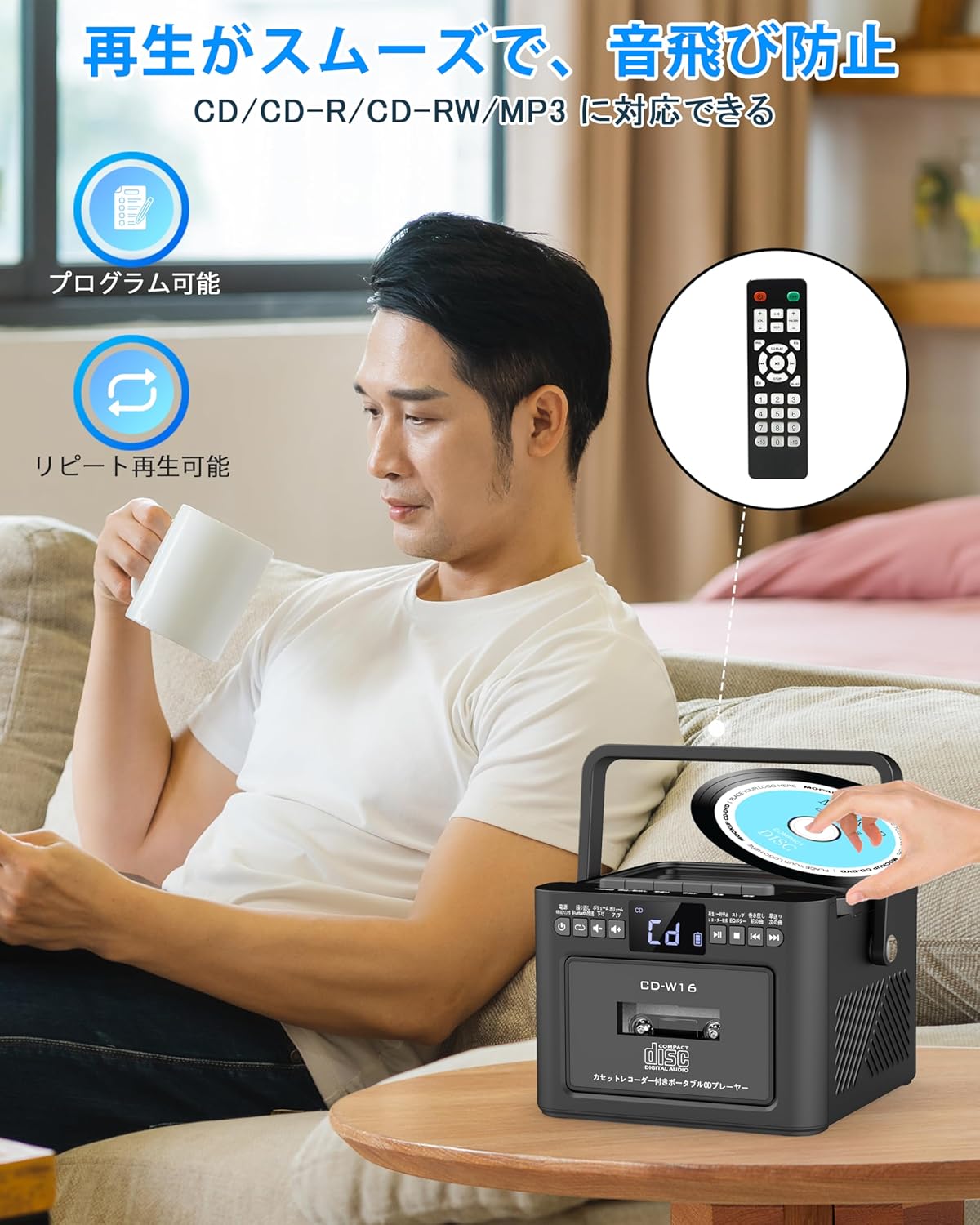
- ഷോർട്ട് അമർത്തുക FUNC. ബട്ടൺ to select CD mode. The display will show "CD".
- സിഡി കമ്പാർട്ട്മെന്റ് ലിഡ് പതുക്കെ ഉയർത്തി തുറക്കുക.
- Place a CD (CD, CD-R, CD-RW compatible) onto the spindle with the label side facing up.
- Close the CD compartment lid. The CD will begin playing automatically.
- ഉപയോഗിക്കുക Play/Pause (||) button for temporary stop/resume.
- ഉപയോഗിക്കുക NEXT (>>|) ഒപ്പം PREV (|<<) ട്രാക്ക് നാവിഗേഷനുള്ള ബട്ടണുകൾ.
6.3. Cassette Playback & Recording
- ഷോർട്ട് അമർത്തുക FUNC. ബട്ടൺ to select Tape mode. The display will show "TAPE".
- അമർത്തുക STOP/EJ. button to open the cassette compartment.
- Insert a cassette tape into the compartment and close the lid.
- അമർത്തുക പ്ലേ ബട്ടൺ to start cassette playback.
- To fast forward or rewind, long press the FFWD or FREW യഥാക്രമം ബട്ടണുകൾ.
- To stop playback, short press the STOP/EJ. button.
Cassette Recording:
To record audio from other modes (CD, FM Radio, USB, AUX, TF/SD) onto a blank cassette:
- Insert a blank cassette into the cassette compartment.
- Select the desired source mode (e.g., CD, FM Radio).
- ഒരേസമയം അമർത്തുക കളിക്കുക ഒപ്പം REC (റെക്കോർഡ്) buttons. Recording will begin.
- അമർത്തുക STOP/EJ. button റെക്കോർഡിംഗ് നിർത്താൻ.

6.4. എഫ്എം റേഡിയോ പ്രവർത്തനം
- ഷോർട്ട് അമർത്തുക FUNC. ബട്ടൺ to select FM Radio mode. The display will show the FM frequency.
- മികച്ച സ്വീകരണത്തിനായി ടെലിസ്കോപ്പിക് ആന്റിന നീട്ടുക.
Auto Scan & Preset Stations:
- ദീർഘനേരം അമർത്തുക സ്കാൻ ബട്ടൺ to automatically scan and save available FM stations. The unit can store up to 30 preset stations.
- ഷോർട്ട് അമർത്തുക സ്കാൻ ബട്ടൺ to recall preset stations (P01, P02, etc.).
സ്വമേധയാലുള്ള ട്യൂണിംഗ്:
- ഷോർട്ട് അമർത്തുക NEXT (>>|) or PREV (|<<) buttons to manually tune to the desired frequency.

6.5. ബ്ലൂടൂത്ത് പ്രവർത്തനം
The Greadio CD-W16 supports Bluetooth 5.1 for both transmitting and receiving audio.
ബ്ലൂടൂത്ത് ട്രാൻസ്മിറ്റർ മോഡ്:
To transmit audio from the CD player to a Bluetooth speaker or headphones:
- ദീർഘനേരം അമർത്തുക ബ്ലൂടൂത്ത് ബട്ടൺ on the unit or remote to activate Bluetooth transmission mode. The display will show "BT".
- നിങ്ങളുടെ ബ്ലൂടൂത്ത് സ്വീകരിക്കുന്ന ഉപകരണം (സ്പീക്കർ, ഹെഡ്ഫോണുകൾ) ജോടിയാക്കൽ മോഡിലാണെന്ന് ഉറപ്പാക്കുക.
- The CD-W16 will automatically search for nearby Bluetooth devices. Once found, it will connect.

ബ്ലൂടൂത്ത് റിസീവർ മോഡ്:
To play audio from your smartphone or other Bluetooth device through the CD player's speakers:
- ഷോർട്ട് അമർത്തുക FUNC. ബട്ടൺ ബ്ലൂടൂത്ത് മോഡ് തിരഞ്ഞെടുക്കാൻ. ഡിസ്പ്ലേ "നീല" കാണിക്കും.
- നിങ്ങളുടെ സ്മാർട്ട്ഫോണിലോ ബ്ലൂടൂത്ത് ഉപകരണത്തിലോ, ബ്ലൂടൂത്ത് പ്രവർത്തനക്ഷമമാക്കി ലഭ്യമായ ഉപകരണങ്ങൾക്കായി തിരയുക.
- Select "CD-W16" from the list to connect.
- Once connected, you can play music from your device, and the audio will output through the CD-W16 speakers.
6.6. USB & TF/SD Card Playback
The unit supports playback from USB drives and TF/SD cards (up to 32GB, not included).
- ഷോർട്ട് അമർത്തുക FUNC. ബട്ടൺ to select USB mode or TF/SD card mode. The display will show "USB" or "TF" respectively.
- Insert your USB drive into the USB port or your TF/SD card into the card slot.
- The unit will automatically detect and begin playing MP3 audio files.
- ഉപയോഗിക്കുക NEXT (>>|) ഒപ്പം PREV (|<<) ട്രാക്ക് നാവിഗേഷനുള്ള ബട്ടണുകൾ.

6.7. AUX ഇൻപുട്ട്
To play audio from an external device via AUX cable:
- ഷോർട്ട് അമർത്തുക FUNC. ബട്ടൺ to select AUX mode. The display will show "LINE".
- Connect one end of the provided AUX cable to the AUX port on the CD-W16.
- മറ്റേ അറ്റം നിങ്ങളുടെ ബാഹ്യ ഉപകരണത്തിന്റെ (ഉദാ: സ്മാർട്ട്ഫോൺ, MP3 പ്ലെയർ) ഓഡിയോ ഔട്ട്പുട്ടുമായി ബന്ധിപ്പിക്കുക.
- Play audio on your external device, and it will be output through the CD-W16 speakers.
6.8. സ്ലീപ്പ് ടൈമർ
The sleep timer allows you to set a duration after which the unit will automatically power off.
- ഷോർട്ട് അമർത്തുക ഉറങ്ങുക ബട്ടൺ on the remote control. The display will show the current sleep timer setting (e.g., 10, 20, 30 minutes).
- ഉപയോഗിക്കുക NEXT (>>|) or PREV (|<<) buttons to adjust the sleep timer duration (10-120 minutes).
- ഷോർട്ട് അമർത്തുക ഉറങ്ങുക ബട്ടൺ ക്രമീകരണം സ്ഥിരീകരിക്കാൻ വീണ്ടും.

6.9. EQ Sound Modes
Customize your audio experience with five different EQ sound modes.
- ഷോർട്ട് അമർത്തുക EQ ബട്ടൺ on the unit or remote control to cycle through the available modes: NORMAL, ROCK, POP, JAZZ, and CLASS.
7. പരിപാലനം
7.1. വൃത്തിയാക്കൽ
- മൃദുവായതും ഉണങ്ങിയതുമായ തുണി ഉപയോഗിച്ച് യൂണിറ്റ് തുടയ്ക്കുക. അബ്രാസീവ് ക്ലീനറുകളോ ലായകങ്ങളോ ഉപയോഗിക്കരുത്.
- സിഡി ലെൻസിന്, ഒരു പ്രത്യേക സിഡി ലെൻസ് ക്ലീനർ ഉപയോഗിക്കുക.
- Keep the cassette head clean to ensure optimal playback and recording quality.
7.2. സംഭരണം
- നേരിട്ടുള്ള സൂര്യപ്രകാശത്തിൽ നിന്നും തീവ്രമായ താപനിലയിൽ നിന്നും മാറി തണുത്തതും വരണ്ടതുമായ സ്ഥലത്ത് യൂണിറ്റ് സൂക്ഷിക്കുക.
- Remove batteries from the remote control if not used for extended periods.
8. പ്രശ്നപരിഹാരം
| പ്രശ്നം | സാധ്യമായ കാരണം | പരിഹാരം |
|---|---|---|
| ശക്തിയില്ല | Battery depleted or power cable not connected. | Charge the unit or ensure the power cable is securely connected. |
| സിഡി പ്ലേ ചെയ്യുന്നില്ല | CD inserted incorrectly, dirty, scratched, or incompatible format. | Reinsert CD correctly, clean the CD, try a different CD. Ensure it's CD/CD-R/CD-RW. |
| കാസറ്റ് പ്ലേ ചെയ്യുന്നില്ല/റെക്കോർഡ് ചെയ്യുന്നില്ല | Cassette inserted incorrectly, tape damaged, or dirty head. | Reinsert cassette, try a different tape, clean the cassette head. |
| മോശം എഫ്എം റേഡിയോ സ്വീകരണം | ആന്റിന വികസിതമല്ല അല്ലെങ്കിൽ ദുർബലമായ സിഗ്നൽ ഏരിയ. | Fully extend the telescopic antenna. Try repositioning the unit. |
| ബ്ലൂടൂത്ത് കണക്റ്റ് ചെയ്യുന്നില്ല | Device not in pairing mode, too far, or already connected to another device. | Ensure both devices are in pairing mode and within range. Disconnect from other devices. |
| USB/TF/SD card not recognized | Card/drive not inserted correctly, incompatible format, or damaged. | Reinsert, ensure files are MP3 format, try a different card/drive. |
9 സ്പെസിഫിക്കേഷനുകൾ
- ബ്രാൻഡ്: ഗ്രേഡിയോ
- മോഡൽ: CD-W16
- കണക്റ്റിവിറ്റി ടെക്നോളജി: AUX, ബ്ലൂടൂത്ത്, USB
- നിറം: കറുപ്പ്
- സ്പീക്കർ തരം: സ്റ്റീരിയോ
- ഊർജ്ജ സ്രോതസ്സ്: ബാറ്ററി പവർ
- അനുയോജ്യമായ ഉപകരണങ്ങൾ: Smartphones, Tablets, PCs
- വാട്ട്tage: 5 W (Dual 5W speakers)
- പിന്തുണയ്ക്കുന്ന ഓഡിയോ ഫോർമാറ്റുകൾ: CD/CD-R/CD-RW
- സ്പീക്കർമാരുടെ എണ്ണം: 2
- ഓഡിയോ putട്ട്പുട്ട് മോഡ്: സ്റ്റീരിയോ
- ബാറ്ററി ശേഷി: 5000mAh
- ചാർജിംഗ് സമയം: ഏകദേശം 3 മണിക്കൂർ
- പ്ലേബാക്ക് സമയം: 16 മണിക്കൂർ വരെ
- FM ഫ്രീക്വൻസി റേഞ്ച്: 76-108MHz
10. വാറണ്ടിയും പിന്തുണയും
This product comes with a 1-year manufacturer's warranty. For any issues or support inquiries, please contact Greadio customer service.