
1. പ്രധാന സുരക്ഷാ നിർദ്ദേശങ്ങൾ
Please read these instructions carefully before using the Audizio Canzo DAB+ Internet Radio. Keep this manual for future reference.
- തീയോ വൈദ്യുതാഘാതമോ തടയാൻ ഉപകരണം മഴയിലോ ഈർപ്പത്തിലോ തുറന്നുകാട്ടരുത്.
- സി തുറക്കരുത്.asing. ഉള്ളിൽ ഉപയോക്തൃ-സേവനയോഗ്യമായ ഭാഗങ്ങളൊന്നുമില്ല. എല്ലാ സേവനങ്ങളും യോഗ്യതയുള്ള ഉദ്യോഗസ്ഥർക്ക് റഫർ ചെയ്യുക.
- ഉപകരണം നൽകിയ പവർ അഡാപ്റ്റർ മാത്രം ഉപയോഗിക്കുക.
- യൂണിറ്റിന് ചുറ്റും ശരിയായ വായുസഞ്ചാരം ഉറപ്പാക്കുക. വെന്റിലേഷൻ ദ്വാരങ്ങൾ തടയരുത്.
- താപ സ്രോതസ്സുകൾക്ക് സമീപമോ നേരിട്ടുള്ള സൂര്യപ്രകാശത്തിലോ യൂണിറ്റ് സ്ഥാപിക്കുന്നത് ഒഴിവാക്കുക.
- Clean the unit only with a dry, soft cloth. Do not use liquid cleaners.
2. ഉൽപ്പന്നം കഴിഞ്ഞുview
The Audizio Canzo is a versatile DAB+ Internet Radio designed for high-quality audio reception and playback. It features multiple connectivity options including Wi-Fi, Bluetooth 5.3, AUX, and USB, along with a remote control for convenient operation. The elegant wooden finish and clear display make it suitable for various home environments.
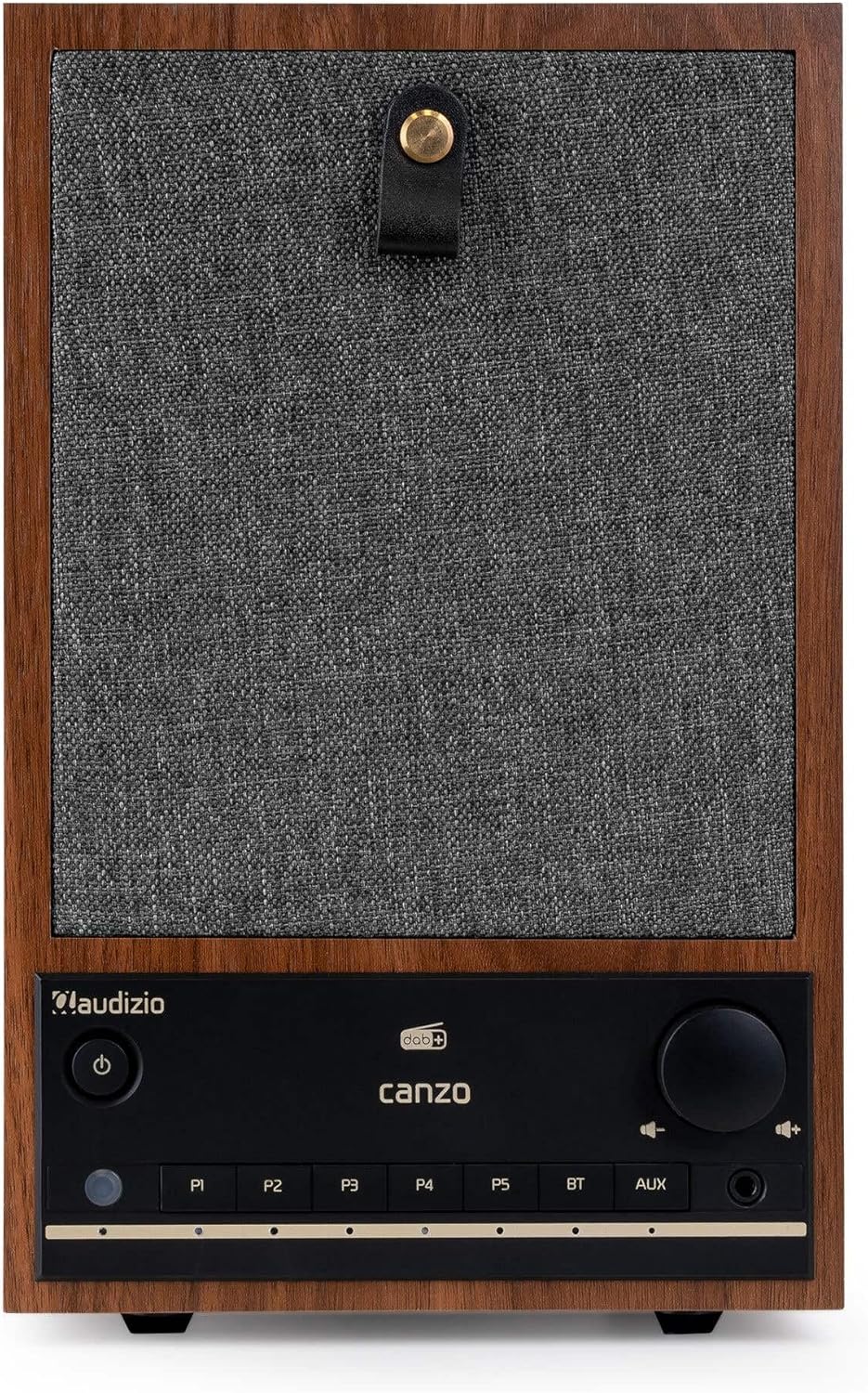
ചിത്രം 2.1: മുൻഭാഗം view of the Audizio Canzo DAB+ Internet Radio in walnut finish.

ചിത്രം 2.2: മുൻഭാഗം view with speaker grille removed, highlighting the speaker, display, and control panel.
3. ബോക്സിൽ എന്താണുള്ളത്?
പെട്ടി ശ്രദ്ധാപൂർവ്വം അൺപാക്ക് ചെയ്ത് എല്ലാ ഇനങ്ങളും ഉണ്ടെന്ന് ഉറപ്പാക്കുക:
- Audizio Canzo DAB+ Internet Radio
- പവർ അഡാപ്റ്റർ
- റിമോട്ട് കൺട്രോൾ
- ദ്രുത ആരംഭ ഗൈഡ്
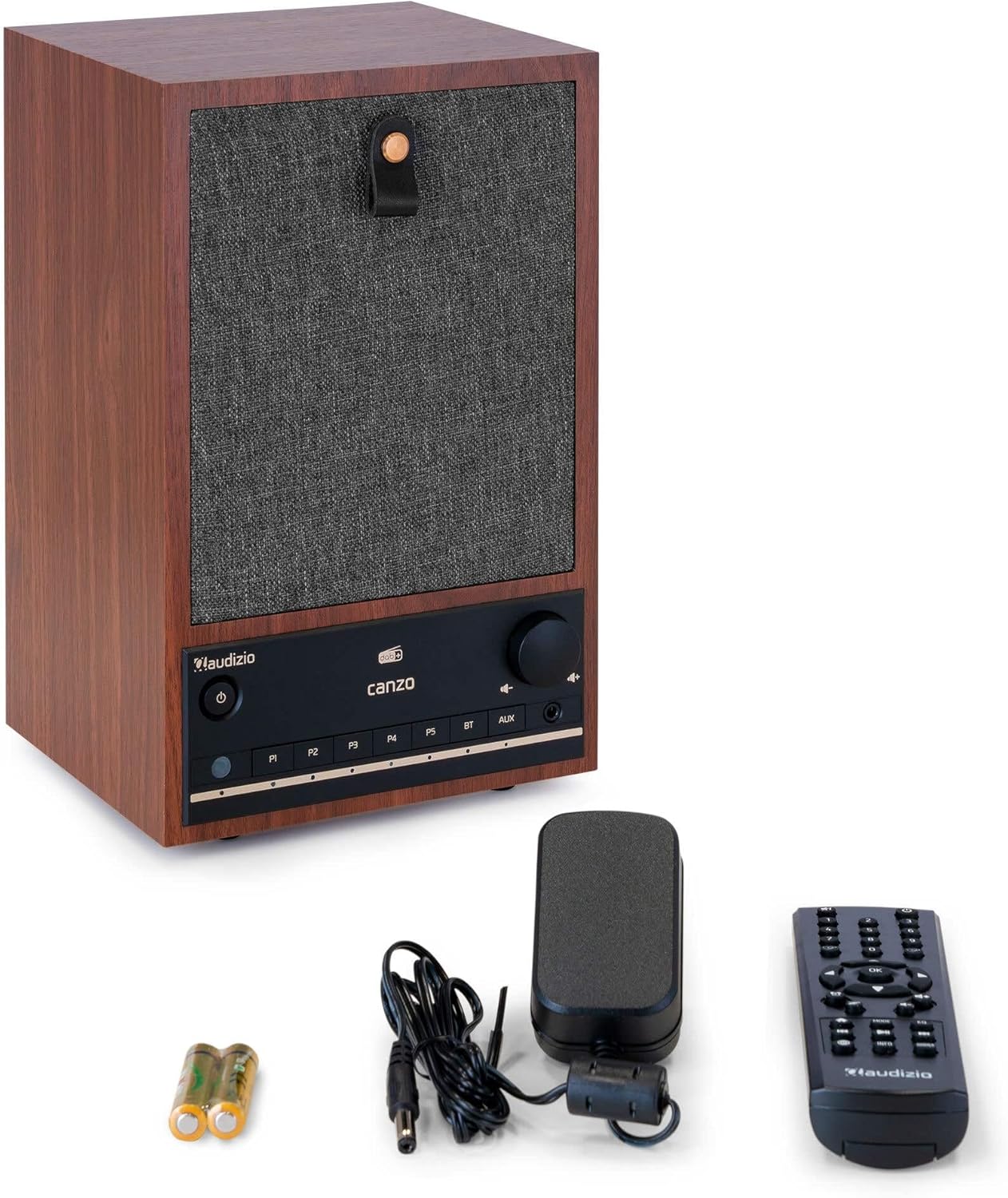
Figure 3.1: Audizio Canzo radio with its accessories.
4. സജ്ജീകരണം
4.1 ബന്ധിപ്പിക്കുന്ന പവർ
- Insert the DC plug of the power adapter into the ഡിസി ഐഎൻ port on the back of the radio.
- Plug the power adapter into a standard wall outlet (220V).
- ഫ്ലിപ്പുചെയ്യുക ഓൺ/ഓഫ് switch on the back of the unit to the ON സ്ഥാനം.
4.2 ആന്റിന കണക്ഷൻ
For optimal DAB+ and FM reception, extend the telescopic antenna located on the back of the unit. Adjust its position for the best signal.

Figure 4.1: Rear panel with power input, audio ports, USB, LAN, and antenna.
4.3 പ്രാരംഭ പവർ ഓണും നെറ്റ്വർക്ക് സജ്ജീകരണവും
- അമർത്തുക ശക്തി button on the front panel or remote control to turn on the radio.
- The display will show the Audizio logo and then guide you through the initial setup wizard.
- നിങ്ങൾ ഇഷ്ടപ്പെടുന്ന ഭാഷ തിരഞ്ഞെടുക്കുക.
- The radio will prompt you to connect to a network. Choose വൈഫൈ or ലാൻ.
- വൈഫൈയ്ക്ക്: Select your Wi-Fi network from the list and enter the password using the navigation buttons and OK ബട്ടൺ.
- For LAN: Connect an Ethernet cable from your router to the ലാൻ port on the back of the radio. The connection should be established automatically.
- Once connected, the radio will update the time and date automatically.
5. പ്രവർത്തന നിർദ്ദേശങ്ങൾ
5.1 അടിസ്ഥാന നിയന്ത്രണങ്ങൾ
The front panel features a power button, preset buttons (P1-P5), Bluetooth (BT) and AUX input buttons, a volume knob, and navigation controls. The remote control provides full access to all functions.
5.2 മോഡ് തിരഞ്ഞെടുക്കൽ
അമർത്തുക മോഡ് button on the radio or remote control to cycle through available modes: Internet Radio, DAB+, FM, Bluetooth, AUX, and USB Playback.
5.3 ഇൻ്റർനെറ്റ് റേഡിയോ
- തിരഞ്ഞെടുക്കുക ഇൻ്റർനെറ്റ് റേഡിയോ മോഡ്.
- Use the navigation buttons to browse stations by location, genre, or search.
- അമർത്തുക OK ഒരു സ്റ്റേഷൻ തിരഞ്ഞെടുക്കാൻ.
- To save a station as a preset, press and hold one of the P1-P5 buttons until the display confirms.
5.4 DAB+ റേഡിയോ
- തിരഞ്ഞെടുക്കുക DAB+ മോഡ്.
- ലഭ്യമായ DAB+ സ്റ്റേഷനുകൾക്കായി റേഡിയോ യാന്ത്രികമായി സ്കാൻ ചെയ്യും.
- Use the navigation buttons to scroll through the list of found stations.
- അമർത്തുക OK ഒരു സ്റ്റേഷൻ തിരഞ്ഞെടുക്കാൻ.
- To save a station as a preset, press and hold one of the P1-P5 ബട്ടണുകൾ.
5.5 എഫ്എം റേഡിയോ
- തിരഞ്ഞെടുക്കുക FM മോഡ്.
- അമർത്തിപ്പിടിക്കുക സ്കാൻ ചെയ്യുക button (usually on the remote or via menu) to auto-scan for FM stations.
- Use the navigation buttons to tune manually or select from scanned stations.
- To save a station as a preset, press and hold one of the P1-P5 ബട്ടണുകൾ.
5.6 ബ്ലൂടൂത്ത് പ്ലേബാക്ക്
- തിരഞ്ഞെടുക്കുക ബ്ലൂടൂത്ത് mode. The radio will enter pairing mode, indicated on the display.
- നിങ്ങളുടെ സ്മാർട്ട്ഫോണിലോ ടാബ്ലെറ്റിലോ, ബ്ലൂടൂത്ത് പ്രവർത്തനക്ഷമമാക്കി ലഭ്യമായ ഉപകരണങ്ങൾക്കായി തിരയുക.
- Select "Audizio Canzo" from the list to pair.
- ജോടിയാക്കിയാൽ, നിങ്ങളുടെ ഉപകരണത്തിൽ നിന്ന് റേഡിയോ വഴി ഓഡിയോ പ്ലേ ചെയ്യാൻ കഴിയും.
5.7 AUX ഇൻപുട്ട്
- ഒരു ബാഹ്യ ഓഡിയോ ഉപകരണം (ഉദാ. MP3 പ്ലെയർ) ഇതിലേക്ക് ബന്ധിപ്പിക്കുക ഓക്സ് ഇൻ port on the back of the radio using a 3.5mm audio cable.
- തിരഞ്ഞെടുക്കുക ഓക്സ് മോഡ്.
- Audio from the connected device will now play through the radio.
5.8 യുഎസ്ബി പ്ലേബാക്ക്
- ഓഡിയോ അടങ്ങിയ യുഎസ്ബി ഫ്ലാഷ് ഡ്രൈവ് ചേർക്കുക fileഎസ് USB പ്ലേബാക്ക് port on the back of the radio.
- തിരഞ്ഞെടുക്കുക USB മോഡ്.
- Use the navigation buttons to browse and select audio fileപ്ലേബാക്കിനായി.
5.9 അലാറം ക്ലോക്കും സ്ലീപ്പ് ടൈമറും
- അലാറം: Access the Alarm settings via the menu. Set up to two alarms with desired time, source (buzzer, radio), and volume.
- സ്ലീപ്പ് ടൈമർ: Access the Sleep Timer settings via the menu. Set a duration (e.g., 15, 30, 60 minutes) after which the radio will automatically turn off.
- സ്നൂസ്: അലാറം മുഴങ്ങുമ്പോൾ, അമർത്തുക സ്നൂസ് ചെയ്യുക button on the remote or radio to temporarily silence it.
6. പരിപാലനം
6.1 വൃത്തിയാക്കൽ
To clean the radio, use a soft, dry, lint-free cloth. Do not use abrasive cleaners, waxes, or solvents as they may damage the finish or internal components.
6.2 സംഭരണം
യൂണിറ്റ് ദീർഘനേരം സൂക്ഷിക്കുകയാണെങ്കിൽ, പവർ ഔട്ട്ലെറ്റിൽ നിന്ന് അത് വിച്ഛേദിച്ച് നേരിട്ടുള്ള സൂര്യപ്രകാശത്തിൽ നിന്നും കടുത്ത താപനിലയിൽ നിന്നും അകലെ തണുത്തതും വരണ്ടതുമായ സ്ഥലത്ത് സൂക്ഷിക്കുക.
7. പ്രശ്നപരിഹാരം
| പ്രശ്നം | സാധ്യമായ കാരണം | പരിഹാരം |
|---|---|---|
| ശക്തിയില്ല | Power adapter not connected; ON/OFF switch is OFF. | Ensure power adapter is securely connected and ON/OFF switch is ON. |
| ശബ്ദമില്ല | Volume too low; incorrect source selected; headphones connected. | ശബ്ദം കൂട്ടുക; ശരിയായ ഇൻപുട്ട് മോഡ് തിരഞ്ഞെടുക്കുക; ഹെഡ്ഫോണുകൾ വിച്ഛേദിക്കുക. |
| Wi-Fi-യിലേക്ക് കണക്റ്റുചെയ്യാൻ കഴിയില്ല | Incorrect password; router too far; network issue. | Verify Wi-Fi password; move radio closer to router; restart router. |
| മോശം DAB+/FM റിസപ്ഷൻ | ആന്റിന നീട്ടിയിട്ടില്ല; ദുർബലമായ സിഗ്നൽ ഏരിയ. | Fully extend and adjust the telescopic antenna; try repositioning the radio. |
| റിമോട്ട് കൺട്രോൾ പ്രവർത്തിക്കുന്നില്ല | Batteries depleted; obstruction between remote and radio. | Replace remote control batteries; ensure clear line of sight to the radio's sensor. |
8 സ്പെസിഫിക്കേഷനുകൾ
| ഫീച്ചർ | സ്പെസിഫിക്കേഷൻ |
|---|---|
| മോഡൽ നമ്പർ | Canzo |
| ഉൽപ്പന്ന അളവുകൾ | 22.5 x 20.5 x 34 സെ.മീ |
| ഇനത്തിൻ്റെ ഭാരം | 2.9 കിലോഗ്രാം |
| നിറം | വാൽനട്ട് |
| സ്ക്രീൻ വലിപ്പം | 2.4 ഇഞ്ച് |
| കണക്റ്റിവിറ്റി ടെക്നോളജി | Aux, Bluetooth, Wi-Fi, LAN |
| ബ്ലൂടൂത്ത് പതിപ്പ് | 5.3 |
| പിന്തുണയ്ക്കുന്ന റേഡിയോ ബാൻഡുകൾ | DAB+, FM, ഇന്റർനെറ്റ് റേഡിയോ |
| പവർ ഉറവിടം | Corded Electric (220 Volt) |
| പ്രത്യേക സവിശേഷതകൾ | Integrated Clock, Sleep Timer, Alarm, Remote Control, Preset Stations |
| അനുയോജ്യമായ ഉപകരണങ്ങൾ | Smartphone, Tablet, Headphones, MP3 Player, USB Storage Device |
9. വാറൻ്റിയും പിന്തുണയും
For warranty information and technical support, please refer to the warranty card included with your product or contact your retailer. Keep your proof of purchase for any warranty claims.