ആമുഖം
The Generic PowerLite Pro 3 is a powerful and versatile searchlight designed for various applications, including outdoor activities, emergencies, and general illumination. It features multiple lighting modes, dual charging capabilities (USB and solar), and a power bank function to charge other electronic devices. This manual provides essential information for the safe and efficient use of your PowerLite Pro 3.
പാക്കേജ് ഉള്ളടക്കം
- 1 x Generic PowerLite Pro 3 Searchlight
- 1 x USB Charging Cable (for Android devices)
- 1 x ഉപയോക്തൃ മാനുവൽ
പ്രധാന സവിശേഷതകൾ
- Multiple Headlights: Combines three spotlights for broad illumination.
- ഇരട്ട ചാർജിംഗ്: Supports USB charging and integrated solar panel for outdoor recharging.
- പവർ ബാങ്ക് പ്രവർത്തനം: USB output to charge mobile phones and other electronic devices.
- ദീർഘകാല ബാറ്ററി: Equipped with a powerful battery for extended runtime.
- മൂന്ന് ലൈറ്റിംഗ് മോഡുകൾ: Strong light, weak light, and SOS mode.
- മോടിയുള്ള ഡിസൈൻ: Water-repellent and impact-resistant, suitable for outdoor use.
- പോർട്ടബിൾ: എളുപ്പത്തിൽ കൊണ്ടുപോകുന്നതിന് ഒതുക്കമുള്ളതും ഭാരം കുറഞ്ഞതും.
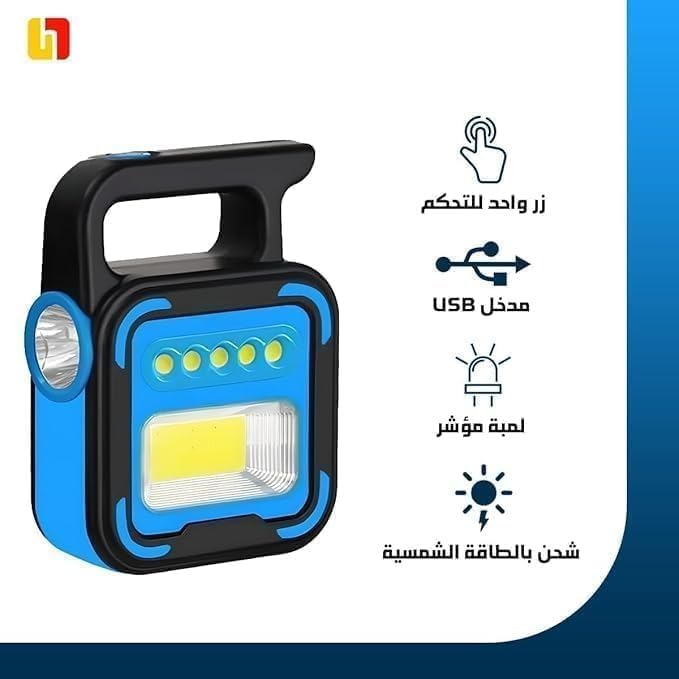
ചിത്രം 1: The PowerLite Pro 3 searchlight, highlighting its single control button, USB input, indicator light, and solar charging capability.
സജ്ജമാക്കുക
- അൺപാക്ക് ചെയ്യുന്നു: Carefully remove the PowerLite Pro 3 and all accessories from the packaging.
- പ്രാരംഭ ചാർജ്: Before first use, fully charge the device using the provided USB cable. Connect the USB cable to the flashlight's USB input and a suitable USB power adapter (not included). The indicator light will show charging status.
- Solar Charging (Optional): For initial solar charging, place the device with the solar panel facing direct sunlight for several hours.
Charging the PowerLite Pro 3
USB ചാർജിംഗ്
To charge the PowerLite Pro 3 via USB:
- Locate the USB input port on the device.
- Connect the provided USB cable to the flashlight's USB input.
- Plug the other end of the USB cable into a USB power source (e.g., wall adapter, computer USB port).
- The indicator light will illuminate to show that charging is in progress. Once fully charged, the indicator light may change color or turn off.
സോളാർ ചാർജിംഗ്
The integrated solar panel allows for convenient outdoor charging:
- Place the PowerLite Pro 3 in direct sunlight, ensuring the solar panel is fully exposed.
- Solar charging is slower than USB charging and is ideal for maintaining charge or for emergency power in outdoor environments.
ഓപ്പറേഷൻ
Turning On/Off and Changing Modes
The PowerLite Pro 3 features a single control button for all lighting functions:
- ആദ്യ അമർത്തുക: Turns on the flashlight in ശക്തമായ വെളിച്ചം മോഡ്.
- രണ്ടാമത്തെ അമർത്തുക: എന്നതിലേക്ക് മാറുന്നു ദുർബലമായ വെളിച്ചം മോഡ്.
- മൂന്നാമത്തെ അമർത്തുക: സജീവമാക്കുന്നു SOS mode (flashing light).
- നാലാമത്തെ അമർത്തുക: Turns the flashlight ഓഫ്.
ഒരു പവർ ബാങ്കായി ഉപയോഗിക്കുന്നു
The PowerLite Pro 3 can charge other electronic devices:
- Locate the USB output port on the device.
- Connect your device's charging cable to the PowerLite Pro 3's USB output port.
- Connect the other end of the cable to your mobile phone or other electronic device.
- ചാർജിംഗ് സ്വയമേവ ആരംഭിക്കും.

ചിത്രം 2: The PowerLite Pro 3 connected via USB cable to charge a smartphone, demonstrating its power bank functionality.

ചിത്രം 3: The PowerLite Pro 3 shown charging various mobile devices, including a smartphone, tablet, and portable gaming console, illustrating its versatility as a charging station.
മെയിൻ്റനൻസ്
- വൃത്തിയാക്കൽ: സോഫ്റ്റ്, ഡി ഉപയോഗിച്ച് ഉപകരണം തുടയ്ക്കുകamp തുണി. ഉരച്ചിലുകളുള്ള ക്ലീനറുകളോ ലായകങ്ങളോ ഉപയോഗിക്കരുത്.
- സംഭരണം: Store the PowerLite Pro 3 in a cool, dry place when not in use. If storing for extended periods, ensure it is partially charged and recharge every 3-6 months to maintain battery health.
- ജല പ്രതിരോധം: The device is water-repellent, but not fully submersible. Avoid prolonged exposure to heavy rain or submersion in water.
ട്രബിൾഷൂട്ടിംഗ്
| പ്രശ്നം | സാധ്യമായ കാരണം | പരിഹാരം |
|---|---|---|
| ടോർച്ച് ഓണാകുന്നില്ല. | കുറഞ്ഞ ബാറ്ററി. | Charge the device using the USB cable or solar panel. |
| Device not charging via USB. | തെറ്റായ USB കേബിൾ അല്ലെങ്കിൽ പവർ സ്രോതസ്സ്. | മറ്റൊരു USB കേബിളോ പവർ അഡാപ്റ്ററോ പരീക്ഷിക്കുക. കണക്ഷനുകൾ സുരക്ഷിതമാണെന്ന് ഉറപ്പാക്കുക. |
| Solar charging is slow or ineffective. | Insufficient direct sunlight; panel obstructed. | Place the device in direct, unobstructed sunlight. Solar charging is supplementary and slower than USB. |
| ബാഹ്യ ഉപകരണങ്ങൾ ചാർജ് ചെയ്യാൻ കഴിയില്ല. | Low battery on PowerLite Pro 3; incorrect cable. | Ensure the PowerLite Pro 3 is sufficiently charged. Use the correct charging cable for your external device. |
സ്പെസിഫിക്കേഷനുകൾ
- മോഡൽ: PowerLite Pro 3
- ഊർജ്ജ സ്രോതസ്സ്: Battery Powered (rechargeable), Solar
- ലൈറ്റിംഗ് മോഡുകൾ: Strong, Weak, SOS
- ചാർജിംഗ് ഇൻപുട്ട്: USB
- ഔട്ട്പുട്ട്: യുഎസ്ബി (ബാഹ്യ ഉപകരണങ്ങൾ ചാർജ് ചെയ്യുന്നതിന്)
- ജല പ്രതിരോധ നില: വാട്ടർ റിപ്പല്ലൻ്റ്
- അളവുകൾ: Approximately 10D x 10W x 10H centimeters
- ഭാരം: ഏകദേശം 10 ഗ്രാം
- വാല്യംtage: 20 Volts (internal operating voltage)
വാറൻ്റിയും പിന്തുണയും
For warranty information or technical support, please refer to the retailer's policy or contact the manufacturer directly. Keep your purchase receipt as proof of purchase.
Extended warranty options may be available from third-party providers. Please check with your retailer for details.


