
B0F78PT5X3
Portable Dual 8-inch Bluetooth Speaker System User Manual
Model: B0F78PT5X3
ആമുഖം
വാങ്ങിയതിന് നന്ദി.asing the Portable Dual 8-inch Bluetooth Speaker System. This manual provides essential information for the safe and efficient operation of your speaker system. Please read this manual thoroughly before using the product and retain it for future reference.

Image: The Portable Dual 8-inch Bluetooth Speaker System, showcasing its main unit with integrated pull rod, two wireless microphones, and a remote control. The speaker features dual 8-inch drivers with colorful LED rings.
പ്രധാനപ്പെട്ട സുരക്ഷാ നിർദ്ദേശങ്ങൾ
- സ്പീക്കറിനെ മഴയിലോ ഈർപ്പത്തിലോ തുറന്നുകാട്ടരുത്.
- വെൻ്റിലേഷൻ ഓപ്പണിംഗുകളൊന്നും തടയരുത്.
- റേഡിയറുകൾ, ഹീറ്റ് രജിസ്റ്ററുകൾ, സ്റ്റൗകൾ, അല്ലെങ്കിൽ മറ്റ് ഉപകരണങ്ങൾ (ഉൾപ്പെടെ) പോലെയുള്ള താപ സ്രോതസ്സുകൾക്ക് സമീപം ഇൻസ്റ്റാൾ ചെയ്യരുത്. ampലൈഫയറുകൾ) ചൂട് ഉത്പാദിപ്പിക്കുന്നത്.
- നിർമ്മാതാവ് വ്യക്തമാക്കിയ അറ്റാച്ച്മെൻ്റുകൾ/ആക്സസറികൾ മാത്രം ഉപയോഗിക്കുക.
- എല്ലാ സേവനങ്ങളും യോഗ്യതയുള്ള സേവന ഉദ്യോഗസ്ഥർക്ക് റഫർ ചെയ്യുക.
- ശക്തമായ കാന്തികക്ഷേത്രങ്ങളിൽ നിന്ന് സ്പീക്കറെ അകറ്റി നിർത്തുക.
സജ്ജീകരണ ഗൈഡ്
അൺപാക്ക് ചെയ്യുന്നു
പാക്കേജിംഗിൽ നിന്ന് എല്ലാ ഘടകങ്ങളും ശ്രദ്ധാപൂർവ്വം നീക്കം ചെയ്യുക. താഴെ പട്ടികപ്പെടുത്തിയിരിക്കുന്ന എല്ലാ ഇനങ്ങളും ഉണ്ടെന്ന് ഉറപ്പാക്കുക:
- Portable Dual 8-inch Bluetooth Speaker System
- വയർലെസ് മൈക്രോഫോണുകൾ (x2)
- റിമോട്ട് കൺട്രോൾ
- പവർ അഡാപ്റ്റർ
- ഉപയോക്തൃ മാനുവൽ
പ്രാരംഭ ചാർജിംഗ്
Before first use, fully charge the speaker's internal 12V/9Ah battery. Connect the power adapter to the speaker's charging port and plug it into a standard wall outlet. The charging indicator will show the charging status.
Positioning the Speaker
Place the speaker on a stable, flat surface. For optimal sound dispersion, position it in an open area, away from obstructions. The integrated pull rod and wheels allow for easy transport.

Image: A visual representation highlighting key structural and component advantages of the speaker, such as its durable plastic shell, protective iron mesh covers for the speakers, the 12V/9Ah battery, and the four 8-inch speaker drive units.
പ്രവർത്തന നിർദ്ദേശങ്ങൾ
പവർ ചെയ്യുന്നത് ഓൺ/ഓഫ്
Locate the power button on the control panel. Press and hold to turn the speaker ON or OFF.
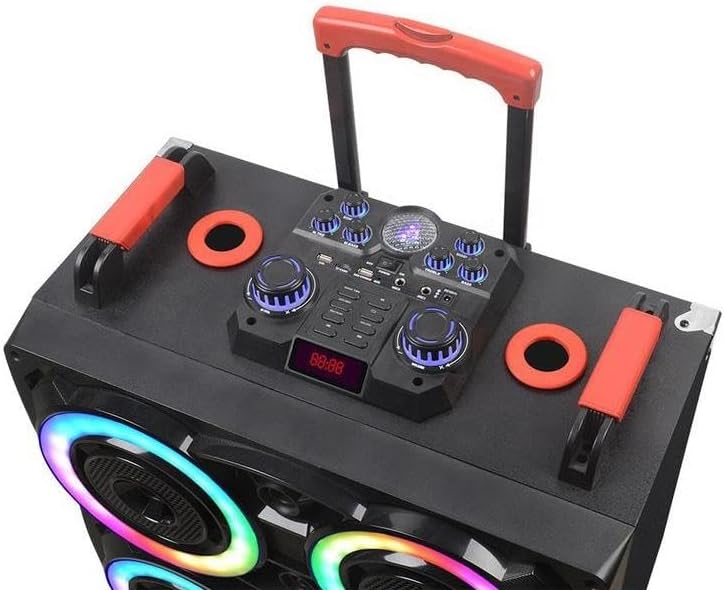
ചിത്രം: വിശദമായ ഒരു ചിത്രം view of the speaker's top control panel, showing the various input ports, volume knobs, mode selection buttons, and the digital display for controlling audio playback and settings.
ബ്ലൂടൂത്ത് കണക്റ്റിവിറ്റി
- Turn on the speaker. It will automatically enter Bluetooth pairing mode.
- നിങ്ങളുടെ ഉപകരണത്തിൽ (സ്മാർട്ട്ഫോൺ, ടാബ്ലെറ്റ് മുതലായവ), ബ്ലൂടൂത്ത് പ്രവർത്തനക്ഷമമാക്കി ലഭ്യമായ ഉപകരണങ്ങൾക്കായി തിരയുക.
- Select "Portable Speaker" (or similar name) from the list.
- Once connected, you will hear a confirmation sound. The Bluetooth range is approximately 10 meters.
Using Wireless Microphones
The speaker system includes two wireless microphones. Turn on the microphones, and they will automatically connect to the speaker. Adjust microphone volume using the dedicated knob on the control panel.
റിമോട്ട് കൺട്രോൾ ഓപ്പറേഷൻ
The included remote control allows for convenient adjustments of volume, track selection, mode switching, and light effects from a distance.
ലൈറ്റ് ഇഫക്റ്റുകൾ
The speaker is equipped with seven-color RGB lights. Use the control panel or remote to cycle through different lighting modes or turn them off.

Image: The speaker highlighting its capabilities for "KARAOKE CINEMA" with features like "Heavy Bass" and "Colorful Lamp" effects, indicating its suitability for entertainment purposes.
പരിപാലനവും പരിചരണവും
- വൃത്തിയാക്കൽ: സ്പീക്കറിന്റെ പുറംഭാഗം വൃത്തിയാക്കാൻ മൃദുവായതും ഉണങ്ങിയതുമായ തുണി ഉപയോഗിക്കുക. അബ്രസീവ് ക്ലീനറുകളോ ലായകങ്ങളോ ഉപയോഗിക്കരുത്.
- സംഭരണം: ദീർഘനേരം ഉപയോഗിക്കാത്തപ്പോൾ, സ്പീക്കർ തണുത്തതും വരണ്ടതുമായ സ്ഥലത്ത് സൂക്ഷിക്കുക, നേരിട്ടുള്ള സൂര്യപ്രകാശത്തിൽ നിന്നും കടുത്ത താപനിലയിൽ നിന്നും അകറ്റി നിർത്തുക.
- ബാറ്ററി കെയർ: To prolong battery life, avoid fully discharging the battery frequently. Recharge the speaker regularly, even if not in use.
ട്രബിൾഷൂട്ടിംഗ്
| പ്രശ്നം | സാധ്യമായ കാരണം | പരിഹാരം |
|---|---|---|
| ശക്തിയില്ല | ബാറ്ററി തീർന്നു. | സ്പീക്കർ ഒരു പവർ സ്രോതസ്സുമായി ബന്ധിപ്പിച്ച് ബാറ്ററി ചാർജ് ചെയ്യുക. |
| ശബ്ദമില്ല | Volume is too low; incorrect input mode; device not connected. | Increase volume; select correct input mode (e.g., Bluetooth); ensure device is paired. |
| ബ്ലൂടൂത്ത് വിച്ഛേദിക്കൽ | Device is out of range; interference. | Move device closer to the speaker (within 10m); avoid obstacles. |
| മൈക്രോഫോൺ പ്രവർത്തിക്കുന്നില്ല | Microphone is off; battery low in microphone. | Ensure microphone is turned on; replace microphone batteries if applicable. |
സ്പെസിഫിക്കേഷനുകൾ
| ഫീച്ചർ | വിശദാംശങ്ങൾ |
|---|---|
| ബ്രാൻഡ് | ജനറിക് |
| മോഡൽ | B0F78PT5X3 |
| സ്പീക്കർ വലിപ്പം | Dual 8-inch (x4 speakers total) |
| പവർ ഔട്ട്പുട്ട് | 80W |
| കണക്റ്റിവിറ്റി | ബ്ലൂടൂത്ത് 5.0 |
| ബ്ലൂടൂത്ത് ശ്രേണി | <10 മീറ്റർ |
| ബാറ്ററി | 12V/9Ah |
| ലൈറ്റിംഗ് | Seven-color RGB lights |
| അളവുകൾ (L x W x H) | 22.83 x 25.98 x 13.77 ഇഞ്ച് |
| മെറ്റീരിയൽ | പ്ലാസ്റ്റിക് |
| നിറം | കറുപ്പ് |
| മാതൃരാജ്യം | ചൈന |

Image: A diagram illustrating the speaker's physical dimensions and key technical specifications such as power output, speaker unit size, battery capacity, and various functions like USB, TWS, Bluetooth, FM, TF card, and remote control.
വാറൻ്റിയും പിന്തുണയും
For warranty information and technical support, please contact the manufacturer or the retailer from whom you purchased this product. Please retain your proof of purchase for any warranty claims.
നിർമ്മാതാവ്: സെൽവിയ
Ask a question about this manual
Ask about setup, troubleshooting, compatibility, parts, safety, or missing instructions. Manuals+ will review the question and use this page’s manual context to help answer it.