
ആമുഖം
This manual provides detailed instructions for the setup, operation, maintenance, and troubleshooting of your ATTACK SHARK X82 PRO HE Magnetic Gaming Keyboard. Designed for high-performance gaming, this keyboard features advanced magnetic switches, a rapid trigger system, and versatile connectivity options. Please read this manual thoroughly to ensure optimal performance and longevity of your device.

Image: The ATTACK SHARK X82 PRO HE Magnetic Gaming Keyboard in its Comic color variant, showcasing its compact layout and RGB lighting.
ഉൽപ്പന്ന സവിശേഷതകൾ
- Ultra-Fast 8000Hz Polling Rate: Achieves a 0.1ms response time with a 128K scan rate for competitive gaming.
- Magnetic Hall Effect Switches: Features custom-designed "Magnetic Crystal" switches, compatible with N-pole-down magnetic switches for customization. Includes precision-tuned stabilizers and factory-lubed components.
- Adjustable Actuation Rapid Trigger: Offers fully customizable RT activation points from 0.1–3.4mm with 0.01mm trigger precision and dual zero dead zones.
- കരുത്തുറ്റ ബിൽഡ് ക്വാളിറ്റി: Constructed with a top-mount structure and aluminum positioning plate for enhanced typing consistency and stability. Incorporates dual-layer PORON sandwich foam for improved acoustics.
- ട്രൈ-മോഡ് വയർലെസ് കണക്റ്റിവിറ്റി: Supports 2.4GHz wireless, Bluetooth, and wired USB-C connections.
- ദീർഘകാല ബാറ്ററി: Equipped with a 5000mAh battery for extended wireless usage.
- C01Ultra Aviation Cable: Provides stable data transmission and fast charging in wired mode, featuring magnetic shielding.
- Full RGB Customization: Offers 16.8 million colors, dynamic lighting modes, and custom light strips.
- ഡ്യൂറബിൾ കീക്യാപ്പുകൾ: Comes with factory original-profile PBT keycaps, including 5-side sublimated "Manga" edition keycaps.
- ക്ലൗഡ് അധിഷ്ഠിത ഡ്രൈവർ: Web-based software for easy setup of lighting, macros, actuation points, and game profiles without installation.

ചിത്രം: ഒരു ഓവർview of the ATTACK SHARK X82 PRO HE keyboard highlighting its key features such as 75% layout, magnetic switches, tri-mode connection, QMK web driver, PBT keycaps, 16.8M RGB lighting, and 8KHz polling rate.
സജ്ജമാക്കുക
1. അൺബോക്സിംഗും ഉള്ളടക്കവും
ഉൽപ്പന്ന പാക്കേജിംഗ് ശ്രദ്ധാപൂർവ്വം തുറക്കുക. എല്ലാ ഘടകങ്ങളും ഉണ്ടെന്ന് ഉറപ്പാക്കുക:
- ATTACK SHARK X82 PRO HE Magnetic Gaming Keyboard
- USB Type-C to Type-A Cable (C01Ultra Aviation Cable)
- കീക്യാപ്പും സ്വിച്ച് പുള്ളറും
- 2.4GHz Wireless Dongle (often stored in a compartment on the keyboard)

Image: The C01Ultra RGB Coiled Keyboard Cable, a Type-C to USB-A HyperSpeed line with 8KHz return rate, included with the keyboard.
2. പ്രാരംഭ കണക്ഷൻ
The keyboard supports three connection modes: wired, 2.4GHz wireless, and Bluetooth.
- വയർഡ് മോഡ്: Connect the provided USB Type-C cable to the keyboard and your computer's USB-A port. The keyboard will automatically switch to wired mode and begin charging.
- 2.4GHz വയർലെസ് മോഡ്: Locate the 2.4GHz wireless dongle (usually stored in a slot on the keyboard's underside). Plug the dongle into an available USB-A port on your computer. Switch the keyboard's mode selector to 2.4G. The keyboard should connect automatically.
- ബ്ലൂടൂത്ത് മോഡ്: Switch the keyboard's mode selector to BT. On your computer or device, search for Bluetooth devices and select "ATTACK SHARK X82 PRO HE" to pair.

Image: The ATTACK SHARK X82 PRO HE keyboard displaying its tri-mode connectivity options (Bluetooth, 2.4G Wireless, Wired) and compatibility with various devices including Windows, Mac, gaming consoles, laptops, PCs, smartphones, and tablets.
പ്രവർത്തന നിർദ്ദേശങ്ങൾ
അടിസ്ഥാന ഉപയോഗം
Once connected, the keyboard functions as a standard QWERTY keyboard. The 75% layout provides essential keys while maintaining a compact form factor.
ഫംഗ്ഷൻ കീ കോമ്പിനേഷനുകൾ (FN)
The keyboard features an FN key for accessing secondary functions and controlling RGB lighting. Specific combinations may vary, but common functions include:
- FN + \|: ലൈറ്റ് മോഡ് മാറുക
- FN + നൽകുക: ഇളം നിറം മാറുക
- FN + മുകളിലേക്കുള്ള അമ്പടയാളം: ബാക്ക്ലൈറ്റ് തെളിച്ചം വർദ്ധിപ്പിക്കുക
- FN + താഴേക്കുള്ള അമ്പടയാളം: ബാക്ക്ലൈറ്റിന്റെ തെളിച്ചം കുറയ്ക്കുക
- FN + ഇടത് അമ്പടയാളം: ബാക്ക്ലൈറ്റിന്റെ വേഗത കുറയ്ക്കുക
- FN + വലത് അമ്പടയാളം: ബാക്ക്ലൈറ്റ് വേഗത വർദ്ധിപ്പിക്കുക
- FN + ക്യാപ്സ്: Switch light bar mode
- FN + A: Switch light bar color
- എഫ്എൻ + എക്സ്: ഇളം നിറം മാറുക
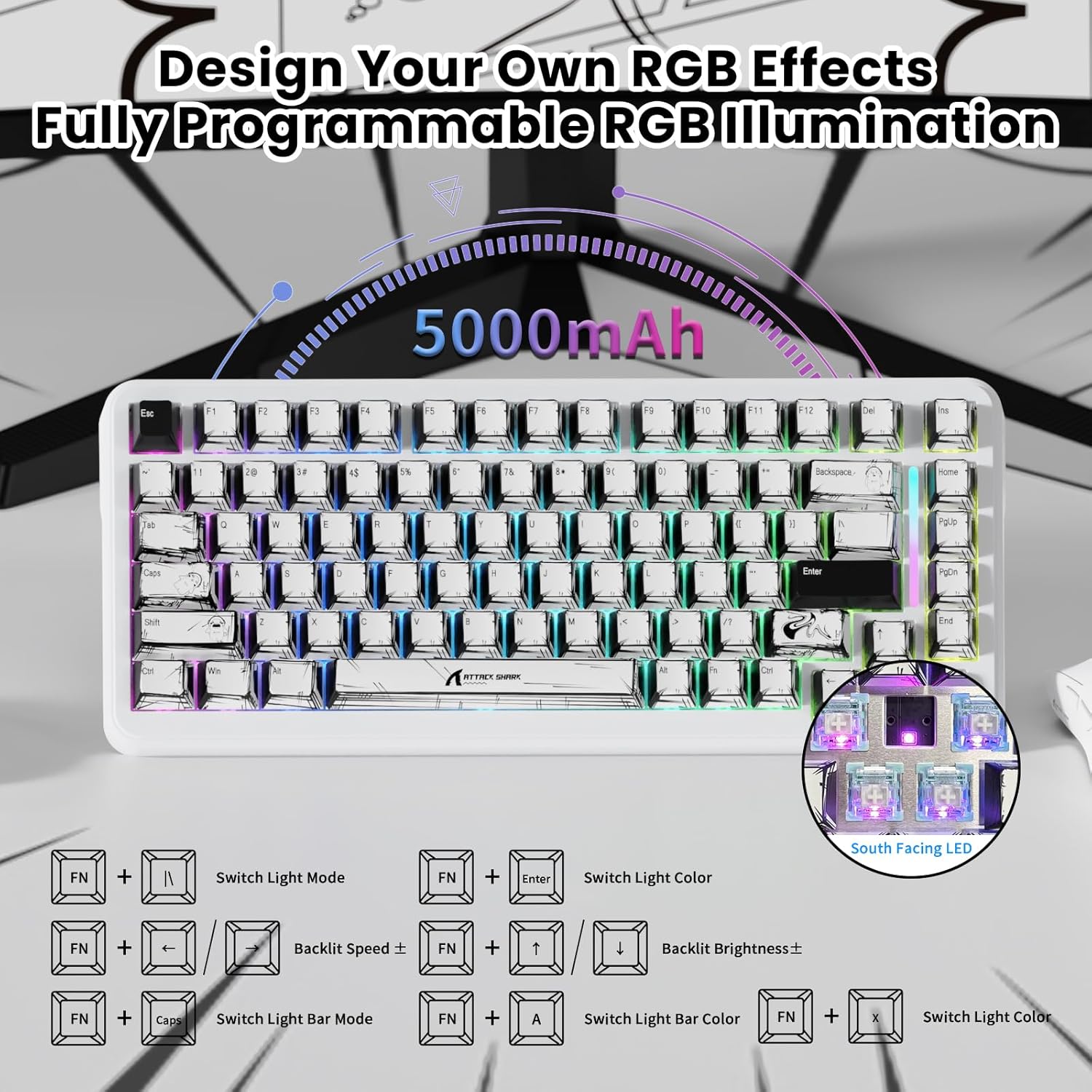
Image: The ATTACK SHARK X82 PRO HE keyboard illustrating various FN key combinations to control RGB lighting effects, brightness, and speed.
കണക്റ്റിവിറ്റി മോഡുകൾ
The X82 PRO HE offers flexible connectivity to suit various setups:
- വയേർഡ് (USB-C): Provides the most stable connection with an 8000Hz polling rate for minimal latency. Ideal for competitive gaming.
- 2.4GHz വയർലെസ്: Utilizes a dedicated USB dongle for a low-latency wireless experience, suitable for gaming without cables.
- ബ്ലൂടൂത്ത്: Connects to a wide range of devices (laptops, tablets, smartphones) for general use.
To switch between modes, use the physical switch located on the keyboard. The keyboard is compatible with Windows and Mac operating systems. For PS4/Xbox connections, an external converter may be required.
Video: Demonstrates the Hall Effect Rapid Trigger Keyboard with 0.01mm Precision, showcasing its responsiveness and customization for gaming.
Customization (Software & RGB)
Cloud-Based Driver
X82 PRO HE ഉപയോഗിക്കുന്നത് a web-based cloud driver for comprehensive customization. No software installation is required. Simply connect your keyboard and access the driver via a web ഇതിലേക്ക് ബ്രൗസർ:
- RGB ലൈറ്റിംഗ് ഇഫക്റ്റുകളും നിറങ്ങളും ക്രമീകരിക്കുക.
- Set macros for complex commands.
- Fine-tune actuation points for individual keys (0.1-3.4mm).
- Configure game modes and user profiles.

Image: The software interface for the ATTACK SHARK X82 PRO HE, showing options to tailor your gaming setup, including DKS, Snap Tap, and Zero Deadzone settings.
RGB ലൈറ്റിംഗ്
Beyond FN key combinations, the cloud driver allows for advanced RGB customization, including per-key effects and dynamic lighting modes. The keyboard features 16.8 million colors and custom light strips for a personalized aesthetic.
Video: A demonstration of the customizable RGB lighting on the magnetic keyboard, suitable for various gaming genres like FPS, MOBA, and MMO.
മെയിൻ്റനൻസ്
വൃത്തിയാക്കൽ
നിങ്ങളുടെ കീബോർഡിന്റെ രൂപഭാവവും പ്രവർത്തനക്ഷമതയും നിലനിർത്താൻ:
- കീബോർഡിന്റെ ഉപരിതലം തുടയ്ക്കാൻ മൃദുവായതും ഉണങ്ങിയതുമായ തുണി ഉപയോഗിക്കുക.
- കീക്യാപ്പുകൾക്കിടയിലുള്ള പൊടിയും അവശിഷ്ടങ്ങളും ഉണ്ടെങ്കിൽ, കംപ്രസ് ചെയ്ത വായു ഉപയോഗിക്കുക.
- കഠിനമായ രാസവസ്തുക്കളോ ഉരച്ചിലുകളോ ഉപയോഗിക്കുന്നത് ഒഴിവാക്കുക.
കീക്യാപ്പും സ്വിച്ചും മാറ്റിസ്ഥാപിക്കൽ
The included keycap and switch puller can be used to remove keycaps and magnetic switches for cleaning or replacement. Exercise caution to avoid damaging the switches or PCB.
ട്രബിൾഷൂട്ടിംഗ്
| ഇഷ്യൂ | സാധ്യമായ പരിഹാരം |
|---|---|
| കീബോർഡ് പ്രതികരിക്കുന്നില്ല | Check cable connection (wired mode), ensure dongle is properly inserted (2.4GHz mode), or re-pair via Bluetooth. Ensure keyboard is charged. |
| RGB ലൈറ്റിംഗ് പ്രവർത്തിക്കുന്നില്ല | Verify FN key combinations or check settings in the cloud-based driver. |
| കീകൾ രജിസ്റ്റർ ചെയ്യുന്നില്ല അല്ലെങ്കിൽ ഇരട്ട ടൈപ്പ് ചെയ്യുന്നില്ല. | Clean under keycaps. If issue persists, check actuation settings in the cloud driver. Consider updating keyboard firmware if available. |
| വയർലെസ് കണക്ഷൻ അസ്ഥിരമാണ് | Ensure no interference from other wireless devices. Move closer to the receiver/device. |
For further assistance, refer to the official ATTACK SHARK support resources.
സ്പെസിഫിക്കേഷനുകൾ
| ഫീച്ചർ | വിശദാംശങ്ങൾ |
|---|---|
| മോഡൽ | എക്സ്82 പ്രോ ഹെ |
| പോളിംഗ് നിരക്ക് | 8000Hz (Wired), 1000Hz (2.4GHz/Bluetooth) |
| സ്വിച്ചുകൾ | Magnetic Hall Effect Switches |
| പ്രവർത്തന ശ്രേണി | 0.1mm – 3.4mm (Adjustable) |
| കണക്റ്റിവിറ്റി | Tri-Mode (USB-C Wired, 2.4GHz Wireless, Bluetooth) |
| ബാറ്ററി ശേഷി | 5000mAh |
| കീകാപ്പുകൾ | PBT Double Shot, Manga Graffiti Design |
| ലേഔട്ട് | 75% (83 കീകൾ) |
| RGB ലൈറ്റിംഗ് | 16.8 Million Colors, Customizable Effects |
| അനുയോജ്യമായ ഉപകരണങ്ങൾ | PC, Laptop, Gaming Console, Smartphone, Tablet |
| മെറ്റീരിയൽ | Aluminum (Positioning Plate) |
| ഇനത്തിൻ്റെ ഭാരം | 2.77 പൗണ്ട് |
| പാക്കേജ് അളവുകൾ | 14.48 x 7.6 x 2.13 ഇഞ്ച് |
വാറൻ്റിയും പിന്തുണയും
വാറന്റി വിവരങ്ങൾക്കും സാങ്കേതിക പിന്തുണയ്ക്കും, ദയവായി ഔദ്യോഗിക ATTACK SHARK കാണുക. webസൈറ്റിൽ ബന്ധപ്പെടുകയോ അവരുടെ ഉപഭോക്തൃ സേവനവുമായി ബന്ധപ്പെടുകയോ ചെയ്യുക. ഏതെങ്കിലും വാറന്റി ക്ലെയിമുകൾക്ക് വാങ്ങിയതിന്റെ തെളിവായി നിങ്ങളുടെ വാങ്ങൽ രസീത് സൂക്ഷിക്കുക.