
1. ആമുഖം
This manual provides essential information for setting up, operating, maintaining, and troubleshooting your new Auusda T160R 16-inch laptop. This device is designed for productivity and entertainment, featuring a Ryzen 5 3500U processor, 32GB RAM, and a 1TB SSD, running on Windows 11 Pro.
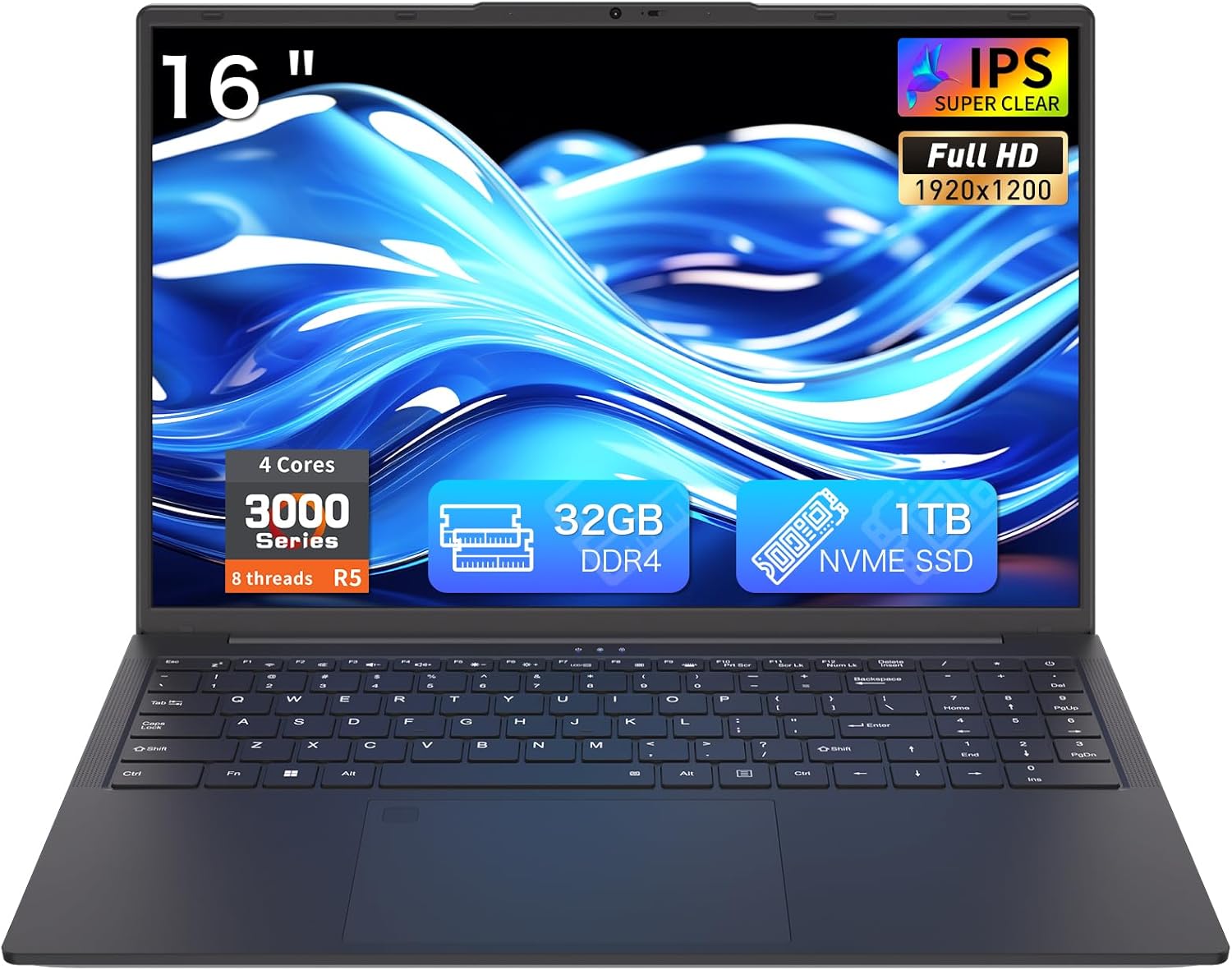
Figure 1: Auusda T160R 16-inch Laptop. This image displays the laptop from the front, highlighting its 16-inch screen, 32GB RAM, 1TB SSD, and Ryzen 5 processor.
2. സജ്ജീകരണം
2.1 അൺബോക്സിംഗും പ്രാരംഭ പരിശോധനയും
പാക്കേജിംഗിൽ നിന്ന് എല്ലാ ഘടകങ്ങളും ശ്രദ്ധാപൂർവ്വം നീക്കം ചെയ്യുക. ബോക്സിൽ ഇവ അടങ്ങിയിരിക്കണം:
- Auusda T160R Laptop
- Power Adapter (19V/3.42A, 3.5 mm plug)
- ഉപയോക്തൃ മാനുവൽ (ഈ പ്രമാണം)
- കീബോർഡ് കവർ
Inspect the laptop and accessories for any signs of damage. If any components are missing or damaged, contact customer support immediately.
Video 1: Unboxing a similar Auusda laptop model. This video demonstrates the unboxing process and initial setup steps, which are generally applicable to the T160R model.
2.2 പ്രാരംഭ പവർ ഓൺ
- Connect the power adapter to the DC3.5mm power port on the left side of the laptop and plug it into a power outlet.
- ലാപ്ടോപ്പ് ലിഡ് തുറക്കുക.
- Press the power button, usually located on the top right of the keyboard or side.
- Windows 11 Pro സജ്ജീകരണം പൂർത്തിയാക്കാൻ ഓൺ-സ്ക്രീൻ നിർദ്ദേശങ്ങൾ പാലിക്കുക.
3. ഘടകങ്ങൾ കഴിഞ്ഞുview
Familiarize yourself with the key components of your Auusda T160R laptop:

Figure 2: Key features of the Auusda T160R laptop, including the Ryzen 5 3500U CPU, 32GB DDR4 RAM, 1TB SSD, 16-inch FHD IPS display, fingerprint unlock, Wi-Fi 6, Bluetooth 5.3, and 5000mAh battery.
3.1 പ്രോസസ്സറും മെമ്മറിയും
The laptop is equipped with a Ryzen 5 3500U 4C8T (2.1-3.7GHz) processor ഒപ്പം 32GB DDR4 റാം, providing smooth performance for multitasking and various applications.

Figure 3: Diagram illustrating the Ryzen 5 3500U processor with 4 cores, 8 threads, 12W TDP, and a maximum frequency of 3.7GHz.
3.2 ഡിസ്പ്ലേ
Enjoy visuals on a 16-inch FHD+ (1920x1200) IPS display with narrow bezels and a 180° hinge for flexible viewing. It includes a 720p HD webവീഡിയോ കോളുകൾക്കുള്ള ക്യാമറ.

Figure 4: The laptop's 16-inch FHD+ IPS display showcasing vibrant colors and wide viewകോണുകൾ.
3.3 കീബോർഡും ടച്ച്പാഡും
The laptop features a full-size backlit keyboard for comfortable typing in various lighting conditions, a സംഖ്യാ കീപാഡ്, ഒപ്പം ഒരു integrated touchpad with a fingerprint reader for secure login.

Figure 5: Close-up of the full-size backlit keyboard and the integrated fingerprint reader on the touchpad.
3.4 പോർട്ടുകളും കണക്റ്റിവിറ്റിയും
The Auusda T160R offers comprehensive connectivity options:
- യുഎസ്ബി-സി പോർട്ട്: Supports 65W fast charging, data transfer, and display output.
- USB-A പോർട്ടുകൾ: Three USB-A ports for connecting peripherals.
- എച്ച്ഡിഎംഐ: Standard HDMI port for external displays.
- SD കാർഡ് സ്ലോട്ട്: Supports up to 2TB microSD cards for expanded storage.
- വയർലെസ്: Wi-Fi 6 and Bluetooth 5.0 for fast and reliable wireless connections.
- ഓഡിയോ ജാക്ക്: 3.5mm audio jack with microphone support.

Figure 6: Detailed diagram showing the various ports on the laptop, including USB, HDMI, SD card slot, and DC-in jack.
4. പ്രവർത്തന നിർദ്ദേശങ്ങൾ
4.1 പവർ ഓൺ/ഓഫ്
- പവർ ഓണാക്കാൻ: Open the lid or press the power button.
- ഷട്ട് ഡൗൺ ചെയ്യാൻ: ആരംഭ ബട്ടൺ ക്ലിക്കുചെയ്യുക, തുടർന്ന് പവർ ബട്ടൺ ക്ലിക്കുചെയ്യുക, തുടർന്ന് 'ഷട്ട് ഡൗൺ' തിരഞ്ഞെടുക്കുക.
- പുനരാരംഭിക്കാൻ: ആരംഭ ബട്ടൺ ക്ലിക്കുചെയ്യുക, തുടർന്ന് പവർ ക്ലിക്കുചെയ്യുക, തുടർന്ന് 'പുനരാരംഭിക്കുക' തിരഞ്ഞെടുക്കുക.
- ഉറങ്ങാൻ: Close the lid or click the Start button, then Power, and select 'Sleep'.
4.2 കീബോർഡും ടച്ച്പാഡും ഉപയോഗം
- ബാക്ക്ലൈറ്റ് കീബോർഡ്: അമർത്തുക Fn + F9 keys to toggle the keyboard backlight on or off.
- ഫിംഗർപ്രിന്റ് റീഡർ: Use the integrated fingerprint reader on the touchpad for quick and secure login. Follow Windows Hello setup instructions to configure your fingerprint.
- ടച്ച്പാഡ് ആംഗ്യങ്ങൾ: The touchpad supports standard Windows gestures for navigation and control.
4.3 ഡിസ്പ്ലേയും Webക്യാമറ
- 180° Hinge: The display can be opened flat to 180 degrees, facilitating screen sharing and collaboration.
- Webcam പ്രൈവസി ഷട്ടർ: Slide the physical shutter located above the webcam to cover or uncover the camera, ensuring your privacy during video calls or when the camera is not in use.
4.4 ബാഹ്യ ഉപകരണ കണക്റ്റിവിറ്റി
ലഭ്യമായ പോർട്ടുകൾ ഉപയോഗിച്ച് ബാഹ്യ ഉപകരണങ്ങൾ ബന്ധിപ്പിക്കുക:
- USB ഉപകരണങ്ങൾ: Plug USB drives, mice, or other peripherals into the USB-A ports.
- ബാഹ്യ പ്രദർശനം: Use the HDMI port or the USB-C port (with a compatible adapter/cable) to connect an external monitor.
- SD കാർഡ്: Insert an SD card into the dedicated slot for additional storage or data transfer.
- ഓഡിയോ: 3.5mm ഓഡിയോ ജാക്കിലേക്ക് ഹെഡ്ഫോണുകളോ ബാഹ്യ സ്പീക്കറുകളോ ബന്ധിപ്പിക്കുക.
വീഡിയോ 2: കഴിഞ്ഞുview of the Auusda 16-inch laptop's features, including its display, keyboard, and connectivity options.
5. പരിപാലനം
5.1 ബാറ്ററി കെയർ
- ബാറ്ററി ലൈഫ് പരമാവധിയാക്കാൻ, ബാറ്ററി ഇടയ്ക്കിടെ പൂർണ്ണമായും ഡിസ്ചാർജ് ചെയ്യുന്നത് ഒഴിവാക്കുക.
- ദീർഘനേരം ഉപയോഗിക്കാത്തപ്പോൾ ലാപ്ടോപ്പ് തണുത്തതും വരണ്ടതുമായ സ്ഥലത്ത് സൂക്ഷിക്കുക.
- ചാർജ് ചെയ്യുന്നതിന് നൽകിയിരിക്കുന്ന പവർ അഡാപ്റ്റർ മാത്രം ഉപയോഗിക്കുക.
5.2 സ്റ്റോറേജ് മാനേജ്മെൻ്റ്
- അനാവശ്യമായത് പതിവായി ഇല്ലാതാക്കുക files to free up space on the 1TB PCIe SSD.
- Utilize the SD card slot for additional storage (supports up to 2TB microSD).
- Consider external storage solutions for large media files or backups.
5.3 Cleaning and Cooling
- സ്ക്രീനും എക്സ്റ്റീരിയറും വൃത്തിയാക്കാൻ മൃദുവായ, ലിന്റ് രഹിത തുണി ഉപയോഗിക്കുക. കഠിനമായ രാസവസ്തുക്കൾ ഒഴിവാക്കുക.
- Ensure the laptop's vents are clear of obstructions to allow for proper airflow and efficient cooling.
6. പ്രശ്നപരിഹാരം
If you encounter any issues with your laptop, try the following basic troubleshooting steps:
- ശക്തിയില്ല: പവർ അഡാപ്റ്റർ സുരക്ഷിതമായി ബന്ധിപ്പിച്ചിട്ടുണ്ടെന്നും ഔട്ട്ലെറ്റ് പ്രവർത്തിക്കുന്നുണ്ടെന്നും ഉറപ്പാക്കുക. മറ്റൊരു ഔട്ട്ലെറ്റ് പരീക്ഷിക്കുക.
- സ്ക്രീൻ പ്രശ്നങ്ങൾ: സ്ക്രീൻ ശൂന്യമാണെങ്കിൽ, ഡിസ്പ്ലേ തകരാറിലാണോ എന്ന് പരിശോധിക്കാൻ തെളിച്ചം ക്രമീകരിക്കുകയോ ഒരു ബാഹ്യ മോണിറ്റർ ബന്ധിപ്പിക്കുകയോ ചെയ്യുക.
- മന്ദഗതിയിലുള്ള പ്രകടനം: Close unnecessary applications, check for background updates, or restart the laptop.
- കണക്റ്റിവിറ്റി പ്രശ്നങ്ങൾ: For Wi-Fi or Bluetooth issues, try toggling them off and on, or restarting your router/modem.
കൂടുതൽ സങ്കീർണ്ണമായ പ്രശ്നങ്ങൾക്ക്, ഓൺലൈൻ പിന്തുണാ ഉറവിടങ്ങൾ പരിശോധിക്കുകയോ ഉപഭോക്തൃ സേവനവുമായി ബന്ധപ്പെടുകയോ ചെയ്യുക.
7 സ്പെസിഫിക്കേഷനുകൾ
| ഫീച്ചർ | സ്പെസിഫിക്കേഷൻ |
|---|---|
| ബ്രാൻഡ് | ഔസ്ദ |
| മോഡലിൻ്റെ പേര് | ടി 160 ആർ |
| സ്ക്രീൻ വലിപ്പം | 16 ഇഞ്ച് |
| സ്ക്രീൻ റെസല്യൂഷൻ | 1920 x 1200 പിക്സലുകൾ (FHD+) |
| പ്രോസസ്സർ | Ryzen 5 3500U (2.1 GHz, up to 3.7 GHz) |
| റാം | 32 GB DDR4 |
| ഹാർഡ് ഡ്രൈവ് | 1 TB PCIe SSD |
| ഗ്രാഫിക്സ് കോപ്രൊസസർ | AMD Radeon RX Vega 8 |
| ഓപ്പറേറ്റിംഗ് സിസ്റ്റം | വിൻഡോസ് 11 പ്രോ |
| വയർലെസ് തരം | 5 GHz Radio Frequency, 802.11ax (Wi-Fi 6), Bluetooth 5.0 |
| USB പോർട്ടുകൾ | 3x USB 3.0, 1x USB-C (full-featured) |
| ബാറ്ററി | 11.4V 5000mAh / 57Wh Li-Po |
| ഇനത്തിൻ്റെ ഭാരം | 3.970 എൽബിഎസ് (1.8 കി.ഗ്രാം) |
| ഉൽപ്പന്ന അളവുകൾ | 14.07″ × 9.65″ × 0.72″ |
| പ്രത്യേക സവിശേഷതകൾ | ബാക്ക്ലിറ്റ് കീബോർഡ്, ഫിംഗർപ്രിന്റ് റീഡർ, Webക്യാമറ സ്വകാര്യത ഷട്ടർ |
8. വാറൻ്റിയും പിന്തുണയും
Your Auusda T160R laptop comes with a two-year coverage for materials and workmanship. കൂടാതെ, ഒരു 100-day trial ഉൾപ്പെടുത്തിയിട്ടുണ്ട്.
For customer support, you can reach out via email:
Email: Auusda.ltd@gmail.com
7/24 customer support is available to assist you with any questions or issues.