
ആമുഖം
This manual provides essential information for the safe and efficient operation of your ProCaster LE-32A552H 32" HD Ready LED-TV. Please read these instructions thoroughly before using the television and retain them for future reference. This television features Android TV 11, HDR10 support, built-in Chromecast, Bluetooth connectivity, and supports both 12V and 230V power sources.
സുരക്ഷാ വിവരങ്ങൾ
തീ, വൈദ്യുതാഘാതം, പരിക്കുകൾ എന്നിവ കുറയ്ക്കുന്നതിന് ഈ ടെലിവിഷൻ ഉപയോഗിക്കുമ്പോൾ എല്ലായ്പ്പോഴും അടിസ്ഥാന സുരക്ഷാ മുൻകരുതലുകൾ പാലിക്കുക.
- മഴയോ ഈർപ്പമോ ടിവിയെ തുറന്നുകാട്ടരുത്.
- ടിവി തുറക്കരുത് casing; എല്ലാ സേവനങ്ങളും യോഗ്യതയുള്ള ഉദ്യോഗസ്ഥർക്ക് റഫർ ചെയ്യുക.
- ടിവിക്ക് ചുറ്റും ശരിയായ വായുസഞ്ചാരം ഉറപ്പാക്കുക.
- Use only the power adapter supplied with the TV or a compatible 12V/230V power source.
- ടിവി നേരിട്ട് സൂര്യപ്രകാശം ഏൽക്കുന്നതിൽ നിന്നും താപ സ്രോതസ്സുകളിൽ നിന്നും അകറ്റി നിർത്തുക.
പാക്കേജ് ഉള്ളടക്കം
പാക്കേജിൽ എല്ലാ ഇനങ്ങളും ഉണ്ടെന്ന് ഉറപ്പാക്കുക:
- ProCaster LE-32A552H 32" HD Ready LED-TV
- റിമോട്ട് കൺട്രോൾ
- പവർ അഡാപ്റ്റർ (230V)
- 12V Power Cable (for mobile use)
- ടിവി സ്റ്റാൻഡും (2 കഷണങ്ങൾ) സ്ക്രൂകളും
- ഉപയോക്തൃ മാനുവൽ (ഈ പ്രമാണം)
- ദ്രുത ആരംഭ ഗൈഡ്
സജ്ജമാക്കുക
1 അൺപാക്ക് ചെയ്യുന്നു
ടിവിയും എല്ലാ അനുബന്ധ ഉപകരണങ്ങളും പാക്കേജിംഗിൽ നിന്ന് ശ്രദ്ധാപൂർവ്വം നീക്കം ചെയ്യുക. ഭാവിയിലെ ഗതാഗതത്തിനോ സംഭരണത്തിനോ വേണ്ടി പാക്കേജിംഗ് സൂക്ഷിക്കുക.
2. സ്റ്റാൻഡ് ഇൻസ്റ്റലേഷൻ
നിങ്ങൾ ടിവി ചുമരിൽ ഘടിപ്പിക്കുന്നില്ലെങ്കിൽ, സ്റ്റാൻഡ് ഇനിപ്പറയുന്ന രീതിയിൽ ഘടിപ്പിക്കുക:
- സ്ക്രീൻ കേടുപാടുകൾ തടയുന്നതിന് ടിവി മുഖം മൃദുവായതും വൃത്തിയുള്ളതുമായ ഒരു പ്രതലത്തിൽ വയ്ക്കുക.
- ഓരോ സ്റ്റാൻഡ് പീസും ടിവിയുടെ അടിയിലുള്ള അനുബന്ധ സ്ലോട്ടുകളുമായി വിന്യസിക്കുക.
- നൽകിയിരിക്കുന്ന സ്ക്രൂകൾ ഉപയോഗിച്ച് ഓരോ സ്റ്റാൻഡ് പീസും ഉറപ്പിക്കുക. അവ ദൃഢമായി മുറുക്കിയിട്ടുണ്ടെന്ന് ഉറപ്പാക്കുക.
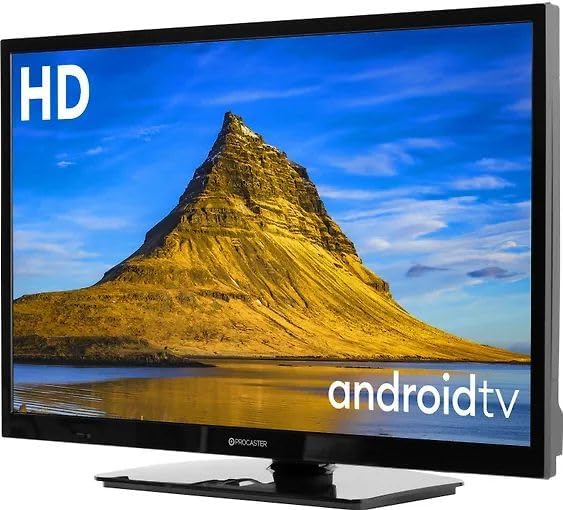
Image: The ProCaster LE-32A552H television with its stand attached, ready for placement.
3. വാൾ മൗണ്ടിംഗ് (ഓപ്ഷണൽ)
This TV is VESA compatible. For wall mounting, use a compatible VESA mount (not included) and follow the instructions provided with the wall mount. Ensure the wall can support the weight of the TV and mount.
4. പവർ ബന്ധിപ്പിക്കുന്നു
Your TV supports both 230V AC (standard household) and 12V DC (e.g., for caravans or boats) power sources.
- For 230V AC: Connect the supplied power adapter to the TV's power input, then plug the adapter into a wall outlet.
- For 12V DC: Connect the supplied 12V power cable to the TV's 12V input and to a compatible 12V DC power source.
5. ബാഹ്യ ഉപകരണങ്ങൾ ബന്ധിപ്പിക്കുന്നു
Connect your external devices such as set-top boxes, game consoles, or USB drives to the appropriate ports on the TV.
- എച്ച്ഡിഎംഐ: ഉയർന്ന ഡെഫനിഷൻ ഓഡിയോ, വീഡിയോ എന്നിവയ്ക്കായി.
- USB: For media playback from USB drives or connecting USB accessories.
- ഇഥർനെറ്റ് (LAN): വയർഡ് ഇന്റർനെറ്റ് കണക്ഷന് വേണ്ടി.
പ്രവർത്തിക്കുന്നു
1. റിമോട്ട് കൺട്രോൾ
Insert two AAA batteries (not included) into the remote control. Ensure correct polarity.

Image: The remote control for the ProCaster LE-32A552H television, showing its layout and buttons.
2. പവർ ഓൺ/ഓഫ്
അമർത്തുക ശക്തി button on the remote control or on the TV to turn the TV on or off.
3. First Time Setup (Android TV)
ആദ്യമായി പവർ-ഓൺ ചെയ്യുമ്പോൾ, ടിവി നിങ്ങളെ പ്രാരംഭ സജ്ജീകരണ പ്രക്രിയയിലൂടെ നയിക്കും:
- ഭാഷ തിരഞ്ഞെടുക്കൽ: നിങ്ങൾ തിരഞ്ഞെടുത്ത ഭാഷ തിരഞ്ഞെടുക്കുക.
- നെറ്റ്വർക്ക് കണക്ഷൻ: നിങ്ങളുടെ വൈഫൈ നെറ്റ്വർക്കിലേക്ക് കണക്റ്റുചെയ്യുക അല്ലെങ്കിൽ വയർഡ് ഇതർനെറ്റ് കണക്ഷൻ ഉപയോഗിക്കുക.
- Google അക്കൗണ്ട് സൈൻ-ഇൻ: Sign in with your Google account to access Android TV features, apps, and Google Assistant.
- സേവന നിബന്ധനകൾ: നിബന്ധനകളും വ്യവസ്ഥകളും അംഗീകരിക്കുക.
- ചാനൽ സ്കാൻ: ലഭ്യമായ ടിവി ചാനലുകൾക്കായി സ്കാൻ ചെയ്യുക (ആന്റിന കണക്റ്റുചെയ്യുകയാണെങ്കിൽ).

Image: The ProCaster LE-32A552H television displaying the Android TV home screen, showing various streaming service applications.
4. അടിസ്ഥാന നാവിഗേഷൻ
Use the directional buttons (മുകളിലേക്ക്, താഴേക്ക്, ഇടത്, വലത്) കൂടാതെ OK button on the remote to navigate the Android TV interface. The വീട് ബട്ടൺ നിങ്ങളെ പ്രധാന സ്ക്രീനിലേക്ക് തിരികെ കൊണ്ടുവരും.
5. ഇൻപുട്ട് ഉറവിട തിരഞ്ഞെടുപ്പ്
അമർത്തുക ഇൻപുട്ട് button on the remote to switch between HDMI inputs, TV tuner, or other connected sources.
6. സ്മാർട്ട് ടിവി സവിശേഷതകൾ
- Chromecast ബിൽറ്റ്-ഇൻ: Cast content from your compatible mobile devices or computer to the TV.
- ബ്ലൂടൂത്ത്: Connect Bluetooth headphones, speakers, or game controllers. Navigate to Settings > Remotes & Accessories to pair devices.
- അപ്ലിക്കേഷനുകൾ: Download and install apps from the Google Play Store. Popular services like Netflix, Disney+, YouTube, and HBO Max are supported.
- ശബ്ദ നിയന്ത്രണം: Use the Google Assistant button on your remote to issue voice commands for searching content, controlling smart home devices, and more.
7 ചിത്ര ക്രമീകരണങ്ങൾ
Access picture settings via Settings > Display & Sound > Picture. Adjust brightness, contrast, color, and select picture modes. The TV supports HDR10 for enhanced dynamic range with compatible content.
8. ശബ്ദ ക്രമീകരണങ്ങൾ
Access sound settings via Settings > Display & Sound > Sound. Adjust volume, balance, and select sound modes.
മെയിൻ്റനൻസ്
1. ടിവി വൃത്തിയാക്കൽ
- സ്ക്രീൻ: മൃദുവായതും ലിന്റ് രഹിതവുമായ ഒരു തുണി ഉപയോഗിച്ച് സ്ക്രീൻ സൌമ്യമായി തുടയ്ക്കുക. സ്ഥിരമായ പാടുകൾ ഉണ്ടെങ്കിൽ, ടിവികൾക്കായി പ്രത്യേകം രൂപകൽപ്പന ചെയ്ത ഒരു സ്ക്രീൻ ക്ലീനർ ഉപയോഗിക്കുക, സ്ക്രീനിൽ നേരിട്ട് പ്രയോഗിക്കുന്നതിനു പകരം തുണിയിൽ പുരട്ടുക.
- Casing: സി തുടയ്ക്കുകasinമൃദുവായതും ഉണങ്ങിയതുമായ തുണി ഉപയോഗിച്ച് വൃത്തിയാക്കുക. അബ്രാസീവ് ക്ലീനറുകളോ ലായകങ്ങളോ ഉപയോഗിക്കരുത്.
2. സോഫ്റ്റ്വെയർ അപ്ഡേറ്റുകൾ
The TV may receive automatic software updates via the internet. You can also manually check for updates via ക്രമീകരണങ്ങൾ > ഉപകരണ മുൻഗണനകൾ > ആമുഖം > സിസ്റ്റം അപ്ഡേറ്റ്.
ട്രബിൾഷൂട്ടിംഗ്
പ്രശ്നങ്ങൾ നേരിടുകയാണെങ്കിൽ, പിന്തുണയുമായി ബന്ധപ്പെടുന്നതിന് മുമ്പ് ഇനിപ്പറയുന്ന പരിഹാരങ്ങൾ പരീക്ഷിക്കുക:
- ശക്തിയില്ല: Ensure the power cable is securely connected and the power outlet is working. Try a different outlet.
- ചിത്രം/ശബ്ദം ഇല്ല: Check input source selection. Ensure external devices are powered on and connected correctly.
- റിമോട്ട് പ്രവർത്തിക്കുന്നില്ല: Check batteries and ensure there are no obstructions between the remote and the TV's IR sensor.
- നെറ്റ്വർക്ക് കണക്ഷൻ പ്രശ്നങ്ങൾ: Restart your router. Check Wi-Fi password. For wired connections, ensure the Ethernet cable is properly connected.
- പ്രവർത്തിക്കാത്ത ആപ്പുകൾ: Try restarting the app or clearing its cache via Settings > Apps > [App Name] > Clear cache.
- ഫാക്ടറി പുന et സജ്ജമാക്കുക: If problems persist, a factory reset can resolve many software issues. Go to Settings > Device Preferences > About > Factory reset. മുന്നറിയിപ്പ്: ഇത് എല്ലാ സ്വകാര്യ ഡാറ്റയും ക്രമീകരണങ്ങളും മായ്ക്കും.
സ്പെസിഫിക്കേഷനുകൾ
| ഫീച്ചർ | സ്പെസിഫിക്കേഷൻ |
|---|---|
| മോഡലിൻ്റെ പേര് | ProCaster LE-32A552H |
| സ്ക്രീൻ വലിപ്പം | 32 ഇഞ്ച് |
| ഡിസ്പ്ലേ ടെക്നോളജി | എൽഇഡി |
| റെസലൂഷൻ | HD റെഡി |
| പുതുക്കിയ നിരക്ക് | 60 Hz |
| വീക്ഷണാനുപാതം | 16:9 |
| ഓപ്പറേറ്റിംഗ് സിസ്റ്റം | ആൻഡ്രോയിഡ് ടിവി 11 |
| HDR പിന്തുണ | HDR10 |
| സ്മാർട്ട് സവിശേഷതകൾ | Chromecast Built-in, Bluetooth, Wi-Fi |
| പിന്തുണയ്ക്കുന്ന ഇന്റർനെറ്റ് സേവനങ്ങൾ | Netflix, Disney+, YouTube, HBO Max |
| കണക്റ്റിവിറ്റി | HDMI, USB (1x USB 3.0), Ethernet, Bluetooth, Wi-Fi |
| വൈദ്യുതി വിതരണം | 12V DC / 230V എസി |
| നിയന്ത്രണ രീതി | Remote Controlled, Voice Controlled |
വാറൻ്റിയും പിന്തുണയും
Your ProCaster LE-32A552H television comes with a standard manufacturer's warranty. Please refer to the warranty card included in your package for specific terms and conditions. For technical support, troubleshooting assistance, or warranty claims, please contact your retailer or the official ProCaster customer service. Contact information can typically be found on the manufacturer's webസൈറ്റ് അല്ലെങ്കിൽ നിങ്ങളുടെ വാങ്ങൽ ഡോക്യുമെന്റേഷനിൽ.