
1. ആമുഖം
The DOOGEE Fire 5 is a rugged smartphone designed for durability and extended use in challenging environments. It features a robust construction, a large capacity battery, and a responsive display, powered by Android 15. This manual provides essential information for setting up, operating, maintaining, and troubleshooting your device.
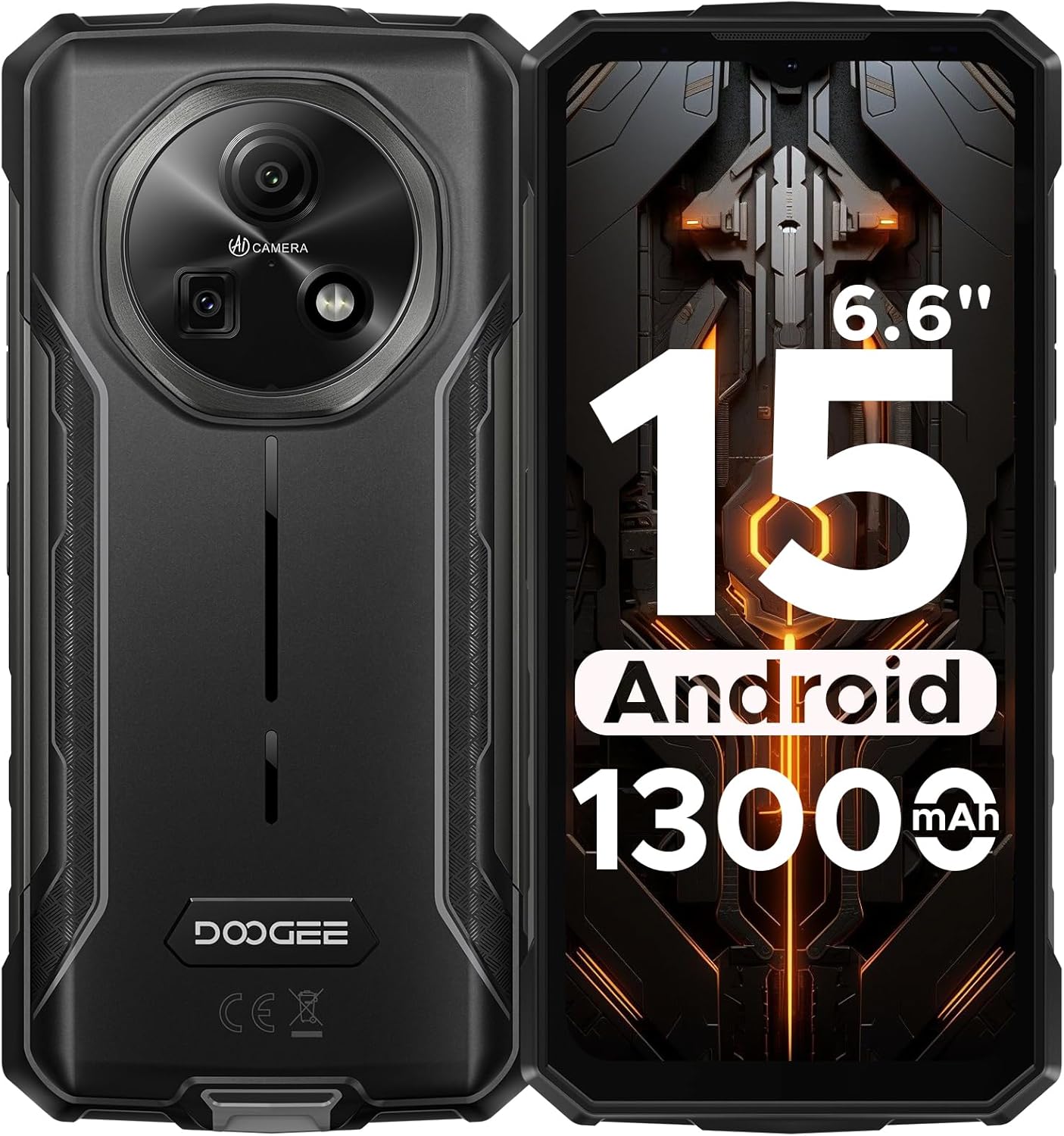
ചിത്രം 1: മുന്നിലും പിന്നിലും view of the DOOGEE Fire 5 Rugged Smartphone.
2. ബോക്സിൽ എന്താണുള്ളത്?
നിങ്ങളുടെ ഉൽപ്പന്ന പാക്കേജിൽ എല്ലാ ഇനങ്ങളും ഉണ്ടെന്ന് ഉറപ്പാക്കുക:
- 1x DOOGEE Fire 5 Rugged Smartphone
- 1x ടൈപ്പ്-സി യുഎസ്ബി കേബിൾ
- 1x ചാർജർ
- 1x ദ്രുത ഗൈഡ്
- 1x വാറൻ്റി കാർഡ്

Figure 2: Package contents of the DOOGEE Fire 5.
3. ഉൽപ്പന്ന സവിശേഷതകൾ
3.1 പരുക്കൻ ഡിസൈൻ
The Fire 5 is engineered to withstand harsh conditions, meeting military standards IP68, IP69K, and MIL-STD-810H. This ensures resistance against drops, dust, and water immersion, making it suitable for outdoor work and adventurous activities.

Figure 3: The DOOGEE Fire 5 is built to withstand water, dust, and drops.
3.2 Unbeatable Battery Life & Reverse Charging
Equipped with a 13000mAh battery, the Fire 5 provides extended usage times. It also supports 5W reverse charging via its Type-C port, allowing you to power other devices like headphones or smartwatches.

Figure 4: The 13000mAh battery offers extensive power and reverse charging.
3.3 Vivid HD+ Display
Experience smooth visuals on the 6.6-inch HD+ IPS screen with a 90Hz refresh rate. The display's full lamination reduces glare, enhancing outdoor visibility.

Figure 5: The 6.6-inch HD+ 90Hz display provides a clear and responsive viewഅനുഭവം.
3.4 ശക്തമായ പ്രകടനം
Running on Android 15 and powered by a UNISOC octa-core processor, the Fire 5 offers seamless app switching with 12GB (3GB + 9GB extended) of RAM and 64GB of internal storage, expandable up to 2TB.

Figure 6: The UNISOC SC9863A chipset ensures stable and efficient performance.
3.5 AI Camera System
Capture clear and vibrant photos with the 13MP main camera and 8MP front camera. The AI camera intelligently optimizes settings for various scenes, enhancing your photography experience.

Figure 7: The 13MP main camera and 8MP front camera for crisp shots.
3.6 Connectivity and Tools
The Fire 5 supports dual SIM functionality and is compatible with major carriers like T-Mobile and MetroPCS. It includes NFC for convenient payments, Face ID for secure unlocking, and a pre-loaded professional toolbox with utilities like a compass, sound meter, and gradienter.

Figure 8: Additional features include NFC, Face Unlock, and a 3-card slot.
4. സജ്ജീകരണം
4.1 സിം കാർഡ് ഇൻസ്റ്റാളേഷൻ
- ഉപകരണത്തിന്റെ വശത്ത് സിം കാർഡ് ട്രേ കണ്ടെത്തുക.
- ട്രേ തുറക്കാൻ നൽകിയിരിക്കുന്ന സിം എജക്റ്റ് ടൂൾ ഉപയോഗിക്കുക.
- നിങ്ങളുടെ നാനോ-സിം കാർഡ്(കൾ) കൂടാതെ/അല്ലെങ്കിൽ മൈക്രോ എസ്ഡി കാർഡ് ട്രേയിൽ വയ്ക്കുക, ശരിയായ ഓറിയന്റേഷൻ ഉറപ്പാക്കുക.
- ഉപകരണത്തിൽ ക്ലിക്കുചെയ്യുന്നത് വരെ ട്രേ മെല്ലെ തിരികെ ഉപകരണത്തിലേക്ക് തള്ളുക.
4.2 പ്രാരംഭ പവർ ഓൺ
- Press and hold the Power button until the DOOGEE logo appears.
- ഭാഷാ തിരഞ്ഞെടുപ്പ്, വൈ-ഫൈ കണക്ഷൻ, ഗൂഗിൾ അക്കൗണ്ട് ലോഗിൻ എന്നിവയുൾപ്പെടെയുള്ള പ്രാരംഭ സജ്ജീകരണം പൂർത്തിയാക്കാൻ ഓൺ-സ്ക്രീൻ നിർദ്ദേശങ്ങൾ പാലിക്കുക.
5. നിങ്ങളുടെ ഉപകരണം പ്രവർത്തിപ്പിക്കുന്നു
5.1 അടിസ്ഥാന നാവിഗേഷൻ
- ഹോം സ്ക്രീൻ: വ്യത്യസ്ത ഹോം സ്ക്രീൻ പാനലുകൾ ആക്സസ് ചെയ്യാൻ ഇടത്തോട്ടോ വലത്തോട്ടോ സ്വൈപ്പ് ചെയ്യുക.
- ആപ്പ് ഡ്രോയർ: സ്ക്രീനിന്റെ അടിയിൽ നിന്ന് മുകളിലേക്ക് സ്വൈപ്പുചെയ്യുക view ഇൻസ്റ്റാൾ ചെയ്ത എല്ലാ ആപ്ലിക്കേഷനുകളും.
- അറിയിപ്പുകളും ദ്രുത ക്രമീകരണങ്ങളും: സ്ക്രീനിന്റെ മുകളിൽ നിന്ന് താഴേക്ക് സ്വൈപ്പ് ചെയ്ത് അറിയിപ്പുകളും ക്വിക്ക് സെറ്റിംഗ്സ് ടോഗിളുകളും ആക്സസ് ചെയ്യുക.
- മൾട്ടിടാസ്കിംഗ്: Swipe up and hold from the bottom of the screen to view സമീപകാല ആപ്പുകൾ.
5.2 ക്യാമറ ഉപയോഗം
വിവിധ മോഡുകൾ ആക്സസ് ചെയ്യാൻ ക്യാമറ ആപ്പ് തുറക്കുക:
- ഫോട്ടോ മോഡ്: Standard mode for still images. The AI will automatically optimize settings.
- വീഡിയോ മോഡ്: വീഡിയോകൾ റെക്കോർഡ് ചെയ്യുക.
- പോർട്രെയിറ്റ് മോഡ്: Create photos with a blurred background.
- പ്രോ മോഡ്: Manually adjust settings like ISO, white balance, and exposure.
5.3 Pre-loaded Tools
The device includes a professional toolbox accessible from the app drawer. This toolbox contains useful utilities such as:
- കോമ്പസ്
- സൗണ്ട് മീറ്റർ
- ഗ്രേഡിയന്റർ
- ഫ്ലാഷ്ലൈറ്റ്
- മാഗ്നിഫയർ
- പ്ലംബ് ബോബ്
6. പരിപാലനം
6.1 വെള്ളത്തിനും പൊടിക്കും പ്രതിരോധം
The DOOGEE Fire 5 is IP68/IP69K rated for water and dust resistance. Ensure all port covers are securely closed before exposing the device to water or dust. Avoid prolonged submersion in water or exposure to high-pressure water jets.
6.2 വൃത്തിയാക്കൽ
നിങ്ങളുടെ ഉപകരണം വൃത്തിയാക്കാൻ, മൃദുവായ, ഡി-ടച്ച് ഉപയോഗിച്ച് തുടയ്ക്കുക.amp cloth. Avoid using harsh chemicals or abrasive materials that could damage the device's rugged exterior or screen.
7. പ്രശ്നപരിഹാരം
If you encounter issues with your DOOGEE Fire 5, try the following steps:
- Device Lagging or Freezing:
- Close background applications to free up RAM.
- Uninstall unused applications to free up storage.
- Perform a restart by long-pressing the power button and selecting "Restart".
- നെറ്റ്വർക്ക് കണക്റ്റിവിറ്റി പ്രശ്നങ്ങൾ:
- നിങ്ങളുടെ സിം കാർഡ് ശരിയായി ചേർത്തിട്ടുണ്ടെന്ന് ഉറപ്പാക്കുക.
- Verify that your carrier is compatible with the device's supported bands (GSM:B2/3/5/8 WCDMA:B1/2/4/5/8 TDD:B34/38/39/40/41 FDD:B1/2/3/4/5/7/8/18/19/20/25/26/28AB/66).
- Check your network settings and ensure mobile data is enabled.
- ചാർജിംഗ് പ്രശ്നങ്ങൾ:
- Use the original charger and Type-C cable provided with the device.
- ചാർജിംഗ് പോർട്ട് വൃത്തിയുള്ളതും അവശിഷ്ടങ്ങളില്ലാത്തതുമാണെന്ന് ഉറപ്പാക്കുക.
വീഡിയോ 1: ഒരു ഓവർview of the DOOGEE Fire 5 Rugged Phone, highlighting its features and design.
8 സ്പെസിഫിക്കേഷനുകൾ
| ഉൽപ്പന്ന അളവുകൾ | 6.95 x 0.74 x 3.25 ഇഞ്ച് |
| ഇനത്തിൻ്റെ ഭാരം | 6.9 ഔൺസ് |
| ഇനം മോഡൽ നമ്പർ | Fire5 |
| ബാറ്ററികൾ | 1 ലിഥിയം പോളിമർ ബാറ്ററി ആവശ്യമാണ് (ഉൾപ്പെടുത്തിയിരിക്കുന്നു) |
| ഓപ്പറേറ്റിംഗ് സിസ്റ്റം | ആൻഡ്രോയിഡ് 15 |
| കണക്റ്റിവിറ്റി ടെക്നോളജികൾ | ബ്ലൂടൂത്ത്, ഇൻഫ്രാറെഡ്, എൻഎഫ്സി, യുഎസ്ബി, വൈ-ഫൈ |
| മറ്റ് ഡിസ്പ്ലേ സവിശേഷതകൾ | വയർലെസ് |
| മറ്റ് ക്യാമറ സവിശേഷതകൾ | ഫ്രണ്ട്, റിയർ |
| ഫോം ഫാക്ടർ | ബാർ |
| നിറം | കറുപ്പ് |
| ബാറ്ററി പവർ റേറ്റിംഗ് | 13000 മില്ലിamp മണിക്കൂറുകൾ |
| മെമ്മറി സ്റ്റോറേജ് കപ്പാസിറ്റി | 64 ജിബി |
| സ്റ്റാൻഡിംഗ് സ്ക്രീൻ ഡിസ്പ്ലേ വലുപ്പം | 6.6 ഇഞ്ച് |
| ഇൻസ്റ്റാൾ ചെയ്ത RAM മെമ്മറി വലുപ്പം | 12 ജിബി |
| പുതുക്കിയ നിരക്ക് | 90 Hz |
| വയർലെസ് കാരിയർ | എല്ലാ കാരിയറുകൾക്കുമായി അൺലോക്കുചെയ്തു |
| സെല്ലുലാർ ടെക്നോളജി | 4G |
9. വാറൻ്റിയും പിന്തുണയും
The DOOGEE Fire 5 Rugged Smartphone comes with a comprehensive 2-year warranty, ensuring peace of mind with your purchase. For any technical assistance, product inquiries, or warranty claims, please contact DOOGEE's professional support team through their official channels or visit their webവിശദമായ പിന്തുണാ വിവരങ്ങൾക്ക് സൈറ്റ്.
You can find additional support and product information by scanning the QR code provided in the quick guide or visiting the official DOOGEE webസൈറ്റ്.