
ആമുഖം
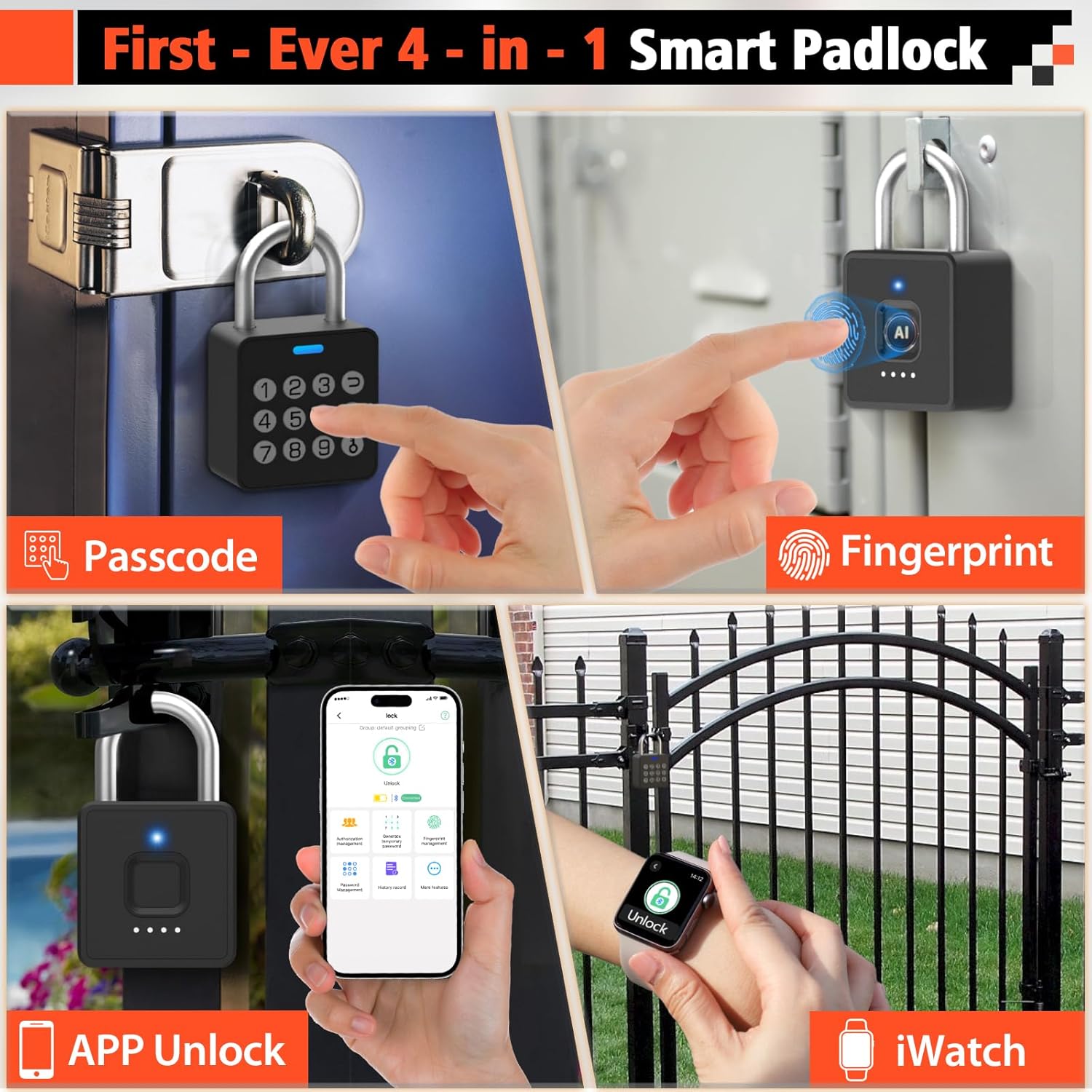
Thank you for choosing the Eseesmart YL-P7 Smart Fingerprint Padlock. This advanced security device offers multiple unlocking methods including fingerprint, passcode, smartphone app, and iWatch control, providing convenient and robust protection for your belongings. This manual will guide you through the setup, operation, and maintenance of your new smart padlock.
ഉൽപ്പന്നം കഴിഞ്ഞുview
The Eseesmart YL-P7 is designed for versatility and durability, suitable for both indoor and outdoor use. Its robust construction and multiple access options ensure your items remain secure while offering unparalleled ease of use.
ചിത്രം: The Eseesmart YL-P7 Smart Fingerprint Padlock, showcasing its compact design and sleek finish.
പ്രധാന സവിശേഷതകൾ:
- 4-in-1 Unlocking: Fingerprint, Passcode, Smartphone App, and iWatch.
- Fast Biometric Recognition: Unlock in 0.2 seconds with registered fingerprints.
- Multi-Function Passwords: Supports 20 permanent codes, time-scheduled guest passwords, and unlimited one-time codes.
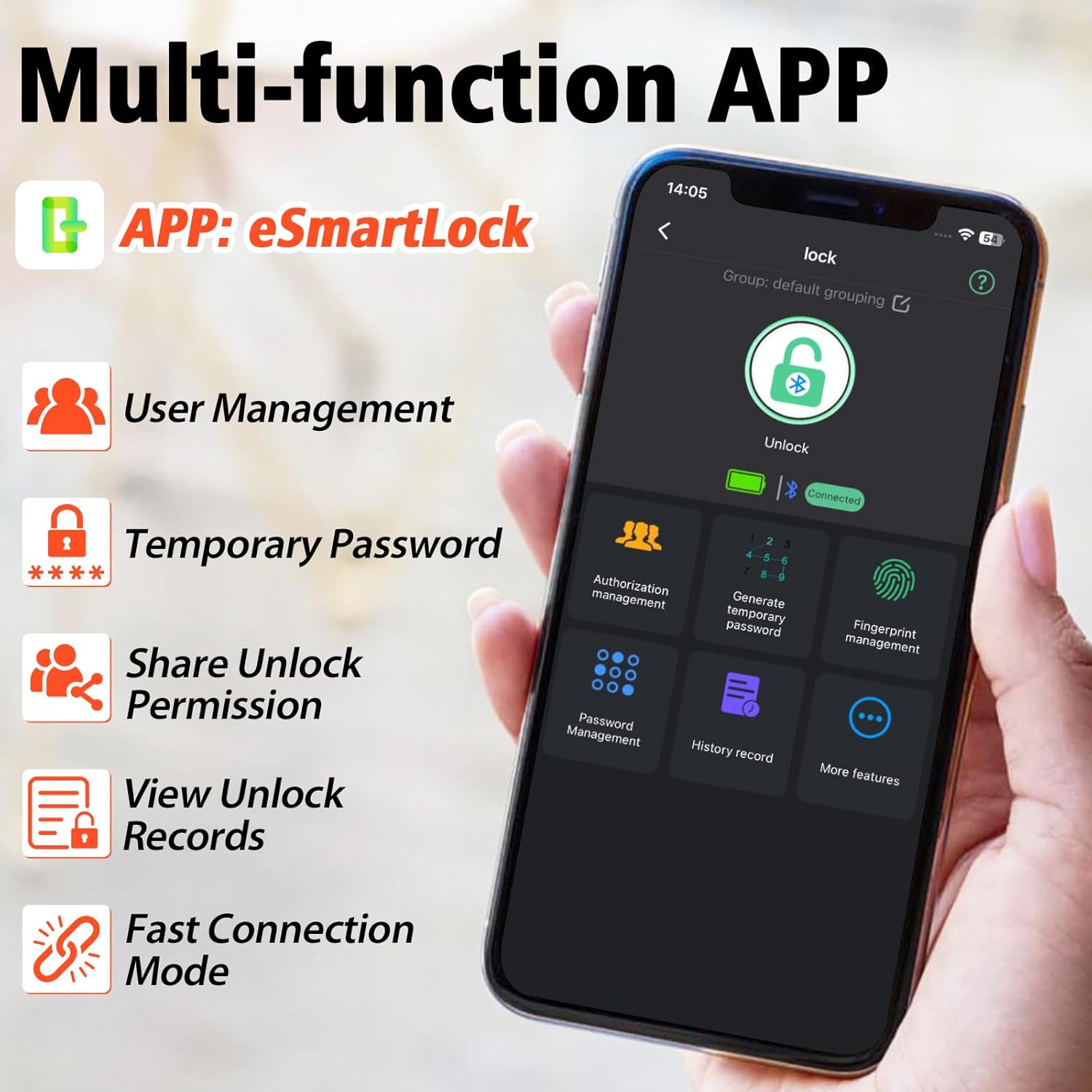
- സ്മാർട്ട് ആപ്പ് നിയന്ത്രണം: Manage fingerprints, passwords, track unlock records, and share access remotely via Bluetooth.
- നീണ്ടുനിൽക്കുന്ന നിർമ്മാണം: Built with alloy steel and zinc alloy body with a hardened steel shackle, resistant to cutting and tampഎറിംഗ്.
- വെതർപ്രൂഫ് ഡിസൈൻ: IP65 waterproof and dustproof, withstands temperatures from -4°F to 113°F.
- ദീർഘകാല ബാറ്ററി: 110mAh lithium battery provides 6 months standby or 2000 unlocks per charge, rechargeable via USB-C.

ചിത്രം: Visual representation of the four unlocking methods: Passcode, Fingerprint, APP Unlock, and iWatch.
വീഡിയോ: An official Eseesmart video demonstrating the revolutionary 4-in-1 unlocking capabilities of the smart padlock, including fingerprint, passcode, app, and iWatch access.
ബോക്സിൽ എന്താണുള്ളത്
- 1 x Eseesmart YL-P7 Smart Padlock
- 1 x USB-C ചാർജ് കേബിൾ
- 1 x ഉപയോക്തൃ മാനുവൽ (ഈ പ്രമാണം)
സജ്ജീകരണ ഗൈഡ്
1 ആപ്പ് ഡൗൺലോഡ് ചെയ്ത് ഇൻസ്റ്റാൾ ചെയ്യുക
The Eseesmart YL-P7 Smart Padlock is controlled via the eSmartLock app. Download it from your device's app store (iOS App Store or Google Play Store for Android) or scan the QR code provided in the included user manual.

ചിത്രം: The eSmartLock app interface on a smartphone, showing various management options for the padlock.
2. പ്രാരംഭ ജോടിയാക്കൽ
- നിങ്ങളുടെ സ്മാർട്ട്ഫോണിന്റെ ബ്ലൂടൂത്ത് പ്രവർത്തനക്ഷമമാക്കിയിട്ടുണ്ടെന്ന് ഉറപ്പാക്കുക.
- Open the eSmartLock app and follow the on-screen instructions to add a new device.
- ജോടിയാക്കൽ പ്രക്രിയയിലൂടെ ആപ്പ് നിങ്ങളെ നയിക്കും.
3. ഫിംഗർപ്രിന്റ് രജിസ്ട്രേഷൻ
- In the eSmartLock app, navigate to "Fingerprint Management".
- Select "Add Fingerprint" and follow the prompts.
- Place your finger firmly on the padlock's fingerprint sensor, lifting and replacing it as instructed by the app until registration is complete. You can register up to 20 fingerprints.

ചിത്രം: Close-up of the padlock's fingerprint sensor, highlighting its quick recognition capability.
4. പാസ്കോഡ് സജ്ജീകരണം
- From the eSmartLock app, go to "Password Management".
- You can set permanent passcodes (up to 20), generate time-scheduled guest passwords, or create one-time passwords.
- Follow the app's instructions to enter and confirm your desired passcode.

ചിത്രം: The padlock featuring its integrated keypad for passcode entry.
പ്രവർത്തന നിർദ്ദേശങ്ങൾ
വിരലടയാളം ഉപയോഗിച്ച് അൺലോക്ക് ചെയ്യുന്നു
Place a registered finger firmly on the fingerprint sensor. The padlock will unlock in approximately 0.2 seconds if the fingerprint is recognized.
Unlocking with Passcode
Enter your set passcode on the keypad and press the unlock button (usually indicated by a 'U' or unlock symbol). The padlock will unlock if the passcode is correct.
Unlocking via App
Open the eSmartLock app on your smartphone. Ensure Bluetooth is connected. Tap the "Unlock" icon within the app to remotely unlock the padlock.
Unlocking via iWatch
If configured, you can unlock the padlock directly from your iWatch using the eSmartLock app interface on your watch.

ചിത്രം: A user unlocking the Eseesmart padlock using an iWatch, demonstrating convenient access.
ആക്സസ് പങ്കിടൽ
Through the eSmartLock app's "Authorization Management" or "Generate Temporary Password" features, you can grant temporary or permanent access to other users. They will need to download the app to receive and use the shared access.
Charging the Padlock
The Eseesmart YL-P7 features a built-in 110mAh lithium battery. When the battery is low, the padlock's indicator light will signal a low charge. Connect the included USB-C cable to the charging port located at the bottom of the padlock and to a standard USB power source (e.g., computer, wall adapter) to recharge. A full charge supports over 2000 unlocks or 6 months of standby time.

ചിത്രം: The padlock connected to a USB-C charging cable, illustrating its rechargeable battery feature.
മെയിൻ്റനൻസ്
- വൃത്തിയാക്കൽ: Wipe the padlock with a soft, dry cloth. Avoid using abrasive cleaners or solvents.
- ജല പ്രതിരോധം: The padlock is IP65 rated for water and dust resistance, making it suitable for outdoor use. However, it should not be submerged in water. Ensure the USB-C port cover is securely closed when not charging.
- താപനില: The padlock is designed to operate in temperatures ranging from -4°F to 113°F.

ചിത്രം: The Eseesmart padlock shown in a rainy environment, demonstrating its IP65 waterproof capabilities.
ട്രബിൾഷൂട്ടിംഗ്
| പ്രശ്നം | സാധ്യമായ കാരണം | പരിഹാരം |
|---|---|---|
| വിരലടയാളം ഉപയോഗിച്ച് പാഡ്ലോക്ക് അൺലോക്ക് ചെയ്യില്ല. | Fingerprint not registered or sensor is dirty/wet. | Ensure finger is clean and dry. Re-register fingerprint if necessary. Try a different registered finger. |
| Padlock does not respond. | Low battery or device is in sleep mode. | Charge the padlock. Tap any button or the fingerprint sensor to wake it up. |
| App cannot connect to padlock. | Bluetooth is off or padlock is out of range. | Ensure Bluetooth is on and the padlock is within range. Restart the app and try again. |
| Forgot passcode. | Passcode forgotten. | Use a registered fingerprint or the app to unlock. Reset or change the passcode via the app. |
സ്പെസിഫിക്കേഷനുകൾ
- ബ്രാൻഡ്: എസെസ്മാർട്ട്
- മോഡൽ നമ്പർ: YL-P7
- ലോക്ക് തരം: Biometric, Combination Lock, Padlock
- മെറ്റീരിയൽ: Zinc Alloy Body + Hardened Steel Shackle
- ഇനത്തിന്റെ അളവുകൾ (L x W x H): 1.74 x 0.97 x 2.95 ഇഞ്ച്
- ഇനത്തിൻ്റെ ഭാരം: 0.24 കിലോഗ്രാം
- പ്രത്യേക സവിശേഷതകൾ: 0.2s Fast Fingerprint Recognition, 4-in-1 Unlock (Fingerprint + Password + App + iWatch), Multi-Function Passwords (Permanent/Guest/One-Time Codes)
- കണക്റ്റിവിറ്റി പ്രോട്ടോക്കോൾ: ബ്ലൂടൂത്ത്
- കൺട്രോളർ തരം: ആൻഡ്രോയിഡ്, ഐഒഎസ്
- നിയന്ത്രണ രീതി: ആപ്പ്, ടച്ച്
- ബാറ്ററി: 110mAh Lithium (Rechargeable via USB-C)
- ജല പ്രതിരോധം: IP65
- ശുപാർശ ചെയ്യുന്ന ഉപയോഗങ്ങൾ: Locker Lock, Gym Locker Lock, School Locker, Fence, Gate, Shed, Storage, Pool

ചിത്രം: Detailed dimensions of the Eseesmart YL-P7 Smart Padlock.
ചിത്രം: Examples of various use cases for the Eseesmart YL-P7 Smart Padlock, including lockers, gates, sheds, and fences.
വാറൻ്റിയും പിന്തുണയും
The Eseesmart YL-P7 Smart Fingerprint Padlock comes with a 6 മാസ വാറൻ്റി. Eseesmart also provides ആജീവനാന്ത സൗജന്യ സാങ്കേതിക പിന്തുണ. For any issues, replacements, refunds, or assistance, please contact Eseesmart customer service.