
1. ആമുഖം
This manual provides detailed instructions for the SVITOO P11 11-inch Android 16 Tablet. It covers initial setup, operation, maintenance, and troubleshooting to ensure optimal performance and user experience. Please read this manual thoroughly before using your device.
2. പാക്കേജ് ഉള്ളടക്കം
താഴെ ലിസ്റ്റ് ചെയ്തിരിക്കുന്ന എല്ലാ ഇനങ്ങളും നിങ്ങളുടെ ഉൽപ്പന്ന പാക്കേജിൽ ഉൾപ്പെടുത്തിയിട്ടുണ്ടെന്ന് ഉറപ്പാക്കുക:
- SVITOO P11 11-inch Tablet
- ബ്ലൂടൂത്ത് കീബോർഡ്
- വയർലെസ് മൗസ്
- സ്റ്റൈലസ് പേന
- OTG Interface Cable
- Charger and Charging Cable
- Tablet Case and Stand

ചിത്രം 2.1: SVITOO P11 Tablet with its complete accessory bundle, including a keyboard, mouse, stylus, charger, and protective case.
3. ഉൽപ്പന്ന സവിശേഷതകൾ
3.1 ഓപ്പറേറ്റിംഗ് സിസ്റ്റം
The SVITOO P11 Tablet runs on the latest Android 16 operating system, offering enhanced multitasking capabilities, improved power efficiency, and robust data protection features. The system is designed for a smooth and secure user experience.

ചിത്രം 3.1: The Android 16 interface on the SVITOO P11 Tablet, showcasing its modern design and application compatibility.
3.2 പ്രകടനം
Equipped with an Octa-Core T7250 processor clocked at 2.0 GHz, the tablet delivers powerful performance for various tasks. It features 20 GB RAM (4GB physical, with up to 16GB virtual expansion) and 128 GB of internal storage, expandable up to 1 TB via a microSD card. This configuration supports seamless multitasking, streaming, gaming, and productivity without significant lag or overheating.

ചിത്രം 3.2: Visual representation of the tablet's internal components, highlighting the UNISOC T7250 processor and memory configuration.
3.3 ഡിസ്പ്ലേയും ഓഡിയോയും
The 11-inch IPS display offers a resolution of 1280 x 800 pixels, providing clear visuals. It features Widevine L1 certification for high-definition content streaming on platforms like Netflix and Prime Video. Anti-glare technology helps reduce eye strain during extended use. Dual stereo speakers enhance the audio experience, and wireless screen mirroring is supported for sharing content.

ചിത്രം 3.3: The tablet's display quality, emphasizing its features for an immersive viewഅനുഭവം.
3.4 ബാറ്ററി
A robust 8800 mAh battery powers the tablet, featuring NTC protection for temperature regulation to prevent overheating. This large capacity provides up to 14 hours of video playback, 10 hours of gaming, or 15 hours of navigation on a single charge, ensuring extended usage.

ചിത്രം 3.4: Illustration of the tablet's 8800mAh battery, indicating its long-lasting power for various activities.
3.5 ക്യാമറകൾ
The tablet is equipped with a 13 MP main rear camera and an 8 MP front camera, suitable for capturing photos, video calls, and scanning documents.

ചിത്രം 3.5: കഴിഞ്ഞുview of the tablet's camera specifications and capabilities.
3.6 കണക്റ്റിവിറ്റി
The P11 Tablet supports dual-band Wi-Fi (2.4G and 5G) for stable internet connectivity and Bluetooth 5 for connecting wireless accessories. It also includes GPS functionality, which requires a Wi-Fi connection for optimal use.
4. സജ്ജീകരണം
4.1 പ്രാരംഭ ചാർജിംഗ്
Before first use, fully charge the tablet using the provided charger and USB cable. Connect the charger to a power outlet and the USB cable to the tablet's USB port. The battery indicator on the screen will show charging progress.
4.2 പവർ ഓൺ/ഓഫ്
- പവർ ഓണാക്കാൻ: Press and hold the Power button located on the side of the tablet until the SVITOO logo appears.
- പവർ ഓഫ് ചെയ്യാൻ: Press and hold the Power button until a power menu appears on the screen. Select "Power off" and confirm.
- പുനരാരംഭിക്കാൻ: From the power menu, select "Restart" and confirm.
4.3 പ്രാരംഭ സജ്ജീകരണ വിസാർഡ്
ആദ്യമായി പവർ-ഓൺ ചെയ്യുമ്പോൾ, ടാബ്ലെറ്റ് നിങ്ങളെ ഒരു പ്രാരംഭ സജ്ജീകരണ വിസാർഡിലൂടെ നയിക്കും. ഓൺ-സ്ക്രീൻ നിർദ്ദേശങ്ങൾ പാലിക്കുക:
- നിങ്ങൾ ഇഷ്ടപ്പെടുന്ന ഭാഷ തിരഞ്ഞെടുക്കുക.
- ഒരു Wi-Fi നെറ്റ്വർക്കിലേക്ക് കണക്റ്റുചെയ്യുക.
- Set up your Google account (or skip for later).
- Review നിബന്ധനകളും വ്യവസ്ഥകളും അംഗീകരിക്കുക.
- സ്ക്രീൻ ലോക്ക് (പിൻ, പാറ്റേൺ അല്ലെങ്കിൽ പാസ്വേഡ്) സജ്ജീകരിക്കുക.
4.4 കണക്റ്റിംഗ് ആക്സസറികൾ
The SVITOO P11 Tablet comes with a Bluetooth keyboard, wireless mouse, and stylus. To connect them:
- ബ്ലൂടൂത്ത് കീബോർഡ്/മൗസ്: Turn on the keyboard/mouse and put it into pairing mode (usually by pressing a dedicated button or a combination of keys). On your tablet, go to ക്രമീകരണങ്ങൾ > കണക്റ്റുചെയ്ത ഉപകരണങ്ങൾ > ബ്ലൂടൂത്ത്, turn Bluetooth on, and select the accessory from the list of available devices to pair.
- സ്റ്റൈലസ്: സ്റ്റൈലസിന് സാധാരണയായി ബ്ലൂടൂത്ത് ജോടിയാക്കൽ ആവശ്യമില്ല, മാത്രമല്ല ഇത് സ്ക്രീനിൽ നേരിട്ട് ഉപയോഗിക്കാൻ കഴിയും.
5. പ്രവർത്തന നിർദ്ദേശങ്ങൾ
5.1 അടിസ്ഥാന നാവിഗേഷൻ
നാവിഗേഷനായി ടാബ്ലെറ്റ് ടച്ച് ജെസ്റ്ററുകൾ ഉപയോഗിക്കുന്നു:
- ടാപ്പ് ചെയ്യുക: ഒരു ഇനം തിരഞ്ഞെടുക്കുകയോ ഒരു ആപ്പ് തുറക്കുകയോ ചെയ്യുക.
- ടാപ്പുചെയ്ത് പിടിക്കുക: സന്ദർഭോചിത മെനുകൾ ആക്സസ് ചെയ്യുക അല്ലെങ്കിൽ ഐക്കണുകൾ നീക്കുക.
- സ്വൈപ്പ്: Scroll through pages, lists, or switch between home screens.
- പിഞ്ച്-ടു-സൂം: ചിത്രങ്ങൾ സൂം ഇൻ ചെയ്യുകയോ ഔട്ട് ചെയ്യുകയോ ചെയ്യുക, web പേജുകൾ.
5.2 ആപ്പുകൾ ഇൻസ്റ്റാൾ ചെയ്യുകയും കൈകാര്യം ചെയ്യുകയും ചെയ്യുക
- ആപ്പുകൾ ഇൻസ്റ്റാൾ ചെയ്യുക: Open the Google Play Store app, search for your desired app, and tap "Install."
- ആപ്പുകൾ അൺഇൻസ്റ്റാൾ ചെയ്യുക: Tap and hold an app icon on the home screen or app drawer, then drag it to "Uninstall" or select "App info" and choose "Uninstall." Alternatively, go to Settings > Apps > See all apps, select the app, and tap "Uninstall."
5.3 വൈ-ഫൈ, ബ്ലൂടൂത്ത് കണക്റ്റിവിറ്റി
- വൈഫൈ: പോകുക ക്രമീകരണങ്ങൾ > നെറ്റ്വർക്കും ഇൻ്റർനെറ്റും > ഇൻ്റർനെറ്റ്. Turn on Wi-Fi, select your network, and enter the password if required.
- ബ്ലൂടൂത്ത്: പോകുക ക്രമീകരണങ്ങൾ > കണക്റ്റുചെയ്ത ഉപകരണങ്ങൾ > ബ്ലൂടൂത്ത്. Turn on Bluetooth and pair with desired devices.
5.4 ക്യാമറകൾ ഉപയോഗിക്കുന്നത്
Open the Camera app from your home screen or app drawer. You can switch between the front and rear cameras, select different modes (photo, video), and adjust settings like flash and timer.
5.5 സ്റ്റോറേജ് മാനേജ്മെൻ്റ്
To expand storage, insert a microSD card into the designated slot. You can manage your storage by going to ക്രമീകരണങ്ങൾ > സംഭരണം വരെ view ഉപയോഗവും സ്ഥലം ശൂന്യമാക്കലും.
5.6 Widevine L1 for HD Streaming
The tablet supports Widevine L1, enabling high-definition video playback on streaming services that require this certification. Ensure your internet connection is stable for the best streaming quality.
6. പരിപാലനം
6.1 ഉപകരണം വൃത്തിയാക്കുന്നു
ടാബ്ലെറ്റിന്റെ സ്ക്രീനും ബോഡിയും വൃത്തിയാക്കാൻ മൃദുവായ, ലിന്റ് രഹിത തുണി ഉപയോഗിക്കുക. കഠിനമായ പാടുകൾക്ക്, ചെറുതായി ഡി.ampതുണിയിൽ വെള്ളം അല്ലെങ്കിൽ സ്ക്രീൻ-ക്ലീനിംഗ് ലായനി ഉപയോഗിക്കുക. കഠിനമായ രാസവസ്തുക്കളോ ഉരച്ചിലുകളോ ഉള്ള വസ്തുക്കൾ ഒഴിവാക്കുക.
6.2 ബാറ്ററി കെയർ
- ബാറ്ററിയുടെ ആയുസ്സ് കുറയ്ക്കുമെന്നതിനാൽ തീവ്രമായ താപനില ഒഴിവാക്കുക.
- Do not leave the tablet charging for excessively long periods after it's full.
- നൽകിയിരിക്കുന്ന ചാർജറോ സാക്ഷ്യപ്പെടുത്തിയ അനുയോജ്യമായ ചാർജറോ മാത്രം ഉപയോഗിക്കുക.
- ദീർഘകാല സംഭരണത്തിനായി, ബാറ്ററി ഏകദേശം 50% വരെ ചാർജ് ചെയ്യുക, തുടർന്ന് ഉപകരണം ഓഫ് ചെയ്യുക.
6.3 സോഫ്റ്റ്വെയർ അപ്ഡേറ്റുകൾ
നിങ്ങളുടെ ടാബ്ലെറ്റിൽ ഏറ്റവും പുതിയ സവിശേഷതകൾ, സുരക്ഷാ പാച്ചുകൾ, പ്രകടന മെച്ചപ്പെടുത്തലുകൾ എന്നിവ ഉറപ്പാക്കാൻ സോഫ്റ്റ്വെയർ അപ്ഡേറ്റുകൾ പതിവായി പരിശോധിച്ച് ഇൻസ്റ്റാൾ ചെയ്യുക. പോകുക ക്രമീകരണങ്ങൾ > സിസ്റ്റം > സിസ്റ്റം അപ്ഡേറ്റ് അപ്ഡേറ്റുകൾ പരിശോധിക്കാൻ.
6.4 സ്റ്റോറേജ് ഒപ്റ്റിമൈസേഷൻ
അനാവശ്യമായത് ഇടയ്ക്കിടെ നീക്കം ചെയ്യുക files, cache data, and uninstall unused apps to maintain optimal performance. You can use the built-in storage management tools in ക്രമീകരണങ്ങൾ > സംഭരണം.
7. പ്രശ്നപരിഹാരം
This section addresses common issues you might encounter with your SVITOO P11 Tablet.
7.1 ഉപകരണം ഓണാക്കുന്നില്ല
- ബാറ്ററി ചാർജ്ജ് ചെയ്തിട്ടുണ്ടെന്ന് ഉറപ്പാക്കുക. ചാർജർ കണക്റ്റ് ചെയ്ത് പവർ ഓൺ ചെയ്യാൻ ശ്രമിക്കുന്നതിന് മുമ്പ് കുറച്ച് മിനിറ്റ് കാത്തിരിക്കുക.
- പുനരാരംഭിക്കാൻ നിർബന്ധിക്കുന്നതിന് പവർ ബട്ടൺ കുറഞ്ഞത് 10-15 സെക്കൻഡ് അമർത്തിപ്പിടിക്കുക.
7.2 വൈ-ഫൈ കണക്റ്റിവിറ്റി പ്രശ്നങ്ങൾ
- വൈഫൈ ഓഫാക്കി ഓണാക്കുക ക്രമീകരണങ്ങൾ > നെറ്റ്വർക്കും ഇന്റർനെറ്റും.
- നിങ്ങളുടെ വൈഫൈ റൂട്ടർ പുനരാരംഭിക്കുക.
- നെറ്റ്വർക്ക് മറന്ന് വീണ്ടും കണക്റ്റുചെയ്യുക: പോകുക ക്രമീകരണങ്ങൾ > നെറ്റ്വർക്കും ഇൻ്റർനെറ്റും > ഇൻ്റർനെറ്റ്, tap the gear icon next to your network, and select "Forget." Then reconnect.
7.3 മന്ദഗതിയിലുള്ള പ്രകടനം
- പശ്ചാത്തലത്തിൽ പ്രവർത്തിക്കുന്ന ഉപയോഗിക്കാത്ത ആപ്പുകൾ അടയ്ക്കുക.
- Clear cache data for frequently used apps (ക്രമീകരണങ്ങൾ > ആപ്പുകൾ > എല്ലാ ആപ്പുകളും കാണുക > [ആപ്പ് നാമം] > സംഭരണവും കാഷെയും > കാഷെ മായ്ക്കുക).
- Free up internal storage by deleting unnecessary files or moving them to a microSD card.
- ടാബ്ലെറ്റ് പുനരാരംഭിക്കുക.
7.4 ആപ്പുകൾ ക്രാഷാകുന്നു അല്ലെങ്കിൽ പ്രതികരിക്കുന്നില്ല
- Force stop the app: Go to Settings > Apps > See all apps > [App Name] > Force stop.
- Clear the app's cache and data (this will reset the app to its initial state): Settings > Apps > See all apps > [App Name] > Storage & cache > Clear storage / Clear data.
- ആപ്പ് അൺഇൻസ്റ്റാൾ ചെയ്ത് വീണ്ടും ഇൻസ്റ്റാൾ ചെയ്യുക.
7.5 ഫാക്ടറി റീസെറ്റ് (അവസാന ആശ്രയം)
പ്രശ്നങ്ങൾ നിലനിൽക്കുകയാണെങ്കിൽ, ഫാക്ടറി റീസെറ്റ് ചെയ്യുന്നതിലൂടെ സോഫ്റ്റ്വെയറുമായി ബന്ധപ്പെട്ട നിരവധി പ്രശ്നങ്ങൾ പരിഹരിക്കാൻ കഴിയും. മുന്നറിയിപ്പ്: ഇത് നിങ്ങളുടെ ടാബ്ലെറ്റിലെ എല്ലാ ഡാറ്റയും മായ്ക്കും. തുടരുന്നതിന് മുമ്പ് പ്രധാനപ്പെട്ട ഡാറ്റയുടെ ബാക്കപ്പ് എടുക്കുക.
- പോകുക ക്രമീകരണങ്ങൾ > സിസ്റ്റം > റീസെറ്റ് ഓപ്ഷനുകൾ.
- തിരഞ്ഞെടുക്കുക എല്ലാ ഡാറ്റയും മായ്ക്കുക (ഫാക്ടറി റീസെറ്റ്).
- നിങ്ങളുടെ തീരുമാനം സ്ഥിരീകരിച്ച് ആവശ്യപ്പെടുകയാണെങ്കിൽ നിങ്ങളുടെ പിൻ/പാറ്റേൺ/പാസ്വേഡ് നൽകുക.
- The tablet will restart and begin the reset process.
8 സ്പെസിഫിക്കേഷനുകൾ
| ഫീച്ചർ | സ്പെസിഫിക്കേഷൻ |
|---|---|
| മോഡൽ നമ്പർ | P11 |
| ഓപ്പറേറ്റിംഗ് സിസ്റ്റം | ആൻഡ്രോയിഡ് 16 |
| പ്രോസസ്സർ | Octa-Core T7250 (2.0 GHz) |
| റാം | 20 GB (4GB physical installed) |
| ആന്തരിക സംഭരണം | 128 ജിബി |
| വികസിപ്പിക്കാവുന്ന സംഭരണം | Up to 1 TB via microSD |
| സ്ക്രീൻ വലിപ്പം | 11 ഇഞ്ച് |
| ഡിസ്പ്ലേ റെസല്യൂഷൻ | 1280 x 800 പിക്സലുകൾ |
| ഡിസ്പ്ലേ തരം | ഐപിഎസ് എൽസിഡി |
| പുതുക്കിയ നിരക്ക് | 90 Hz |
| പരമാവധി തെളിച്ചം | 350 നിറ്റുകൾ |
| Widevine Certification | വൈഡ്വൈൻ എൽ1 |
| പിൻ ക്യാമറ | 13 എം.പി |
| മുൻ ക്യാമറ | 8 എം.പി |
| ബാറ്ററി ശേഷി | 8800 mAh |
| ബാറ്ററി ലൈഫ് (ശരാശരി) | 14 hours (video playback) |
| കണക്റ്റിവിറ്റി | Wi-Fi (2.4G + 5G), Bluetooth 5, GPS |
| USB പോർട്ടുകൾ | 1 (ടൈപ്പ്-സി) |
| ഹെഡ്ഫോൺ ജാക്ക് | 3.5 മി.മീ |
| അളവുകൾ (L x W x H) | 28.23 x 17.84 x 0.98 സെ.മീ |
| ഭാരം | 1.49 കിലോഗ്രാം |
9. വാറൻ്റിയും പിന്തുണയും
SVITOO is committed to providing reliable products and excellent customer service.
- വാറൻ്റി: Your SVITOO P11 Tablet comes with a 1-year manufacturer's warranty and legal guarantee.
- തിരികെ നൽകൽ നയം: A 30-day return policy is provided.
- ഉപഭോക്തൃ പിന്തുണ: We offer 24/7 customer support. Responses are guaranteed within 24 hours, including weekends.
- വാറന്റി റിട്ടേണുകൾ: Free returns are provided in case of a valid warranty claim.
- ഇൻവോയ്സ്: An invoice with stated VAT is available upon request.
For any assistance, please contact SVITOO customer service through the platform where you purchased the product or refer to the contact information provided in your product packaging.
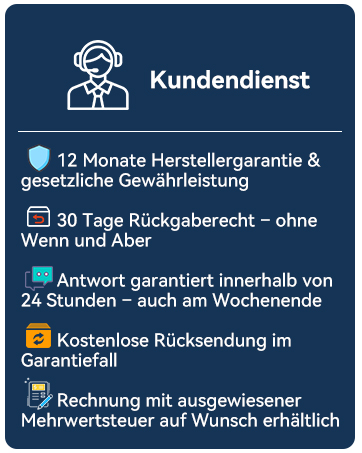
ചിത്രം 9.1: കഴിഞ്ഞുview of SVITOO's customer service commitments.