
1. ആമുഖം
This manual provides essential information for the safe and efficient use of your DOOGEE Blade 10 Pro Energy Rugged Phone. Please read this manual thoroughly before operating the device and retain it for future reference. The DOOGEE Blade 10 Pro Energy is designed for durability and performance, featuring an ultra-thin yet robust design, a powerful battery, and an advanced camera system.
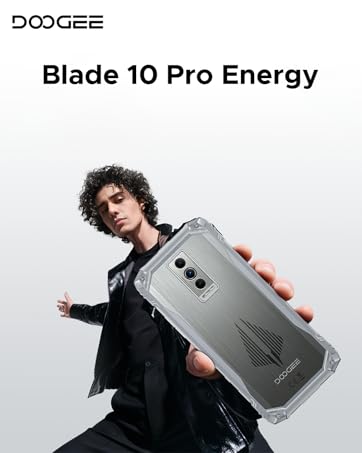
Image 1.1: DOOGEE Blade 10 Pro Energy Rugged Phone Overview
2. ബോക്സിൽ എന്താണുള്ളത്?
പാക്കേജിംഗിൽ എല്ലാ ഇനങ്ങളും ഉണ്ടെന്ന് ഉറപ്പാക്കുക:
- 1 x Blade10 Pro Energy Rugged Phone
- 1 x Type-C USB Cable and Charger
- 1 x Packing Box 1 x Manual
- 1 x Warranty Card 1 x Sling 1 x Protective case
- 1 x Tempered Glass Protective Film (Pre-applied)

Image 2.1: Included Accessories - Protective Case and Phone Strap
3. ഡിവൈസ് ഓവർview
Familiarize yourself with the physical components of your DOOGEE Blade 10 Pro Energy phone.
ചിത്രം 3.1: വശം View ഉപകരണത്തിന്റെ

ചിത്രം 3.2: പിൻഭാഗം View and Camera Module
4. സജ്ജീകരണം
4.1 സിം, ടിഎഫ് കാർഡ് ഇൻസ്റ്റാളേഷൻ
The DOOGEE Blade 10 Pro Energy supports a triple card slot design, allowing for two SIM cards and one TF (microSD) card simultaneously.
- ഫോണിന്റെ വശത്ത് സിം കാർഡ് ട്രേ കണ്ടെത്തുക.
- ട്രേ തുറക്കാൻ നൽകിയിരിക്കുന്ന സിം എജക്റ്റർ ഉപകരണം ഉപയോഗിക്കുക.
- Carefully place your SIM cards and TF card into their respective slots, ensuring correct orientation.
- ഉപകരണ ബോഡിയുമായി ഫ്ലഷ് ആകുന്നതുവരെ ട്രേ ഫോണിലേക്ക് പതുക്കെ തിരികെ തള്ളുക.

Image 4.1: Triple Card Slot and Security Features
4.2 പ്രാരംഭ പവർ ഓൺ
Press and hold the Power button located on the side of the device until the DOOGEE logo appears. Follow the on-screen instructions to complete the initial setup, including language selection, Wi-Fi connection, and Google account setup.
4.3 നെറ്റ്വർക്ക് അനുയോജ്യത
വാങ്ങുന്നതിന് മുമ്പ്asing and using the device, ensure compatibility with your local frequency bands. The DOOGEE Blade 10 Pro Energy supports the following network bands:
- GSM: B2/3/5/8
- WCDMA: B1/2/4/5/8
- TDD: B34/38/39/40/41
- FDD: B1/2/3/4/5/7/8/18/19/20/25/26/28AB/66
5. പ്രവർത്തന നിർദ്ദേശങ്ങൾ
5.1 ആൻഡ്രോയിഡ് 15 ഓപ്പറേറ്റിംഗ് സിസ്റ്റം
Your device runs on the Android 15 operating system, offering enhanced performance, security, and user experience. Navigate through the interface using gestures and on-screen buttons.

Image 5.1: Android 15 System with Glove Mode
5.2 ഡിസ്പ്ലേ
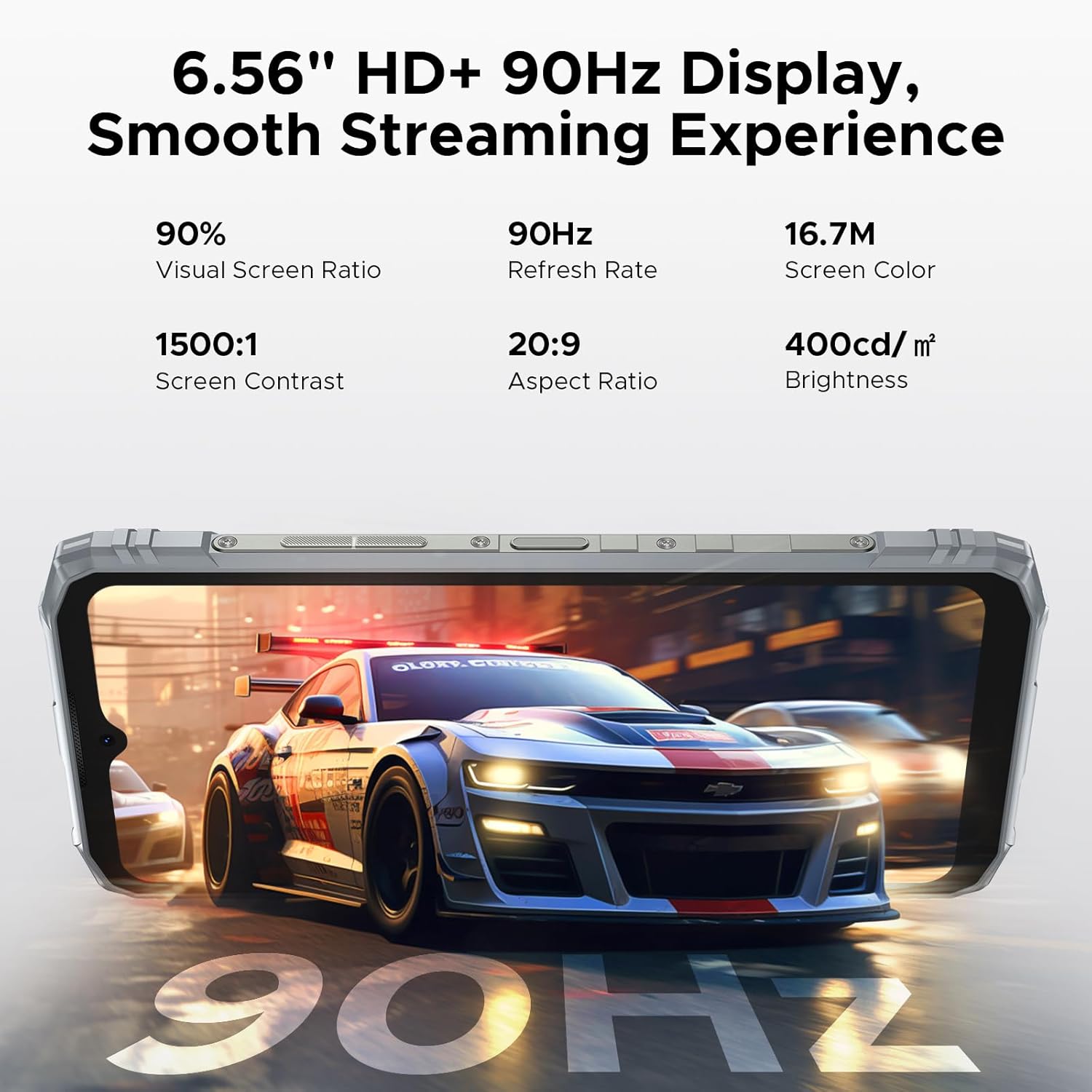
The phone features a 6.56-inch HD+ IPS waterdrop screen with a 90Hz refresh rate for smooth visuals. The IPS technology provides wide viewing angles, and the 90Hz refresh rate ensures fluid scrolling and gaming.

Image 5.2: 6.56" HD+ 90Hz Display Features
5.3 ക്യാമറ
Capture high-quality photos and videos with the 50MP main camera and 8MP front camera. The camera system includes AI recognition for scene optimization and various shooting modes.
- 50MP പ്രധാന ക്യാമറ: For detailed and clear images.
- 8MP മുൻ ക്യാമറ: സെൽഫികൾക്കും വീഡിയോ കോളുകൾക്കും.
- അണ്ടർവാട്ടർ ക്യാമറ മോഡ്: Allows for photography in aquatic environments.
- AI തിരിച്ചറിയൽ: Automatically identifies and optimizes shooting scenes.
- വിവിധ മോഡുകൾ: Includes Beauty, Portrait, Panoramic, HDR, Pro, Night, and more.

Image 5.3: Camera Specifications

Image 5.4: Underwater Camera Functionality
5.4 എൻഎഫ്സി പ്രവർത്തനം
The device supports NFC (Near Field Communication) for convenient and fast operations such as mobile payments and data transfer with compatible devices.

Image 5.5: NFC for Convenient Transactions
5.5 സുരക്ഷാ സവിശേഷതകൾ
Unlock your phone securely using Face ID or the side-mounted fingerprint sensor.
5.6 മറ്റ് പ്രവർത്തനങ്ങൾ
The DOOGEE Blade 10 Pro Energy includes various useful software features:
- ആപ്പ് ക്ലോണിംഗ്: Run multiple instances of an app.
- Split-screen Mode: Use two apps simultaneously.
- Super Clipboard: Enhanced clipboard functionality.
- Dual System Mode: Create separate user environments.
- തത്സമയ സബ്ടൈറ്റിലുകൾ: Provides live captioning.
- Smart Sensing/Incoming Call Muting: Intelligent call management.
- സ്ക്രീൻ സെൻസിംഗ്: Advanced screen interaction.
- Video Display Enhancement: Optimizes video playback quality.

Image 5.6: Additional Smart Functions
6. ബാറ്ററി മാനേജ്മെന്റ്
The DOOGEE Blade 10 Pro Energy is equipped with a 6150mAh Si-C battery, designed for extended usage. It supports 18W fast charging and reverse charging.
- ചാർജിംഗ്: Use the provided Type-C USB cable and charger for optimal charging speed.
- ഫാസ്റ്റ് ചാർജിംഗ്: Supports 18W fast charging to reduce charging time.
- വിപരീത ചാർജിംഗ്: The phone can act as a power bank to charge other devices.
- ബാറ്ററി ദീർഘായുസ്സ്: The Si-C battery is designed for 1000 charging cycles and maintains over 80% health status for up to 3 years.

Image 6.1: 6150mAh Battery Capacity

Image 6.2: Fast and Reverse Charging
7. ഈട് സവിശേഷതകൾ
The DOOGEE Blade 10 Pro Energy is built to withstand challenging environments, meeting IP68/IP69K and MIL-STD-810H standards.
- IP68/IP69K: വെള്ളത്തിനും പൊടിക്കും പ്രതിരോധശേഷിയുള്ളതിന് സാക്ഷ്യപ്പെടുത്തിയത്.
- മിൽ-എസ്ടിഡി-810എച്ച്: Military-grade durability against drops, shocks, and extreme temperatures.
- നിർമ്മാണം: Features an aviation-grade aluminum titanium alloy frame for enhanced compression and high-temp resistance.

Image 7.1: Durability Test Results

Image 7.2: IP68/IP69K and MIL-STD-810H Certifications
8. പരിപാലനം
To ensure the longevity and optimal performance of your DOOGEE Blade 10 Pro Energy, follow these maintenance guidelines:
- Regularly clean the screen and device body with a soft, lint-free cloth.
- ഉയർന്ന താപനിലയിലോ നേരിട്ടുള്ള സൂര്യപ്രകാശത്തിലോ ഫോൺ ദീർഘനേരം തുറന്നുവെക്കുന്നത് ഒഴിവാക്കുക.
- Ensure all port covers are securely closed when the phone is exposed to water or dust.
- Keep the software updated to the latest version for security and performance improvements.
- Use only authorized accessories and chargers.
9. പ്രശ്നപരിഹാരം
If you encounter issues with your device, refer to the following common troubleshooting steps:
- ഉപകരണം ഓണാക്കുന്നില്ല: ബാറ്ററി ചാർജ്ജ് ചെയ്തിട്ടുണ്ടെന്ന് ഉറപ്പാക്കുക. ചാർജർ കണക്റ്റ് ചെയ്ത് വീണ്ടും പവർ ചെയ്യാൻ ശ്രമിക്കുന്നതിന് മുമ്പ് കുറച്ച് മിനിറ്റ് കാത്തിരിക്കുക.
- സ്ക്രീൻ പ്രതികരിക്കുന്നില്ല: പവർ ബട്ടൺ ഏകദേശം 10-15 സെക്കൻഡ് അമർത്തിപ്പിടിച്ചുകൊണ്ട് ഉപകരണം പുനരാരംഭിക്കുക.
- നെറ്റ്വർക്ക് കണക്റ്റിവിറ്റി പ്രശ്നങ്ങൾ: നിങ്ങളുടെ സിം കാർഡ് ശരിയായി ചേർത്തിട്ടുണ്ടോയെന്ന് പരിശോധിക്കുക. നെറ്റ്വർക്ക് ക്രമീകരണങ്ങൾ പരിശോധിച്ച് നിങ്ങൾ നെറ്റ്വർക്ക് കവറേജിലാണെന്ന് ഉറപ്പാക്കുക.
- ആപ്പുകൾ ക്രാഷാകുന്നു: പ്രശ്നമുള്ള ആപ്പിന്റെ കാഷെ മായ്ക്കുക അല്ലെങ്കിൽ അത് വീണ്ടും ഇൻസ്റ്റാൾ ചെയ്യുക. നിങ്ങളുടെ ഉപകരണ സോഫ്റ്റ്വെയർ കാലികമാണെന്ന് ഉറപ്പാക്കുക.
- മന്ദഗതിയിലുള്ള പ്രകടനം: ആവശ്യമില്ലാത്ത പശ്ചാത്തല ആപ്ലിക്കേഷനുകൾ അടയ്ക്കുക. കാഷെ മായ്ക്കുക, താൽക്കാലികം files. Consider performing a factory reset if the issue persists (back up your data first).
For more complex issues, please contact DOOGEE customer support.
10 സ്പെസിഫിക്കേഷനുകൾ
Key technical specifications for the DOOGEE Blade 10 Pro Energy:
| ഫീച്ചർ | സ്പെസിഫിക്കേഷൻ |
|---|---|
| മോഡലിൻ്റെ പേര് | Blade10 Pro Energy |
| ഓപ്പറേറ്റിംഗ് സിസ്റ്റം | ആൻഡ്രോയിഡ് 15 |
| പ്രോസസ്സർ | UNISOC T7250 Octa-core (1.8 GHz) |
| റാം | 32 ജിബി (6 ജിബി ഫിസിക്കൽ + 26 ജിബി വെർച്വൽ) |
| ആന്തരിക സംഭരണം | 256 ജിബി |
| വികസിപ്പിക്കാവുന്ന സംഭരണം | Up to 2 TB (TF card, sold separately) |
| സ്ക്രീൻ വലിപ്പം | 6.56 ഇഞ്ച് |
| ഡിസ്പ്ലേ റെസല്യൂഷൻ | 720 x 1600 (എച്ച്ഡി+) |
| പുതുക്കിയ നിരക്ക് | 90 Hz |
| പ്രധാന ക്യാമറ | 50 എം.പി |
| മുൻ ക്യാമറ | 8 എം.പി |
| ബാറ്ററി ശേഷി | 6150 mAh |
| ചാർജിംഗ് | 18W Fast Charging, Reverse Charging |
| സിം കാർഡ് പിന്തുണ | Dual SIM (Triple Card Slot) |
| കണക്റ്റിവിറ്റി | 4.5G LTE, Wi-Fi 5, Bluetooth 5.0, NFC, GPS |
| ഈട് | IP68/IP69K Water & Dust Resistant, MIL-STD-810H Certified |
| അളവുകൾ | 3.15 x 0.42 x 6.8 ഇഞ്ച് (10.7mm കനം) |
| ഭാരം | 1.1 പൗണ്ട് (499 ഗ്രാം) |
11. വാറൻ്റിയും പിന്തുണയും
Your DOOGEE Blade 10 Pro Energy comes with a warranty card included in the box. Please refer to the warranty card for detailed terms and conditions regarding coverage and duration.
For technical support, service, or further inquiries, please visit the official DOOGEE website or contact their customer service department. Keep your purchase receipt and warranty card handy when seeking support.