
ആമുഖം
This manual provides essential information for the setup, operation, and maintenance of your new Generic Replacement Remote Control. This remote is designed to be a direct replacement for various AUNA DisGo Box speaker systems, including models 100, 2100, 10033685, 10033686, 10030725, 10030726, and 10032598.
The remote control is pre-programmed and requires no additional setup or coding. Simply insert the batteries, and it will be ready for immediate use with your compatible speaker system.
സജ്ജമാക്കുക
1. ബാറ്ററി ഇൻസ്റ്റാളേഷൻ
റിമോട്ട് കൺട്രോളിന് ആവശ്യമാണ് two (2) AAA batteries (not included). Please purchase new batteries from a local store before proceeding.
- റിമോട്ട് കൺട്രോളിന്റെ പിൻഭാഗത്ത് ബാറ്ററി കമ്പാർട്ട്മെന്റ് കണ്ടെത്തുക.
- ബാറ്ററി കമ്പാർട്ട്മെന്റ് കവർ തുറക്കാൻ താഴേക്ക് സ്ലൈഡ് ചെയ്യുക അല്ലെങ്കിൽ ഒരു അമ്പടയാളം സൂചിപ്പിക്കുന്ന ദിശയിലേക്ക് സ്ലൈഡ് ചെയ്യുക.
- കമ്പാർട്ടുമെന്റിനുള്ളിലെ മാർക്കിംഗുകളുമായി പോസിറ്റീവ് (+) ഉം നെഗറ്റീവ് (-) ഉം ടെർമിനലുകൾ ശരിയായി വിന്യസിക്കുന്നുണ്ടെന്ന് ഉറപ്പാക്കാൻ രണ്ട് AAA ബാറ്ററികൾ ഇടുക. തെറ്റായി ചേർക്കുന്നത് റിമോട്ട് പ്രവർത്തിക്കുന്നത് തടയും.
- സുരക്ഷിതമായി ക്ലിക്ക് ചെയ്യുന്നതുവരെ ബാറ്ററി കമ്പാർട്ട്മെന്റ് കവർ തിരികെ സ്ഥലത്തേക്ക് സ്ലൈഡുചെയ്ത് മാറ്റിസ്ഥാപിക്കുക.

Figure 1: Battery compartment with cover removed, showing slots for two AAA batteries.
2. പ്രാരംഭ ഉപയോഗം
Once batteries are correctly installed, the remote control is ready for use. No programming or pairing is required. Point the remote directly at your AUNA DisGo Box speaker system and press the desired function button.
പ്രവർത്തന നിർദ്ദേശങ്ങൾ
The remote control provides full functionality for your compatible AUNA DisGo Box speaker system. Below is a general overview of the buttons and their functions.
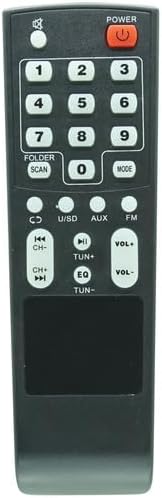
ചിത്രം 2: മുൻഭാഗം view വിദൂര നിയന്ത്രണത്തിന്റെ.
- പവർ: സ്പീക്കർ സിസ്റ്റം ഓൺ അല്ലെങ്കിൽ ഓഫ് ചെയ്യുന്നു.
- നമ്പർ ബട്ടണുകൾ (0-9): Used for direct track selection, radio station input, or other numerical inputs depending on the speaker system's mode.
- FOLDER / SCAN: Navigates through folders or initiates a scan function (e.g., for FM radio).
- വഴികൾ: Switches between different input modes (e.g., Bluetooth, USB, SD, AUX, FM, CD).
- CD / U/SD / AUX / FM: Direct selection buttons for specific input sources.
- Previous/Next Track (|<</>>|): Skips to the previous or next track/file.
- Play/Pause (>||): ഓഡിയോ പ്ലേബാക്ക് പ്ലേ ചെയ്യുകയോ താൽക്കാലികമായി നിർത്തുകയോ ചെയ്യുന്നു.
- VOL+ / VOL-: മാസ്റ്റർ വോളിയം കൂട്ടുകയോ കുറയ്ക്കുകയോ ചെയ്യുന്നു.
- EQ: ഇക്വലൈസർ പ്രീസെറ്റുകളിലൂടെ കടന്നുപോകുന്നു.
- TUN+ / TUN-: Adjusts radio frequency up or down.
For specific functions and advanced operations, please refer to the original user manual of your AUNA DisGo Box speaker system.
മെയിൻ്റനൻസ്
ബാറ്ററി മാറ്റിസ്ഥാപിക്കൽ
If the remote control's range decreases or it becomes unresponsive, it is likely time to replace the batteries. Follow the battery installation steps outlined in the "Setup" section.
വൃത്തിയാക്കൽ
To clean the remote control, gently wipe it with a soft, dry cloth. Do not use liquid cleaners, abrasive materials, or solvents, as these can damage the remote's surface or internal components.
ട്രബിൾഷൂട്ടിംഗ്
- റിമോട്ട് പ്രതികരിക്കുന്നില്ല:
- Ensure new batteries are correctly installed with the correct polarity.
- Check if there are any obstructions between the remote control and the speaker system's infrared receiver.
- Make sure you are within the effective range of the speaker system's IR receiver.
- Verify that the speaker system is powered on.
- ചില പ്രവർത്തനങ്ങൾ പ്രവർത്തിക്കുന്നില്ല:
- Confirm that your specific AUNA DisGo Box model is listed as compatible. If you are unsure, please contact the seller for verification.
- Ensure the speaker system is in the correct mode for the function you are trying to use (e.g., pressing track skip buttons while in FM radio mode might not work).
If problems persist after following these steps, please contact the seller for further assistance.
സ്പെസിഫിക്കേഷനുകൾ
| ഫീച്ചർ | വിശദാംശങ്ങൾ |
|---|---|
| ASIN | B0F8NQNH7W |
| ബാറ്ററികൾ ആവശ്യമാണ് | 2 AAA ബാറ്ററികൾ (ഉൾപ്പെടുത്തിയിട്ടില്ല) |
| നിർമ്മാതാവ് | ജനറിക് |
| ബ്രാൻഡ് | ജനറിക് |
| പ്രത്യേക ഫീച്ചർ | അധിക പ്രോഗ്രാമിംഗ് ആവശ്യമില്ല |
| നിറം | As shown (Black) |
| പിന്തുണയ്ക്കുന്ന ഉപകരണങ്ങളുടെ പരമാവധി എണ്ണം | 1 (Specific AUNA DisGo Box Speaker System) |
| അനുയോജ്യമായ ഉപകരണങ്ങൾ | AUNA DisGo Box 100, 2100, 10033685, 10033686, 10030725, 10030726, 10032598 Speaker Systems |
വാറൻ്റിയും പിന്തുണയും
ഈ മാറ്റിസ്ഥാപിക്കൽ റിമോട്ട് കൺട്രോളിനായുള്ള പ്രത്യേക വാറന്റി വിവരങ്ങൾ ഈ മാനുവലിൽ നൽകിയിട്ടില്ല. വാറന്റി കവറേജ്, റിട്ടേണുകൾ അല്ലെങ്കിൽ സാങ്കേതിക പിന്തുണ എന്നിവയെക്കുറിച്ചുള്ള വിശദാംശങ്ങൾക്ക്, വാങ്ങൽ ഡോക്യുമെന്റേഷൻ പരിശോധിക്കുകയോ ഉൽപ്പന്നം വാങ്ങിയ പ്ലാറ്റ്ഫോം വഴി വിൽപ്പനക്കാരനെ നേരിട്ട് ബന്ധപ്പെടുകയോ ചെയ്യുക.
If you are unsure about compatibility with your device, it is recommended to contact the seller before purchase or for troubleshooting assistance.