
1. ആമുഖം
The VILTROX DC-L1 is a professional 7-inch camera field monitor designed for DSLR and mirrorless cameras. It features a touchscreen IPS panel with a 170° wide viewing angle, 600 nits brightness, and HD 1280x800 resolution, supporting 4K HDMI loop in/out. This monitor provides advanced monitoring functions such as Peak Focus, Waveform, 3D LUT support, and more, enhancing your shooting and post-production workflow. This manual provides detailed instructions for setting up, operating, and maintaining your DC-L1 monitor.
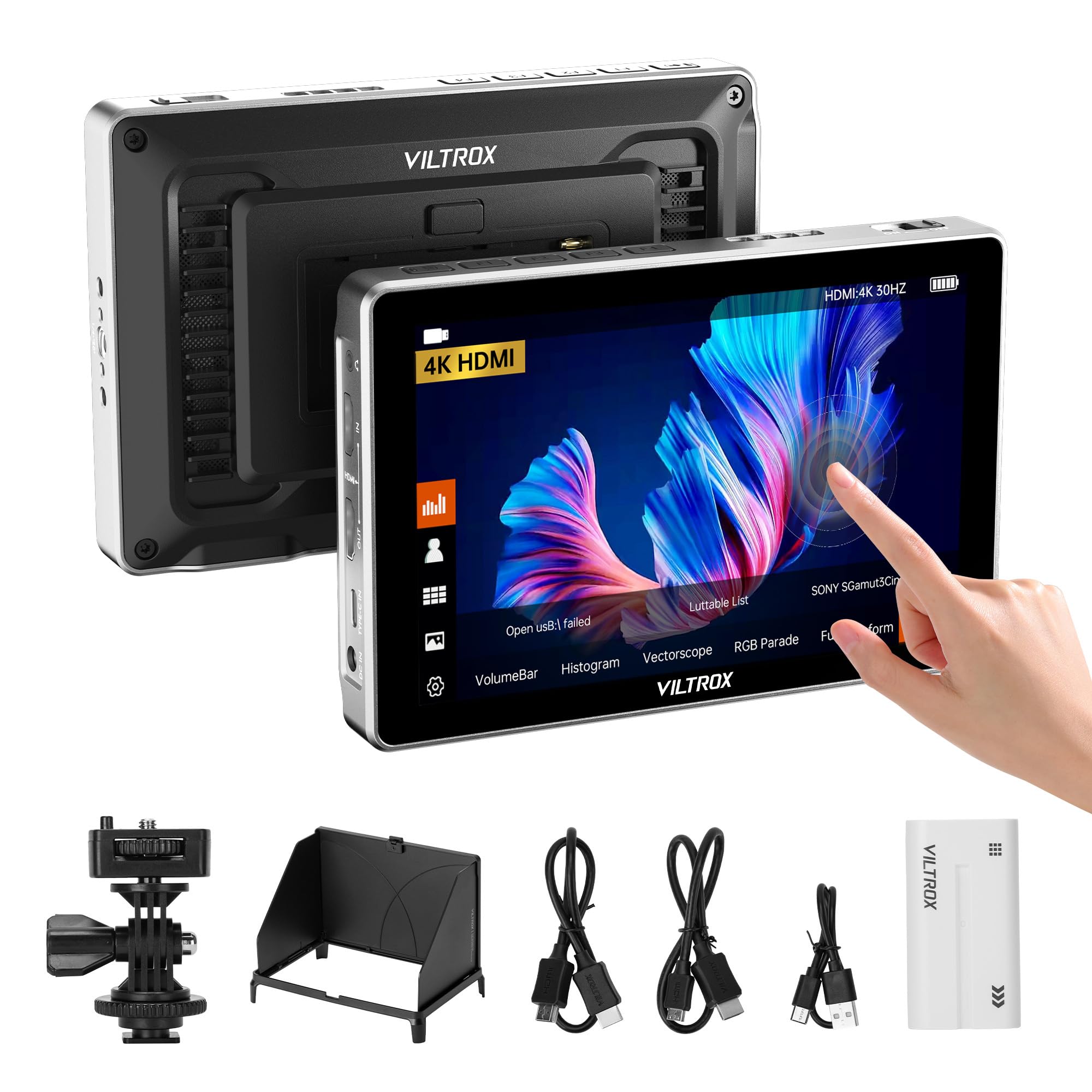
Figure 1: VILTROX DC-L1 7-inch Camera Field Monitor
2. ബോക്സിൽ എന്താണുള്ളത്?
എല്ലാ ഇനങ്ങളും ഉണ്ടെന്ന് ഉറപ്പാക്കാൻ നിങ്ങളുടെ പാക്കേജിന്റെ ഉള്ളടക്കങ്ങൾ പരിശോധിക്കുക:
- 1x VILTROX DC-L1 Camera Field Monitor
- 1x NP-F550 Battery
- 1x Sunshade Hood
- 1x Cold Shoe Adapter
- 1x സ്റ്റാൻഡേർഡ് HDMI കേബിൾ
- 1x മിനി HDMI കേബിൾ
- 1x യുഎസ്ബി ടൈപ്പ്-സി കേബിൾ
- 1x Custom Screen Protectors
- 1x ഉപയോക്തൃ മാനുവൽ
- 1x പാക്കിംഗ് ബോക്സ്

ചിത്രം 2: പാക്കേജ് ഉള്ളടക്കം
3. ഉൽപ്പന്നം കഴിഞ്ഞുview
Familiarize yourself with the components and interfaces of your VILTROX DC-L1 monitor.

Figure 3: DC-L1 Product Instruction Diagram
- ബാക്ക്/മെനു ബട്ടൺ
- Shortcut Key (F1-F4)
- ഡിസ്പ്ലേ സ്ക്രീൻ
- ഹീറ്റ് ഡിസിപ്പേഷൻ പോർട്ട്
- സിഗ്നൽ സൂചകം
- പവർ ബട്ടൺ
- ഹെഡ്ഫോൺ ജാക്ക് (3.5 എംഎം)
- എച്ച്ഡിഎംഐ ഇൻപുട്ട്
- HDMI ഔട്ട്പുട്ട്
- Type-C Port (Power Supply)
- DC Port (Power Supply)
- 1/4 Screw Hole (Top)
- 1/4 Screw Hole (Bottom)
- USB Interface (for 3D LUT import/firmware)
- ഹീറ്റ് ഡിസിപ്പേഷൻ പോർട്ട്
- Battery Slot (NP-F series)
- ബാറ്ററി റിലീസ് ബട്ടൺ
4. സജ്ജീകരണം
4.1 മോണിറ്റർ പവർ ചെയ്യുന്നു
The DC-L1 monitor offers multiple power supply options:
- NP-F Series Battery: Insert a compatible NP-F550, NP-F750, or NP-F970 series battery into the battery slot on the back of the monitor. Ensure it clicks into place.
- ഡിസി പവർ അഡാപ്റ്റർ: Connect a 10-12V/2A DC power adapter to the DC IN port.
- Type-C Power Bank: Connect a Type-C power source (≥9V, 3A) to the Type-C port.

Figure 4: Multiple Power Supply Options
4.2 മോണിറ്റർ മൌണ്ട് ചെയ്യൽ
The monitor can be mounted using the 1/4" screw holes located on the top and bottom. Use the included cold shoe adapter to attach it to your camera's hot shoe or a rig.
4.3 ഒരു ക്യാമറയിലേക്ക് കണക്റ്റുചെയ്യുന്നു
Use the provided Standard HDMI Cable or Mini HDMI Cable to connect your camera's HDMI output to the HDMI Input port on the DC-L1 monitor. The monitor supports up to 4K@30Hz HDMI signals.

Figure 5: HDMI Input/Output Connection
5. പ്രവർത്തന നിർദ്ദേശങ്ങൾ
5.1 പവർ ഓൺ/ഓഫ്
Press and hold the Power Button (6) to turn the monitor on or off.
5.2 Touchscreen Control
The DC-L1 features an intuitive touchscreen interface. Tap and swipe gestures allow quick access to menus and settings.
- ടാപ്പ് ചെയ്യുക: മെനു ഇനങ്ങൾ തിരഞ്ഞെടുക്കുക അല്ലെങ്കിൽ പ്രവർത്തനങ്ങൾ സജീവമാക്കുക.
- സ്വൈപ്പ്: Navigate through menus or adjust parameters.
- ഇരട്ട ഞെക്കിലൂടെ: Access Main Menu.
- ഇടത്തേക്ക് സ്വൈപ്പ് ചെയ്യുക: മെനുവിൽ നിന്ന് പുറത്തുകടക്കുക.
- മുകളിലേക്കും താഴേക്കും സ്വൈപ്പ് ചെയ്യുക: Adjust Volume/Backlight.
- Pinch In/Out: Zoom In/Out.

Figure 6: Touchscreen Control Interface
5.3 Shortcut Keys (F1-F4)
The four customizable shortcut keys (2) provide quick access to frequently used functions. You can configure these in the monitor's settings menu.
- Default F1: Full Waveform switch.
- Default F2: Pseudo Color function switch.
- Default F3: 3D LUT function switch.
- Default F4: Lock Screen switch.
5.4 Professional Monitoring Functions
The DC-L1 includes a suite of professional monitoring tools:
- 3D ലട്ട്: Import custom 3D LUT tables via the USB-A interface (14) for real-time color preview.
- Parade Waveform: Displays luminance and chrominance levels.
- Oscillogram (Y): Shows luminance distribution.
- Vector Graph: Visualizes color hue and saturation.
- ബ്രൈറ്റ്നസ് ഹിസ്റ്റോഗ്രാം: Indicates exposure levels.
- Auxiliary Focus (Peaking): Highlights in-focus areas.
- Audio Column: Monitors audio input levels.
- ഇമേജ് ഫ്ലിപ്പ്: ചിത്രം തിരശ്ചീനമായോ ലംബമായോ ഫ്ലിപ്പുചെയ്യുന്നു.
- തെറ്റായ നിറം: Helps evaluate exposure by displaying different exposure levels as distinct colors.
- സുരക്ഷിത മേഖല: Displays guides for broadcast-safe areas.
- മാർക്ക് അനുപാതം: Overlays various aspect ratio markers.
- ഗ്രിഡ്ലൈനുകൾ: Provides compositional guides.
- വർണ്ണ താപനില: Adjusts the color temperature of the display.
- പിക്സലിൽ നിന്ന് പിക്സലിൽ നിന്ന്: Displays the image at 1:1 pixel ratio.

Figure 7: Professional Monitoring Tools
5.5 Sunshade Hood Installation
The detachable sunshade hood can be quickly installed to reduce glare and improve visibility in bright outdoor conditions.
5.6 വീഡിയോ ഓവർview
ഒരു ചെറിയ വിവരണത്തിനായി ഈ വീഡിയോ കാണുകview of the VILTROX DC-L1 monitor's features and accessories.
Video 1: VILTROX DC-L1 Monitor Overview
6. പരിപാലനം
- വൃത്തിയാക്കൽ: Use a soft, dry cloth to clean the monitor's body. For the screen, use a specialized screen cleaning solution and a microfiber cloth. Avoid harsh chemicals.
- സംഭരണം: When not in use, store the monitor in a cool, dry place, away from direct sunlight and extreme temperatures. Use the provided packing box or a protective case.
- ബാറ്ററി കെയർ: If using NP-F batteries, ensure they are charged regularly and stored properly to prolong their lifespan. Remove batteries if the monitor will not be used for an extended period.
- ഫേംവെയർ അപ്ഡേറ്റുകൾ: Periodically check the VILTROX official website for firmware updates to ensure optimal performance and access to new features. Updates can typically be installed via the USB-A port.
7. പ്രശ്നപരിഹാരം
| പ്രശ്നം | സാധ്യമായ കാരണം | പരിഹാരം |
|---|---|---|
| മോണിറ്റർ പവർ ഓണാക്കുന്നില്ല. | Low or depleted battery; power cable not connected properly; faulty power source. | Ensure battery is charged or replace with a charged one. Check power cable connections. Try a different power source (DC adapter or Type-C). |
| No signal displayed. | HDMI cable not connected properly; incorrect input selected; camera output settings. | Check HDMI cable connection to both camera and monitor. Ensure the camera's HDMI output is active. Verify the monitor's input source is set to HDMI. Try a different HDMI cable. |
| ചിത്രം വികലമായതോ തെറ്റായ നിറങ്ങളോ ആണ്. | Incorrect color settings; 3D LUT applied incorrectly; faulty HDMI cable. | Reset color settings in the monitor menu. Check if a 3D LUT is active and if it's the correct one. Try a different HDMI cable. |
| ടച്ച്സ്ക്രീൻ പ്രതികരിക്കുന്നില്ല. | Screen lock activated; temporary software glitch. | Check if the screen lock (F4 default) is active. Restart the monitor. If the issue persists, consider a firmware update. |
| അമിതമായി ചൂടാകുന്നത് നിരീക്ഷിക്കുക. | Prolonged use in high temperatures; blocked ventilation. | Ensure heat dissipation ports are not blocked. Operate in a well-ventilated area. Allow the monitor to cool down if it becomes excessively hot. |
8 സ്പെസിഫിക്കേഷനുകൾ
| ഫീച്ചർ | വിശദാംശങ്ങൾ |
|---|---|
| ബ്രാൻഡ് | വിൽട്രോക്സ് |
| മോഡൽ നമ്പർ | DC-L1 |
| സ്ക്രീൻ വലിപ്പം | 7 ഇഞ്ച് |
| റെസലൂഷൻ | 1280x800 |
| വീക്ഷണാനുപാതം | 16:9 |
| സ്ക്രീൻ ഉപരിതല വിവരണം | തിളങ്ങുന്ന |
| കോൺട്രാസ്റ്റ് റേഷ്യോ | 1000:1 |
| ഡിസ്പ്ലേ തരം | ഐ.പി.എസ് |
| Viewing ആംഗിൾ | 170 ഡിഗ്രി |
| തെളിച്ചം | 600 candela_per_square_meter |
| ചിത്രത്തിൻ്റെ ഗുണനിലവാരം മെച്ചപ്പെടുത്തൽ സാങ്കേതികവിദ്യ | IPS panel, 3D LUT, REC-709 color calibration |
| ഇനത്തിൻ്റെ അളവുകൾ (D x W x H) | 1.18"D x 7"W x 4.72"H |
| ഇനത്തിൻ്റെ ഭാരം | 12.2 ഔൺസ് |
| ഡിസ്പ്ലേ റെസല്യൂഷൻ പരമാവധി | 4096 x 2160 |
| നേറ്റീവ് റെസല്യൂഷൻ | 1280x800 |
| അധിക സവിശേഷതകൾ | Portable, Touchscreen |
| അനുയോജ്യമായ ഉപകരണങ്ങൾ | DSLR ക്യാമറകൾ |
| കണക്റ്റിവിറ്റി ടെക്നോളജി | HDMI |
| ഹാർഡ്വെയർ കണക്റ്റിവിറ്റി | HDMI |
| Total Number of HDMI Ports | 1 |
| Number of Component Outputs | 1 |
| Total USB 3.0 Ports | 1 |
9. വാറണ്ടിയും പിന്തുണയും
9.1 വാറൻ്റി വിവരങ്ങൾ
The VILTROX DC-L1 Camera Field Monitor comes with a 1 വർഷത്തെ നിർമ്മാതാവിന്റെ വാറന്റി. സാധാരണ ഉപയോഗത്തിലുള്ള മെറ്റീരിയലുകളിലെയും നിർമ്മാണത്തിലെയും വൈകല്യങ്ങൾ ഈ വാറന്റി ഉൾക്കൊള്ളുന്നു. വാറന്റി ക്ലെയിമുകൾക്കായി നിങ്ങളുടെ വാങ്ങലിന്റെ തെളിവ് സൂക്ഷിക്കുക.
9.2 ഉപഭോക്തൃ പിന്തുണ
For technical support, service, or further inquiries, please visit the official VILTROX webസൈറ്റ് സന്ദർശിക്കുക അല്ലെങ്കിൽ അവരുടെ ഉപഭോക്തൃ സേവന വിഭാഗവുമായി ബന്ധപ്പെടുക. നിങ്ങൾക്ക് സന്ദർശിക്കാനും കഴിയും VILTROX Store on Amazon കൂടുതൽ ഉൽപ്പന്ന വിവരങ്ങൾക്കും പിന്തുണാ ഉറവിടങ്ങൾക്കും.