
1. ആമുഖം
This manual provides comprehensive instructions for the CORBOBO SM809 Wired MMO Gaming Mouse. It covers product features, setup, operation, software customization, maintenance, and troubleshooting to ensure optimal performance and user experience.
2. പാക്കേജ് ഉള്ളടക്കം
- MMO wired mouse x1
- Right side plate x1
- Left side plate x1
- ഉൽപ്പന്ന മാനുവൽ x1
3. ഉൽപ്പന്നം കഴിഞ്ഞുview
The CORBOBO SM809 is a wired MMO gaming mouse designed for precision and customization. It features a high-precision optical sensor, programmable buttons, interchangeable side plates, and customizable RGB lighting.
3.1 പ്രധാന സവിശേഷതകൾ
- ഉയർന്ന കൃത്യതയുള്ള ഒപ്റ്റിക്കൽ സെൻസർ: Equipped with a PAW3311 optical sensor, offering DPI adjustable from 100 to 24,000.
- പ്രോഗ്രാം ചെയ്യാവുന്ന ബട്ടണുകൾ: 16 customizable buttons, including 9 side buttons, for macro functions and remapping.
- പരസ്പരം മാറ്റാവുന്ന സൈഡ് പ്ലേറ്റുകൾ: Modular magnetic design with 3-button and 9-button side plate options.
- എർഗണോമിക് ഡിസൈൻ: Lightweight (85g) with a honeycomb pattern for breathability and grip, suitable for palm and claw grips.
- ഇഷ്ടാനുസൃതമാക്കാവുന്ന RGB ലൈറ്റിംഗ്: Over 16.8 million color combinations with various dynamic effects.
- Stable Wired Connectivity: Durable 1.8-meter braided cable for reliable data transfer.
3.2 മൗസ് ഡയഗ്രം

Figure 3.2.1: CORBOBO SM809 Mouse with Labeled Buttons. This image illustrates the various buttons on the mouse, including the left and right click, scroll wheel/middle button, DPI+ and DPI- buttons, forward and backward keys, rapid fire key, and the 9 programmable side buttons.

ചിത്രം 3.2.2: മുകളിൽ നിന്ന് താഴേക്ക് view of the CORBOBO SM809 Wired MMO Gaming Mouse. This image shows the overall design of the mouse, highlighting its honeycomb shell and the placement of the scroll wheel and DPI buttons.
4. സജ്ജീകരണം
The CORBOBO SM809 mouse is designed for plug-and-play functionality.
- Connect the USB cable of the SM809 mouse to an available USB port on your computer.
- ഓപ്പറേറ്റിംഗ് സിസ്റ്റം ആവശ്യമായ ഡ്രൈവറുകൾ യാന്ത്രികമായി കണ്ടെത്തി ഇൻസ്റ്റാൾ ചെയ്യും.
- For advanced customization, proceed to Section 6: Software Installation and Customization.
5. പ്രവർത്തന നിർദ്ദേശങ്ങൾ
5.1 ഡിപിഐ അഡ്ജസ്റ്റ്മെന്റ്
The mouse features a high-precision optical sensor with adjustable DPI settings.
- Preset DPI Levels: The mouse has 8 preset DPI levels (1000/1600/2400/3200/4800/6400/12000/22800).
- ഓൺ-ദി-ഫ്ലൈ ക്രമീകരണം: Use the DPI+ and DPI- buttons (typically located behind the scroll wheel) to cycle through the preset DPI levels.
- Software Adjustment: For precise DPI settings from 100 to 24,000 in ±100 increments, use the dedicated software (refer to Section 6).

Figure 5.1.1: Adjustable DPI Levels. This image displays the 8 preset DPI levels and their visual indicators, demonstrating how the mouse's sensitivity can be changed.
5.2 പ്രോഗ്രാം ചെയ്യാവുന്ന ബട്ടണുകൾ
The SM809 mouse offers 16 programmable buttons for enhanced control.
- Each button can be remapped or assigned complex macro functions.
- Customization is performed through the mouse software. Refer to Section 6 for details.
5.3 Interchangeable Modular Side Plates
The mouse features magnetic side plates that can be swapped to suit different gaming or work preferences.
- The mouse comes with multiple side button layouts, including 3-button and 9-button options.
- To change a side plate, gently pull the current plate away from the mouse body. The magnetic attachment allows for easy removal and reattachment of the desired plate.

Figure 5.3.1: Interchangeable Side Plates. This image demonstrates the magnetic attachment of the side plates, showing how they can be easily removed and swapped.
5.4 Customizable RGB Lighting Effects
The SM809 features extensive RGB lighting customization.
- The LOGO and scroll/middle button offer 8 preset RGB breathing light effects.
- To access 11 customizable RGB lighting effects on the adjustable side keys, press the ബാക്ക്വേർഡ് കീ എന്നിവയുമായി ചേർന്ന് DPI- ബട്ടൺ.
- Further customization, including 16.8 million color combinations and various dynamic modes, is available through the mouse software.
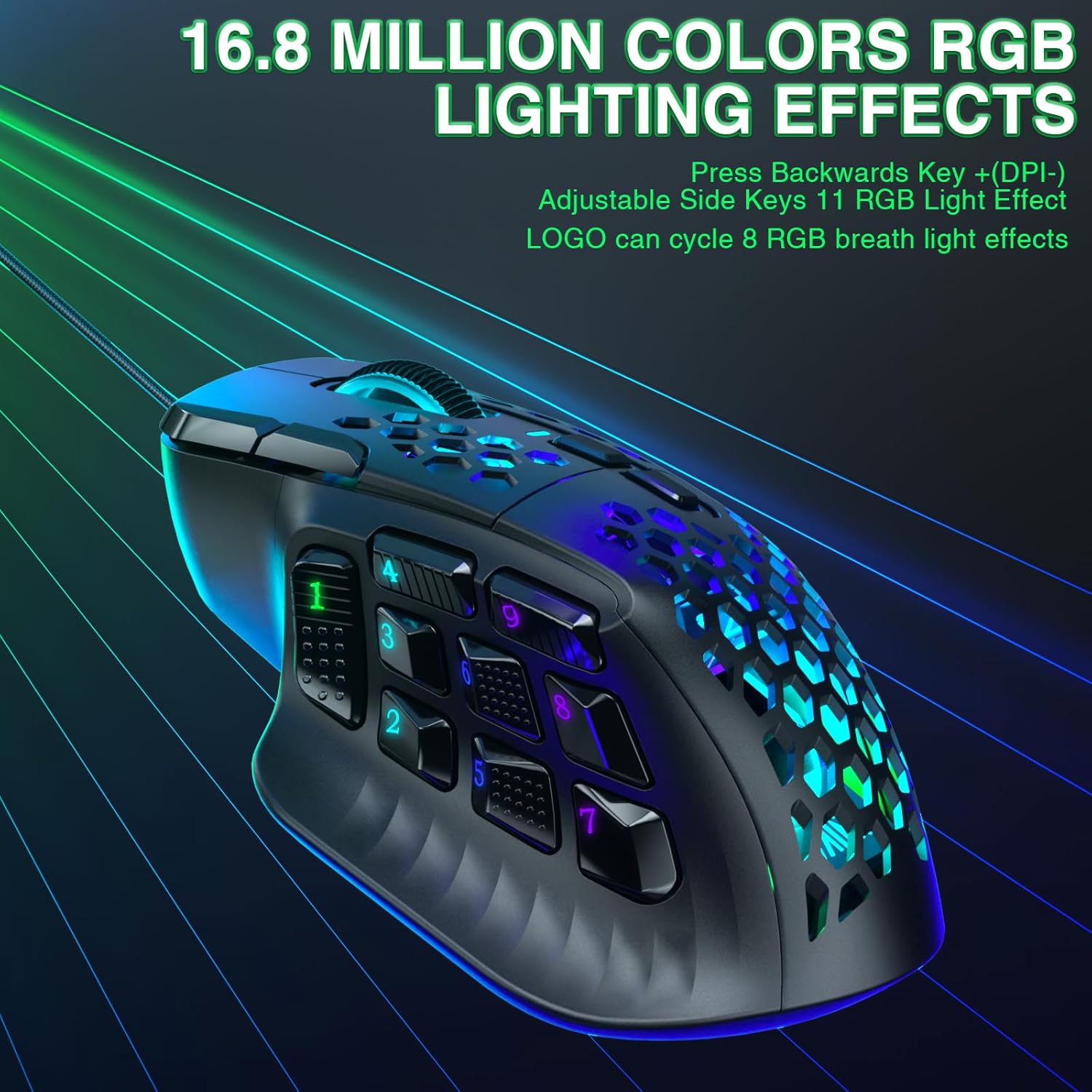
Figure 5.4.1: Customizable RGB Lighting Effects. This image showcases the vibrant RGB lighting options available on the mouse, highlighting the illuminated scroll wheel and side buttons.
6. സോഫ്റ്റ്വെയർ ഇൻസ്റ്റാളേഷനും ഇഷ്ടാനുസൃതമാക്കലും
To unlock the full potential of your CORBOBO SM809 mouse, install the dedicated software.
6.1 സോഫ്റ്റ്വെയർ ഡൗൺലോഡ്
- Visit the official download page: സോളകാകാഡ്രൈവർ.കോം
- Select "SM809 (Wired)" from the available options.
- അനുയോജ്യത: The software is only compatible with Windows operating systems. Ensure your operating system version meets the requirements.
- ഇൻസ്റ്റലേഷൻ കുറിപ്പ്: Temporarily disable your antivirus software and firewall before downloading and installing the mouse driver software to avoid interruptions.
6.2 ഇഷ്ടാനുസൃതമാക്കൽ ഓപ്ഷനുകൾ
The software allows for extensive personalization:
- ബട്ടൺ റീമാപ്പിംഗ്: 16 ബട്ടണുകളിൽ ഏതെങ്കിലുമൊന്നിലേക്ക് ഇഷ്ടാനുസൃത പ്രവർത്തനങ്ങൾ നൽകുക.
- മാക്രോ സൃഷ്ടി: Record and assign complex sequences of commands to a single button.
- DPI ക്രമീകരണങ്ങൾ: Fine-tune DPI sensitivity in 100-DPI increments up to 24,000 DPI.
- പോളിംഗ് നിരക്ക്: Adjust the polling rate (125-1000Hz) for responsiveness.
- RGB ലൈറ്റിംഗ്: Customize colors, effects, and brightness for various lighting zones.
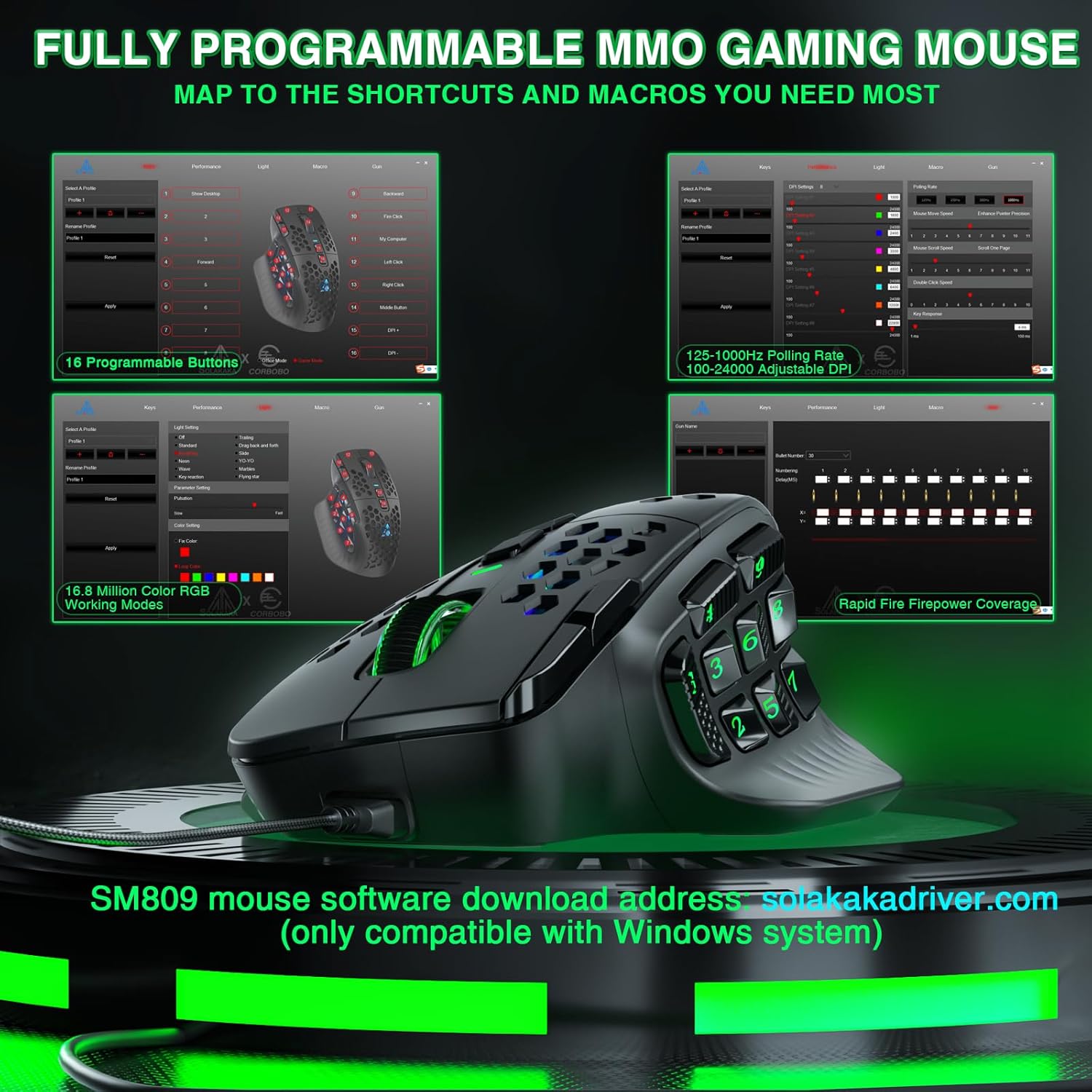
Figure 6.2.1: Mouse Software Interface. This image displays the graphical user interface of the SM809 customization software, showing options for button programming, DPI settings, and RGB lighting.

Figure 6.2.2: Custom Button Combination Key Settings. This image shows a detailed view of how to assign key combinations and macros within the mouse software.
7. പരിപാലനം
ശരിയായ അറ്റകുറ്റപ്പണികൾ നിങ്ങളുടെ മൗസിന്റെ ദീർഘായുസ്സും പ്രകടനവും ഉറപ്പാക്കുന്നു.
- വൃത്തിയാക്കൽ: മൗസിന്റെ പ്രതലം തുടയ്ക്കാൻ മൃദുവായതും ഉണങ്ങിയതുമായ ഒരു തുണി ഉപയോഗിക്കുക. കഠിനമായ അഴുക്കിന്, അല്പം ഡി.amp ഈർപ്പം മൗസിനുള്ളിൽ കടക്കാതിരിക്കാൻ തുണി ഉപയോഗിക്കാം.
- സെൻസർ പരിചരണം: Keep the optical sensor area clean and free of dust or debris to maintain tracking accuracy.
- കേബിൾ മാനേജുമെന്റ്: കേബിളിന് കേടുപാടുകൾ സംഭവിക്കാതിരിക്കാൻ മൂർച്ചയുള്ള വളവുകളോ അമിതമായി വലിക്കുന്നതോ ഒഴിവാക്കുക.
8. പ്രശ്നപരിഹാരം
If you encounter issues with your CORBOBO SM809 mouse, refer to the following common solutions.
- മൗസ് പ്രതികരിക്കുന്നില്ല:
- യുഎസ്ബി കേബിൾ നിങ്ങളുടെ കമ്പ്യൂട്ടറിലേക്ക് സുരക്ഷിതമായി കണക്റ്റുചെയ്തിട്ടുണ്ടെന്ന് ഉറപ്പാക്കുക.
- മറ്റൊരു യുഎസ്ബി പോർട്ടിലേക്ക് മൗസ് ബന്ധിപ്പിക്കാൻ ശ്രമിക്കുക.
- പ്രശ്നം മൗസിനോ കമ്പ്യൂട്ടറിനോ ആണോ എന്ന് നിർണ്ണയിക്കാൻ മറ്റൊരു കമ്പ്യൂട്ടറിൽ മൗസ് പരിശോധിക്കുക.
- Software Not Saving Settings/Macros:
- Ensure the mouse software is run with administrator privileges. Right-click the software icon and select "Run as administrator."
- Temporarily disable antivirus or firewall software during configuration, as they may interfere with saving settings.
- Verify that the software version is correct for your SM809 (Wired) model.
- Inconsistent Tracking/DPI Issues:
- മൗസിന്റെ അടിയിലുള്ള ഒപ്റ്റിക്കൽ സെൻസർ വൃത്തിയാക്കുക.
- മൗസ് അനുയോജ്യമായ ഒരു പ്രതലത്തിലാണ് ഉപയോഗിക്കുന്നതെന്ന് ഉറപ്പാക്കുക (ഉദാ. ഒരു മൗസ് പാഡ്).
- Adjust DPI settings via the mouse buttons or software.
- RGB Lighting Not Working Correctly:
- Check RGB settings within the mouse software.
- Ensure the correct lighting effect is selected using the Backward key + DPI- button combination.
If issues persist after attempting these solutions, please contact customer support.
9 സ്പെസിഫിക്കേഷനുകൾ
| ഫീച്ചർ | വിശദാംശങ്ങൾ |
|---|---|
| മോഡൽ നമ്പർ | SM809 |
| കണക്റ്റിവിറ്റി ടെക്നോളജി | USB, വയർഡ് |
| സെൻസർ തരം | High Precision Optical (PAW3311) |
| ഡിപിഐ ശ്രേണി | 100 - 24,000 (adjustable in ±100 increments via software) |
| പോളിംഗ് നിരക്ക് | 1000Hz വരെ |
| ട്രാക്കിംഗ് സ്പീഡ് | 300 ഐ.പി.എസ് |
| ത്വരണം | 35G |
| പ്രോഗ്രാം ചെയ്യാവുന്ന ബട്ടണുകൾ | 16 |
| സൈഡ് ബട്ടണുകൾ | Interchangeable 3-button and 9-button plates |
| RGB ലൈറ്റിംഗ് | 16.8 Million Colors, Customizable Effects |
| കേബിൾ നീളം | 1.8 മീറ്റർ (ബ്രെയ്ഡ് ചെയ്തത്) |
| ഉൽപ്പന്ന അളവുകൾ | 4.72 x 3.07 x 0.1 ഇഞ്ച് |
| ഇനത്തിൻ്റെ ഭാരം | 3.04 ഔൺസ് (ഏകദേശം 85 ഗ്രാം) |
| ഓപ്പറേറ്റിംഗ് സിസ്റ്റം അനുയോജ്യത | Windows (for software customization) |
10. വാറൻ്റിയും പിന്തുണയും
For any issues or questions regarding your CORBOBO SM809 Wired MMO Gaming Mouse, please contact customer support. The manufacturer is committed to providing assistance and will respond as soon as possible.
നിർദ്ദിഷ്ട വാറന്റി നിബന്ധനകൾക്കും വ്യവസ്ഥകൾക്കും നിങ്ങളുടെ വാങ്ങൽ ഡോക്യുമെന്റേഷൻ പരിശോധിക്കുക.