
ആമുഖം
The Blink Outdoor 2K+ is a wireless smart security camera system designed to provide enhanced visual and audio monitoring for your property. This system features 2K video resolution, Color Vision in low light, enhanced two-way audio with noise cancellation, and a two-year battery life. It is built to withstand various weather conditions with an IP-65 rating. This manual provides essential information for setting up, operating, maintaining, and troubleshooting your Blink Outdoor 2K+ system.

Image: Blink Outdoor 2K+ camera mounted on an exterior wall.
എന്താണ് ഉൾപ്പെടുത്തിയിരിക്കുന്നത്
Your Blink Outdoor 2K+ system package includes the following components:
- 3 Blink Outdoor 2K+ Cameras
- 1 Blink Sync Module Core
- 6 AA 1.5V Lithium Batteries
- 3 Mounting Kits
- 1 Power Adapter (for Sync Module Core)
- 1 USB-C Cable (for Sync Module Core)
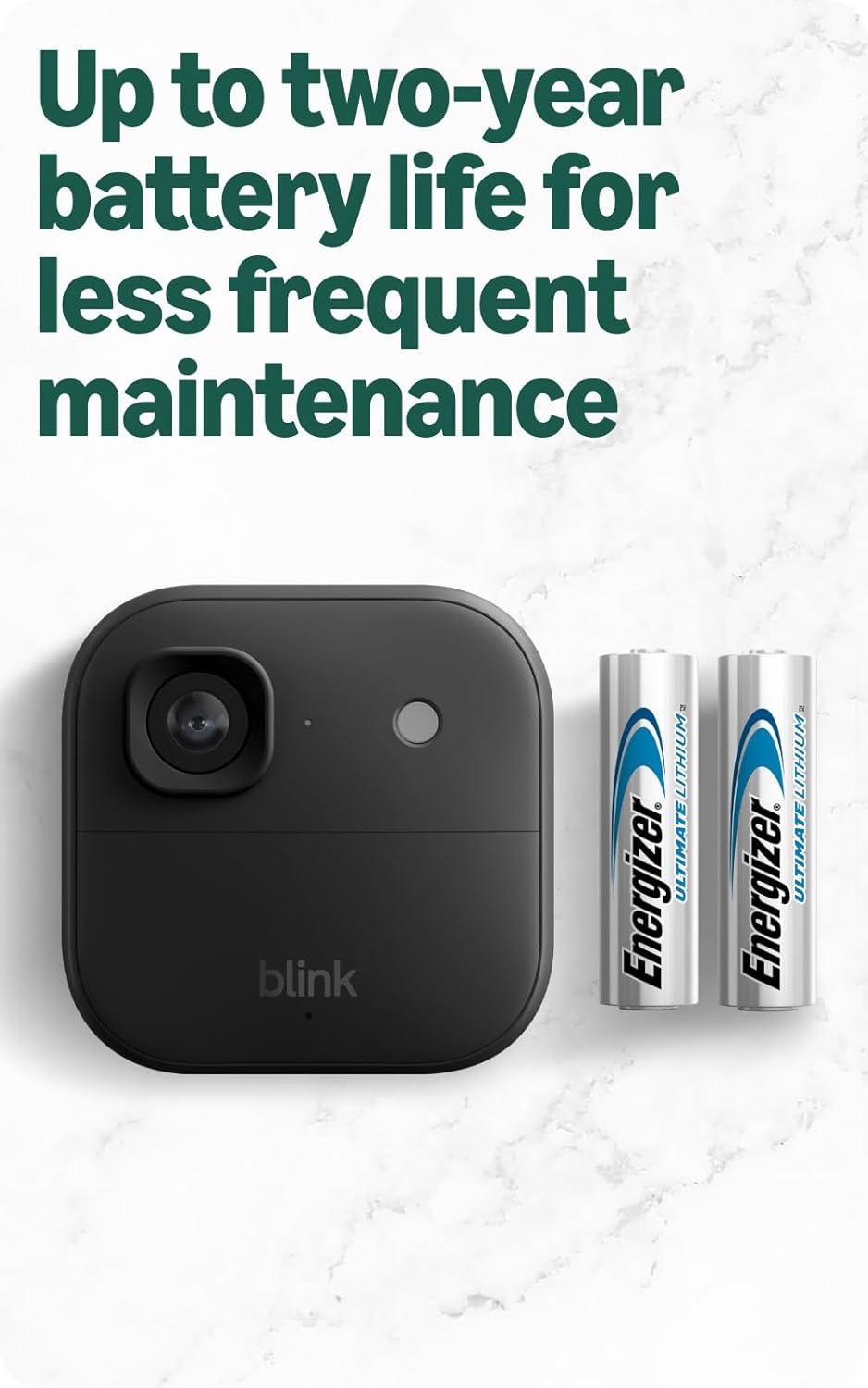
Image: Blink Outdoor 2K+ camera shown with two AA Energizer lithium batteries.
സജ്ജമാക്കുക
Follow these steps to set up your Blink Outdoor 2K+ camera system:
- Install the Blink Home Monitor App: Download and install the Blink Home Monitor app on your smartphone. The app is compatible with iOS 17, Android 10, and Fire OS 8 or newer.
- Set up the Sync Module Core:
- Plug the Sync Module Core into a power outlet using the provided power adapter and USB-C cable.
- Ensure the Sync Module Core is placed in a central location within your home, away from thick walls or large obstructions, to optimize Wi-Fi signal strength to your cameras.
- Follow the in-app instructions to connect the Sync Module Core to your 2.4 GHz Wi-Fi network (802.11b/g/n).
- Install Batteries in Cameras: Insert the two included AA 1.5V lithium metal (non-rechargeable) batteries into each Blink Outdoor 2K+ camera.
- Add Cameras to the System:
- Within the Blink app, select the option to add a new device and follow the prompts to add each camera to your Sync Module Core system.
- During the connection process, the camera's red LED should flash steadily. If it flashes 4-5 times with a long pause, it may indicate a connection issue.
- മൗണ്ട് ക്യാമറകൾ: Use the provided mounting kits to securely install your cameras in desired outdoor locations. Consider the field of view (115° x 62° x 135°) and potential obstructions.

Image: Blink Sync Module Core connected to a power source.
Operating the Camera System
വീഡിയോ, ഓഡിയോ സവിശേഷതകൾ
- 2K വീഡിയോ റെസല്യൂഷൻ: The camera captures video at 2560 x 1440 resolution, providing clear and detailed footage.
- Color Vision in Low Light: The camera can provide color video in low ambient light conditions before switching to infrared black and white.
- 4x സൂം: Utilize the digital zoom feature in the app to get a closer look at details within your video feed.
- Two-Way Audio with Noise Cancellation: Engage in clear conversations with visitors or deter unwanted activity using the camera's built-in speaker and microphone. Advanced noise cancellation improves audio clarity.

Image: A smartphone screen showing a live 2K video feed from a Blink camera.
Blink Home Monitor App Usage
The Blink Home Monitor app is your primary interface for managing your camera system:
- തത്സമയം View: Access real-time video from your cameras.
- ചലനം കണ്ടെത്തൽ: Configure motion detection settings, including sensitivity and re-trigger time.
- സ്മാർട്ട് ഡിറ്റക്ഷൻ: With an optional Blink Subscription Plan, receive smart notifications for person and vehicle detection.
- വീഡിയോ ചരിത്രം: Review recorded motion clips.
- ക്രമീകരണങ്ങൾ: Adjust camera and system settings, including video quality (Saver, Standard, Best).

Image: A smartphone screen showing a Blink notification with a video description, indicating smart detection features.
Night Vision Configuration
To optimize night vision performance, especially for color night vision, adjust settings in the Blink app under "Video and Photo Settings":
- രാത്രി കാഴ്ച: This setting has options for Auto, On, or Off.
- നേടാൻ കളർ നൈറ്റ് വിഷൻ, set this to ഓട്ടോ or ഓഫ്. If set to ON, the infrared (IR) lamp will always be illuminated, resulting in black and white footage.
- In ഓട്ടോ mode, the camera will use color night vision if sufficient ambient light is present; otherwise, it will switch to IR black and white.
- In ഓഫ് mode, the camera will always attempt color night vision. If ambient light is insufficient, the image may be too dark.
- IR Intensity: Available when Night Vision is set to AUTO. Options are Low, Medium, High.
- ആരംഭിക്കുക താഴ്ന്നത് intensity. Higher settings can wash out details and consume more battery.
- Test different settings by taking screenshots during live view to compare clarity and detail.
മെയിൻ്റനൻസ്
Proper maintenance ensures the longevity and optimal performance of your Blink Outdoor 2K+ system:
- ബാറ്ററി മാറ്റിസ്ഥാപിക്കൽ: The cameras are powered by two AA 1.5V lithium metal batteries, offering up to two years of battery life under typical use. Replace batteries with new Energizer lithium batteries when indicated by the app. Do not use rechargeable or alkaline batteries, as they may cause issues or damage.
- കാലാവസ്ഥ പ്രതിരോധം: The Blink Outdoor 2K+ camera has an IP-65 weather-resistant design, protecting it from rain, dust, and severe weather. Periodically check the camera for any debris accumulation on the lens or housing and clean gently if necessary.
- ഫേംവെയർ അപ്ഡേറ്റുകൾ: Ensure your camera and Sync Module Core firmware are up to date through the Blink Home Monitor app to benefit from the latest features and security enhancements.

Image: Blink Outdoor 2K+ camera demonstrating its weather resistance in light snow.
ട്രബിൾഷൂട്ടിംഗ്
If you encounter issues with your Blink Outdoor 2K+ system, consider the following troubleshooting steps:
- ക്യാമറ കണക്ഷൻ പ്രശ്നങ്ങൾ: If a camera fails to connect to the Sync Module Core (e.g., red LED flashes 4-5 times with a long pause), try the following:
- Ensure fresh lithium batteries are correctly installed.
- Restart your Sync Module Core and Wi-Fi router.
- Move the camera closer to the Sync Module Core.
- If issues persist, contact Blink customer service.
- Wi-Fi Connectivity and Network Speed:
- The system operates on a 2.4 GHz Wi-Fi network. Ensure your router is configured for this band.
- Avoid using Wi-Fi extenders, as they can interfere with the Sync Module's connection.
- For optimal performance, set your 2.4 GHz Wi-Fi channel to 01, 06, or 11 to minimize overlap and interference.
- Adequate internet upload speed is crucial, especially with multiple cameras. Recommended upload speeds are 2 Mbps for Saver, 3 Mbps for Standard, and 6 Mbps for Best video quality settings.
- Night Vision "Flair" or "Halo" Effect: If you observe a bright flair or halo in IR night vision footage, it may be due to the camera being mounted too close to a reflective surface (wall, eve, etc.). Adjust the camera's angle slightly away from the surface to mitigate this effect.
- പൊതു പ്രകടനം: If experiencing slow response times or connection delays, ensure your Sync Module Core is positioned in an open area, not against walls or in tight corners, to maximize signal strength.
സ്പെസിഫിക്കേഷനുകൾ
| ഫീൽഡ് View | 115° x 62° x 135° |
| ക്യാമറ റെസല്യൂഷൻ | 2K (2560 x 1440) |
| വീക്ഷണാനുപാതം | 16:9 |
| ക്യാമറ ഫ്രെയിം റേറ്റ് | 24/25 FPS (Max) |
| ക്യാമറ അളവുകൾ | 2.8 x 2.8 x 1.6 inches (70mm x 70 mm x 41 mm) |
| Sync Module Core Dimensions | 3.19 x 1.77 ൽ x 0.85 ഇഞ്ച് (81mm x 45mm x 21.55mm) |
| ക്യാമറ ഭാരം | 5.0 ഔൺസ് (136 ഗ്രാം) |
| Sync Module Core Weight | 1.5 ഔൺസ് (43.6 ഗ്രാം) |
| Camera Electrical Rating | 2 AA 1.5V lithium metal (non-rechargeable) batteries |
| Sync Module Core Power | 5V ⌊ 1A |
| Wi-Fi കണക്റ്റിവിറ്റി | 2.4 GHz 802.11b/g/n |
| Minimum Smartphone Requirements | iOS 17, Android 10, Fire OS 8 only |
| Blink App | ബ്ലിങ്ക് ഹോം മോണിറ്റർ |
| ഓഡിയോ | ദ്വിമുഖ സംസാരം |
| പ്രവർത്തന താപനില | -4° മുതൽ 113° F (-20° മുതൽ 45°C വരെ) |
| തലമുറ | നാലാം തലമുറ |
വാറൻ്റിയും പിന്തുണയും
Your Blink Outdoor 2K+ system comes with a one-year limited warranty and service. For detailed terms, please refer to the official Blink webസൈറ്റ്.
For additional information, setup guides, and troubleshooting assistance, visit the official Blink Outdoor 2K+ support page. You can also find support within the Blink Home Monitor app.