
VILTROX DC-L2
VILTROX DC-L2 7-inch Touchscreen Camera Field Monitor User Manual
Model: DC-L2
1. ആമുഖം
This manual provides detailed instructions for the proper use and maintenance of your VILTROX DC-L2 7-inch Touchscreen Camera Field Monitor. The DC-L2 is designed to enhance your video production workflow with its high-resolution display, advanced monitoring tools, and versatile connectivity options. Please read this manual thoroughly before operating the device to ensure optimal performance and longevity.
2. പാക്കേജ് ഉള്ളടക്കം
താഴെ ലിസ്റ്റ് ചെയ്തിരിക്കുന്ന എല്ലാ ഇനങ്ങളും നിങ്ങളുടെ പാക്കേജിൽ ഉൾപ്പെടുത്തിയിട്ടുണ്ടെന്ന് ഉറപ്പാക്കുക. ഏതെങ്കിലും ഇനങ്ങൾ നഷ്ടപ്പെട്ടിട്ടുണ്ടെങ്കിലോ കേടായിട്ടുണ്ടെങ്കിലോ, ദയവായി ഉപഭോക്തൃ പിന്തുണയുമായി ബന്ധപ്പെടുക.
- VILTROX DC-L2 7-inch Touchscreen Camera Field Monitor
- Sunshade Hood
- NP-F തരം ബാറ്ററി
- Standard Shoe Adapter
- HDMI A-A Cable
- HDMI A-C Cable
- യുഎസ്ബി-സി കേബിൾ
- തുണി സഞ്ചി
- HD Screen Protector
- വാറൻ്റി കാർഡ്
- ഉപയോക്തൃ മാനുവൽ (ഈ പ്രമാണം)

Image: The VILTROX DC-L2 monitor shown with its complete set of accessories, including the sunshade, battery, cables, and mounting adapter.

ചിത്രം: ഒരു ഓവർഹെഡ് view of the VILTROX DC-L2 monitor and all its accessories neatly arranged outside their packaging.
3. സജ്ജീകരണം
3.1 മോണിറ്റർ പവർ ചെയ്യുന്നു
The DC-L2 monitor offers multiple power options:
- NP-F ബാറ്ററി: Insert a fully charged NP-F type battery into the battery slot on the rear of the monitor. Ensure it clicks into place securely.
- DC ഇൻപുട്ട്: Connect a compatible DC power adapter (not included, typically 12V/3A) to the DC IN port.
- ടൈപ്പ്-സി യുഎസ്ബി: Connect a Type-C USB power source to the USB-C port. This port also supports charging the NP-F battery when inserted.
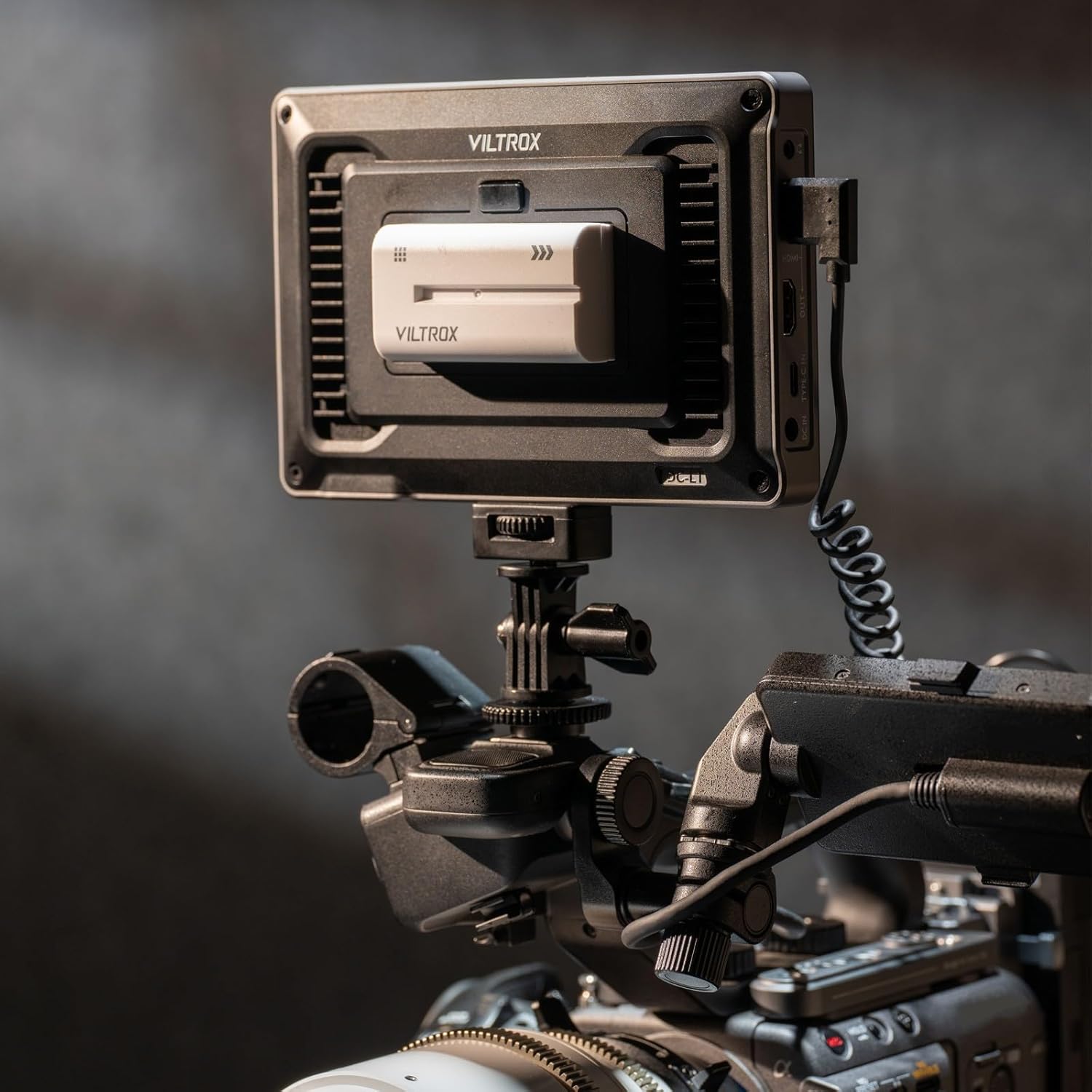
Image: The back of the VILTROX DC-L2 monitor showing the battery plate with an NP-F battery inserted, and various ports including SDI and HDMI.
3.2 വീഡിയോ ഉറവിടങ്ങൾ ബന്ധിപ്പിക്കൽ
The DC-L2 supports both HDMI and SDI input/output.
- HDMI കണക്ഷൻ: Use the provided HDMI A-A or HDMI A-C cable to connect your camera's HDMI output to the monitor's HDMI IN port.
- SDI കണക്ഷൻ: For professional cameras, connect an SDI cable from your camera's SDI output to the monitor's SDI IN port.
- ലൂപ്പ് ഔട്ട്: The monitor also features HDMI OUT and SDI OUT ports, allowing you to loop the video signal to another monitor or device.

Image: The VILTROX DC-L2 monitor mounted on a camera rig, displaying a live feed, demonstrating its use in a production environment.
3.3 മോണിറ്റർ മൌണ്ട് ചെയ്യൽ
Attach the monitor to your camera rig or tripod using the standard shoe adapter or the 1/4"-20 threaded holes located on the bottom and side of the monitor.

Image: The VILTROX DC-L2 monitor securely mounted on a camera's hot shoe using the included adapter, showing its compact setup.
3.4 Attaching the Sunshade Hood
The sunshade hood helps reduce glare and improve screen visibility in bright conditions. Clip the sunshade onto the monitor's frame. It can also fold flat for storage.

Image: A hand demonstrating the attachment of the sunshade hood to the VILTROX DC-L2 monitor, highlighting its ease of use.
4. മോണിറ്റർ പ്രവർത്തിപ്പിക്കുക
4.1 അടിസ്ഥാന പ്രവർത്തനം
- പവർ ഓൺ/ഓഫ്: Press and hold the power button (usually on the side or top) to turn the monitor on or off.
- ടച്ച്സ്ക്രീൻ നിയന്ത്രണം: The 7-inch IPS display is a touchscreen. Tap icons and swipe to navigate menus and adjust settings.
- കുറുക്കുവഴി കീകൾ: The monitor features customizable shortcut keys (F1-F4) on the top panel. These can be assigned to frequently used functions for quick access.

Image: The VILTROX DC-L2 monitor displaying its graphical user interface with various monitoring tools and settings accessible via touchscreen.
4.2 Advanced Monitoring Tools
The DC-L2 integrates a suite of professional monitoring features:
- തരംഗരൂപം: Displays the luminance and chrominance levels of your video signal, aiding in exposure and color correction.
- ഹിസ്റ്റോഗ്രാം: Provides a graphical representation of the tonal distribution in your image, helping to prevent clipping of highlights and shadows.
- ഫോക്കസ് പീക്കിംഗ്: Highlights in-focus areas with a selectable color, assisting with precise manual focusing.
- തെറ്റായ നിറം: Assigns different colors to specific exposure levels, allowing for quick and accurate exposure adjustments.
- 3D ലട്ട്: Supports loading custom 3D Look-Up Tables for on-set color grading and previewing final looks.
- De-squeeze: Corrects the aspect ratio for anamorphic lenses.
- സീബ്ര പാറ്റേൺ: വരയുള്ള പാറ്റേണുള്ള അമിതമായി തുറന്നുകിടക്കുന്ന പ്രദേശങ്ങളെ സൂചിപ്പിക്കുന്നു.
- മോണോക്രോം: Displays the image in black and white for evaluating contrast and composition.
- Flip/Mirror: Adjusts the image orientation for various mounting configurations.
- Frame Freeze: Captures and holds a single frame for detailed analysis.

Image: The VILTROX DC-L2 monitor screen showing multiple professional monitoring tools active, such as waveform, vectorscope, and histogram, overlaid on the video feed.
5. പരിപാലനം
- സ്ക്രീൻ വൃത്തിയാക്കൽ: Use a soft, lint-free cloth to gently wipe the screen. For stubborn smudges, a screen cleaning solution designed for electronics can be used sparingly. Avoid harsh chemicals.
- ശരീരം വൃത്തിയാക്കൽ: Wipe the monitor body with a dry, soft cloth. Do not use abrasive cleaners or solvents.
- സംഭരണം: When not in use, store the monitor in a dry, dust-free environment, preferably in its protective cloth bag. Remove the battery if storing for extended periods.
- താപനില: മോണിറ്ററിനെ തീവ്രമായ താപനിലയിലോ ഉയർന്ന ആർദ്രതയിലോ തുറന്നുകാട്ടുന്നത് ഒഴിവാക്കുക.
6. പ്രശ്നപരിഹാരം
| പ്രശ്നം | സാധ്യമായ കാരണം | പരിഹാരം |
|---|---|---|
| മോണിറ്റർ പവർ ഓണാക്കുന്നില്ല. | Battery is depleted or not inserted correctly. Power cable is loose or faulty. | Ensure battery is charged and properly seated. Check power cable connections. Try a different power source. |
| വീഡിയോ സിഗ്നൽ പ്രദർശിപ്പിച്ചിട്ടില്ല. | Incorrect input source selected. Cable is loose or faulty. Camera output settings are incorrect. | Verify the correct input (HDMI/SDI) is selected in the monitor's menu. Check cable connections. Confirm camera is outputting video. |
| ടച്ച്സ്ക്രീൻ പ്രതികരിക്കുന്നില്ല. | Temporary software glitch. Screen is dirty. | Restart the monitor. Clean the screen surface. |
| Image is distorted or colors are incorrect. | Incorrect display settings. Faulty cable. | Reset display settings to default. Try a different HDMI/SDI cable. Check camera's video output settings. |
7 സ്പെസിഫിക്കേഷനുകൾ
| ഫീച്ചർ | വിശദാംശങ്ങൾ |
|---|---|
| മോഡൽ | DC-L2 |
| സ്ക്രീൻ വലിപ്പം | 7 ഇഞ്ച് (18 സെ.മീ. ഡയഗണൽ) |
| റെസലൂഷൻ | 1280 x 800 |
| തെളിച്ചം | 600 നിറ്റുകൾ |
| കോൺട്രാസ്റ്റ് റേഷ്യോ | 1000:1 |
| Viewing ആംഗിൾ | 170° Ultra-wide IPS |
| വർണ്ണ ആഴം | 8-ബിറ്റ് |
| വർണ്ണ കവറേജ് | sRGB/Rec.709 |
| പുതുക്കിയ നിരക്ക് | 60Hz |
| വീഡിയോ ഇൻപുട്ട്/ഔട്ട്പുട്ട് | 4K 60Hz SDI + HDMI Input/Output |
| പവർ ഓപ്ഷനുകൾ | NP-F Battery, DC Input, Type-C USB |
| ഇനത്തിൻ്റെ ഭാരം | 13.4 ഔൺസ് (ഏകദേശം 380 ഗ്രാം) |
| അളവുകൾ | 12.2 x 7.09 x 3.54 ഇഞ്ച് (പാക്കേജ് അളവുകൾ) |
8. വാറൻ്റിയും പിന്തുണയും
For warranty information, please refer to the warranty card included in your package. For technical support, product inquiries, or to report issues, please contact VILTROX customer service through their official webഉൽപ്പന്നം വാങ്ങിയ സൈറ്റ് അല്ലെങ്കിൽ റീട്ടെയിലർ.
VILTROX Official Webസൈറ്റ്: www.viltrox.com
Ask a question about this manual
Ask about setup, troubleshooting, compatibility, parts, safety, or missing instructions. Manuals+ will review the question and use this page’s manual context to help answer it.