
1. ആമുഖം
വാങ്ങിയതിന് നന്ദി.asing the FYDEE A9 Record Player. This manual provides essential information for the safe and efficient operation of your new device. Please read these instructions thoroughly before use and retain them for future reference.
2 സുരക്ഷാ വിവരങ്ങൾ
- ഊർജ്ജ സ്രോതസ്സ്: നൽകിയിരിക്കുന്ന എസി അഡാപ്റ്റർ മാത്രം ഉപയോഗിക്കുക. വോളിയം ഉറപ്പാക്കുകtagഇ നിങ്ങളുടെ പ്രാദേശിക വൈദ്യുതി വിതരണവുമായി പൊരുത്തപ്പെടുന്നു.
- ജലവും ഈർപ്പവും: യൂണിറ്റ് മഴയിലോ ഈർപ്പത്തിലോ ദ്രാവകങ്ങളിലോ വയ്ക്കരുത്. പാത്രങ്ങൾ പോലുള്ള ദ്രാവകങ്ങൾ നിറച്ച വസ്തുക്കൾ യൂണിറ്റിൽ വയ്ക്കുന്നത് ഒഴിവാക്കുക.
- ചൂട്: റേഡിയേറ്ററുകൾ, ഹീറ്റ് രജിസ്റ്ററുകൾ, സ്റ്റൗകൾ അല്ലെങ്കിൽ മറ്റ് ഉപകരണങ്ങൾ (ഉൾപ്പെടെ) പോലുള്ള താപ സ്രോതസ്സുകളിൽ നിന്ന് യൂണിറ്റ് അകറ്റി നിർത്തുക. ampലൈഫയറുകൾ) ചൂട് ഉത്പാദിപ്പിക്കുന്നത്.
- വെൻ്റിലേഷൻ: ശരിയായ വായുസഞ്ചാരം ഉറപ്പാക്കുക. വായുസഞ്ചാര ദ്വാരങ്ങളൊന്നും തടയരുത്.
- വൃത്തിയാക്കൽ: വൃത്തിയാക്കുന്നതിന് മുമ്പ് വാൾ ഔട്ട്ലെറ്റിൽ നിന്ന് യൂണിറ്റ് പ്ലഗ് അൺപ്ലഗ് ചെയ്യുക. മൃദുവായതും ഉണങ്ങിയതുമായ തുണി മാത്രം ഉപയോഗിക്കുക.
- സേവനം: യൂണിറ്റ് സ്വയം സർവീസ് ചെയ്യാൻ ശ്രമിക്കരുത്. എല്ലാ സർവീസിംഗും യോഗ്യതയുള്ള സർവീസ് ഉദ്യോഗസ്ഥരെ ഏൽപ്പിക്കുക.
- പ്ലേസ്മെൻ്റ്: വീഴാതിരിക്കാൻ യൂണിറ്റ് ഒരു സ്ഥിരതയുള്ളതും പരന്നതുമായ പ്രതലത്തിൽ വയ്ക്കുക.
3. പാക്കേജ് ഉള്ളടക്കം
- FYDEE A9 Record Player
- എസി അഡാപ്റ്റർ
- Transparent Acrylic Dust Cover
- ആർസിഎ കേബിൾ
- ഇൻസ്ട്രക്ഷൻ മാനുവൽ
- 45 ആർപിഎം അഡാപ്റ്റർ
4. ഉൽപ്പന്നം കഴിഞ്ഞുview
Familiarize yourself with the main components of your FYDEE A9 Record Player.
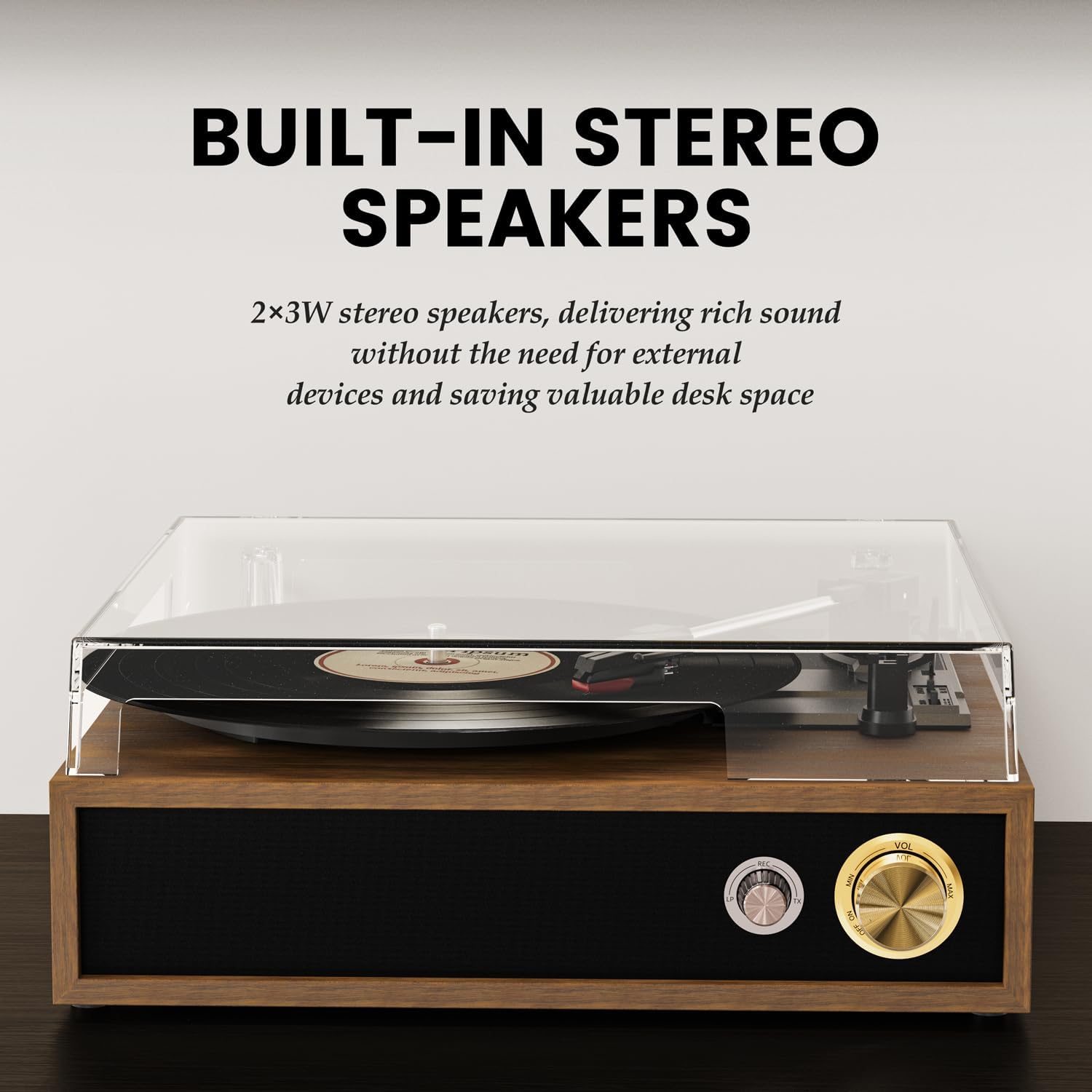
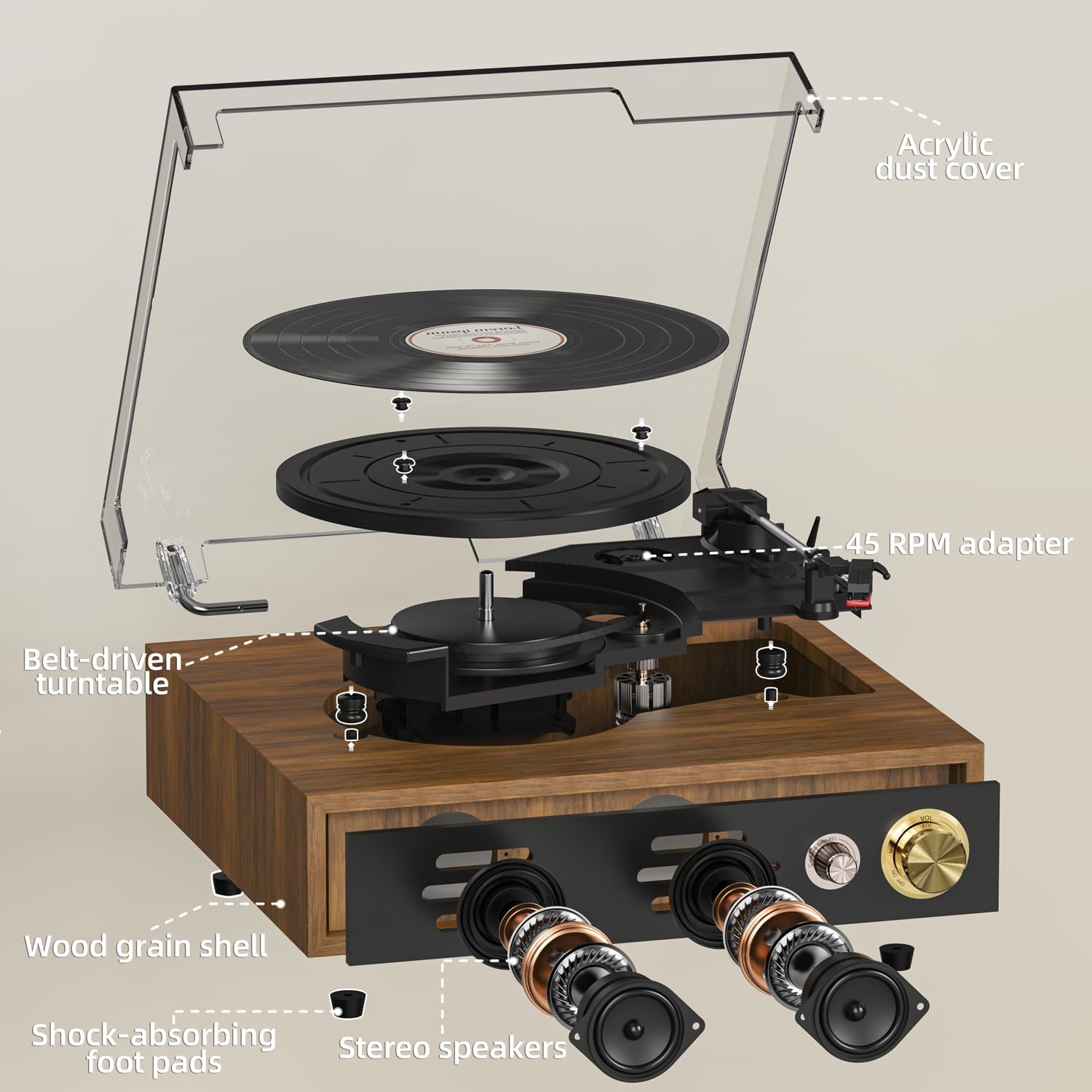
- ടേൺടേബിൾ പ്ലാറ്റർ: Where vinyl records are placed for playback.
- ടോണെർം: സ്റ്റൈലസ് പിടിച്ച് റെക്കോർഡ് ഗ്രൂവുകൾ ട്രാക്ക് ചെയ്യുന്നു.
- സ്റ്റൈലസ് (സൂചി): റെക്കോർഡിൽ നിന്നുള്ള ഓഡിയോ വിവരങ്ങൾ വായിക്കുന്നു.
- പൊടി കവർ: Protects the turntable and records from dust.
- സ്പീഡ് സെലക്ടർ: Allows selection of 33, 45, or 78 RPM.
- Auto-Stop Switch: Enables or disables automatic stopping of the platter at the end of a record.
- പവർ/വോളിയം നോബ്: Turns the unit on/off and adjusts the volume.
- മോഡ് നോബ്: Selects between LP (Vinyl), Bluetooth Receiving (BT RX), Bluetooth Transmission (BT TX), and USB modes.
- ഹെഡ്ഫോൺ ജാക്ക്: ഹെഡ്ഫോണുകൾ ഉപയോഗിച്ച് സ്വകാര്യ ശ്രവണത്തിനായി.
- USB പോർട്ട്: യുഎസ്ബി പ്ലേബാക്കിനും റെക്കോർഡിംഗിനും.
- ആർസിഎ putട്ട്പുട്ട്: For connecting to external speakers or an ampജീവൻ.
- DC 5V ഇൻപുട്ട്: Power connection port.
5. സജ്ജീകരണം
- അൺപാക്ക് ചെയ്യുന്നു: പാക്കേജിംഗിൽ നിന്ന് എല്ലാ ഘടകങ്ങളും ശ്രദ്ധാപൂർവ്വം നീക്കം ചെയ്യുക. ഭാവിയിലെ ഗതാഗതത്തിനോ സംഭരണത്തിനോ വേണ്ടി പാക്കേജിംഗ് സൂക്ഷിക്കുക.
- പൊടി മൂടൽ ഇൻസ്റ്റാളേഷൻ: Align the hinges of the transparent acrylic dust cover with the slots on the back of the record player and gently slide it into place. This cover protects the turntable and records from dust when not in use.
- പവർ കണക്ഷൻ: Connect the provided AC adapter to the DC 5V input port on the back of the record player and then plug it into a wall outlet.
- സ്റ്റൈലസ് സംരക്ഷണം: Remove the clear plastic stylus protective cap from the stylus assembly before playing any record.
- Optional: External Speaker Connection: If you wish to connect external speakers or an amplifier, use the provided RCA cable. Connect the red plug to the 'R' (Right) output and the white plug to the 'L' (Left) output on the record player. Connect the other end to the corresponding input on your external audio system.
For a visual guide on setting up the dust cover and initial connections, please refer to the video below:
വീഡിയോ 1: Unboxing and initial setup of the FYDEE Record Player, including dust cover installation and cable connections.
6. പ്രവർത്തിക്കുന്നു
6.1 വിനൈൽ റെക്കോർഡുകൾ പ്ലേ ചെയ്യുന്നു
- പവർ ഓൺ: Turn the Power/Volume knob clockwise to turn on the record player. The indicator light will illuminate.
- Select LP Mode: Turn the Mode knob to 'LP' for vinyl playback.
- സ്ഥല രേഖ: Place a vinyl record on the turntable platter. If playing a 45 RPM single, use the included 45 RPM adapter.
- വേഗത തിരഞ്ഞെടുക്കുക: Adjust the speed selector switch (located near the tonearm) to match the record's speed (33, 45, or 78 RPM).
- Enable/Disable Auto-Stop: Set the Auto-Stop switch to 'ON' if you want the platter to stop spinning automatically at the end of the record. Set to 'OFF' for continuous play or if your record has a non-standard run-out groove.
- ടോൺആം സ്ഥാനം: Gently lift the tonearm using the cueing lever. Move the tonearm over the desired starting track of the record.
- താഴത്തെ ടോൺ ആം: ക്യൂയിംഗ് ലിവർ ഉപയോഗിച്ച് ടോൺആം പതുക്കെ റെക്കോർഡിലേക്ക് താഴ്ത്തുക. സംഗീതം പ്ലേ ചെയ്യാൻ തുടങ്ങും.
- വോളിയം ക്രമീകരിക്കുക: പവർ/വോളിയം നോബ് ഉപയോഗിച്ച് വോളിയം ക്രമീകരിക്കുക.

See the record player in action, including playing a vinyl record:
വീഡിയോ 2: Demonstration of the FYDEE Turntable playing a 3-speed vinyl record, showcasing its operation and sound output.
6.2 Bluetooth Functionality (Bidirectional)
The FYDEE A9 supports Bluetooth 5.4 for both receiving and transmitting audio.
6.2.1 Bluetooth Receiving Mode (Turntable as Speaker)
- പവർ ഓൺ: Turn the Power/Volume knob clockwise to turn on the record player.
- Select BT RX Mode: Turn the Mode knob to 'BT RX'. The blue indicator light will flash, indicating it's ready for pairing.
- ഉപകരണം ജോടിയാക്കുക: On your smartphone or other Bluetooth device, enable Bluetooth and search for 'A9'. Select it to pair. Once connected, the blue indicator light will stop flashing and remain solid.
- ഓഡിയോ പ്ലേ ചെയ്യുക: Play music from your connected device. The audio will play through the record player's built-in speakers.
- വോളിയം ക്രമീകരിക്കുക: Control the volume using the Power/Volume knob on the record player or from your connected device.
6.2.2 Bluetooth Transmission Mode (Turntable to External Bluetooth Speaker)
- പവർ ഓൺ: Turn the Power/Volume knob clockwise to turn on the record player.
- Select BT TX Mode: Turn the Mode knob to 'BT TX'. The red indicator light will flash, indicating it's searching for an external Bluetooth speaker.
- Activate External Speaker: നിങ്ങളുടെ ബാഹ്യ ബ്ലൂടൂത്ത് സ്പീക്കറോ ഹെഡ്ഫോണുകളോ പെയറിംഗ് മോഡിൽ ഇടുക.
- യാന്ത്രിക കണക്ഷൻ: The record player will automatically connect to the nearest discoverable Bluetooth speaker. Once connected, the red indicator light will stop flashing and remain solid.
- Play Vinyl: Play a vinyl record as described in section 6.1. The audio will be transmitted wirelessly to your external Bluetooth speaker.
- വോളിയം ക്രമീകരിക്കുക: Control the volume primarily from your external Bluetooth speaker.
For a detailed guide on Bluetooth setup, watch this video:
വീഡിയോ 3: A quick guide to setting up Bluetooth on the FYDEE Turntable, demonstrating both receiving and transmission modes.
6.3 യുഎസ്ബി പ്ലേബാക്കും റെക്കോർഡിംഗും
The USB port allows for both playing digital audio files and recording your vinyl collection.
6.3.1 യുഎസ്ബി പ്ലേബാക്ക്
- യുഎസ്ബി ഡ്രൈവ് ചേർക്കുക: MP3 ഓഡിയോ അടങ്ങിയ ഒരു USB ഫ്ലാഷ് ഡ്രൈവ് ഇടുക. fileയുഎസ്ബി പോർട്ടിലേക്ക് എസ്.
- യുഎസ്ബി മോഡ് തിരഞ്ഞെടുക്കുക: Turn the Mode knob to 'USB'. The unit will automatically detect and begin playing MP3 fileയുഎസ്ബി ഡ്രൈവിൽ നിന്നുള്ള ങ്ങൾ.
- വോളിയം ക്രമീകരിക്കുക: പവർ/വോളിയം നോബ് ഉപയോഗിച്ച് വോളിയം ക്രമീകരിക്കുക.
6.3.2 USB Recording (Vinyl to MP3)
- യുഎസ്ബി ഡ്രൈവ് ചേർക്കുക: USB പോർട്ടിൽ ഒരു USB ഫ്ലാഷ് ഡ്രൈവ് ചേർക്കുക.
- Select LP Mode: Turn the Mode knob to 'LP'.
- റെക്കോർഡിംഗ് ആരംഭിക്കുക: While a record is playing, press and hold the 'MODE' knob for a few seconds until the indicator light changes (refer to product specific light indicators for recording). The record player will begin recording the audio from the vinyl to the USB drive as MP3 files.
- റെക്കോർഡിംഗ് നിർത്തുക: Press the 'MODE' knob again to stop recording. The recorded files will be saved on the USB drive.

7. പരിപാലനം
7.1 വൃത്തിയാക്കൽ
- പൊടി കവർ: Wipe the dust cover gently with a soft, dry cloth. Do not use abrasive cleaners or solvents.
- സ്റ്റൈലസ്: Use a soft brush (not included) to gently clean the stylus from back to front. Do not brush from side to side.
- രേഖകള്: Keep your records clean by wiping them with an anti-static record brush (not included) before each play.
- യൂണിറ്റിന്റെ പുറംഭാഗം: മൃദുവായതും ഉണങ്ങിയതുമായ തുണി ഉപയോഗിച്ച് യൂണിറ്റിന്റെ പുറംഭാഗം തുടയ്ക്കുക.
7.2 സ്റ്റൈലസ് മാറ്റിസ്ഥാപിക്കൽ
The stylus is a consumable part and should be replaced after approximately 300-500 hours of use to maintain optimal sound quality and prevent damage to your records. Contact FYDEE customer support for replacement stylus information.
8. പ്രശ്നപരിഹാരം
| ഇഷ്യൂ | സാധ്യമായ കാരണം | പരിഹാരം |
|---|---|---|
| ശക്തിയില്ല | Power adapter not connected; Power outlet not active; Unit not turned on. | Ensure AC adapter is securely connected and plugged into a live outlet. Turn the Power/Volume knob clockwise to power on. |
| സ്പീക്കറുകളിൽ നിന്ന് ശബ്ദമില്ല | Volume too low; Incorrect mode selected; Stylus protective cap still on. | Increase volume. Ensure 'LP' mode is selected for vinyl. Remove stylus cap. |
| ശബ്ദ വികലമാക്കൽ അല്ലെങ്കിൽ ഒഴിവാക്കൽ | Record is dirty or damaged; Stylus is worn or dirty; Incorrect speed selected; Unit not on a stable surface. | Clean record. Clean or replace stylus. Select correct RPM. Place unit on a stable, level surface. |
| ബ്ലൂടൂത്ത് ജോടിയാക്കൽ പ്രശ്നങ്ങൾ | Incorrect Bluetooth mode; Device too far; Interference. | Ensure correct BT mode (RX or TX) is selected. Keep devices within range (approx. 10m). Reduce interference from other electronic devices. |
| USB not playing/recording | Incorrect mode; USB drive not formatted correctly or unsupported file type; USB drive faulty. | Ensure 'USB' mode is selected. Use FAT32 formatted USB drives with MP3 files. മറ്റൊരു USB ഡ്രൈവ് പരീക്ഷിക്കുക. |
9 സ്പെസിഫിക്കേഷനുകൾ
| ഫീച്ചർ | വിശദാംശങ്ങൾ |
|---|---|
| ബ്രാൻഡ് | FYDEE |
| മോഡൽ | A9 |
| പിന്തുണയ്ക്കുന്ന വേഗതകൾ | 33 1/3, 45, 78 ആർപിഎം |
| ഡ്രൈവ് തരം | ബെൽറ്റ് ഓടിക്കുന്ന |
| കണക്റ്റിവിറ്റി | Bidirectional Bluetooth 5.4, USB, RCA Output, Headphone Jack |
| സ്പീക്കറുകൾ | Built-in Stereo Speakers (2x3W) |
| പ്രത്യേക സവിശേഷതകൾ | USB Recording (Vinyl to MP3), USB Playback, Auto-Stop Function, Acrylic Dust Cover |
| പവർ ഉറവിടം | എസി അഡാപ്റ്റർ (DC 5V) |
| അളവുകൾ | 32 x 29 x 13 സെ.മീ (12.6 x 11.4 x 5.1 ഇഞ്ച്) |
| ഭാരം | 2.62 കി.ഗ്രാം (5.78 പൗണ്ട്) |
| മെറ്റീരിയൽ | Acrylic, Engineered Wood, Metal |
10. വാറൻ്റിയും പിന്തുണയും
FYDEE is committed to providing quality products and customer satisfaction. Your FYDEE A9 Record Player comes with a standard manufacturer's warranty. For specific warranty details, please refer to the warranty card included in your package or contact our customer support.
Our dedicated support team is available to assist you with any setup, operational, or troubleshooting questions you may have. We also offer repair and replacement services as needed.
For assistance, please visit our official website or contact us via the email address provided in your product documentation.