
BT80
BT80 Earphones User Manual
മോഡൽ: BT80 | ബ്രാൻഡ്: ജനറിക്
ആമുഖം
Welcome to your new BT80 Earphones. These earphones are designed to provide a high-fidelity audio experience with advanced noise reduction capabilities and extended battery life. This manual will guide you through the setup, operation, and maintenance of your device, ensuring you get the most out of your BT80 earphones.
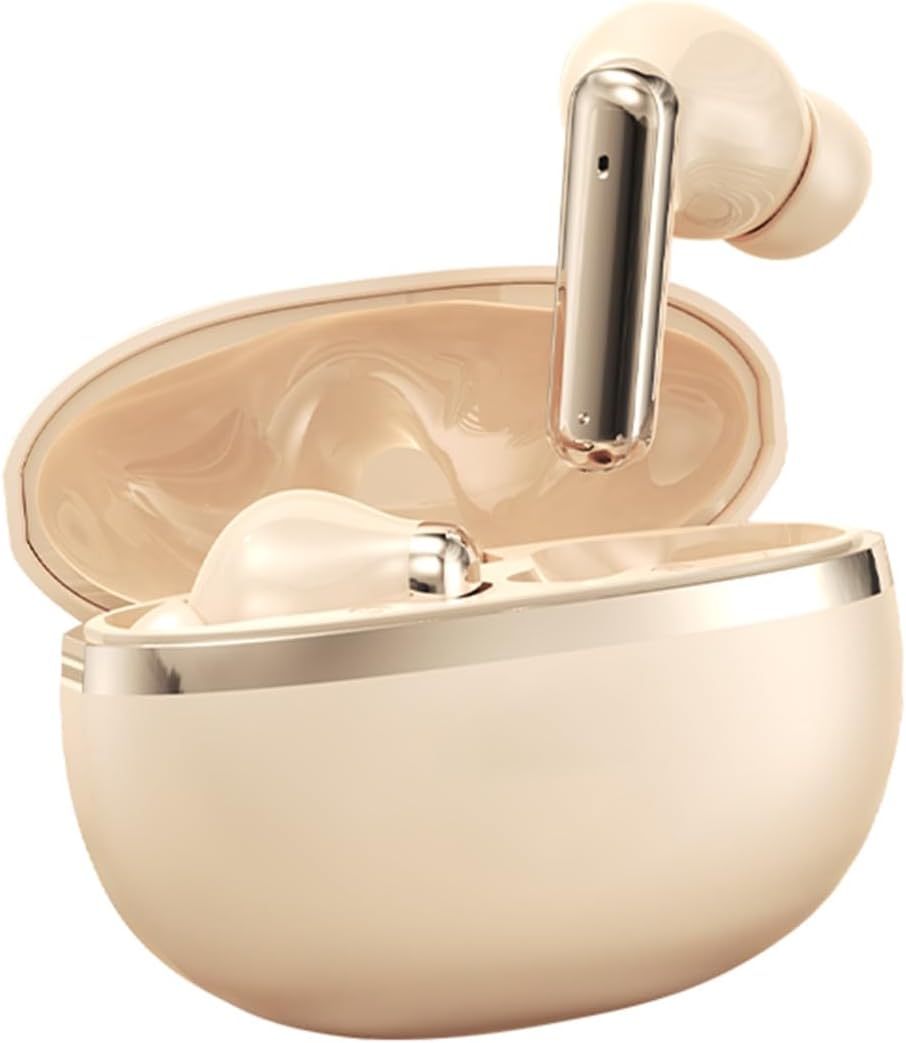
Image: The BT80 earphones in their beige charging case, showcasing കോംപാക്റ്റ് ഡിസൈൻ.
ബോക്സിൽ എന്താണുള്ളത്
എല്ലാ ഇനങ്ങളും ഉണ്ടെന്ന് ഉറപ്പാക്കാൻ നിങ്ങളുടെ പാക്കേജിന്റെ ഉള്ളടക്കങ്ങൾ പരിശോധിക്കുക:
- 2 x BT80 Earphones (Left and Right)
- 1 x Charging Compartment (Case)
- 1 x Charging Wire (USB Cable)
- 1 x ഉൽപ്പന്ന മാനുവൽ
ഉൽപ്പന്ന സവിശേഷതകൾ
The BT80 Earphones offer a range of advanced features for an enhanced listening experience:
- Experience unparalleled sound quality with advanced ANC+ENC noise reduction technology.
- Enjoy extended listening sessions with ultra-long battery life and a portable charging case.
- Stay connected effortlessly with intuitive controls for hands-free operation.
- Designed for all-day comfort with a lightweight, ergonomic fit that prevents fatigue.
- Immerse yourself in high-fidelity stereo sound for an exceptional audio experience.

Image: A visual representation of the BT80 earphones in different colors, emphasizing key features such as panoramic sound and long battery life.
സജ്ജമാക്കുക
ഇയർഫോണുകൾ ചാർജ് ചെയ്യുന്നു
Before first use, fully charge the earphones and the charging case to ensure optimal performance.
- Insert the provided charging wire into the charging port on the charging compartment.
- Connect the other end of the charging wire to a compatible USB power source (e.g., wall adapter, computer USB port).
- The indicator lights on the charging case will illuminate to show the charging status. Once fully charged, the lights may change or turn off.
ഒരു ഉപകരണവുമായി ജോടിയാക്കുന്നു
Follow these steps to connect your BT80 Earphones to your Bluetooth-enabled device:
- ഇയർഫോണുകൾ ചാർജ് ചെയ്തിട്ടുണ്ടെന്നും ചാർജിംഗ് കെയ്സിനുള്ളിൽ വച്ചിട്ടുണ്ടെന്നും ഉറപ്പാക്കുക.
- ചാർജിംഗ് കെയ്സിന്റെ ലിഡ് തുറക്കുക. ഇയർഫോണുകൾ സ്വയമേവ ഓണാകുകയും ജോടിയാക്കൽ മോഡിലേക്ക് പ്രവേശിക്കുകയും ചെയ്യും.
- On your device (smartphone, tablet, laptop, etc.), navigate to the Bluetooth settings.
- ഇതിനായി തിരയുക available Bluetooth devices. You should see "BT80" in the list. Select it to connect.
- Once connected, a voice prompt will confirm successful pairing. The earphones are now ready for use.
പ്രവർത്തന നിർദ്ദേശങ്ങൾ
പവർ ഓൺ/ഓഫ്
- പവർ ഓൺ: ചാർജിംഗ് കേസ് തുറക്കുക. ഇയർഫോണുകൾ സ്വയമേവ ഓണാകും.
- പവർ ഓഫ്: ഇയർഫോണുകൾ ചാർജിംഗ് കെയ്സിലേക്ക് തിരികെ വയ്ക്കുക, ലിഡ് അടയ്ക്കുക. അവ യാന്ത്രികമായി ഓഫാകും.
സംഗീത പ്ലേബാക്ക്
- പ്ലേ/താൽക്കാലികമായി നിർത്തുക: ഇയർബഡുകളിലൊന്നിൽ ഒറ്റത്തവണ ടാപ്പ് ചെയ്യുക.
- അടുത്ത ട്രാക്ക്: വലത് ഇയർബഡിൽ രണ്ടുതവണ ടാപ്പ് ചെയ്യുക.
- മുമ്പത്തെ ട്രാക്ക്: ഇടത് ഇയർബഡിൽ രണ്ടുതവണ ടാപ്പ് ചെയ്യുക.
- വോളിയം കൂട്ടുക: വലത് ഇയർബഡിൽ മൂന്ന് തവണ ടാപ്പ് ചെയ്യുക.
- വോളിയം താഴേക്ക്: ഇടത് ഇയർബഡിൽ മൂന്ന് തവണ ടാപ്പ് ചെയ്യുക.
കോൾ മാനേജുമെന്റ്
- ഉത്തരം/അവസാന കോൾ: Single tap either earbud during an incoming call.
- കോൾ നിരസിക്കുക: ഇൻകമിംഗ് കോൾ വരുമ്പോൾ ഇയർബഡുകളിൽ ഏതെങ്കിലുമൊന്ന് 2 സെക്കൻഡ് അമർത്തിപ്പിടിക്കുക.
Noise Reduction (ANC+ENC)
The BT80 earphones feature both Active Noise Cancellation (ANC) and Environmental Noise Cancellation (ENC) for an immersive audio experience and clear calls.
- To switch between noise reduction modes (ANC On/Off, Transparency Mode), press and hold the touch area on either earbud for approximately 2-3 seconds until you hear a voice prompt indicating the mode change.
മെയിൻ്റനൻസ്
വൃത്തിയാക്കൽ
- ഇയർഫോണുകളും ചാർജിംഗ് കെയ്സും മൃദുവായതും ഉണങ്ങിയതും ലിന്റ് രഹിതവുമായ തുണി ഉപയോഗിച്ച് പതിവായി വൃത്തിയാക്കുക.
- Do not use abrasive cleaners, solvents, or harsh chemicals, as these may damage the device.
- Ensure the charging contacts on both the earphones and the case are clean and free of dust or debris to maintain proper charging.
സംഭരണം
- When not in use, always store the earphones in their charging case to protect them from damage and to conserve battery life.
- Avoid exposing the earphones to extreme temperatures (hot or cold) or high humidity, as this can affect battery life and overall performance.
ട്രബിൾഷൂട്ടിംഗ്
ഇയർഫോണുകൾ ജോടിയാക്കുന്നില്ല:
- Ensure the earphones are sufficiently charged.
- നിങ്ങളുടെ ഉപകരണത്തിൽ ബ്ലൂടൂത്ത് പ്രവർത്തനക്ഷമമാക്കിയിട്ടുണ്ടെന്ന് ഉറപ്പാക്കുക.
- Try forgetting "BT80" from your device's Bluetooth list and then attempt to re-pair.
- നിങ്ങളുടെ ഉപകരണവും ഇയർഫോണുകളും പുനരാരംഭിക്കുക (അവ കേസിൽ തിരികെ വച്ചതിനുശേഷം പുറത്തെടുക്കുക).
ഒരു ഇയർബഡിൽ നിന്ന് ശബ്ദമില്ല:
- രണ്ട് ഇയർബഡുകളുടെയും ബാറ്ററി നില പരിശോധിക്കുക.
- Place both earbuds back in the charging case, close the lid, wait a few seconds, then take them out again.
- Ensure they are properly seated in your ears.
ചാർജിംഗ് പ്രശ്നങ്ങൾ:
- ചാർജിംഗ് കേബിൾ കേസിലേക്കും പവർ സ്രോതസ്സിലേക്കും സുരക്ഷിതമായി ബന്ധിപ്പിച്ചിട്ടുണ്ടെന്ന് ഉറപ്പാക്കുക.
- മറ്റൊരു ചാർജിംഗ് കേബിളോ പവർ അഡാപ്റ്ററോ പരീക്ഷിച്ചുനോക്കൂ.
- ഇയർഫോണുകളിലെയും കേസിലെയും ചാർജിംഗ് കോൺടാക്റ്റുകൾ വൃത്തിയാക്കുക.
സ്പെസിഫിക്കേഷനുകൾ
| ഫീച്ചർ | വിശദാംശങ്ങൾ |
|---|---|
| മോഡൽ | BT80 |
| മെറ്റീരിയൽ | എബിഎസ് |
| ബ്ലൂടൂത്ത് പതിപ്പ് | V5.4 |
| ബ്ലൂടൂത്ത് ചിപ്പ് | Blue Information 5636E solution |
| ശബ്ദം കുറയ്ക്കൽ | ANC+ENC |
| വാട്ടർപ്രൂഫ് ലെവൽ | IP5 |
| ഇയർഫോൺ ബാറ്ററി ശേഷി | 35mAh (ഓരോ ഇയർബഡും) |
| കെയ്സ് ബാറ്ററി കപ്പാസിറ്റി | 200mAh |
| വയർലെസ് ശ്രേണി | Approximately 10 meters or more |
| സംഗീത പ്ലേബാക്ക് സമയം | ഏകദേശം 4-6 മണിക്കൂർ |
| നിയന്ത്രണ രീതി | ടച്ച് നിയന്ത്രണം |
| Call Effect | സ്റ്റീരിയോ സൗണ്ട് |
| വർണ്ണ ഓപ്ഷനുകൾ | Beige, Black, White |

Image: The BT80 earphones available in black and beige, highlighting the color variations.

Image: All three color variants (black, white, beige) of the BT80 earphones, emphasizing their long battery life and HIFI sound quality.
വാറൻ്റിയും പിന്തുണയും
For warranty information and technical support regarding your BT80 Earphones, please refer to the specific warranty policy provided by your retailer or contact the manufacturer directly. It is recommended to keep your purchase receipt as proof of purchase for any warranty claims.
Ask a question about this manual
Ask about setup, troubleshooting, compatibility, parts, safety, or missing instructions. Manuals+ will review the question and use this page’s manual context to help answer it.