
CORBOBO K98 Pro
LINGBAO K98 PRO Mechanical Keyboard User Manual
Model: K98 Pro | Brand: CORBOBO
1. ആമുഖം
Thank you for choosing the LINGBAO K98 PRO 96% Mechanical Keyboard. This advanced keyboard is designed to enhance your typing and gaming experience with its versatile features, including tri-mode connectivity, a smart LCD display, a multi-function knob, and extensive customization options. This manual will guide you through the setup, operation, maintenance, and troubleshooting of your new keyboard.

Image 1.1: The LINGBAO K98 PRO Mechanical Keyboard, showcasing its 96% layout with a smart display and knob.

ചിത്രം 1.2: ഒരു ഓവർview of the LINGBAO K98 PRO's key features, including Gasket-Mount, 10000mAh battery, Full Key Hot-Swappable, N-Key Rollover, Fine-Tuned Satellite Stabilizers, LCD Smart Screen, Tri-Mode Connectivity, 16 RGB Backlit Effects, 16.8 Million RGB Color Options, 101-Key Layout, Macro Programmable, and Knob Design.
2. സജ്ജീകരണ ഗൈഡ്
2.1 പാക്കേജ് ഉള്ളടക്കം
ആരംഭിക്കുന്നതിന് മുമ്പ്, പാക്കേജിൽ എല്ലാ ഇനങ്ങളും ഉണ്ടെന്ന് ഉറപ്പാക്കുക:
- LINGBAO K98 PRO Mechanical Keyboard
- യുഎസ്ബി-സി കേബിൾ
- കീക്യാപ് പുള്ളർ
- ഉപയോക്തൃ മാനുവൽ (ഈ പ്രമാണം)
2.2 പ്രാരംഭ ചാർജിംഗ്
The keyboard comes with a built-in 10,000mAh battery. For optimal performance, it is recommended to fully charge the keyboard before first use. Connect the provided USB-C cable to the keyboard's USB-C port and the other end to a powered USB port on your computer or a wall adapter. The LCD display will indicate charging status.
2.3 കണക്റ്റിവിറ്റി മോഡുകൾ
The LINGBAO K98 PRO supports three connectivity modes:
- 2.4GHz വയർലെസ്: For a stable and fast wireless connection. Insert the 2.4GHz USB receiver into your device's USB port. The keyboard will automatically connect.
- ബ്ലൂടൂത്ത് 5.0: For connecting to multiple devices. The keyboard can pair with up to 3 Bluetooth devices.
- USB-C വയേർഡ്: For a direct, low-latency connection and charging. Connect the USB-C cable directly to your device.
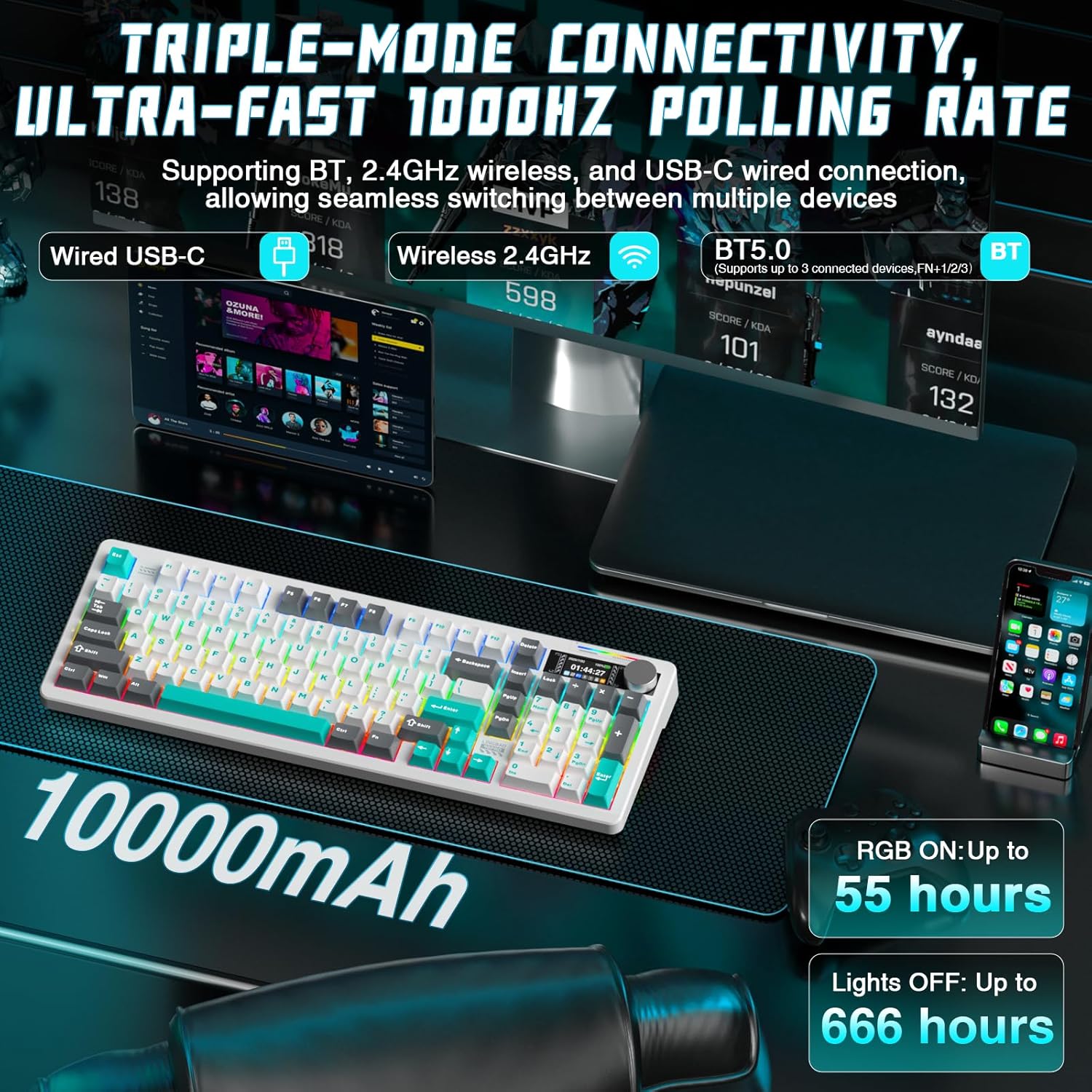
Image 2.1: Illustration of the keyboard's triple-mode connectivity options: Wired USB-C, Wireless 2.4GHz, and Bluetooth 5.0, along with battery life indicators.
2.4 സിസ്റ്റം അനുയോജ്യത
The keyboard is fully compatible with:
- വിൻഡോസ് ഓപ്പറേറ്റിംഗ് സിസ്റ്റങ്ങൾ
- macOS
- ലിനക്സ്
- Android ഉപകരണങ്ങൾ
3. പ്രവർത്തന നിർദ്ദേശങ്ങൾ
3.1 Smart LCD Display and Multi-Functional Knob
The high-resolution LCD display provides real-time information such as time, date, battery level, and current keyboard settings. The multi-functional knob allows for quick and precise control over various functions.
- നോബ് പ്രവർത്തനങ്ങൾ: Rotate the knob to adjust volume, brightness, or switch between RGB effects. Press the knob to confirm selections or mute/unmute audio.
- ഡിസ്പ്ലേ നാവിഗേഷൻ: Use the knob to navigate through display menus for settings like connectivity, lighting, and system information.
Note: Time and date must be set via the driver software.
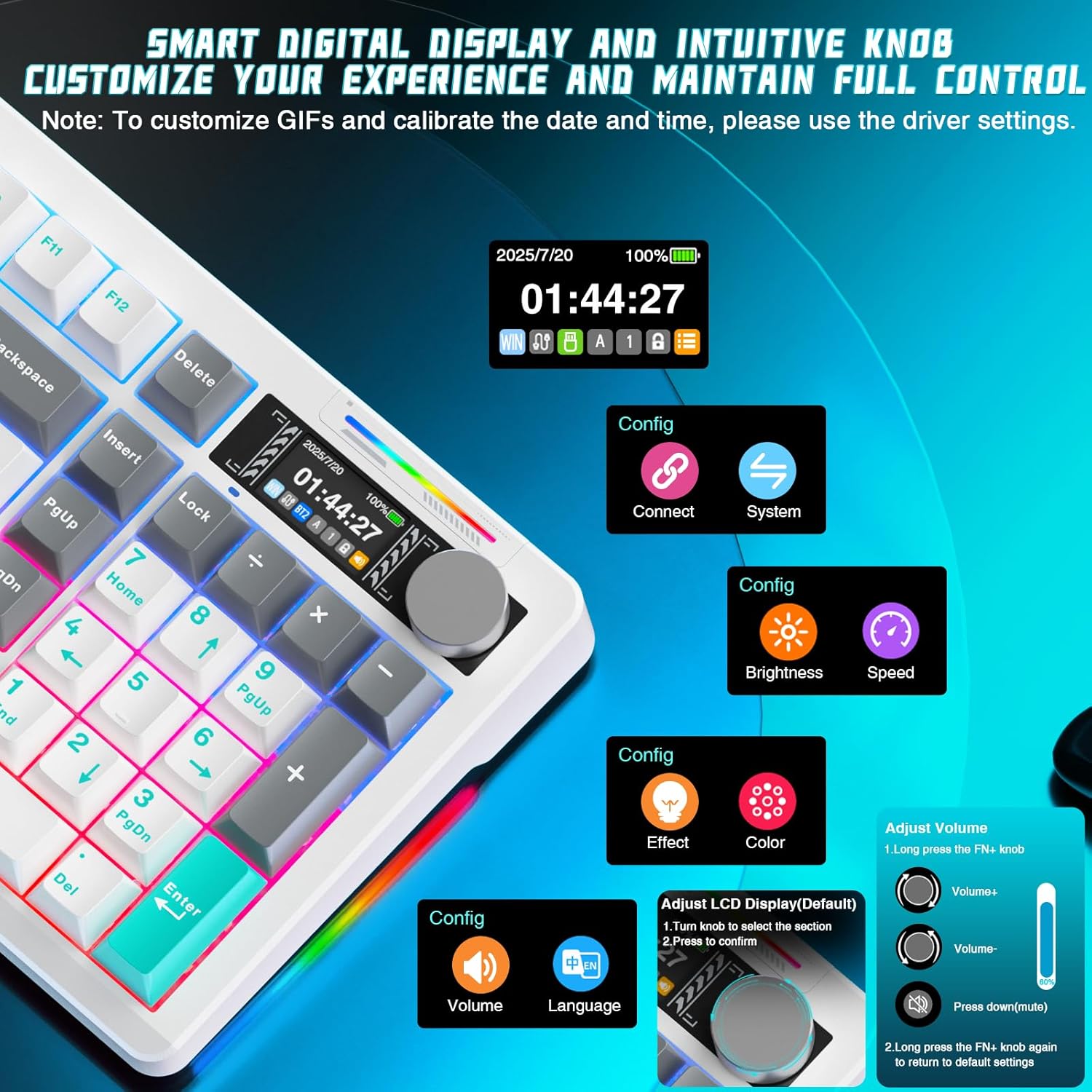
ചിത്രം 3.1: വിശദമായത് view of the smart digital display and intuitive knob, showing options for connection, system, brightness, speed, effect, color, volume, and language adjustments.
3.2 RGB ലൈറ്റിംഗ് കസ്റ്റമൈസേഷൻ
The keyboard features multi-zone RGB lighting with 16 dynamic backlighting effects and 6 side-lighting modes. You can adjust these directly from the keyboard using the smart screen and knob, or through the dedicated software for deeper customization.
- FN + വലത് ഷിഫ്റ്റ്: Switch side lighting modes (e.g., Flowing Light, Aurora, Constant Brightness, Breathing Mode).
- FN + Left Shift: Switch RGB light strip modes (e.g., Flowing Light, Aurora, Constant Brightness, Breathing Mode, Turn Off).

Image 3.2: The keyboard displaying various RGB lighting effects, highlighting 16 RGB backlight effects and 6 RGB light effects.
3.3 ഹോട്ട്-സ്വാപ്പബിൾ സ്വിച്ചുകൾ
The K98 PRO features a gasket-mount, fully hot-swappable PCB, supporting both 3-pin and 5-pin mechanical switches. This allows you to easily change switches without soldering, customizing your typing feel.

ചിത്രം 3.3: ക്ലോസ്-അപ്പ് view of the hot-swappable switch sockets and included LEOBOG Custom Switches, emphasizing easy switch and keycap replacement.
3.4 പ്രധാന പ്രവർത്തനങ്ങളും ലേഔട്ടും
The 96% layout with 97 keys provides a compact design while retaining essential functions, including a full arrow key cluster, function row (F1-F12), dedicated media controls, and a built-in number pad.

Image 3.4: The 96% layout of the LINGBAO K98 PRO, highlighting its compact design and full numeric keypad for both work and gaming.
3.5 Personalization Software Customization
For advanced customization, download the official software. This allows you to:
- Create personalized lighting profiles with over 16 million colors.
- Set up music-responsive lighting effects.
- Design animated lighting sequences.
- Configure macros for gaming or productivity.
- Remap keys to suit your typing habits.
- ഒന്നിലധികം പ്രൊഫഷണലുകളെ സംരക്ഷിക്കുകfiles for different uses.

Image 3.5: Screenshots of the customization software interface, showing options for key assignment, lighting effects, macro programming, and music-synced RGB lighting.
4. പരിപാലനം
4.1 വൃത്തിയാക്കൽ
നിങ്ങളുടെ കീബോർഡിന്റെ രൂപഭാവവും പ്രവർത്തനക്ഷമതയും നിലനിർത്താൻ:
- മൃദുവായ, ലിൻ്റ് രഹിത തുണി ഉപയോഗിക്കുകampened with water or a mild cleaning solution to wipe down the keycaps and frame.
- താക്കോലുകൾക്കിടയിലുള്ള പൊടിയും അവശിഷ്ടങ്ങളും ഒഴിവാക്കാൻ, കംപ്രസ് ചെയ്ത വായു ഉപയോഗിക്കുക.
- കഠിനമായ രാസവസ്തുക്കളോ ഉരച്ചിലുകളോ ഉപയോഗിക്കുന്നത് ഒഴിവാക്കുക.
4.2 ബാറ്ററി കെയർ
The keyboard is equipped with a 10,000mAh Lithium Ion battery. To prolong battery life:
- ബാറ്ററി ഇടയ്ക്കിടെ പൂർണ്ണമായും ഡിസ്ചാർജ് ചെയ്യുന്നത് ഒഴിവാക്കുക.
- ദീർഘനേരം ഉപയോഗിക്കാത്തപ്പോൾ കീബോർഡ് തണുത്തതും വരണ്ടതുമായ സ്ഥലത്ത് സൂക്ഷിക്കുക.
- ദീർഘനേരം സൂക്ഷിക്കുകയാണെങ്കിൽ, സൂക്ഷിക്കുന്നതിന് മുമ്പ് ബാറ്ററി ഏകദേശം 50% ചാർജ് ചെയ്യുക.
4.3 കീക്യാപ്പും സ്വിച്ചും മാറ്റിസ്ഥാപിക്കൽ
The hot-swappable design allows for easy replacement of keycaps and switches. Use the provided keycap puller to gently remove keycaps. For switches, use a switch puller (not included unless specified) to carefully extract them from the PCB. Ensure proper alignment when inserting new switches to avoid bending pins.
5. പ്രശ്നപരിഹാരം
5.1 കണക്റ്റിവിറ്റി പ്രശ്നങ്ങൾ
- 2.4GHz: Ensure the USB receiver is securely plugged in and within range. Try a different USB port.
- ബ്ലൂടൂത്ത്: Ensure Bluetooth is enabled on your device. Unpair and re-pair the keyboard. Check if the keyboard is in pairing mode.
- വയർ: Try a different USB-C cable or USB port on your device.
5.2 Lighting Not Working
- Check battery level; low battery can affect RGB performance.
- Ensure RGB lighting is enabled via the knob or software.
- Perform a factory reset if necessary (refer to software instructions).
5.3 LCD Display Issues
- കീബോർഡ് ഓണാണെന്ന് ഉറപ്പാക്കുക.
- If the display is frozen or unresponsive, try restarting the keyboard.
- Update the keyboard firmware via the official software if available.
6 സ്പെസിഫിക്കേഷനുകൾ
| ഫീച്ചർ | വിശദാംശങ്ങൾ |
|---|---|
| മോഡലിൻ്റെ പേര് | LINGBAO K98 Pro |
| ലേഔട്ട് | 96% (97 കീകൾ) |
| കണക്റ്റിവിറ്റി | 2.4GHz വയർലെസ്, ബ്ലൂടൂത്ത് 5.0, യുഎസ്ബി-സി വയേർഡ് |
| ബാറ്ററി ശേഷി | 10,000mAh ലിഥിയം അയോൺ |
| ബാറ്ററി ലൈഫ് (RGB ഓൺ) | 55 മണിക്കൂർ വരെ |
| ബാറ്ററി ലൈഫ് (ലൈറ്റുകൾ ഓഫാണ്) | Up to 666 hours (power-saving mode) |
| സ്വിച്ചുകൾ | ഹോട്ട്-സ്വാപ്പ് ചെയ്യാവുന്നത് (3-പിൻ & 5-പിൻ അനുയോജ്യം) |
| കീകാപ്പുകൾ | PBT മെറ്റീരിയൽ |
| ബാക്ക്ലൈറ്റിംഗ് | RGB (16 backlight effects, 6 side-lighting modes) |
| പ്രത്യേക സവിശേഷതകൾ | Smart LCD Display, Multi-functional Knob, Gasket Mount |
| അനുയോജ്യമായ ഉപകരണങ്ങൾ | PC, Laptop, Gaming Console, Tablet (Windows, macOS, Linux, Android) |
| ഉൽപ്പന്ന അളവുകൾ | 40.64 x 14.3 x 4.09 സെ.മീ |
| ഇനത്തിൻ്റെ ഭാരം | 1.65 കി.ഗ്രാം |
7. വാറൻ്റിയും പിന്തുണയും
Your LINGBAO K98 PRO Mechanical Keyboard is covered by a standard manufacturer's warranty. Please refer to the warranty card included in your package for specific terms and conditions, including warranty duration and coverage details. Keep your proof of purchase for warranty claims.
7.1 ഉപഭോക്തൃ പിന്തുണ
For technical assistance, troubleshooting not covered in this manual, or warranty inquiries, please contact CORBOBO customer support through the retailer's platform or the official brand website. Provide your product model and purchase details for faster service.
Ask a question about this manual
Ask about setup, troubleshooting, compatibility, parts, safety, or missing instructions. Manuals+ will review the question and use this page’s manual context to help answer it.