
1. ഉൽപ്പന്നം കഴിഞ്ഞുview
The CORBOBO K98 is a versatile wireless mechanical gaming keyboard designed for performance and customization. It features tri-mode connectivity (Bluetooth 5.0, 2.4GHz wireless, and USB-C wired), a 10000mAh battery, and a fully hot-swappable design for effortless switch and keycap replacement. The keyboard also includes immersive RGB lighting with multiple modes and full customization options via dedicated software.

പ്രധാന സവിശേഷതകളിൽ ഇവ ഉൾപ്പെടുന്നു:
- ട്രൈ-മോഡ് കണക്റ്റിവിറ്റി: Seamless switching between Bluetooth 5.0, 2.4GHz wireless, and USB-C wired modes.
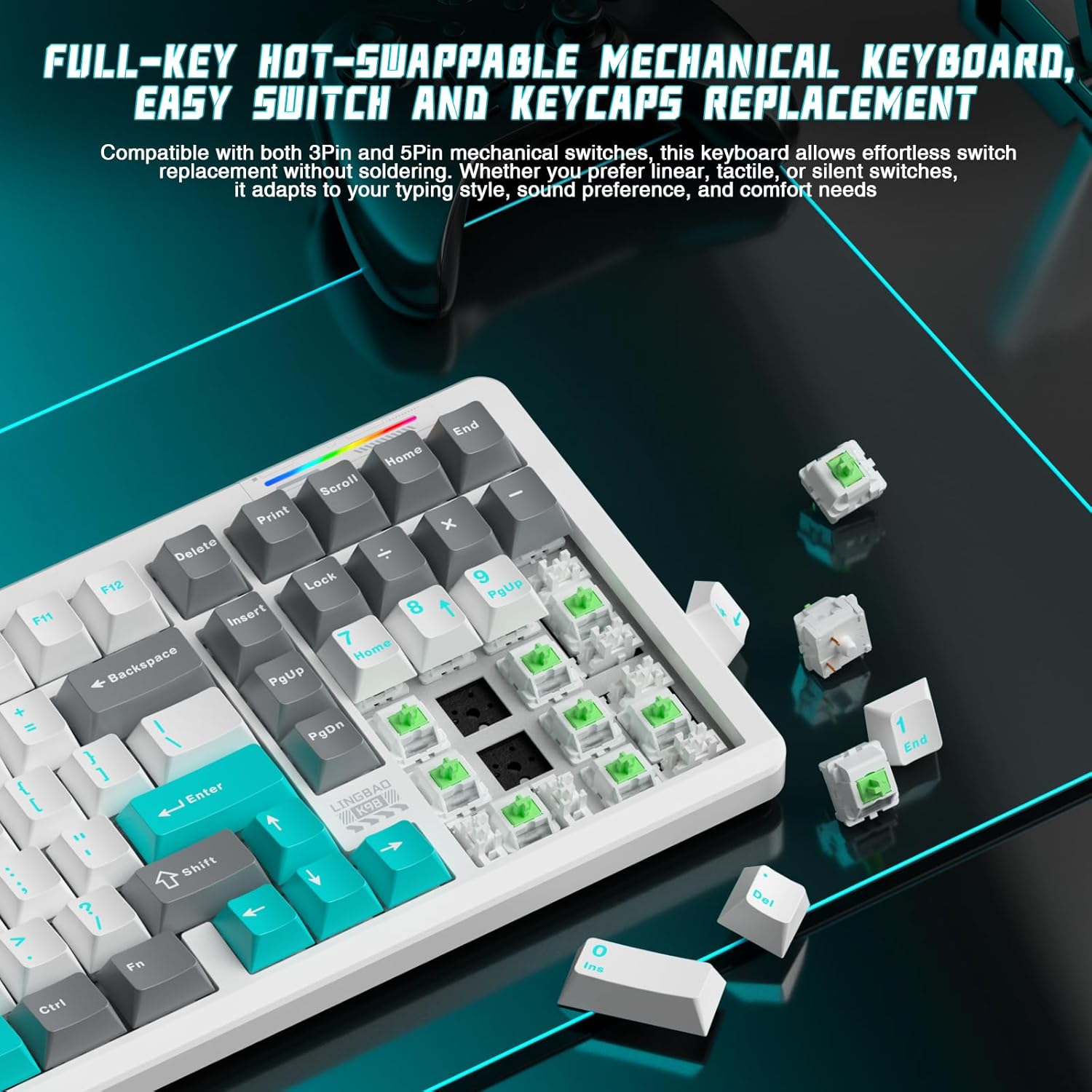
- ഹോട്ട്-സ്വാപ്പ് ചെയ്യാവുന്ന ഡിസൈൻ: Supports 3-pin and 5-pin switches for easy customization without soldering.
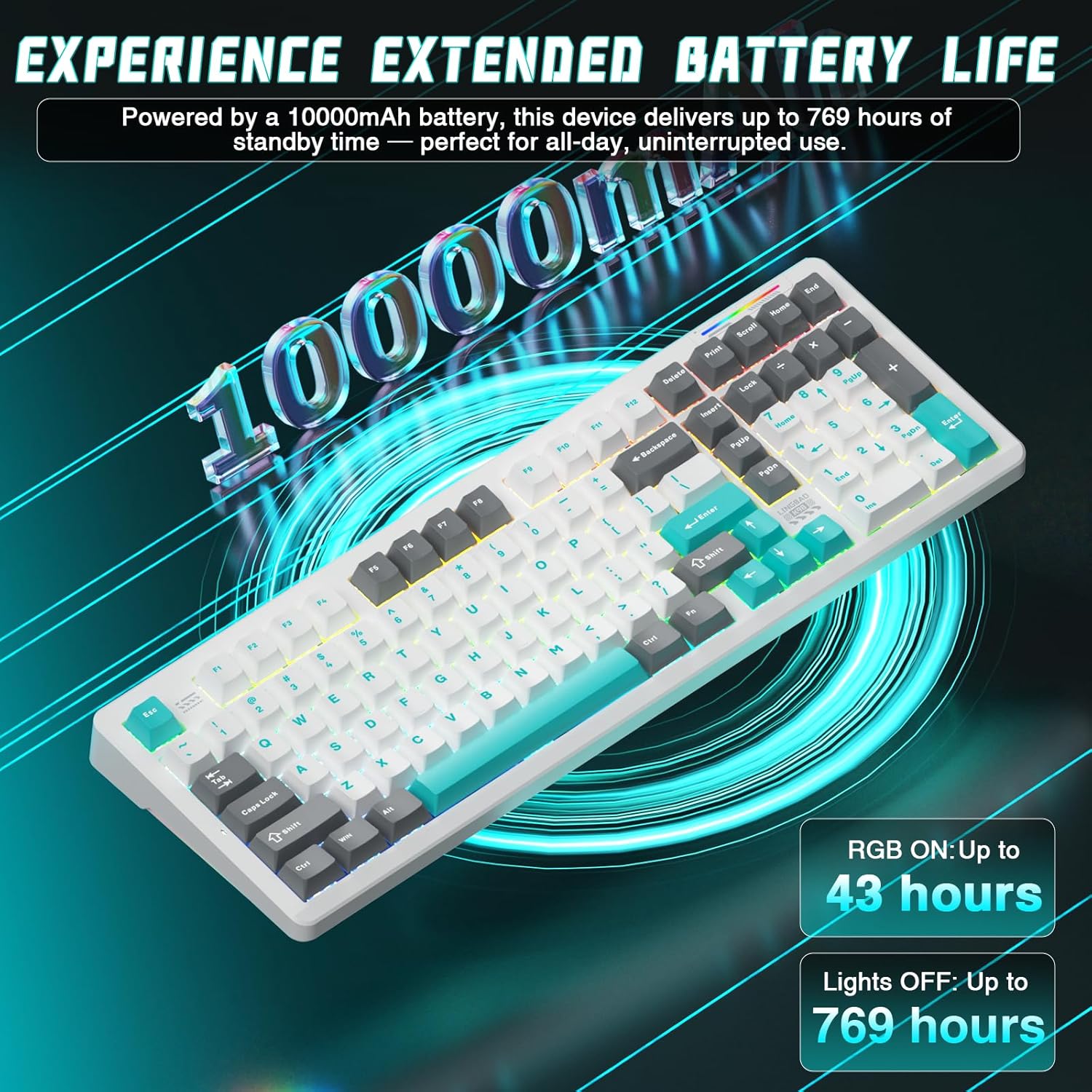
- വിപുലീകരിച്ച ബാറ്ററി ലൈഫ്: Equipped with a 10000mAh battery for prolonged wireless use.
- ഡൈനാമിക് RGB ലൈറ്റിംഗ്: 16 lighting modes and 16.8 million color options.
- ഇഷ്ടാനുസൃതമാക്കൽ സോഫ്റ്റ്വെയർ: Dedicated software for RGB control, macro programming, and key remapping.
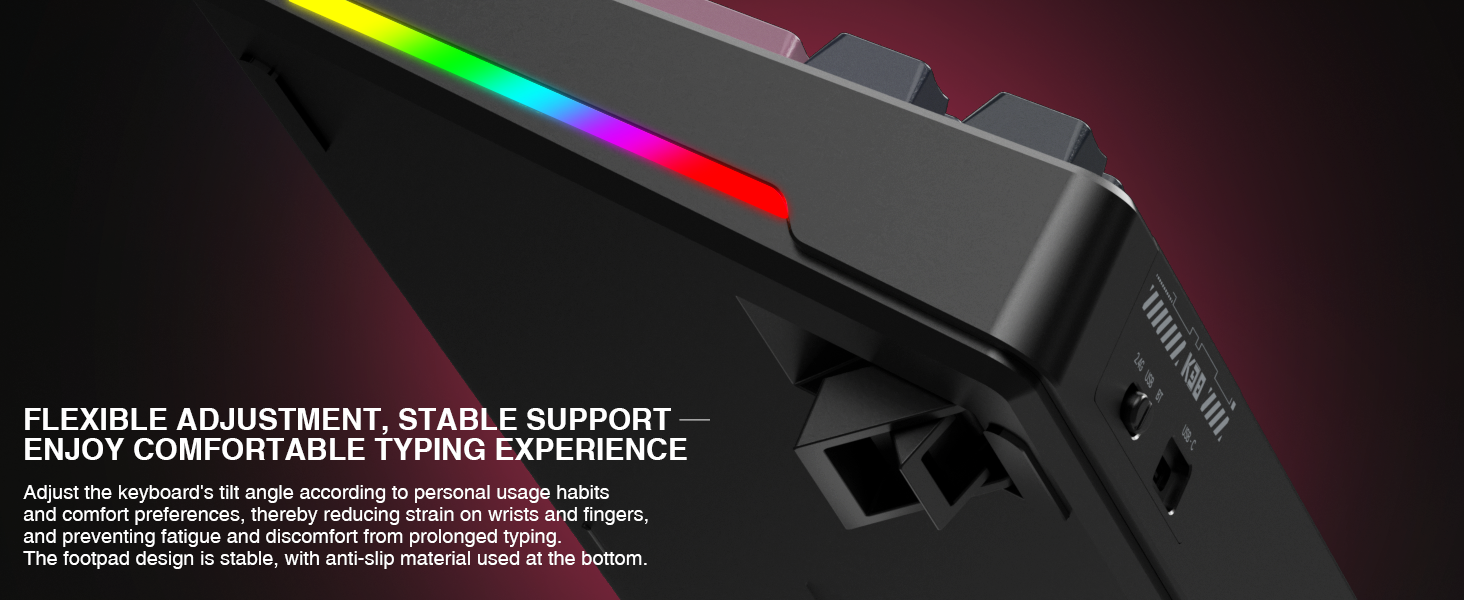
- എർഗണോമിക് ഡിസൈൻ: Angled key layout with dual-tilt support and non-slip feet for comfort and stability.
2. ബോക്സിൽ എന്താണുള്ളത്?
പാക്കേജിൽ എല്ലാ ഇനങ്ങളും ഉണ്ടെന്ന് ദയവായി പരിശോധിക്കുക:
- CORBOBO K98 Keyboard (x1)
- ഉപയോക്തൃ മാനുവൽ (x1)
- USB-C കേബിൾ (x1)
- Keycap Puller (x1)
3. സജ്ജീകരണവും കണക്റ്റിവിറ്റിയും
3.1 പ്രാരംഭ ചാർജിംഗ്
Before first use, connect the keyboard to a USB power source using the provided USB-C cable to ensure it is fully charged. The 10000mAh battery provides extended usage, but an initial charge is recommended.
3.2 കീബോർഡ് ബന്ധിപ്പിക്കുന്നു
K98 കീബോർഡ് മൂന്ന് കണക്ഷൻ മോഡുകൾ പിന്തുണയ്ക്കുന്നു:
- USB-C വയേർഡ് മോഡ്: Connect the USB-C cable directly from the keyboard to your computer. The keyboard will automatically switch to wired mode.
- 2.4GHz വയർലെസ് മോഡ്: Insert the 2.4GHz USB receiver into an available USB port on your computer. Switch the keyboard to 2.4GHz mode using the designated switch or key combination (refer to the keyboard's physical switch or FN key combinations).
- ബ്ലൂടൂത്ത് 5.0 മോഡ്: Activate Bluetooth on your device. Switch the keyboard to Bluetooth mode. Press FN + 1, 2, or 3 ഒരു ബ്ലൂടൂത്ത് പ്രോ തിരഞ്ഞെടുക്കാൻfile. The keyboard will enter pairing mode. ഇതിനായി തിരയുക 'K98' in your device's Bluetooth settings and connect. You can pair up to 3 Bluetooth devices and switch between them using FN + 1/2/3.

3.3 ഹോട്ട്-സ്വാപ്പബിൾ സ്വിച്ചുകൾ
The K98 features a hot-swappable design, allowing you to change mechanical switches without soldering. This supports both 3-pin and 5-pin switches. Use the included switch puller to carefully remove switches.
4. പ്രവർത്തന നിർദ്ദേശങ്ങൾ
4.1 RGB ലൈറ്റിംഗ് നിയന്ത്രണം
The K98 keyboard offers 16 dynamic RGB lighting modes and 16.8 million color options. Use the following key combinations to control the lighting:
- FN + \|: Switch between 16 vivid RGB effects or turn off the backlight.
- FN + വലത് ഷിഫ്റ്റ്: Switch side lighting modes (Flowing Light / Aurora / Constant Brightness / Breathing Mode) and toggle the light effects on/off.
- FN + Left Shift: Switch RGB light strip modes (Flowing Light / Aurora / Constant Brightness / Breathing Mode / Turn Off).

4.2 സോഫ്റ്റ്വെയർ കസ്റ്റമൈസേഷൻ
For advanced customization, including macro programming, key remapping, and detailed RGB lighting adjustments, download the dedicated software. This software allows for personalized shortcuts and N-Key rollover configuration.

The software can typically be found on the manufacturer's support website. Refer to the packaging or included documentation for the specific download link.
4.3 Ergonomic Adjustment
The keyboard features dual-tilt angle support. Adjust the feet on the underside of the keyboard to find your preferred typing or gaming posture, reducing strain during prolonged use.
5. പരിപാലനം
5.1 കീബോർഡ് വൃത്തിയാക്കൽ
To clean the keyboard, disconnect it from all power sources. Use a soft, lint-free cloth slightly dampവെള്ളം അല്ലെങ്കിൽ നേരിയ ക്ലീനിംഗ് ലായനി ഉപയോഗിച്ച് നനയ്ക്കുക. കീബോർഡിലേക്ക് നേരിട്ട് ദ്രാവകങ്ങൾ സ്പ്രേ ചെയ്യുന്നത് ഒഴിവാക്കുക. കീക്യാപ്പുകൾക്കിടയിൽ വൃത്തിയാക്കാൻ, കംപ്രസ് ചെയ്ത വായു അല്ലെങ്കിൽ ഒരു ചെറിയ ബ്രഷ് ഉപയോഗിക്കുക.
5.2 കീക്യാപ്പുകളും സ്വിച്ചുകളും മാറ്റിസ്ഥാപിക്കൽ
Use the provided keycap puller to gently remove keycaps. For switches, use the switch puller to carefully grip and extract the switch from its socket. When inserting new switches, align the pins correctly with the socket holes to prevent damage. Ensure the keyboard is disconnected before performing any replacements.
6. പ്രശ്നപരിഹാരം
- കീബോർഡ് പ്രതികരിക്കുന്നില്ല:
- കീബോർഡ് ചാർജ് ചെയ്തിട്ടുണ്ടെന്ന് ഉറപ്പാക്കുക.
- Check the connection mode (wired, 2.4GHz, Bluetooth) and ensure it matches your device.
- 2.4GHz-ന്, USB റിസീവർ ശരിയായി ചേർത്തിട്ടുണ്ടെന്ന് ഉറപ്പാക്കുക.
- For Bluetooth, ensure the keyboard is paired and selected on your device. Try re-pairing if issues persist.
- വയർലെസ് പ്രശ്നങ്ങൾ ഒഴിവാക്കാൻ USB-C കേബിൾ വഴി കണക്റ്റുചെയ്യാൻ ശ്രമിക്കുക.
- RGB ലൈറ്റിംഗ് പ്രവർത്തിക്കുന്നില്ല:
- Ensure the lighting is not turned off via FN key combinations.
- Check settings in the customization software.
- രജിസ്റ്റർ ചെയ്യാത്ത കീകൾ:
- If a specific key is not working, carefully remove the keycap and switch. Re-insert the switch, ensuring it is fully seated and the pins are not bent.
- ലഭ്യമാണെങ്കിൽ മറ്റൊരു സ്വിച്ച് ഉപയോഗിച്ച് പരീക്ഷിക്കുക.
- Connectivity issues (lag, disconnections):
- Ensure the keyboard is within range of the receiver/device (for wireless modes).
- മറ്റ് വയർലെസ് ഉപകരണങ്ങളിൽ നിന്നുള്ള ഇടപെടൽ കുറയ്ക്കുക.
- കീബോർഡ് ബാറ്ററി ആവശ്യത്തിന് ചാർജ്ജ് ചെയ്തിട്ടുണ്ടെന്ന് ഉറപ്പാക്കുക.
7 സ്പെസിഫിക്കേഷനുകൾ
| ഫീച്ചർ | വിശദാംശങ്ങൾ |
|---|---|
| മോഡൽ നമ്പർ | K98 |
| ബ്രാൻഡ് | കോർബോബോ |
| കണക്റ്റിവിറ്റി ടെക്നോളജി | ബ്ലൂടൂത്ത് 5.0, 2.4GHz വയർലെസ്, USB-C വയേർഡ് |
| ബാറ്ററി ശേഷി | 10000mAh |
| സ്വിച്ചുകൾ | Hot-Swappable (3-pin and 5-pin compatible) |
| ബാക്ക്ലൈറ്റിംഗ് | RGB (16 modes, 16.8 million colors) |
| അനുയോജ്യമായ ഉപകരണങ്ങൾ | ഗെയിമിംഗ് കൺസോൾ, ലാപ്ടോപ്പ്, പിസി, സ്മാർട്ട്ഫോൺ, ടാബ്ലെറ്റ് |
| ഉൽപ്പന്ന അളവുകൾ | 16 x 5.63 x 1.61 ഇഞ്ച് |
| ഇനത്തിൻ്റെ ഭാരം | 3.54 പൗണ്ട് |
| നിർമ്മാതാവ് | കോർബോബോ |

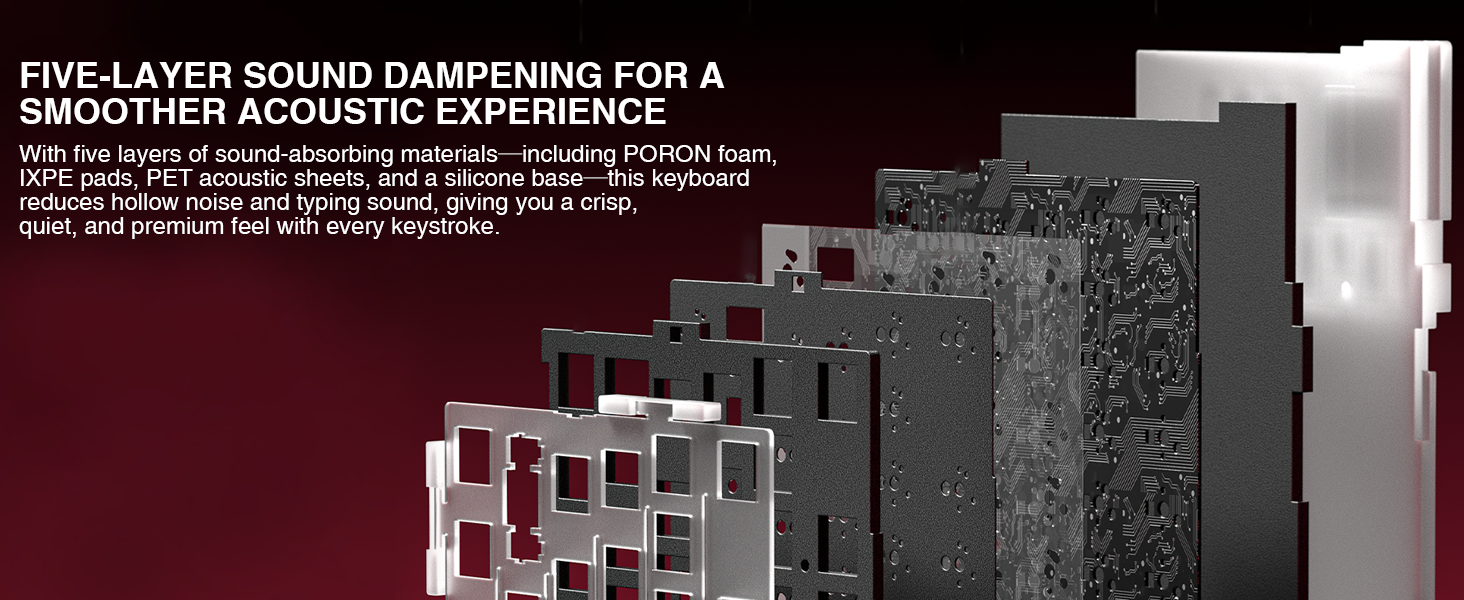
The keyboard incorporates a five-layer sound dampening system, including PORON foam, IXPE pads, PET acoustic sheets, and a silicone base, to provide a crisp, quiet, and premium typing experience.
8. വാറൻ്റിയും പിന്തുണയും
For warranty information and technical support, please refer to the official CORBOBO webസൈറ്റിൽ ബന്ധപ്പെടുക അല്ലെങ്കിൽ അവരുടെ ഉപഭോക്തൃ സേവനവുമായി ബന്ധപ്പെടുക. വാറന്റി ക്ലെയിമുകൾക്കായി നിങ്ങളുടെ വാങ്ങൽ രസീത് സൂക്ഷിക്കുക.
Manufacturer: CORBOBO