
1. ആമുഖം
This manual provides detailed instructions for the setup, operation, maintenance, and troubleshooting of your CORBOBO LINGBAO K98 PRO Mechanical Keyboard. Please read this manual thoroughly to ensure proper use and to maximize your keyboard's functionality.

Image 1.1: LINGBAO K98 PRO Mechanical Keyboard in Gradient Black Pink.
2. പാക്കേജ് ഉള്ളടക്കം
പാക്കേജിൽ എല്ലാ ഇനങ്ങളും ഉണ്ടെന്ന് ഉറപ്പാക്കുക:
- LINGBAO K98 PRO Mechanical Keyboard
- ഉപയോക്തൃ മാനുവൽ (ഈ പ്രമാണം)
- യുഎസ്ബി-സി കേബിൾ
- കീക്യാപ് പുള്ളർ

ചിത്രം 2.1: കഴിഞ്ഞുview of the LINGBAO K98 PRO keyboard and included accessories.
3. സജ്ജീകരണം
3.1 പ്രാരംഭ ചാർജിംഗ്
Before first use, it is recommended to fully charge the keyboard. Connect the supplied USB-C cable to the keyboard's USB-C port and the other end to a powered USB port on your computer or a USB wall adapter. The keyboard features a 10,000mAh battery.
3.2 കീബോർഡ് ബന്ധിപ്പിക്കുന്നു
The LINGBAO K98 PRO supports three connection modes: 2.4GHz Wireless, Bluetooth 5.0, and USB-C Wired.
3.2.1 USB-C വയർഡ് കണക്ഷൻ
- USB-C കേബിൾ കീബോർഡിലേക്കും കമ്പ്യൂട്ടറിലേക്കും ബന്ധിപ്പിക്കുക.
- Ensure the keyboard's mode switch (usually on the back or side) is set to USB-C (often indicated by a cable icon or "Wired").
- നിങ്ങളുടെ ഓപ്പറേറ്റിംഗ് സിസ്റ്റം കീബോർഡ് യാന്ത്രികമായി തിരിച്ചറിയും.
3.2.2 2.4GHz വയർലെസ് കണക്ഷൻ
- Locate the 2.4GHz USB receiver (dongle), typically stored in a compartment on the keyboard.
- നിങ്ങളുടെ കമ്പ്യൂട്ടറിൽ ലഭ്യമായ USB പോർട്ടിലേക്ക് USB റിസീവർ പ്ലഗ് ചെയ്യുക.
- Set the keyboard's mode switch to 2.4GHz (often indicated by a wireless icon or "2.4G").
- കീബോർഡ് യാന്ത്രികമായി കണക്ട് ചെയ്യണം.
3.2.3 ബ്ലൂടൂത്ത് 5.0 കണക്ഷൻ
The keyboard can pair with up to 3 Bluetooth devices.
- Set the keyboard's mode switch to Bluetooth (often indicated by a Bluetooth icon or "BT").
- നിങ്ങളുടെ കമ്പ്യൂട്ടറിലോ ഉപകരണത്തിലോ, Bluetooth പ്രവർത്തനക്ഷമമാക്കി പുതിയ ഉപകരണങ്ങൾക്കായി തിരയുക.
- കീബോർഡിൽ, അമർത്തുക Fn + 1, Fn + 2, അല്ലെങ്കിൽ Fn + 3 to select a Bluetooth channel. The indicator light for the selected channel will flash, indicating pairing mode.
- Select "LINGBAO K98 PRO" from the list of available devices on your computer/device to complete pairing.
- ജോടിയാക്കിയ ബ്ലൂടൂത്ത് ഉപകരണങ്ങൾക്കിടയിൽ മാറാൻ, അമർത്തുക Fn + 1/2/3.

Image 3.1: Illustration of the keyboard's tri-mode connectivity options (USB-C, 2.4GHz, Bluetooth).
3.3 സിസ്റ്റം കോംപാറ്റിബിലിറ്റി സ്വിച്ച്
The keyboard supports various operating systems. Use the following key combinations to switch modes:
- Fn + Q: For Android System
- Fn + E: For macOS System
- Fn + W: For Windows System
4. പ്രവർത്തന നിർദ്ദേശങ്ങൾ
4.1 Smart LCD Display and Multi-Functional Knob
The keyboard features a smart LCD display and a multi-functional knob for quick adjustments.
- The LCD display shows real-time information such as time, date, battery level, and current keyboard settings.
- കുറിപ്പ്: Time and date must be set via the driver software.
- The multi-functional knob controls various settings:
- വോളിയം ക്രമീകരണം: Rotate the knob to adjust volume. Press down to mute/unmute.
- RGB ലൈറ്റിംഗ് നിയന്ത്രണം: Rotate the knob to cycle through RGB effects. Press down to confirm.
- LCD ഡിസ്പ്ലേ ക്രമീകരണങ്ങൾ: Long press the Fn+ knob to enter display settings. Turn the knob to select options (e.g., brightness, speed, effect, color, language) and press to confirm. Long press Fn+ knob again to return to default settings.

Image 4.1: Close-up of the smart digital display and intuitive knob for customization.
4.2 RGB ലൈറ്റിംഗ് കസ്റ്റമൈസേഷൻ
The keyboard features multi-zone RGB lighting with 16 backlighting effects, 6 side-lighting modes, and a dedicated RGB strip.
- ബാക്ക്ലൈറ്റ് ഇഫക്റ്റുകൾ: When the screen is on, rotate the knob to "Effect" to browse 16 vibrant backlight effects.
- Fn + വലത് ഷിഫ്റ്റ്: Switch side lighting modes (Flowing Light / Aurora / Constant Brightness / Breathing Mode) and toggle the light effects on/off.
- Fn + Left Shift: Switch RGB light strip modes (Flowing Light / Aurora / Constant Brightness / Breathing Mode / Turn Off).
- For deeper customization with over 16 million colors, music-responsive lighting, and personalized animations, use the dedicated software.

ചിത്രം 4.2: ഉദാamples of 16 RGB backlight effects and 6 side-lighting modes.
4.3 ഹോട്ട്-സ്വാപ്പബിൾ സ്വിച്ചുകളും കീക്യാപ്പുകളും
The K98 PRO features a gasket mount, fully hot-swappable PCB, supporting both 3-pin and 5-pin mechanical switches. This allows for switch replacement without soldering.
- സ്വിച്ച് മാറ്റിസ്ഥാപിക്കൽ: Use the included keycap puller to gently remove the keycap. Then, use a switch puller (not included, but often comes with replacement switches) to carefully remove the switch. Align the pins of the new switch with the holes on the PCB and press firmly until it clicks into place.
- കീക്യാപ്പ് മാറ്റിസ്ഥാപിക്കൽ: Use the included keycap puller to gently remove keycaps. Press new keycaps onto the switch stems until secure.

Image 4.3: Illustration of the hot-swappable switch feature, showing switches being removed and inserted.
4.4 Personalization Software
The included customization software allows for fine-tuning of lighting, macros, and key mapping. This software is essential for setting the time and date on the LCD display.
- സോഫ്റ്റ്വെയർ ഡൗൺലോഡ്: The software can typically be found on the CORBOBO official website or via the link provided in the product documentation. Ensure you download software only from official and trusted sources.
- ഫീച്ചറുകൾ:
- Customize RGB lighting with over 16 million colors.
- Create music-responsive lighting effects.
- Design personalized animated lighting profiles.
- Set up macros for gaming or productivity.
- Remap keys to suit typing habits.
- ഒന്നിലധികം പ്രൊഫഷണലുകളെ സംരക്ഷിക്കുകfiles for different uses.
- Calibrate time and date for the LCD display.

Image 4.4: Screenshot of the personalization software interface for key mapping and RGB customization.
5. പരിപാലനം
5.1 കീബോർഡ് വൃത്തിയാക്കൽ
- കീബോർഡ് വൃത്തിയാക്കുന്നതിന് മുമ്പ് എല്ലാ വൈദ്യുതി സ്രോതസ്സുകളിൽ നിന്നും വിച്ഛേദിക്കുക.
- മൃദുവായ, ലിൻ്റ് രഹിത തുണി ഉപയോഗിക്കുകampകീക്യാപ്പുകളും കീബോർഡ് പ്രതലവും തുടയ്ക്കാൻ വെള്ളം അല്ലെങ്കിൽ നേരിയ ക്ലീനിംഗ് ലായനി ഉപയോഗിച്ച് നനയ്ക്കുക.
- കീക്യാപ്പുകൾക്കിടയിലുള്ള പൊടിയും അവശിഷ്ടങ്ങളും ഉണ്ടെങ്കിൽ, കംപ്രസ് ചെയ്ത വായു അല്ലെങ്കിൽ ഒരു ചെറിയ ബ്രഷ് ഉപയോഗിക്കുക.
- കഠിനമായ രാസവസ്തുക്കൾ, ഉരച്ചിലുകൾ ഉള്ള വസ്തുക്കൾ, അല്ലെങ്കിൽ അമിതമായ ഈർപ്പം എന്നിവ ഉപയോഗിക്കുന്നത് ഒഴിവാക്കുക.
5.2 ബാറ്ററി കെയർ
- ബാറ്ററി ലൈഫ് വർദ്ധിപ്പിക്കാൻ, കീബോർഡ് ഇടയ്ക്കിടെ പൂർണ്ണമായും ഡിസ്ചാർജ് ചെയ്യുന്നത് ഒഴിവാക്കുക.
- ദീർഘനേരം ഉപയോഗിക്കാത്തപ്പോൾ കീബോർഡ് തണുത്തതും വരണ്ടതുമായ സ്ഥലത്ത് സൂക്ഷിക്കുക.
- The keyboard features a smart sleep mode to extend battery life when idle.
6. പ്രശ്നപരിഹാരം
If you encounter issues with your LINGBAO K98 PRO keyboard, refer to the following common problems and solutions:
| പ്രശ്നം | സാധ്യമായ കാരണം | പരിഹാരം |
|---|---|---|
| കീബോർഡ് പ്രതികരിക്കുന്നില്ല (വയേർഡ്) | Loose USB-C cable connection; incorrect mode switch setting. | Ensure USB-C cable is securely connected. Verify mode switch is set to USB-C. Try a different USB port or cable. |
| Keyboard not responding (2.4GHz Wireless) | USB receiver not plugged in; incorrect mode switch setting; low battery. | Plug in the USB receiver. Verify mode switch is set to 2.4GHz. Charge the keyboard. |
| കീബോർഡ് പ്രതികരിക്കുന്നില്ല (ബ്ലൂടൂത്ത്) | Bluetooth not enabled on device; not paired; incorrect channel selected; low battery. | Enable Bluetooth on your device. Ensure keyboard is in pairing mode (Fn + 1/2/3 flashing). Re-pair if necessary. Select the correct Bluetooth channel. Charge the keyboard. |
| LCD Display shows incorrect time/date | Time/date not calibrated via software. | Download and install the personalization software. Use the software to set the correct time and date. |
| RGB ലൈറ്റിംഗ് പ്രവർത്തിക്കുന്നില്ല അല്ലെങ്കിൽ തെറ്റാണ് | Lighting effects turned off; incorrect settings. | Check lighting settings using the knob or personalization software. Ensure lighting is enabled. |
| കീകൾ രജിസ്റ്റർ ചെയ്യുന്നില്ല അല്ലെങ്കിൽ ഇരട്ട ടൈപ്പ് ചെയ്യുന്നില്ല. | Faulty switch; debris under keycap/switch. | Remove keycap and switch, clean the area. Replace the switch if it is faulty (due to hot-swappable design). |
If the problem persists after trying these solutions, please contact CORBOBO customer support for further assistance.
7 സ്പെസിഫിക്കേഷനുകൾ
| ഫീച്ചർ | വിശദാംശങ്ങൾ |
|---|---|
| മോഡൽ | കെ98 പ്രോ |
| ലേഔട്ട് | 96% Layout, 97 Keys |
| കണക്റ്റിവിറ്റി | Tri-Mode: 2.4GHz Wireless, Bluetooth 5.0, USB-C Wired |
| പോളിംഗ് നിരക്ക് | 1000Hz (in wired mode, typically) |
| ബാറ്ററി ശേഷി | 10,000mAh |
| ബാറ്ററി ലൈഫ് | Up to 55 hours (RGB on), Up to 666 hours (power-saving mode) |
| സ്വിച്ചുകൾ | Lubricated Linear Switches (Hot-Swappable, supports 3-pin and 5-pin) |
| കീകാപ്പുകൾ | High-quality PBT Keycaps |
| മൗണ്ടിംഗ് ശൈലി | ഗാസ്കറ്റ് മൗണ്ട് |
| പ്രദർശിപ്പിക്കുക | Smart LCD Display (shows time, date, battery, settings) |
| നോബ് ഫങ്ഷണാലിറ്റി | Multi-functional (volume, RGB, display settings) |
| RGB ലൈറ്റിംഗ് | 16 Backlighting Effects, 6 Side-lighting Modes, Dedicated RGB Strip, 16 Million Colors (via software) |
| അനുയോജ്യത | Windows, macOS, Linux, Android |
| ഉൽപ്പന്ന അളവുകൾ | 16 x 5.63 x 1.61 ഇഞ്ച് (40.64 x 14.30 x 4.09 സെ.മീ) |
| ഇനത്തിൻ്റെ ഭാരം | 3.65 പൗണ്ട് (1.66 കി.ഗ്രാം) |
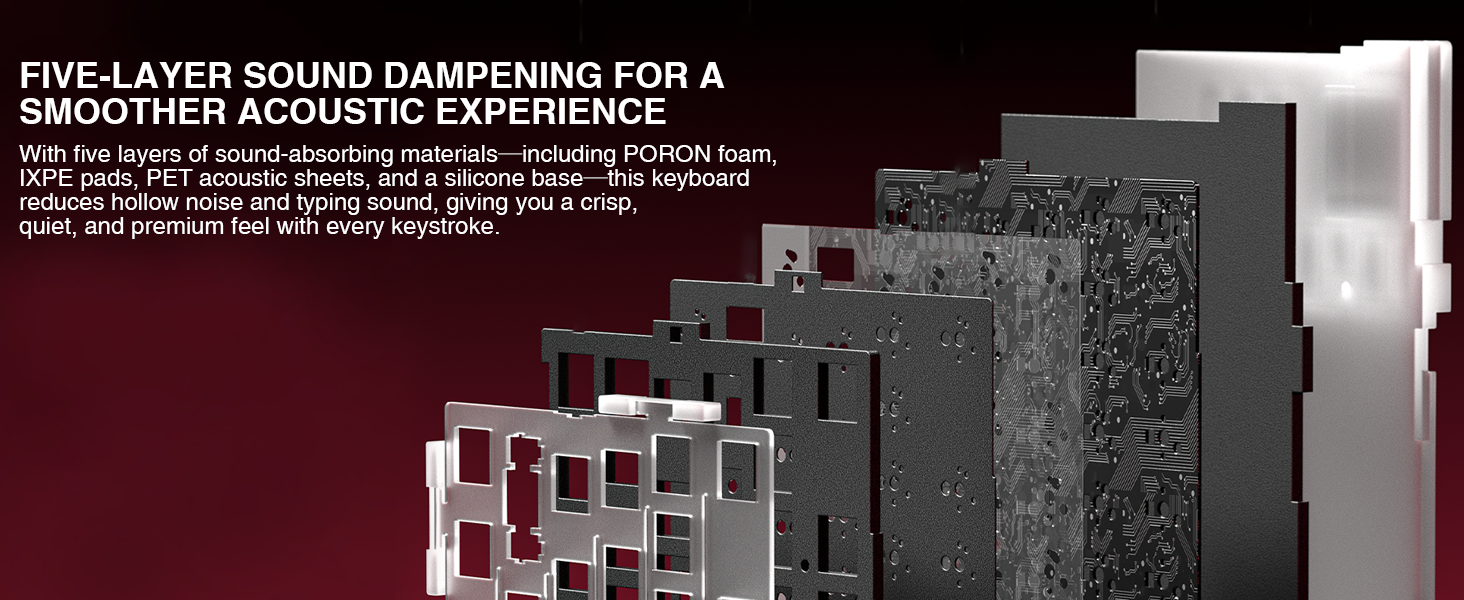
Image 7.1: Diagram illustrating the five-layer sound dampening structure of the keyboard.
8. വാറൻ്റിയും പിന്തുണയും
For warranty information, please refer to the documentation included with your purchase or visit the official CORBOBO webസൈറ്റ്. വാറന്റി നിബന്ധനകളും വ്യവസ്ഥകളും പ്രദേശത്തിനും റീട്ടെയിലർക്കും അനുസരിച്ച് വ്യത്യാസപ്പെടാം.
For technical support, troubleshooting assistance beyond this manual, or inquiries about replacement parts, please contact CORBOBO customer service through their official webഉൽപ്പന്നം വാങ്ങിയ സൈറ്റ് അല്ലെങ്കിൽ റീട്ടെയിലർ.
നിർമ്മാതാവ്: കോർബോബോ
ബ്രാൻഡ് സ്റ്റോർ: CORBOBO Store on Amazon