
1 സുരക്ഷാ വിവരങ്ങൾ
Always prioritize safety when operating welding and plasma cutting equipment. Failure to follow safety guidelines can result in serious injury or death.
- നിർദ്ദേശം 65 മുന്നറിയിപ്പ്: കാൻസർ, ജനന വൈകല്യങ്ങൾ അല്ലെങ്കിൽ മറ്റ് പ്രത്യുൽപാദന വൈകല്യങ്ങൾ എന്നിവയ്ക്ക് കാരണമാകുന്ന കാലിഫോർണിയ സംസ്ഥാനത്തിന് അറിയാവുന്ന രാസവസ്തുക്കൾ ഈ ഉൽപ്പന്നം നിങ്ങളെ തുറന്നുകാട്ടാം.
- താപ ഓവർലോഡ്: Allow the machine to cool down if thermal overload protection is triggered. Do not bypass safety features.
- വ്യക്തിഗത സംരക്ഷണ ഉപകരണങ്ങൾ (PPE): Always wear appropriate PPE, including an auto-darkening welding helmet, leather gloves, and long-sleeved flame-resistant (FR) clothing. Avoid synthetic materials as spatter can melt them onto skin.
- ഇലക്ട്രിക്കൽ സുരക്ഷ: Ensure proper circuit breaker specifications are met. Avoid welding in humid environments. If using MMA mode, ensure Voltage Reduction Device (VRD) is enabled for enhanced electric shock protection.
- വെൻ്റിലേഷൻ: Ensure adequate ventilation to disperse welding fumes.
- അഗ്നി അപകടങ്ങൾ: Keep flammable materials away from the work area. Have a fire extinguisher readily available.

Image: Welding Safety Tips covering thermal overload, safety protection, and electricity safety.
2. ഉൽപ്പന്നം കഴിഞ്ഞുview
The YESWELDER MCT-520 is a versatile 6-in-1 multifunctional welding and plasma cutting machine designed for a wide range of applications. It supports Gas MIG, Flux Core MIG, Plasma Cutting (CUT), High-Frequency TIG (HF TIG), Stick (MMA), and Spool Gun Aluminum Welding (spool gun sold separately).

ചിത്രം: മുൻഭാഗം view of the YESWELDER MCT-520 machine, showcasing its compact design and various connection points.

Image: Graphic illustrating the 6-in-1 capabilities of the MCT-520, including Gas MIG, Flux Core, Stick, TIG, Cut, and Spool Gun.
This machine features a large 7-inch LED display for clear settings visibility and intuitive physical dials for precise adjustments, even with welding gloves on. It offers advanced parameter control for various welding processes and is compatible with both 110V and 220V power inputs.
ഉൽപ്പന്നം കഴിഞ്ഞുview വീഡിയോ
വീഡിയോ: ഒരു ഉദ്യോഗസ്ഥൻview of the YESWELDER MCT-520, highlighting its multifunctional capabilities and design features.
3. സജ്ജീകരണം
3.1 Machine Components and Connections
Familiarize yourself with the machine's layout and connection points before beginning any operation.

Image: Diagram showing the various connection points and components of the MCT-520, including MIG Gun Connection, Wire Drive Polarity Lead, Trigger Receptacles, Output Receptacles, Work Clamp Receptacle, Cutting Torch & TIG Torch Connection, Gas Inlets, Power Switch, Air Filter Installation Location, Ground Terminal, Input Power Cable, and Cooling Fan.
3.2 പവർ കണക്ഷൻ
- The MCT-520 features auto-detect voltage for 110V/220V power sources.
- Connect the input power cable to a suitable power outlet. Ensure the outlet matches the machine's voltage requirements and has adequate ampകോപം ശേഷി.
3.3 ആക്സസറി ഇൻസ്റ്റലേഷൻ
Connect the appropriate torch and work clamp for your chosen welding or cutting process.
- Plasma Cutting (CUT) Installation: Connect the cutting torch and work clamp. An air compressor must be connected to the machine's air inlet.

Image: Diagram illustrating the connection of the cutting torch, work clamp, and controller interface for plasma cutting. An air compressor connection is required.
- MIG Welding Installation (Gas MIG/Flux Core): Connect the MIG/Flux torch and work clamp. For Gas MIG, connect the gas cylinder to the MIG/TIG gas inlet.

Image: Diagram showing the connection of the MIG/Flux torch and work clamp for MIG welding. Gas cylinder connection is shown for Gas MIG.

Image: Diagram showing the connection of the MIG/Flux torch and work clamp for Flux Core welding.
- Spool Gun Installation: Connect the spool gun, work clamp, and controller interface. An air compressor may be needed depending on the spool gun model.

Image: Diagram showing the connection of a spool gun, work clamp, and controller interface for aluminum welding.
- TIG Welding Installation: Connect the TIG torch, work clamp, and controller interface. Connect the gas cylinder to the MIG/TIG gas inlet.

Image: Diagram showing the connection of the TIG torch, work clamp, and controller interface for TIG welding. Gas cylinder connection is required.
- Stick Welding (MMA) Installation: ഇലക്ട്രോഡ് ഹോൾഡറും വർക്ക് clയും ബന്ധിപ്പിക്കുകamp. Interfaces can be interchanged as needed for DCEN/DCEP.

Image: Diagram showing the connection of the electrode holder and work clamp for stick welding.
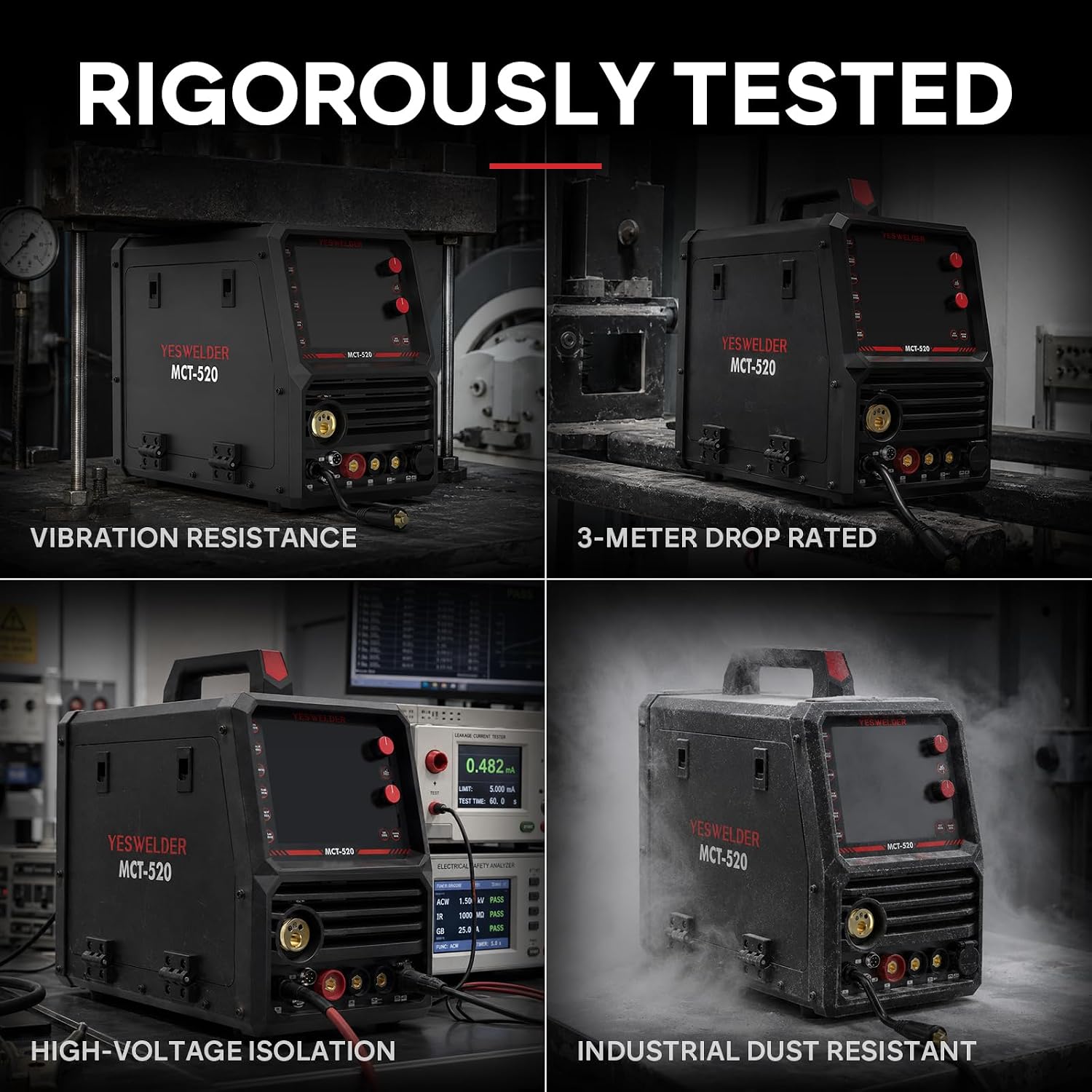
Image: The MCT-520 machine displayed with its various accessories, emphasizing universal compatibility and easy replacement.
4. പ്രവർത്തന നിർദ്ദേശങ്ങൾ
4.1 നിയന്ത്രണ പാനൽ ആമുഖം
The MCT-520 features a large LED display and intuitive dials for setting parameters.

ചിത്രം: വിശദമായത് view of the MCT-520 control panel, labeling buttons such as Gas Flow, Weld Mode, Feed Wire, 2T/4T, Wire DIA, Gas Select, Gas Check, Spool Gun, Inductance, Upper Value Knob/Button, Lower Value Knob/Button, and the Digital Panel.

Image: Close-up of the MCT-520's clear LED display and glove-friendly control dials, showing settings for ampകോപവും വോളിയവുംtage.
4.2 Selecting a Welding/Cutting Mode
Use the 'Weld Mode' button on the control panel to cycle through the available modes: TIG, CUT, Stick, Syn MIG, and Manual MIG.
4.3 പാരാമീറ്റർ ക്രമീകരണം
After selecting a mode, use the upper and lower value knobs/buttons to adjust parameters such as amperage (A) and voltage (V). The large LED display provides clear readouts.
- MIG Inductance: Adjust to minimize spatter.
- TIG Control: Fine-tune for heat control on thin metals. Foot pedal (sold separately) can be used for hands-free amperage control.
- MMA Arc Force: Adjust for crisp arc starts.
- വയർ ഫീഡിംഗ് വേഗത: The smart parameter-matching system automatically adjusts wire feeding speed based on selected voltage in certain modes.
4.4 Welding and Cutting Processes

ചിത്രം: ഉദാamples of weld beads and plasma cuts for MIG/Flux, Cutting, TIG, and Stick modes.
- MIG/Flux Core: High-speed efficiency for various materials. Gas MIG for clean indoor precision, Flux Core for outdoor repairs.
- Plasma Cutting (CUT): Provides fast, clean cuts. Capable of 5/16" (8mm) clean cut and 5/8" (16mm) maximum sever.
- ടിഐജി: Offers precision control for flawless beads, especially on thin metals. Features a stick-free, non-touch start.
- സ്റ്റിക്ക് (എംഎംഎ): Suitable for outdoor repairs and rusty metals. Features Arc Force, Hot Start, Anti Stick, and VRD.
- Spool Gun (Aluminum Welding): Direct-feed spool gun prevents soft aluminum wire from tangling, enabling effortless aluminum welding.

Image: Graphic detailing professional functions like 2T/4T mode, Pre Flow, Post Flow, Inductance, Arc Force, Hot Start, Anti Stick, Inching, Gas Check, and VRD.
5. പരിപാലനം
Regular maintenance ensures optimal performance and longevity of your MCT-520 machine.
- വൃത്തിയാക്കൽ: Keep the machine clean and free from dust and debris. Regularly clean the air filter installation location to ensure proper airflow for the smart cooling system.
- ഉപഭോഗവസ്തുക്കൾ: Periodically inspect and replace consumables such as MIG tips, plasma electrodes, nozzles, and TIG tungsten electrodes as needed.
- കേബിൾ പരിശോധന: Check all cables and connections for wear, damage, or loose fittings before each use.
- താപ സംരക്ഷണം: The machine is equipped with thermal protection. Ensure the cooling fan is not obstructed to prevent overheating.

ചിത്രം: ആന്തരികം view of the MCT-520 highlighting the 10-lb spool capacity, smart cooling system, and thermal protection features.

Image: Assortment of consumables and parts, indicating availability for maintenance and upgrades.
6. പ്രശ്നപരിഹാരം
If you encounter issues with your MCT-520, consider the following general troubleshooting steps:
- ശക്തിയില്ല: Check power connections, circuit breakers, and ensure the power switch is on.
- Poor Weld/Cut Quality: Verify correct settings for ampക്ഷോഭം, വാല്യംtage, wire feed speed, and gas flow (if applicable). Ensure consumables are in good condition and correctly installed. Check for proper work clamp കണക്ഷൻ.
- മെഷീൻ അമിത ചൂടാക്കൽ: Allow the machine to cool down. Ensure cooling fan is unobstructed and operating correctly. Reduce duty cycle if continuously welding at high amperages.
- Arc Instability/No Arc: Check all cable connections. Ensure proper polarity for Stick welding. Verify gas supply for MIG/TIG.
- Plasma Cutting Issues: Ensure air compressor is connected and providing sufficient pressure. Check plasma torch consumables for wear.
For persistent issues or complex problems, refer to the detailed troubleshooting section in the full user manual or contact YESWELDER technical support.
7 സ്പെസിഫിക്കേഷനുകൾ
Key technical specifications for the YESWELDER MCT-520:
| ഫീച്ചർ | സ്പെസിഫിക്കേഷൻ |
|---|---|
| മോഡൽ നമ്പർ | MCT-520 |
| ഇൻപുട്ട് വോളിയംtage | 110 Volts, 220 Volts (Auto-Detect) |
| MIG/TIG/Stick Amperage റേഞ്ച് | 20-200എ |
| പ്ലാസ്മ കട്ടിംഗ് Amperage റേഞ്ച് | 20-50എ |
| Clean Cut (Plasma) | 5/16" (8 മിമി) |
| Maximum Sever (Plasma) | 5/8" (16 മിമി) |
| ഇനത്തിൻ്റെ ഭാരം | 47 പൗണ്ട് |
| പാക്കേജ് അളവുകൾ | 19.81 x 16.93 x 15.68 ഇഞ്ച് |
| മെറ്റീരിയൽ | ലോഹം |
| ഉൾപ്പെടുത്തിയ ഘടകങ്ങൾ | MCT-520 Welding Machine, Welding Accessories |

Image: The MCT-520 machine with its dimensions (13.9 in height, 17.5 in width, 9.46 in depth), illustrating its compact size.

Image: Four panels showing the MCT-520 being tested for vibration resistance, 3-meter drop rating, high-voltage isolation, and industrial dust resistance.
8. വാറണ്ടിയും പിന്തുണയും
YESWELDER stands behind the MCT-520 with a comprehensive warranty and dedicated customer support.
- വാറൻ്റി: The MCT-520 comes with a 2-Year Product Warranty.
- സാങ്കേതിക സഹായം: Dedicated North American service center provides 24/7 technical support. Expect a prompt response within 24 hours for any inquiries or assistance needed.
For support, please refer to the contact information provided in your product packaging or visit the official YESWELDER webസൈറ്റ്.

Image: Graphic indicating that professional welders are available to provide support beyond the machine itself.