
1. ആമുഖം
വാങ്ങിയതിന് നന്ദി.asing the Retrolife HQ-KZ009 Record Player. This all-in-one vintage turntable is designed to provide a high-fidelity audio experience with its built-in stereo speakers, Bluetooth connectivity, and support for various vinyl record speeds. This manual will guide you through the setup, operation, and maintenance of your new record player to ensure optimal performance and longevity.

2. സുരക്ഷാ നിർദ്ദേശങ്ങൾ
ഈ ഉൽപ്പന്നം ഉപയോഗിക്കുന്നതിന് മുമ്പ് ദയവായി എല്ലാ സുരക്ഷാ നിർദ്ദേശങ്ങളും വായിച്ച് മനസ്സിലാക്കുക. ഭാവിയിലെ റഫറൻസിനായി ഈ മാനുവൽ സൂക്ഷിക്കുക.
- ഊർജ്ജ സ്രോതസ്സ്: Use only the provided power adapter (DC 5.8V 1.5A). Ensure the voltagഇ നിങ്ങളുടെ പ്രാദേശിക വൈദ്യുതി വിതരണവുമായി പൊരുത്തപ്പെടുന്നു.
- ജലവും ഈർപ്പവും: Do not expose the unit to rain, moisture, or dripping/splashing liquids. Do not place objects filled with liquids, such as vases, on the apparatus.
- വെൻ്റിലേഷൻ: Ensure proper ventilation. Do not block any ventilation openings. Maintain a minimum distance around the apparatus for sufficient ventilation.
- ചൂട്: റേഡിയേറ്ററുകൾ, ഹീറ്റ് രജിസ്റ്ററുകൾ, സ്റ്റൗകൾ അല്ലെങ്കിൽ മറ്റ് ഉപകരണങ്ങൾ (ഉൾപ്പെടെ) പോലുള്ള താപ സ്രോതസ്സുകൾക്ക് സമീപം യൂണിറ്റ് സ്ഥാപിക്കരുത്. ampലൈഫയറുകൾ) ചൂട് ഉത്പാദിപ്പിക്കുന്നത്.
- വൃത്തിയാക്കൽ: Unplug the unit from the power outlet before cleaning. Use a soft, dry cloth for cleaning. Do not use liquid cleaners or aerosol cleaners.
- സേവനം: ഈ ഉൽപ്പന്നം സ്വയം സേവിക്കാൻ ശ്രമിക്കരുത്. യോഗ്യതയുള്ള സേവന ഉദ്യോഗസ്ഥർക്ക് എല്ലാ സേവനങ്ങളും റഫർ ചെയ്യുക.
- പ്ലേസ്മെൻ്റ്: Place the unit on a stable, flat surface to prevent it from falling. Avoid placing it in direct sunlight or extreme temperatures.
3. പാക്കേജ് ഉള്ളടക്കം
Carefully unpack the box and ensure all the following items are included:
- 1. Retrolife HQ-KZ009 Turntable Unit
- 2. Power Adapter (DC 5.8V 1.5A)
- 3. Instruction Manual (this document)
- 4. A 45 RPM Fixtor (Mounted)
- 5. An AT-3600L Stylus Needle (Mounted)
- 6. Detachable Dust Cover (Mounted)
4. ഉൽപ്പന്നം കഴിഞ്ഞുview
Familiarize yourself with the main components of your Retrolife HQ-KZ009 Record Player.

- പ്ലേറ്റർ: The rotating disc where records are placed.
- ടോണെർം: റെക്കോർഡിന്റെ ഗ്രൂവുകൾ വായിക്കുന്ന കാട്രിഡ്ജും സ്റ്റൈലസും പിടിക്കുന്നു.
- AT-3600L Cartridge: A high-quality moving magnet (MM) cartridge ensuring precise stylus movement and rich audio reproduction.
- Tonearm Lifter: Lever to gently raise and lower the tonearm, protecting your records and stylus.
- സ്പീഡ് സെലക്ടർ: Allows selection of 33 1/3, 45, or 78 RPM playback speeds.
- 45 RPM അഡാപ്റ്റർ: An embedded adapter for playing 7-inch records with a large center hole. Turn clockwise to raise, counter-clockwise to sink.
- ബിൽറ്റ്-ഇൻ സ്റ്റീരിയോ സ്പീക്കറുകൾ: Features two bass speakers and one tweeter speaker for spacious and detailed sound.
- കൺട്രോൾ നോബുകൾ: Integrated controls for power, volume, and mode selection (Bluetooth, Phono, AUX).
- പൊടി കവർ: A clear, detachable cover to protect the turntable from dust.

5. സജ്ജീകരണം
Follow these steps to set up your record player for the first time.
- അൺപാക്ക് ചെയ്യുന്നു: Carefully remove the record player and all accessories from the packaging. Retain the packaging for future transport or storage.
- പ്ലേസ്മെൻ്റ്: Place the record player on a stable, level surface away from direct sunlight, heat sources, and excessive dust or vibrations. Ensure there is enough space around the unit for proper ventilation.
- പൊടി കവർ: The detachable dust cover is pre-mounted. You can remove it if preferred, but it is recommended to keep it on when not in use to protect the unit.
- സ്റ്റൈലസ് സംരക്ഷണം: Remove the clear plastic stylus protector from the AT-3600L cartridge before use. Be careful not to touch the stylus tip.
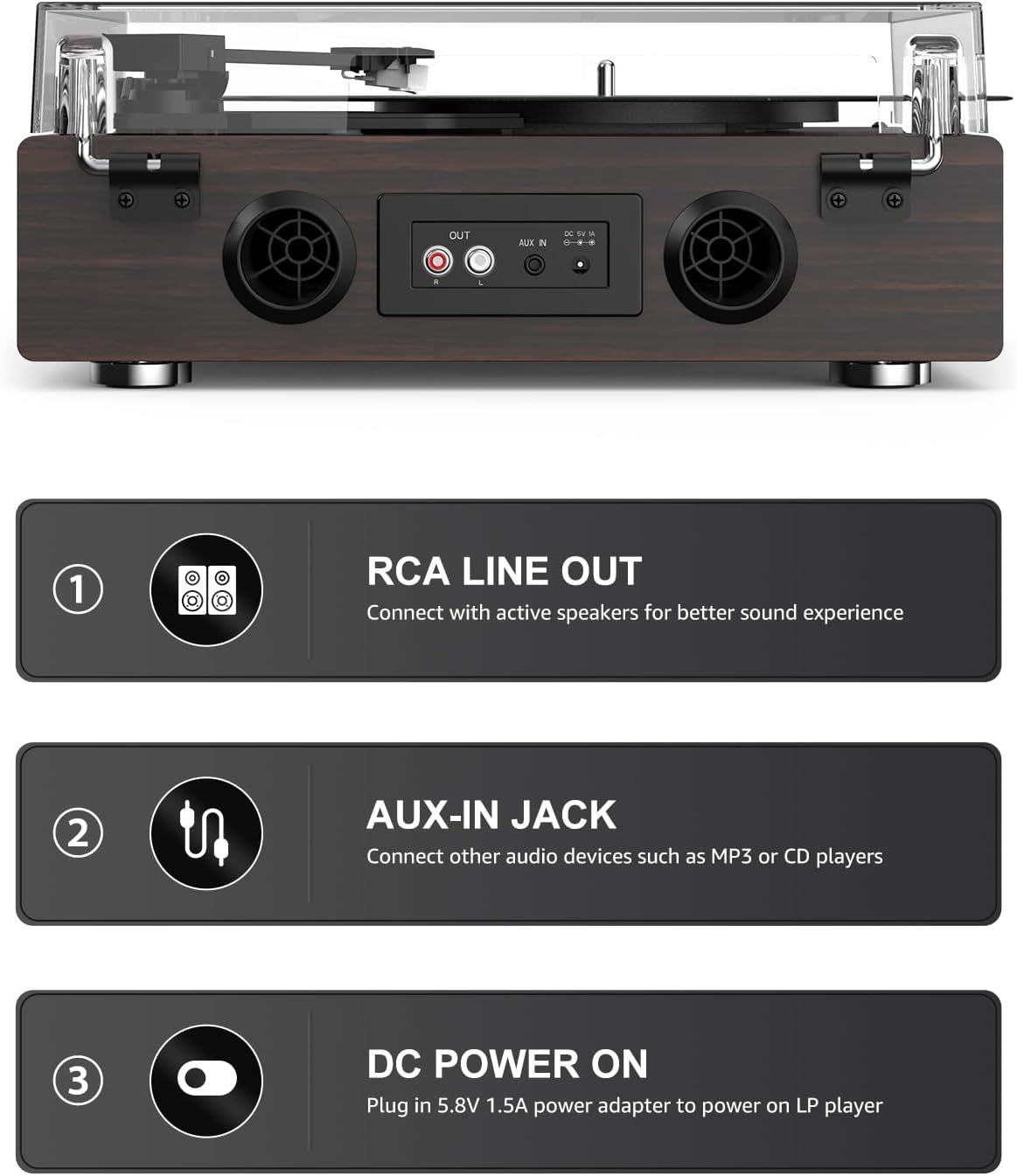
- പവർ കണക്ഷൻ: Connect the provided DC 5.8V 1.5A power adapter to the 'DC Power On' port on the rear of the unit. Plug the other end into a wall outlet.
- ബാഹ്യ കണക്ഷനുകൾ (ഓപ്ഷണൽ):
- RCA ലൈൻ ഔട്ട്: To connect to external active speakers or an amplifier, use an RCA cable (not included) to connect the 'OUT' ports on the rear of the record player to the input of your external audio system.
- AUX ഇതിൽ: To connect external audio devices like an MP3 player or CD player, use a 3.5mm audio cable (not included) to connect the device to the 'AUX IN' port on the rear.
6. പ്രവർത്തന നിർദ്ദേശങ്ങൾ
6.1. പവർ ഓൺ/ഓഫ്, വോളിയം നിയന്ത്രണം
- To power on the unit, turn the 'MIN/OFF' knob clockwise. You will hear a click, and the unit will power on.
- Continue turning the knob clockwise to increase the volume. Turn counter-clockwise to decrease the volume.
- To power off, turn the knob counter-clockwise until it clicks into the 'OFF' position.
6.2. Playing Vinyl Records (Phono Mode)

- യൂണിറ്റ് ഓണാണെന്ന് ഉറപ്പാക്കുക.
- Select 'PHONO' mode using the mode selector knob.
- Place a vinyl record on the platter. If playing a 7-inch record with a large center hole, use the embedded 45 RPM adapter by turning it clockwise to raise it.
- Select the correct speed (33 1/3, 45, or 78 RPM) using the speed selector switch located on the top panel.
- Gently lift the tonearm using the tonearm lifter lever.
- റെക്കോർഡിന്റെ ആവശ്യമുള്ള സ്റ്റാർട്ടിംഗ് ഗ്രൂവിന് മുകളിലൂടെ ടോൺആം നീക്കുക.
- Slowly lower the tonearm using the tonearm lifter lever. The stylus will gently descend onto the record, and playback will begin.
- To stop playback, lift the tonearm using the lifter lever, return it to the tonearm rest, and gently lower the lifter.
6.3. ബ്ലൂടൂത്ത് കണക്റ്റിവിറ്റി

The record player features Bluetooth 5.3 input, allowing you to stream audio wirelessly from your smart devices.
- യൂണിറ്റ് ഓണാണെന്ന് ഉറപ്പാക്കുക.
- Select 'BT' mode using the mode selector knob. The Bluetooth indicator light will blink, indicating it is in pairing mode.
- On your smartphone, tablet, or other Bluetooth-enabled device, turn on Bluetooth and search for available devices.
- Select 'Retrolife HQ-KZ009' (or similar name) from the list of devices.
- Once paired, the Bluetooth indicator light will stop blinking and remain solid. You can now play audio from your device through the record player's speakers.
6.4. AUX ഇൻപുട്ട്
Use the AUX input to connect non-Bluetooth audio devices.
- യൂണിറ്റ് ഓണാണെന്ന് ഉറപ്പാക്കുക.
- Select 'AUX' mode using the mode selector knob.
- Connect your external audio device (e.g., MP3 player, CD player) to the 'AUX IN' port on the rear of the record player using a 3.5mm audio cable.
- Play audio from your connected device. The sound will be output through the record player's speakers.
6.5. RCA Line Out

The RCA Line Out allows you to connect your record player to external active speakers or an amplifier for a more powerful and customized audio experience.
- Ensure the record player and your external audio system are powered off.
- Connect an RCA cable (not included) from the 'OUT' ports on the rear of the record player to the corresponding input ports on your external ampലൈഫയർ അല്ലെങ്കിൽ സജീവ സ്പീക്കറുകൾ.
- Power on the record player and your external audio system.
- Play a record or stream via Bluetooth/AUX. The audio will be routed through your external system. Adjust volume on both the record player and the external system as needed.
7. പരിപാലനം
Proper care and maintenance will ensure the longevity and optimal performance of your record player.
- യൂണിറ്റ് വൃത്തിയാക്കൽ: Use a soft, dry, lint-free cloth to wipe the surface of the record player. Do not use abrasive cleaners, waxes, or solvents as they may damage the finish.
- സ്റ്റൈലസ് കെയർ: The stylus (needle) is delicate. Avoid touching it with your fingers. Use a soft brush (not included) to gently clean the stylus tip from back to front to remove dust and debris. Replace the stylus if you notice a significant drop in sound quality or distortion.
- പൊടി കവർ: പൊടി കവർ ഒരു സോഫ്റ്റ്, ഡി ക്ലീനർ ഉപയോഗിച്ച് വൃത്തിയാക്കുക.amp cloth. Avoid using harsh chemicals that could scratch or cloud the plastic.
- റെക്കോർഡ് കെയർ: നിങ്ങളുടെ വിനൈൽ റെക്കോർഡുകൾ വൃത്തിയായും പൊടി രഹിതമായും സൂക്ഷിക്കുക. വളച്ചൊടിക്കൽ തടയാൻ അവ സ്ലീവുകളിൽ ലംബമായി സൂക്ഷിക്കുക.
8. പ്രശ്നപരിഹാരം
If you encounter any issues, refer to the following common problems and solutions.
| പ്രശ്നം | സാധ്യമായ കാരണം | പരിഹാരം |
|---|---|---|
| ശക്തിയില്ല | Power adapter not connected; Power outlet not working; Unit not turned on. | Ensure power adapter is securely connected to the unit and a working outlet. Turn the volume/power knob clockwise past the 'OFF' position. |
| സ്പീക്കറുകളിൽ നിന്ന് ശബ്ദമില്ല | Volume too low; Incorrect mode selected; Stylus protector still on; Stylus damaged. | Increase volume. Ensure correct mode (PHONO, BT, AUX) is selected. Remove stylus protector. Check stylus for damage and replace if necessary. |
| ശബ്ദം വളച്ചൊടിക്കൽ അല്ലെങ്കിൽ ഒഴിവാക്കൽ | Record is dirty or scratched; Stylus is dirty or worn; Unit is on an unstable surface; Incorrect speed selected. | Clean the record. Clean or replace the stylus. Place the unit on a stable, level surface. Ensure correct playback speed (33 1/3, 45, or 78 RPM) is selected. |
| ബ്ലൂടൂത്ത് കണക്റ്റ് ചെയ്യുന്നില്ല | Unit not in BT mode; Device not in pairing mode; Device too far. | Select 'BT' mode on the record player. Ensure Bluetooth is enabled on your device and it's searching for devices. Move your device closer to the record player. |
| റെക്കോർഡ് വളരെ വേഗത്തിൽ/സാവധാനത്തിൽ പ്ലേ ചെയ്യുന്നു | തെറ്റായ വേഗത തിരഞ്ഞെടുത്തു. | Adjust the speed selector switch to match the record's required RPM (33 1/3, 45, or 78). |
ഈ പരിഹാരങ്ങൾ പരീക്ഷിച്ചതിന് ശേഷവും പ്രശ്നം നിലനിൽക്കുകയാണെങ്കിൽ, ദയവായി ഉപഭോക്തൃ പിന്തുണയുമായി ബന്ധപ്പെടുക.
9 സ്പെസിഫിക്കേഷനുകൾ
| ഫീച്ചർ | വിവരണം |
|---|---|
| ബ്രാൻഡ് | റെട്രോലൈഫ് |
| മോഡലിൻ്റെ പേര് | HQ-KZ009 |
| ഇനം മോഡൽ നമ്പർ | HQ-KZ009 |
| പാക്കേജ് അളവുകൾ | 15.83 x 15.43 x 7.91 ഇഞ്ച് |
| ഇനത്തിൻ്റെ ഭാരം | 7.26 പൗണ്ട് |
| പരമാവധി റൊട്ടേഷണൽ സ്പീഡ് | 78 ആർപിഎം (33 1/3, 45, 78 ആർപിഎം പിന്തുണയ്ക്കുന്നു) |
| ഉൾപ്പെടുത്തിയ ഘടകങ്ങൾ | Turntable HQ-KZ009 Unit, Power Adapter(DC 5.8V 1.5A), Instruction Manual, A 45 RPM Fixtor(Mounted), An AT-3600L Stylus Needle(Mounted), Detachable Dust Cover(Mounted) |
| പ്രത്യേക സവിശേഷതകൾ |
|
| മെറ്റീരിയൽ | എഞ്ചിനീയറിംഗ് വുഡ് |
| ശൈലി | വിൻtage |
| നിറം | Walnut Dark Red |
| അനുയോജ്യമായ ഉപകരണങ്ങൾ | Smartphone (via Bluetooth) |
| മോട്ടോർ തരം | ഡിസി മോട്ടോർ |
| നിർമ്മാതാവ് | റെട്രോലൈഫ് |
10. വാറൻ്റിയും പിന്തുണയും
Retrolife products are designed for reliability and performance. This product comes with a standard manufacturer's warranty. For specific warranty details, please refer to the warranty card included in your package or contact Retrolife customer support.
If you require technical assistance, have questions about your product, or need to claim warranty service, please contact Retrolife customer support through the official webനിങ്ങളുടെ വാങ്ങലിനൊപ്പം നൽകിയിരിക്കുന്ന സൈറ്റ് അല്ലെങ്കിൽ ബന്ധപ്പെടാനുള്ള വിവരങ്ങൾ.