
ആമുഖം
Thank you for choosing the GOBOULT Soniq Over Ear Bluetooth Headphones. These headphones are designed to provide a superior audio experience with features like 70 hours of playtime, 40mm bass drivers, Zen™ ENC microphone, Type-C fast charging, and dual device pairing. This manual will guide you through the setup, operation, and maintenance of your new headphones to ensure optimal performance.
ബോക്സിൽ എന്താണുള്ളത്
എല്ലാ ഇനങ്ങളും ഉണ്ടെന്ന് ഉറപ്പാക്കാൻ പാക്കേജ് ഉള്ളടക്കങ്ങൾ പരിശോധിക്കുക:
- Soniq Headphone
- ടൈപ്പ്-സി ചാർജിംഗ് കേബിൾ
- ഉപയോക്തൃ മാനുവൽ
- ഇയർ കുഷ്യനുകൾ (മുൻകൂട്ടി ഇൻസ്റ്റാൾ ചെയ്തത്)
- വാറൻ്റി കാർഡ്
ഉൽപ്പന്ന സവിശേഷതകൾ കഴിഞ്ഞുview
The GOBOULT Soniq headphones come equipped with several advanced features:
- വിപുലീകരിച്ച കളിസമയം: ഒറ്റ ചാർജിൽ 70 മണിക്കൂർ വരെ ഓഡിയോ പ്ലേബാക്ക്.
- Customizable EQ Modes: സൗണ്ട് പ്രോ ക്രമീകരിക്കുകfiles for bass boost, balanced audio, or vocal clarity.
- എൻവയോൺമെൻ്റൽ നോയ്സ് ക്യാൻസലേഷൻ (ENC): പശ്ചാത്തല ശബ്ദം കുറച്ചുകൊണ്ട് കോൾ വ്യക്തത വർദ്ധിപ്പിക്കുന്നു.
- Dual Device Pairing: Seamlessly connect and switch between two devices simultaneously.
- Powerful Audio Drivers: 40mm bass-boosted drivers for rich sound.
- Latest Bluetooth Technology: Bluetooth 5.4 for faster pairing and stable connections.
- സുഖപ്രദമായ ഡിസൈൻ: Lightweight build with cushioned earcups for prolonged wear.
- ജല പ്രതിരോധം: IPX5 rating for splash, rain, and sweat protection.
- Tactile Controls: Easy-to-use physical buttons for volume, playback, and mode switching.
- AI Voice Assistant Support: Compatible with Google Assistant and Siri.

ചിത്രം: കഴിഞ്ഞുview of key features including 70H battery, EQ modes, ENC, dual pairing, 40mm drivers, and Bluetooth 5.4.

Image: Close-up of the GOBOULT Soniq headphone earcup highlighting the 40mm power-packed bass neodymium drivers with BoomX™ Technology and Memory Foam.
സജ്ജീകരണ ഗൈഡ്
1. ഹെഡ്ഫോണുകൾ ചാർജ് ചെയ്യുന്നു
Before first use, fully charge your GOBOULT Soniq headphones. Use the provided Type-C charging cable to connect the headphones to a compatible USB power source.
- ഒരു ഫുൾ ചാർജ് 70 മണിക്കൂർ വരെ പ്ലേടൈം നൽകുന്നു.
- Fast charging feature: 10 minutes of charge provides approximately 8 hours of playtime.
- LED ഇൻഡിക്കേറ്റർ ചാർജിംഗ് സ്റ്റാറ്റസ് കാണിക്കുകയും പൂർണ്ണമായി ചാർജ് ചെയ്യുമ്പോൾ അത് ഓഫാക്കുകയോ നിറം മാറ്റുകയോ ചെയ്യും.

Image: GOBOULT Soniq headphones connected via Type-C cable, illustrating 70 hours playtime and fast charging capability.
2. പവർ ഓൺ/ഓഫ്
To power on, press and hold the Power button for approximately 3 seconds until the LED indicator lights up. To power off, press and hold the Power button again for 3 seconds until the LED indicator turns off.
3. ബ്ലൂടൂത്ത് ജോടിയാക്കൽ
നിങ്ങളുടെ ഹെഡ്ഫോണുകൾ ബ്ലൂടൂത്ത് പ്രവർത്തനക്ഷമമാക്കിയ ഉപകരണവുമായി ജോടിയാക്കാൻ ഈ ഘട്ടങ്ങൾ പാലിക്കുക:
- ഹെഡ്ഫോണുകൾ പൂർണ്ണമായും ചാർജ് ചെയ്തിട്ടുണ്ടെന്നും പവർ ഓഫ് ചെയ്തിട്ടുണ്ടെന്നും ഉറപ്പാക്കുക.
- ജോടിയാക്കൽ മോഡ് സൂചിപ്പിക്കുന്ന LED ഇൻഡിക്കേറ്റർ ചുവപ്പും നീലയും മാറിമാറി മിന്നുന്നതുവരെ പവർ ബട്ടൺ 5-7 സെക്കൻഡ് അമർത്തിപ്പിടിക്കുക.
- നിങ്ങളുടെ ഉപകരണത്തിൽ (സ്മാർട്ട്ഫോൺ, ടാബ്ലെറ്റ്, ലാപ്ടോപ്പ്), ബ്ലൂടൂത്ത് പ്രവർത്തനക്ഷമമാക്കി ലഭ്യമായ ഉപകരണങ്ങൾക്കായി തിരയുക.
- Select "GOBOULT Soniq" from the list of found devices.
- കണക്ട് ചെയ്തുകഴിഞ്ഞാൽ, LED ഇൻഡിക്കേറ്റർ സാവധാനം നീല നിറത്തിൽ മിന്നിമറയും അല്ലെങ്കിൽ കടും നീലയായി തുടരും.

Image: GOBOULT Soniq headphones highlighting Bluetooth 5.4 for fast and stable connection.
പ്രവർത്തന നിർദ്ദേശങ്ങൾ
1. അടിസ്ഥാന നിയന്ത്രണങ്ങൾ
The headphones feature tactile buttons for easy control:
- പവർ ബട്ടൺ: പവർ ഓൺ/ഓഫ് ചെയ്യാൻ അമർത്തിപ്പിടിക്കുക. പ്ലേ/താൽക്കാലികമായി നിർത്താൻ ഹ്രസ്വമായി അമർത്തുക.
- വോളിയം കൂട്ടുക (+): ശബ്ദം കൂട്ടാൻ ഷോർട്ട് പ്രസ് ചെയ്യുക. അടുത്ത ട്രാക്കിനായി ദീർഘനേരം അമർത്തുക.
- വോളിയം ഡൗൺ (-): ശബ്ദം കുറയ്ക്കാൻ ഷോർട്ട് പ്രസ് ചെയ്യുക. മുമ്പത്തെ ട്രാക്കിനായി ദീർഘനേരം അമർത്തുക.
- Multi-function Button (often combined with Power or a dedicated button): Answer/End calls, activate voice assistant.

Image: Close-up of the right earcup showing tactile button controls for volume and play/pause.
2. ഇക്യു മോഡുകൾ
Customize your audio experience with multiple EQ modes. Press the dedicated EQ button (or a specific combination, refer to quick start guide if available) to cycle through modes:
- ബാസ് ബൂസ്റ്റ് മോഡ്: Enhances low frequencies for a deeper bass sound.
- സമതുലിതമായ മോഡ്: ഒരു ന്യൂട്രൽ സൗണ്ട് പ്രോ നൽകുന്നുfile suitable for various genres.
- വോക്കൽ മോഡ്: Optimizes mid-range frequencies for clearer vocals.
- ഗെയിം മോഡ്: Reduces latency for a more synchronized gaming audio experience (60ms ultra-low latency).
- സംഗീത മോഡ്: സ്റ്റാൻഡേർഡ് ഓഡിയോ പ്രോfile for general music listening.
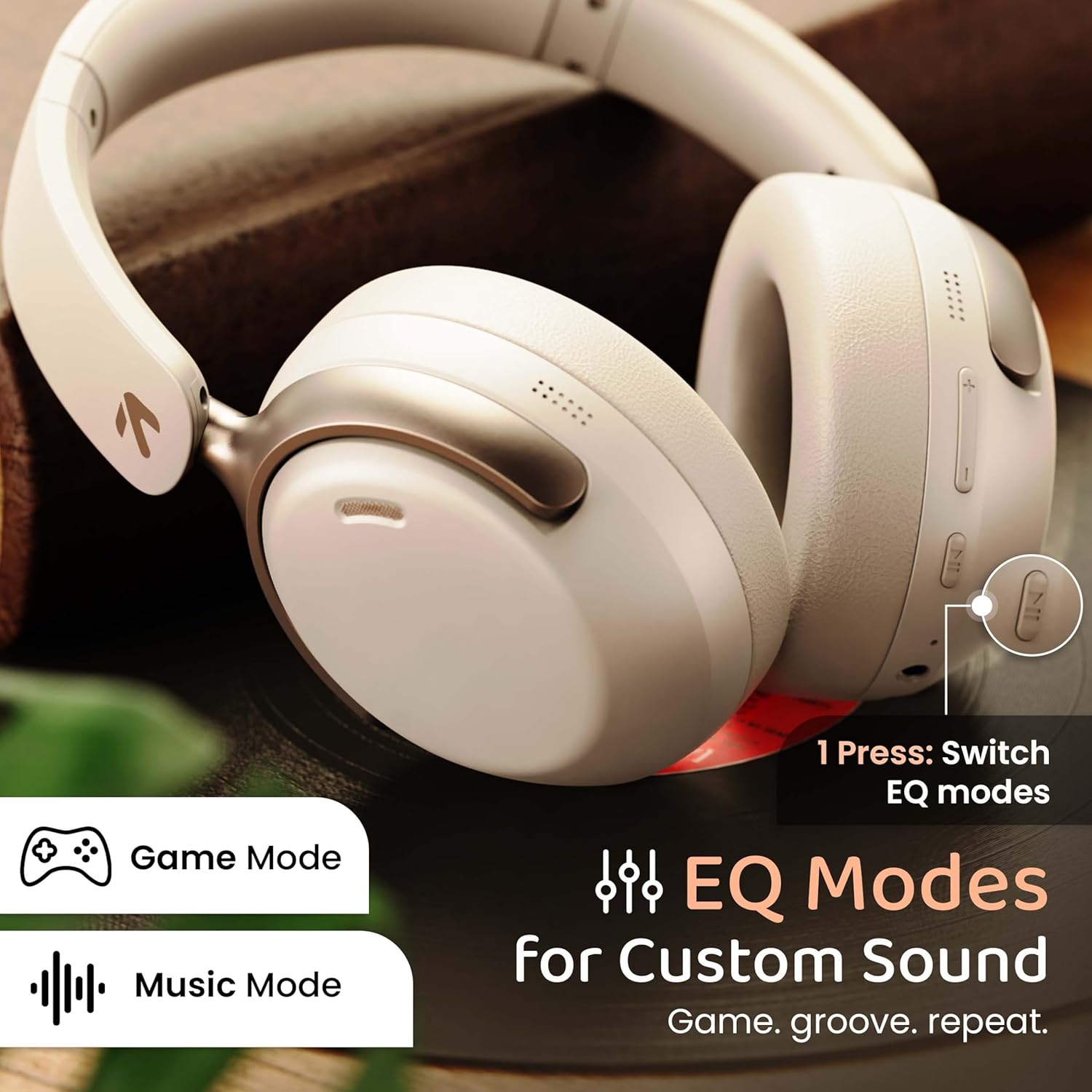
Image: GOBOULT Soniq headphones illustrating the EQ modes for custom sound, including Game Mode and Music Mode.

Image: GOBOULT Soniq headphones highlighting Combat™ Gaming Mode with 60ms ultra-low latency, tailored for mobile gaming and real-time sound accuracy.
3. ഡ്യുവൽ ഡിവൈസ് ജോടിയാക്കൽ
The headphones support dual device pairing, allowing you to connect to two devices simultaneously and switch between them seamlessly.
- Pair the headphones with the first device as described in the "Bluetooth Pairing" section.
- ആദ്യത്തെ ഉപകരണത്തിൽ ബ്ലൂടൂത്ത് പ്രവർത്തനരഹിതമാക്കുക.
- രണ്ടാമത്തെ ഉപകരണവുമായി ഹെഡ്ഫോണുകൾ ജോടിയാക്കുക.
- ആദ്യത്തെ ഉപകരണത്തിൽ ബ്ലൂടൂത്ത് വീണ്ടും പ്രവർത്തനക്ഷമമാക്കുക. ഹെഡ്ഫോണുകൾ രണ്ട് ഉപകരണങ്ങളിലേക്കും യാന്ത്രികമായി കണക്റ്റ് ചെയ്യണം.
- Audio will play from the device currently active. To switch, pause audio on the first device and start playing on the second.

Image: GOBOULT Soniq headphones demonstrating dual device connectivity with a laptop and a smartphone.
4. Wired Mode (AUX)
For a wired connection, use a standard 3.5mm AUX cable (not included) to connect the headphones to your audio source. In wired mode, the headphones operate passively, and the built-in microphone will not function.

Image: GOBOULT Soniq headphones showing the option for wireless mode and an optional wired mode via AUX cable, noting that the mic is off in wired mode.
5. കോളുകൾക്കുള്ള പരിസ്ഥിതി ശബ്ദ റദ്ദാക്കൽ (ENC)
The Zen™ ENC microphone technology helps reduce ambient noise during calls, ensuring clearer conversations. This feature is automatically active during phone calls.

Image: Close-up of the GOBOULT Soniq headphone earcup highlighting the Zen™ ENC Mic for processed calling, ambient noise isolation, enhanced call experience, and sharper voice clarity.
6. വോയ്സ് അസിസ്റ്റൻ്റ്
Activate your device's voice assistant (Google Assistant or Siri) by pressing the multi-function button (or specific button, refer to quick start guide) for approximately 2 seconds.

Image: GOBOULT Soniq headphones with icons for Google Assistant and Siri, indicating personalized AI assistant support.
പരിപാലനവും പരിചരണവും
- വൃത്തിയാക്കൽ: മൃദുവായതും ഉണങ്ങിയതുമായ തുണി ഉപയോഗിച്ച് ഹെഡ്ഫോണുകൾ തുടയ്ക്കുക. അബ്രാസീവ് ക്ലീനറുകളോ ലായകങ്ങളോ ഉപയോഗിക്കരുത്.
- ജല പ്രതിരോധം: The headphones are IPX5 water resistant, meaning they are protected against splashes, rain, and sweat. Do not submerge them in water or expose them to strong jets of water.
- സംഭരണം: ഉപയോഗത്തിലില്ലാത്തപ്പോൾ, ഹെഡ്ഫോണുകൾ തണുത്തതും വരണ്ടതുമായ സ്ഥലത്ത് സൂക്ഷിക്കുക, നേരിട്ടുള്ള സൂര്യപ്രകാശത്തിൽ നിന്നും കടുത്ത താപനിലയിൽ നിന്നും അകറ്റി നിർത്തുക. മടക്കാവുന്ന രൂപകൽപ്പന ഒതുക്കമുള്ള സംഭരണം അനുവദിക്കുന്നു.
- ബാറ്ററി കെയർ: ബാറ്ററി ലൈഫ് വർദ്ധിപ്പിക്കാൻ, ഹെഡ്ഫോണുകൾ ഇടയ്ക്കിടെ പൂർണ്ണമായും ചാർജ് ചെയ്യുന്നത് ഒഴിവാക്കുക. തുടർച്ചയായ ഉപയോഗത്തിലല്ലെങ്കിൽ പോലും അവ പതിവായി ചാർജ് ചെയ്യുക.
Image: GOBOULT Soniq headphones illustrating IPX5 water resistance, indicating protection against splash, rain, and sweat.

Image: GOBOULT Soniq headphones showcasing their adjustable headband, foldable design, and movable earcups for maximum comfort and portability.
ട്രബിൾഷൂട്ടിംഗ്
| പ്രശ്നം | സാധ്യമായ പരിഹാരം |
|---|---|
| ഹെഡ്ഫോണുകൾ പവർ ഓൺ ചെയ്യുന്നില്ല. | ഹെഡ്ഫോണുകൾ ചാർജ് ചെയ്തിട്ടുണ്ടെന്ന് ഉറപ്പാക്കുക. ടൈപ്പ്-സി കേബിൾ ഉപയോഗിച്ച് ഒരു പവർ സ്രോതസ്സിലേക്ക് കണക്റ്റ് ചെയ്യുക. |
| ഉപകരണവുമായി ജോടിയാക്കാൻ കഴിയില്ല. |
|
| ശബ്ദമില്ല അല്ലെങ്കിൽ കുറഞ്ഞ ശബ്ദമില്ല. |
|
| വയേർഡ് മോഡിൽ മൈക്രോഫോൺ പ്രവർത്തിക്കുന്നില്ല. | The built-in microphone is not active when using the AUX wired connection. This is normal operation. |
| ഇടവിട്ടുള്ള കണക്ഷൻ. |
|
സ്പെസിഫിക്കേഷനുകൾ
| ഫീച്ചർ | വിശദാംശങ്ങൾ |
|---|---|
| മോഡലിൻ്റെ പേര് | എയർബാസ് |
| കണക്റ്റിവിറ്റി ടെക്നോളജി | Bluetooth, Wired, Wireless |
| വയർലെസ് കമ്മ്യൂണിക്കേഷൻ ടെക്നോളജി | ബ്ലൂടൂത്ത് 5.4 |
| ബ്ലൂടൂത്ത് ശ്രേണി | 10 മീറ്റർ |
| ഓഡിയോ ഡ്രൈവർ വലിപ്പം | 40 മില്ലിമീറ്റർ |
| ഓഡിയോ ഡ്രൈവർ തരം | ഡൈനാമിക് ഡ്രൈവർ |
| ബാറ്ററി ലൈഫ് | 40 മണിക്കൂർ |
| ചാർജിംഗ് പോർട്ട് | ടൈപ്പ്-സി ഫാസ്റ്റ് ചാർജിംഗ് ജാക്ക് |
| ശബ്ദ നിയന്ത്രണം | പരിസ്ഥിതി ശബ്ദം റദ്ദാക്കൽ (ENC) |
| ജല പ്രതിരോധ നില | IPX5 (Splash, Rain, Sweat Proof) |
| ഓഡിയോ ലേറ്റൻസി | 60 മില്ലിസെക്കൻഡ് (ഗെയിം മോഡ്) |
| ഇയർപീസ് ആകൃതി | ചെവിക്ക് മുകളിൽ |
| മെറ്റീരിയൽ | Memory Foam (Ear Cushions) |
| ഇനത്തിൻ്റെ ഭാരം | 227 ഗ്രാം |
| ഉൽപ്പന്ന അളവുകൾ (LxWxH) | 17 x 5.5 x 19 സെൻ്റീമീറ്റർ |
| കൺട്രോളർ തരം | Button, Google Assistant |
| പ്രതിരോധം | 32 ഓം |
| സംവേദനക്ഷമത | 118 ഡി.ബി |
വാറൻ്റിയും പിന്തുണയും
Your GOBOULT Soniq Over Ear Bluetooth Headphones come with a 1 വർഷത്തെ നിർമ്മാതാവിൻ്റെ വാറൻ്റി from the date of purchase. This warranty covers manufacturing defects and ensures the reliability of your product.
For warranty claims, technical support, or any inquiries, please refer to the contact information provided on the warranty card included in your package or visit the official GOBOULT support webസൈറ്റ്.
വാറന്റി സാധൂകരണത്തിനായി വാങ്ങിയതിന്റെ തെളിവായി നിങ്ങളുടെ വാങ്ങൽ രസീത് സൂക്ഷിക്കുക.