
L16pro
L16PRO Smart Watch User Manual
Model: L16pro
1. ആമുഖം
Welcome to the L16PRO Smart Watch User Manual. This guide provides detailed instructions to help you set up, operate, and maintain your L16PRO Smart Watch. This advanced health monitoring companion is designed with comprehensive tracking capabilities, global connectivity, and durable construction, making it ideal for daily wear and consistent health tracking.
2. പാക്കേജ് ഉള്ളടക്കം
Please verify that all items listed below are present in your L16PRO Smart Watch package:
- 1 x L16 PRO GPS Smartwatch
- 1 x ഉപയോക്തൃ മാനുവൽ (ഈ പ്രമാണം)
- 1 x സ്ക്രൂഡ്രൈവർ
- 1 x പിൻ
- 1 x Adapter (EU/UK)
3. ഉൽപ്പന്നം കഴിഞ്ഞുview
The L16PRO Smart Watch features a sleek design with a 1.0-inch display, providing clear visibility for time, messages, and health metrics. Its robust construction ensures durability for everyday use.

ചിത്രം 3.1: മുൻഭാഗം view of the L16PRO Smart Watch, showing the display and overall design.
The rear of the watch houses the advanced health sensors and the charging contacts, designed for efficient and accurate data collection.

ചിത്രം 3.2: പിൻഭാഗം view of the L16PRO Smart Watch, highlighting the PPG, SpO2, and temperature sensors.
4. സജ്ജീകരണം
4.1 ഉപകരണം ചാർജ് ചെയ്യുന്നു
Before first use, fully charge your L16PRO Smart Watch. Connect the provided charging cable to the magnetic charging contacts on the back of the watch and plug the adapter into a power outlet. A full charge typically takes approximately 2 hours.
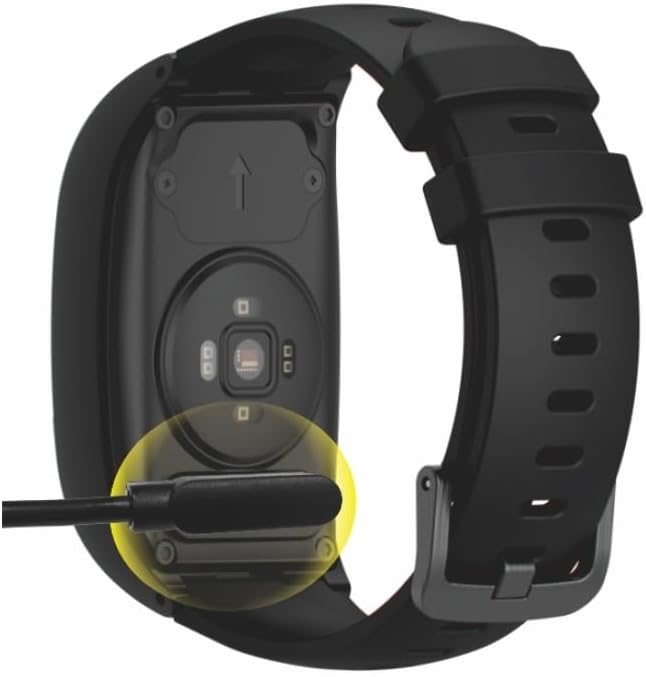
Figure 4.1: The L16PRO Smart Watch connected to its magnetic charging cable.
4.2. പവർ ഓൺ/ഓഫ്
- പവർ ഓൺ: Press and hold the power button (usually located on the side) for a few seconds until the screen lights up.
- പവർ ഓഫ്: Navigate to the 'Settings' menu on the watch, then select 'Power Off' or press and hold the power button until the power-off option appears on the screen.
4.3. SIM Card Installation (for 4G/3G/2G Connectivity)
The L16PRO Smart Watch supports 4G, 3G, and 2G networks for global connectivity. To enable cellular features, install a compatible Nano-SIM card:
- Locate the SIM card slot on the device (refer to the device diagram in the full manual if available).
- Using the provided screwdriver and pin, carefully open the SIM card tray.
- Insert the Nano-SIM card into the tray with the gold contacts facing down, ensuring correct orientation.
- Gently close the SIM card tray until it clicks into place.
4.4. ആപ്പ് ഇൻസ്റ്റാളേഷനും ജോടിയാക്കലും
To unlock the full potential of your L16PRO Smart Watch, including AI-powered health insights and detailed data monitoring, download the companion application on your smartphone. The app utilizes BLE 5.0 for efficient data transfer.
- Scan the QR code in the watch's settings or search for the official L16PRO app in your smartphone's app store (e.g., Google Play Store or Apple App Store).
- Install the app and follow the on-screen instructions to create an account and pair your smartwatch via Bluetooth.
5. പ്രവർത്തന നിർദ്ദേശങ്ങൾ
5.1. ഡിസ്പ്ലേ നാവിഗേഷൻ
The 1.0-inch display is touch-sensitive. Swipe left/right or up/down to navigate through different menus and features. Tap to select an option. The watch face can display various information such as time, date, battery status, and signal strength.

Figure 5.1: Various display screens of the L16PRO Smart Watch, including main time display, oximetry, message notifications, and heart rate/blood pressure readings.
5.2. ആരോഗ്യ നിരീക്ഷണം
The L16PRO Smart Watch is equipped with comprehensive sensors (PPG, SpO2, temperature) to track vital signs. Ensure the watch is worn snugly on your wrist for accurate readings.
- ഹൃദയമിടിപ്പ് (HR): Access the Heart Rate function from the main menu. The watch will begin measuring your heart rate automatically.
- രക്ത ഓക്സിജൻ (SpO2): Select the SpO2 measurement option. Remain still during the measurement for best results.
- താപനില: The watch can monitor your body temperature. Follow the on-screen prompts to initiate a reading.

Figure 5.2: Visual representation of the L16PRO Smart Watch's heart rate monitoring capability.
5.3 ജിപിഎസ് ട്രാക്കിംഗ്
The integrated GPS allows for real-time location tracking, enhancing safety. This feature is particularly useful for monitoring the location of the wearer. Ensure the watch has a clear view ഒപ്റ്റിമൽ ജിപിഎസ് സിഗ്നൽ സ്വീകരണത്തിനായി ആകാശത്തിൻ്റെ.
5.4. ആശയവിനിമയ സവിശേഷതകൾ
With 4G/3G/2G connectivity, the L16PRO Smart Watch supports communication functionalities:
- കോളുകൾ: നിങ്ങളുടെ വാച്ചിൽ നിന്ന് നേരിട്ട് കോളുകൾ വിളിക്കുകയും സ്വീകരിക്കുകയും ചെയ്യുക.
- സന്ദേശങ്ങൾ: View incoming messages and notifications on the display.
6. പരിപാലനം
6.1. വൃത്തിയാക്കൽ
Regularly clean your L16PRO Smart Watch to ensure optimal performance and hygiene. Use a soft, lint-free cloth to wipe the screen and body. For stubborn dirt, slightly dampതുണിയിൽ വെള്ളം ഒഴിക്കുക. കഠിനമായ രാസവസ്തുക്കളോ ഉരച്ചിലുകളോ ഉള്ള വസ്തുക്കൾ ഉപയോഗിക്കുന്നത് ഒഴിവാക്കുക.
6.2. ജല പ്രതിരോധം (IP66)
The L16PRO Smart Watch has an IP66 water-resistant rating, meaning it is protected against powerful water jets and dust. It is suitable for daily wear, including splashes, rain, and brief exposure to water. However, it is not recommended for swimming, showering, or prolonged submersion.
6.3. ബാറ്ററി പരിചരണം
To maximize the lifespan of your 680mAh lithium polymer battery:
- തീവ്രമായ താപനില ഒഴിവാക്കുക.
- ബാറ്ററി പൂർണ്ണമായും തീരുന്നതിന് മുമ്പ് വാച്ച് ചാർജ് ചെയ്യുക.
- If storing the watch for an extended period, charge it to about 50% and power it off.
7. പ്രശ്നപരിഹാരം
If you encounter issues with your L16PRO Smart Watch, please refer to the following common solutions:
- ഉപകരണം ഓണാക്കുന്നില്ല: Ensure the device is fully charged. Try connecting it to the charger for at least 30 minutes.
- Cannot connect to network: Check if the SIM card is correctly installed and activated. Verify network coverage in your area.
- കൃത്യമല്ലാത്ത ആരോഗ്യ വായനകൾ: Ensure the watch is worn snugly on your wrist, not too loose or too tight. Clean the sensor area on the back of the watch.
- App pairing issues: Make sure Bluetooth is enabled on your smartphone and the watch. Restart both devices and try pairing again.
- ഹ്രസ്വ ബാറ്ററി ലൈഫ്: Reduce screen brightness, disable unnecessary notifications, or close background applications.
പ്രശ്നം നിലനിൽക്കുകയാണെങ്കിൽ, കൂടുതൽ സഹായത്തിനായി ഉപഭോക്തൃ പിന്തുണയുമായി ബന്ധപ്പെടുക.
8 സ്പെസിഫിക്കേഷനുകൾ
| ഫീച്ചർ | സ്പെസിഫിക്കേഷൻ |
|---|---|
| മോഡൽ നമ്പർ | L16pro |
| ഡിസ്പ്ലേ വലിപ്പം | 1.0 Inches (1" / 3 cm) |
| മെമ്മറി സ്റ്റോറേജ് കപ്പാസിറ്റി | 128 MB |
| ഇൻസ്റ്റാൾ ചെയ്ത RAM മെമ്മറി വലുപ്പം | 128 MB |
| ഓപ്പറേറ്റിംഗ് സിസ്റ്റം | OS RTOS Thread X |
| ബാറ്ററി | 680mAh Lithium Polymer (Nonstandard Battery) |
| കണക്റ്റിവിറ്റി ടെക്നോളജി | 4G, 3G, 2G (GSM 850/900/1800/1900MHz, 3G WCDMA Band1/Band8, LTE B2/B4/B5/B7/B12/B17/B66), Wi-Fi |
| വയർലെസ് കമ്മ്യൂണിക്കേഷൻ സ്റ്റാൻഡേർഡ് | Bluetooth (BLE 5.0), 2.4 GHz Radio Frequency |
| പ്രത്യേക സവിശേഷതകൾ | Health Monitoring (PPG, SpO2, Temperature), IP66 Water-Resistant, GPS Tracking, AI-Powered Insights |
| ജിപിഎസ് | Integrated with W307 |
| ഇനത്തിൻ്റെ ഭാരം | 1.41 ഔൺസ് (40 ഗ്രാം) |
| പാക്കേജ് അളവുകൾ | 2.17 x 2.16 x 1.22 ഇഞ്ച് |
9. വാറന്റി, പിന്തുണ വിവരങ്ങൾ
Specific warranty details for the L16PRO Smart Watch are not provided in the product information. For warranty claims, technical support, or any inquiries regarding your device, please contact the manufacturer or the retailer from whom you purchased the product. Keep your proof of purchase for any warranty-related services.
Ask a question about this manual
Ask about setup, troubleshooting, compatibility, parts, safety, or missing instructions. Manuals+ will review the question and use this page’s manual context to help answer it.