
1. ആമുഖം
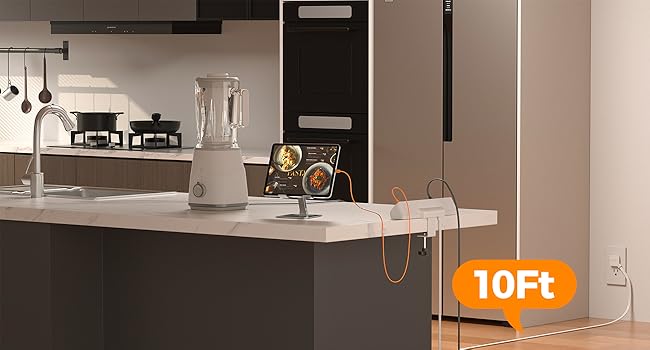
Thank you for choosing the TESSAN TS-PS06US00 Desk Clamp Power Strip. This device is designed to provide convenient power access and surge protection for your electronic devices in various settings such as home offices, dorm rooms, and workspaces. It features 5 AC outlets, 2 USB-C ports, and 2 USB-A ports, along with a 10-foot flat plug extension cord for flexible placement.
2. സുരക്ഷാ നിർദ്ദേശങ്ങൾ
മുന്നറിയിപ്പ്: വൈദ്യുതാഘാതം, തീപിടുത്തം അല്ലെങ്കിൽ പരിക്ക് എന്നിവയുടെ അപകടസാധ്യത കുറയ്ക്കുന്നതിന്, ദയവായി എല്ലാ നിർദ്ദേശങ്ങളും ശ്രദ്ധാപൂർവ്വം വായിച്ച് പാലിക്കുക.
- Do not exceed the electrical ratings of this power strip (1250W Max, 10A).
- This product is intended for indoor use only. Do not expose to moisture or use in wet environments.
- Keep children away from the power strip and electrical outlets.
- Do not disassemble, modify, or attempt to repair the unit. Contact customer support if service is required.
- Ensure the power cord is fully inserted into a grounded wall outlet.
- Avoid running the power cord under carpets or rugs, as this can cause overheating.
- അക്വേറിയങ്ങൾക്കൊപ്പമോ ജലവുമായി ബന്ധപ്പെട്ട മറ്റ് ഉൽപ്പന്നങ്ങളോടൊപ്പമോ ഉപയോഗിക്കരുത്.
- The surge protection feature safeguards connected devices. If the 'Protected' indicator light is off, the surge protection may have expired.
3. ഉൽപ്പന്നം കഴിഞ്ഞുview
The TESSAN Desk Clamp Power Strip offers a versatile solution for managing power and charging needs on your desk or workbench. Its unique clamp design allows for secure and flexible mounting, while the flat plug and slim cord minimize obstruction.

Image: The TESSAN Desk Clamp Power Strip with various devices connected, highlighting its 9-in-1 functionality.
പ്രധാന സവിശേഷതകൾ:
- 5 എസി ഔട്ട്ലെറ്റുകൾ: നൽകുന്നു ample power for computers, monitors, lamps, and other electronics.
- 4 USB Ports (2 USB-C, 2 USB-A): Includes 20W max USB-C for fast charging and 12W max USB-A ports for various USB devices.
- 2100J സർജ് പ്രൊട്ടക്ഷൻ: Protects your valuable electronics from power surges and spikes.
- ഡെസ്ക് Clamp ഡിസൈൻ: Securely mounts to desktops, under desks, or table legs up to 2 inches thick, saving desktop space.
- 10 Ft Flat Plug Extension Cord: The ultra-thin (0.14 inches deep) flat plug and long cord allow for discreet placement behind furniture and easy access to distant outlets.
- ഓൺ/ഓഫ് സ്വിച്ച്: Controls power to all outlets and ports, with an indicator light for surge protection status.
ചിത്രം: വിശദമായത് view of the power strip's dimensions and the adjustable clamp മേശ മൗണ്ടിംഗിനായി.
4. സജ്ജീകരണം
Follow these steps to properly install your TESSAN Desk Clamp പവർ സ്ട്രിപ്പ്:
- ഒരു ലൊക്കേഷൻ തിരഞ്ഞെടുക്കുക: Select a suitable location on your desk, under your desk, or on a table leg. Ensure the surface thickness does not exceed 2 inches (5 cm).
- Cl അറ്റാച്ചുചെയ്യുകamp: cl-ലെ നോബ് അഴിക്കുകamp to open it wide enough to fit over your chosen surface. Position the power strip and tighten the knob securely until the clamp holds firmly. Do not overtighten.
- പവറിലേക്ക് ബന്ധിപ്പിക്കുക: Plug the 10-foot flat plug extension cord into a grounded wall outlet. The flat plug design allows it to fit in tight spaces, such as behind furniture.
- Verify Protection: Once plugged in, the 'Protected' indicator light on the power strip should illuminate, confirming that the surge protection is active.
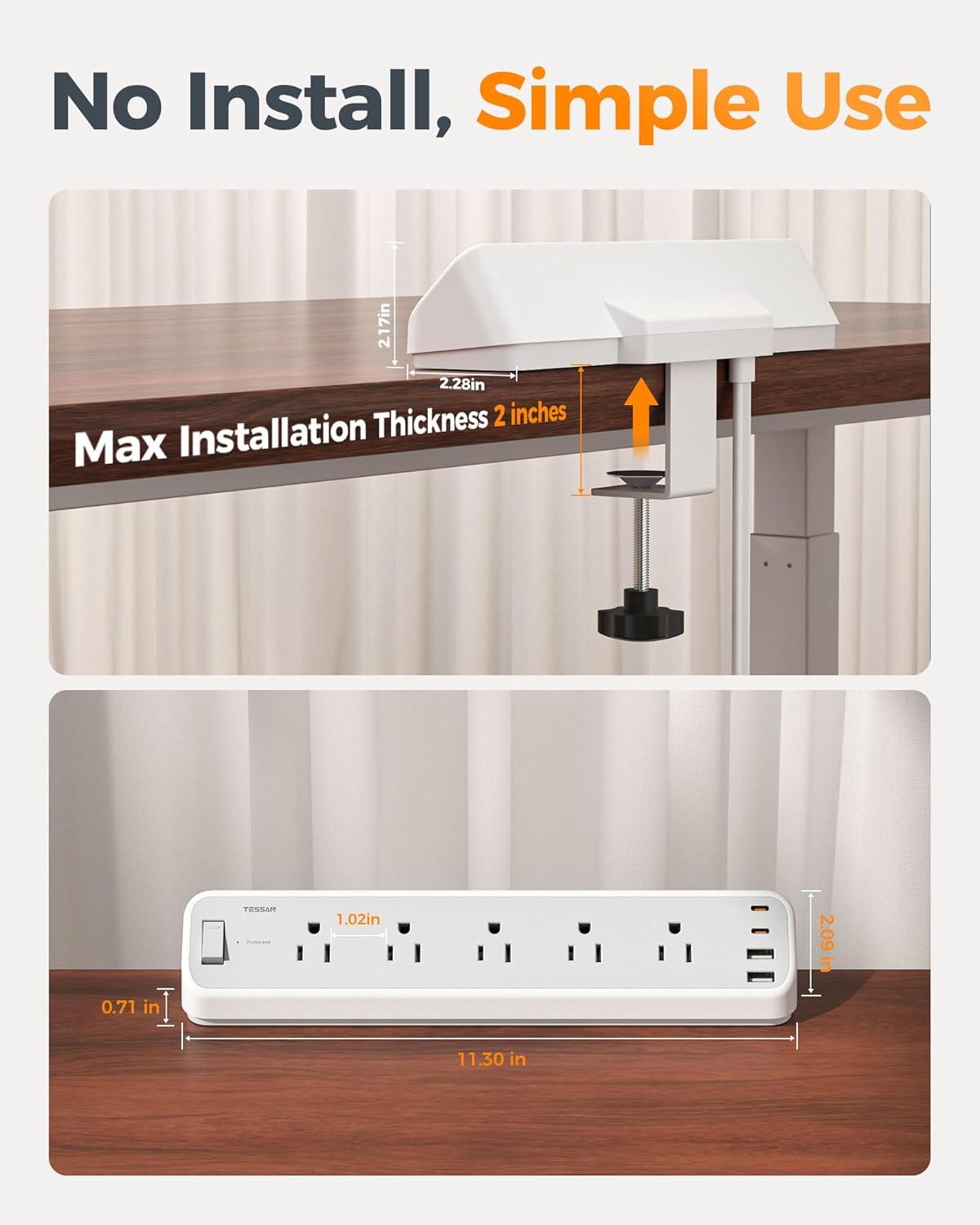
Image: A hand demonstrating the easy, tool-free adjustment of the desk clamp.
Video: Official TESSAN video demonstrating the installation and features of the Desk Clamp Power Strip.
5. പ്രവർത്തന നിർദ്ദേശങ്ങൾ
Using your TESSAN Desk Clamp Power Strip is straightforward:
- പവർ ഓൺ/ഓഫ്: Use the master On/Off switch located on the power strip to control power to all connected devices. The switch will illuminate when power is on.
- എസി ഔട്ട്ലെറ്റുകൾ: Plug your AC-powered devices (e.g., laptops, monitors, lamps) into any of the 5 standard AC outlets.
- USB-C പോർട്ടുകൾ: Connect your USB-C compatible devices (e.g., smartphones, tablets) to the USB-C ports for fast charging up to 20W.
- USB-A പോർട്ടുകൾ: Connect your USB-A compatible devices to the USB-A ports for charging up to 12W per port.

Image: Illustrates the fast charging capabilities of the USB-C and USB-A ports.
6. പരിപാലനം
To ensure the longevity and safe operation of your power strip:
- വൃത്തിയാക്കൽ: വൃത്തിയാക്കുന്നതിന് മുമ്പ് വാൾ ഔട്ട്ലെറ്റിൽ നിന്ന് പവർ സ്ട്രിപ്പ് വിച്ഛേദിക്കുക. ഉപരിതലം തുടയ്ക്കാൻ ഉണങ്ങിയതും മൃദുവായതുമായ തുണി ഉപയോഗിക്കുക. ലിക്വിഡ് ക്ലീനറുകളോ എയറോസോളുകളോ ഉപയോഗിക്കരുത്.
- സംഭരണം: When not in use for extended periods, store the power strip in a cool, dry place away from direct sunlight and moisture.
- പരിശോധന: Periodically inspect the power cord and the unit for any signs of damage, such as frayed wires or cracks. If damage is found, discontinue use and contact customer support.
7. പ്രശ്നപരിഹാരം
If you encounter issues with your power strip, refer to the following common problems and solutions:
| പ്രശ്നം | സാധ്യമായ കാരണം | പരിഹാരം |
|---|---|---|
| No power to outlets/USB ports | Power switch is off; Wall outlet has no power; Overload protection tripped | Ensure power switch is ON; Check wall outlet with another device; Reduce connected load and reset power strip (if applicable). |
| 'Protected' indicator light is off | Surge protection has expired or is damaged | The power strip may no longer provide surge protection. Replace the unit to ensure continued protection. |
| Devices not charging via USB | Incorrect cable; Device not compatible; USB port overloaded | Ensure correct USB cable is used; Check device compatibility; Try another USB port or reduce total USB load. |
8 സ്പെസിഫിക്കേഷനുകൾ
- ബ്രാൻഡ്: ടെസ്സാൻ
- മോഡൽ നമ്പർ: TS-PS06US00
- നിറം: ചാരനിറം
- മൊത്തം പവർ ഔട്ട്ലെറ്റുകൾ: 9 (5 AC, 4 USB)
- എസി ഔട്ട്ലെറ്റുകൾ: 5
- USB പോർട്ടുകൾ: 4 (2 യുഎസ്ബി-സി, 2 യുഎസ്ബി-എ)
- USB-C ഔട്ട്പുട്ട്: 20W പരമാവധി
- USB-A putട്ട്പുട്ട്: 12W Max per port
- പരമാവധി കറൻ്റ്: 10 Amps
- പവർ പ്ലഗ് തരം: ടൈപ്പ് ബി - 3 പിൻ (വടക്കേ അമേരിക്കൻ)
- സർജ് പ്രൊട്ടക്ഷൻ റേറ്റിംഗ്: 2100 ജൂൾസ്
- ചരട് നീളം: 10 അടി
- പരമാവധി Clamp കനം: 2 ഇഞ്ച്
- പ്രത്യേക സവിശേഷതകൾ: On And Off Switch, Surge Protection, USB Slot, Wide Spaced Outlet
9. വാറണ്ടിയും പിന്തുണയും
TESSAN products are designed and manufactured to the highest quality standards. This product is covered by a limited warranty from the date of purchase. For detailed warranty information, product support, or to report any issues, please visit the official TESSAN webസൈറ്റ് ചെയ്യുക അല്ലെങ്കിൽ അവരുടെ ഉപഭോക്തൃ സേവന ടീമിനെ നേരിട്ട് ബന്ധപ്പെടുക.
ബന്ധപ്പെടാനുള്ള വിവരങ്ങൾ:
- Webസൈറ്റ്: www.tessan.com (ദയവായി റഫർ ചെയ്യുക web(ഏറ്റവും പുതിയ കോൺടാക്റ്റ് വിശദാംശങ്ങൾക്കും പിന്തുണാ ഉറവിടങ്ങൾക്കുമായി സൈറ്റ് സന്ദർശിക്കുക.)