
1. ആമുഖം
The ATTACK SHARK X11SE is a high-performance wireless gaming mouse designed for precision and comfort. It features a lightweight design, advanced sensor technology, and versatile connectivity options to enhance your gaming and productivity experience.

ചിത്രം: കഴിഞ്ഞുview of the ATTACK SHARK X11SE's key features including PAW3311 sensor, 63g lightweight design, 22000 DPI, HUANO switches, tri-mode switch, BK52820 chip, TTC encoders, and 65 hours of battery life.
പ്രധാന സവിശേഷതകൾ:
- PAW3311 Gaming Sensor: Equipped with the flagship PixArt PAW3311 sensor, offering up to 22,000 DPI with 6 adjustable levels, 400 IPS tracking speed, 35G acceleration, and a 1000Hz/1ms polling rate.
- Ultralight 63g Design: Weighing only 63 ± 3g, this mouse features a minimalist, full-casing design optimized for reduced weight without compromising build quality.
- ട്രൈ-മോഡ് കണക്റ്റിവിറ്റി: Supports 2.4 GHz wireless, USB-C wired, and Bluetooth connections for versatile use across various devices.
- Durable Switches & Encoder: Features HUANO switches with a lifespan of 20 million clicks and an optimized TTC encoder for precise scroll wheel feedback.
- എർഗണോമിക് ഡിസൈൻ: Dimensions (128 x 64 x 40 mm) suitable for medium to large hands, accommodating palm, claw, and fingertip grip styles for extended comfort.
- Dual Driver Support: എന്നിവയുമായി പൊരുത്തപ്പെടുന്നു Web Driver and proprietary ATTACK SHARK driver for advanced customization of buttons, DPI, polling rate, and macros.
2. സജ്ജീകരണം
പാക്കേജ് ഉള്ളടക്കം:
- ATTACK SHARK X11SE Wireless Gaming Mouse
- യുഎസ്ബി-സി കേബിൾ
- യുഎസ്ബി റിസീവർ (2.4GHz)
- ഗ്രിപ്പ് ടേപ്പ്
- ഉപയോക്തൃ മാനുവൽ
മൗസ് ചാർജ് ചെയ്യുന്നു:
Connect the mouse to your computer using the provided USB-C cable. The mouse has a 300mAh battery, providing up to 65 hours of uninterrupted use on a full charge (2-3 hours charging time).

Image: The ATTACK SHARK X11SE mouse illustrating its efficient battery management, offering up to 65 hours of use from a 300mAh battery, fully charged in 2-3 hours.
കണക്റ്റിവിറ്റി മോഡുകൾ:
The X11SE mouse supports three connection modes: 2.4GHz Wireless, Bluetooth, and USB-C Wired.

Image: The ATTACK SHARK X11SE mouse highlighting its lightning-fast 2.4G wireless connection, wired mode via USB-C, and Bluetooth 5.2 capabilities.
- 2.4GHz വയർലെസ് മോഡ്:
- സാധാരണയായി മൗസിന്റെ അടിഭാഗത്തുള്ള ഒരു കമ്പാർട്ടുമെന്റിൽ സൂക്ഷിച്ചിരിക്കുന്ന യുഎസ്ബി റിസീവർ കണ്ടെത്തുക.
- നിങ്ങളുടെ കമ്പ്യൂട്ടറിൽ ലഭ്യമായ USB പോർട്ടിലേക്ക് USB റിസീവർ പ്ലഗ് ചെയ്യുക.
- താഴെയുള്ള സ്വിച്ച് ഉപയോഗിച്ച് മൗസ് ഓണാക്കുക. 2.4G മോഡ് തിരഞ്ഞെടുക്കുക.
- മൗസ് യാന്ത്രികമായി കണക്ട് ചെയ്യണം.
- ബ്ലൂടൂത്ത് മോഡ്:
- മൗസ് ഓണാക്കി താഴെയുള്ള സ്വിച്ച് ഉപയോഗിച്ച് ബ്ലൂടൂത്ത് മോഡ് തിരഞ്ഞെടുക്കുക.
- Press and hold the Bluetooth toggle button (often located near the mode switch) for 3 seconds to enter pairing mode. The indicator light will flash.
- നിങ്ങളുടെ കമ്പ്യൂട്ടറിലോ ഉപകരണത്തിലോ, Bluetooth ക്രമീകരണങ്ങളിലേക്ക് പോയി പുതിയ ഉപകരണങ്ങൾക്കായി തിരയുക.
- Select "ATTACK SHARK X11SE" from the list to pair.
- USB-C വയേർഡ് മോഡ്:
- Connect the USB-C cable to the front port of the mouse and the other end to a USB port on your computer.
- മൗസ് യാന്ത്രികമായി വയേർഡ് മോഡിലേക്ക് മാറുകയും ചാർജ് ചെയ്യാൻ തുടങ്ങുകയും ചെയ്യും.
3. ഓപ്പറേഷൻ
ബട്ടൺ പ്രവർത്തനങ്ങൾ:
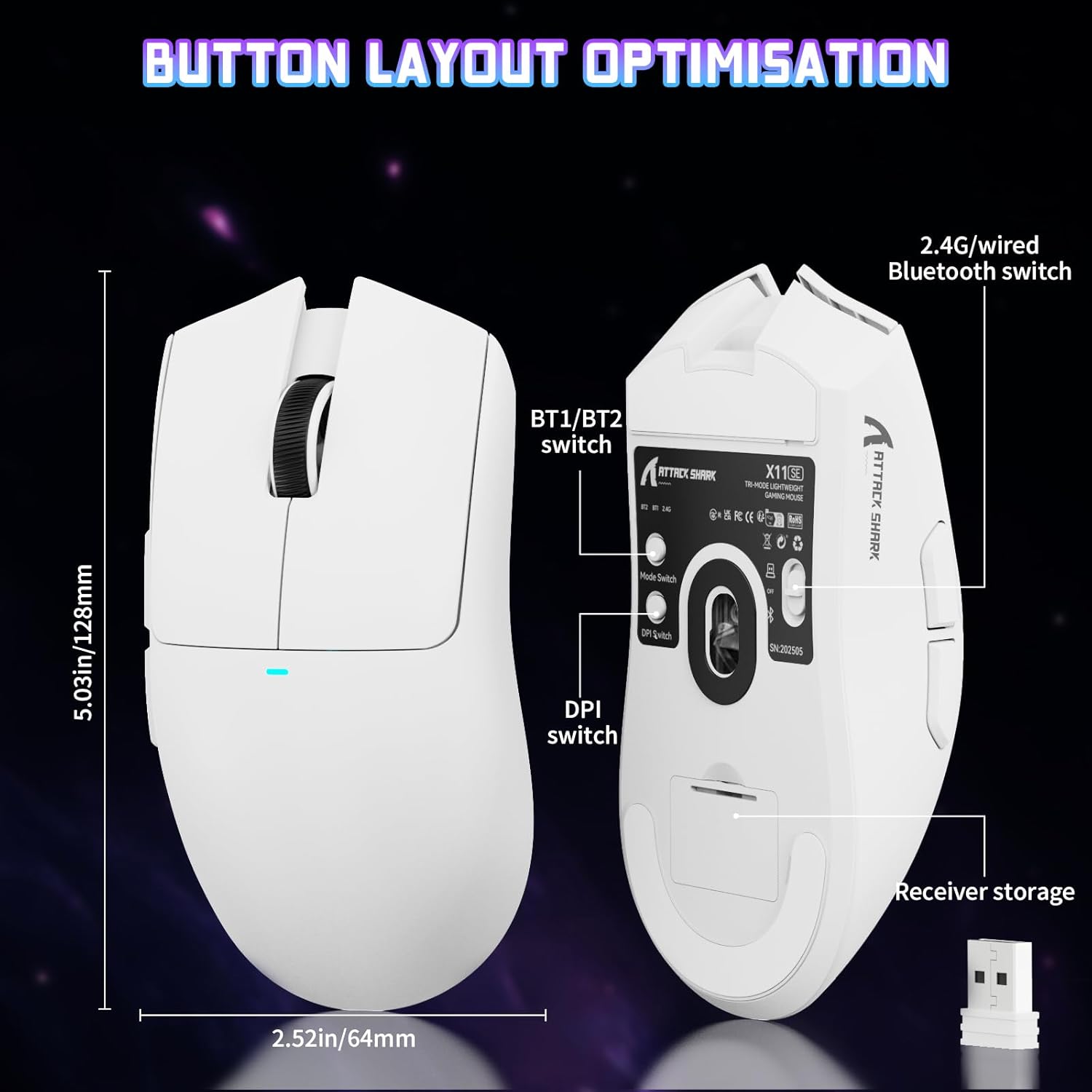
Image: The ATTACK SHARK X11SE mouse displaying its button layout, including the BT1/BT2 switch, DPI switch, and receiver storage, along with its dimensions (128mm length, 64mm width).
- ഇടത് ക്ലിക്ക്: പ്രാഥമിക പ്രവർത്തന ബട്ടൺ.
- വലത് ക്ലിക്കിൽ: സാധാരണയായി സന്ദർഭ മെനുകൾക്കുള്ള സെക്കൻഡറി പ്രവർത്തന ബട്ടൺ.
- സ്ക്രോൾ വീൽ: Scrolls up/down. Can also be pressed for a middle-click function.
- സൈഡ് ബട്ടണുകൾ (മുന്നോട്ട്/പിന്നോട്ട്): Used for navigation in web browsers or in-game actions.
- DPI സ്വിച്ച്: Located on the underside of the mouse, this button cycles through preset DPI levels.
- മോഡ് സ്വിച്ച്: Located on the underside, this switch allows you to select between 2.4G wireless, Bluetooth, and Off modes.
DPI ക്രമീകരണം:
The X11SE features a PixArt PAW3311 sensor with up to 22,000 DPI. You can adjust the DPI sensitivity using the dedicated DPI switch on the bottom of the mouse. For more precise control and custom DPI levels, use the official software.
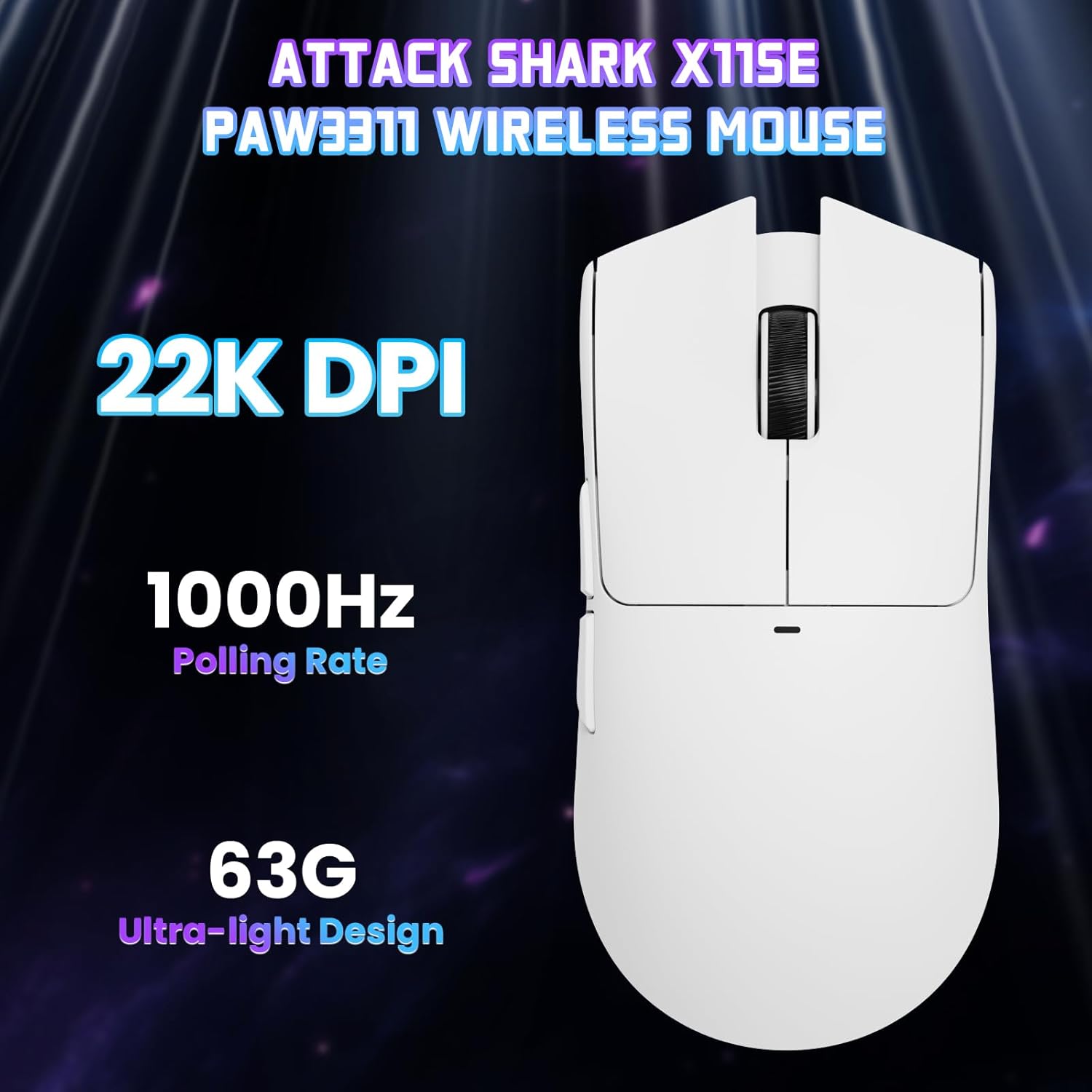
ചിത്രം: മുകളിൽ നിന്ന് താഴേക്ക് view of the ATTACK SHARK X11SE mouse, emphasizing its 22,000 DPI capability and 1000Hz polling rate for high-performance gaming.
4. ഇഷ്ടാനുസൃതമാക്കൽ
The ATTACK SHARK X11SE mouse offers extensive customization options through its dedicated software. This allows you to personalize button assignments, DPI settings, polling rate, and create macros.
ഡ്രൈവർ ഇൻസ്റ്റാളേഷൻ:
The mouse supports two drivers:
- Web ഡ്രൈവർ: വഴി പ്രവേശനം http://szslxd-tech.com/#/
- ATTACK SHARK Proprietary Driver: ഡൗൺലോഡ് ചെയ്യുക https://attackshark.com/pages/dirver-download
Download and install the preferred driver software on your Windows, macOS, or Linux system.
സോഫ്റ്റ്വെയർ സവിശേഷതകൾ:

Image: The ATTACK SHARK X11SE software interface, demonstrating options for mouse settings, DPI adjustments, parameter settings, macro editing, and personal profiles.
- ബട്ടൺ പ്രോഗ്രാമിംഗ്: Reassign functions to any of the 5 buttons.
- DPI ക്രമീകരണങ്ങൾ: Create custom DPI profiles and adjust sensitivity levels.
- പോളിംഗ് നിരക്ക്: ഒപ്റ്റിമൽ പ്രതികരണശേഷിക്കായി പോളിംഗ് നിരക്ക് ക്രമീകരിക്കുക.
- മാക്രോ എഡിറ്റർ: Record and assign complex sequences of commands to a single button.
- പ്രൊഫfile മാനേജ്മെൻ്റ്: വ്യത്യസ്ത പ്രൊഫഷണലുകൾ സംരക്ഷിച്ച് അവയ്ക്കിടയിൽ മാറുകfiles for various games or applications.
5. പരിപാലനം
വൃത്തിയാക്കൽ:
- മൗസിന്റെ ഉപരിതലം തുടയ്ക്കാൻ മൃദുവായതും ഉണങ്ങിയതുമായ ഒരു തുണി ഉപയോഗിക്കുക.
- കഠിനമായ അഴുക്കിന്, ചെറുതായി dampതുണിയിൽ വെള്ളം അല്ലെങ്കിൽ നേരിയ ക്ലീനിംഗ് ലായനി ഉപയോഗിക്കുക. കഠിനമായ രാസവസ്തുക്കൾ ഒഴിവാക്കുക.
- കൃത്യമായ ട്രാക്കിംഗ് ഉറപ്പാക്കാൻ മൗസിന്റെ അടിയിലുള്ള ഒപ്റ്റിക്കൽ സെൻസർ ഏരിയ ഒരു കോട്ടൺ സ്വാബ് ഉപയോഗിച്ച് വൃത്തിയാക്കുക.
ബാറ്ററി കെയർ:
- ബാറ്ററിയുടെ ആയുസ്സ് വർദ്ധിപ്പിക്കുന്നതിന് ഇടയ്ക്കിടെ പൂർണ്ണമായും ഡിസ്ചാർജ് ചെയ്യുന്നത് ഒഴിവാക്കുക.
- ദീർഘനേരം ഉപയോഗിക്കാത്തപ്പോൾ തണുത്തതും വരണ്ടതുമായ സ്ഥലത്ത് മൗസ് സൂക്ഷിക്കുക.
6. പ്രശ്നപരിഹാരം
പൊതുവായ പ്രശ്നങ്ങളും പരിഹാരങ്ങളും:
- മൗസ് പ്രതികരിക്കുന്നില്ല:
- മൗസ് ചാർജ് ചെയ്തിട്ടുണ്ടെന്ന് ഉറപ്പാക്കുക.
- Check the mode switch on the bottom of the mouse to ensure it's in the correct mode (2.4G, BT, or Wired).
- For 2.4GHz mode, ensure the USB receiver is securely plugged in. Try a different USB port.
- For Bluetooth mode, ensure Bluetooth is enabled on your device and the mouse is paired correctly. Try re-pairing.
- For wired mode, ensure the USB-C cable is properly connected.
- DPI മാറുന്നില്ല:
- Press the DPI switch on the bottom of the mouse.
- If using custom DPI settings, ensure the driver software is running and the correct profile സജീവമാണ്.
- കാലതാമസം അല്ലെങ്കിൽ ഇടവിട്ടുള്ള കണക്ഷൻ:
- Ensure the mouse is close to the USB receiver (for 2.4GHz) or your device (for Bluetooth).
- മറ്റ് വയർലെസ് ഉപകരണങ്ങളിൽ നിന്നുള്ള ഇടപെടൽ ഒഴിവാക്കുക.
- മൗസ് ബാറ്ററി ആവശ്യത്തിന് ചാർജ്ജ് ചെയ്തിട്ടുണ്ടെന്ന് ഉറപ്പാക്കുക.
- Update mouse drivers if available.
7 സ്പെസിഫിക്കേഷനുകൾ
| ഫീച്ചർ | സ്പെസിഫിക്കേഷൻ |
|---|---|
| ബ്രാൻഡ് | അറ്റാക്ക് സ്രാവ് |
| മോഡലിൻ്റെ പേര് | എക്സ്11എസ്ഇ |
| നിറം | വെള്ള |
| കണക്റ്റിവിറ്റി ടെക്നോളജി | 2.4 GHz Wireless/USB-C Wired/Bluetooth |
| പ്രത്യേക സവിശേഷതകൾ | 63g ultralight, BK52820 Chip, TTC Encoder, Dual Driver |
| മോഷൻ ഡിറ്റക്ഷൻ ടെക്നോളജി | ഒപ്റ്റിക്കൽ (പിക്സ്ആർട്ട് PAW3311) |
| ബട്ടണുകളുടെ എണ്ണം | 5 |
| കൈ ഓറിയൻ്റേഷൻ | ഉഭയകക്ഷി |
| ശുപാർശ ചെയ്യുന്ന ഉൽപ്പന്ന ഉപയോഗം | കമ്പ്യൂട്ടർ ഗെയിമിംഗ് |
| അനുയോജ്യമായ ഉപകരണങ്ങൾ | Desktop Computer, MAC |
| ഓപ്പറേറ്റിംഗ് സിസ്റ്റം | വിൻഡോസ്, മാകോസ്, ലിനക്സ് |
| ബാറ്ററികളുടെ എണ്ണം | 1 ലിഥിയം പോളിമർ (ഉൾപ്പെട്ടിരിക്കുന്നു) |
| പവർ ഉറവിടം | ബാറ്ററി പവർ |
| Maximum Mouse Sensitivity | 22000 ഡിപിഐ |
| പരിധി | 300 സെൻ്റീമീറ്റർ |
| ശൈലി | എർഗണോമിക് |
| മെറ്റീരിയൽ | പ്ലാസ്റ്റിക് |
| മാതൃരാജ്യം | ചൈന |
| ഉൾപ്പെടുത്തിയ ഘടകങ്ങൾ | USB-C Cable, Manual, Grip Tape |
| യു.പി.സി | 752010613663 |
8. വാറൻ്റിയും പിന്തുണയും
വാറൻ്റി വിവരങ്ങൾ:
The ATTACK SHARK X11SE Wireless Gaming Mouse comes with a six-month warranty from the date of purchase. Please retain your proof of purchase for warranty claims.
ഡ്രൈവർ ഡൗൺലോഡുകൾ:
For the latest drivers and software updates, please visit:
- Web ഡ്രൈവർ: http://szslxd-tech.com/#/
- ATTACK SHARK Driver: https://attackshark.com/pages/dirver-download
Related Product Video:
വീഡിയോ: ഒരു ഔദ്യോഗിക വിൽപ്പനക്കാരന്റെ വീഡിയോ ഷോasing the ATTACK SHARK X11 Mouse, demonstrating its features and functionality. While specifically for the X11, it provides relevant insights into the X11SE's design and operation.