
ആമുഖം
The Logitech MX Vertical Wireless Mouse is an advanced ergonomic mouse designed to enhance comfort and performance. Its unique 57-degree vertical angle promotes a natural handshake position, aiming to reduce wrist pressure and forearm strain often associated with prolonged computer use. This manual provides essential information for setting up, operating, maintaining, and troubleshooting your MX Vertical mouse.

Image: A hand comfortably gripping the Logitech MX Vertical mouse, demonstrating the ergonomic design that reduces muscle strain.

Image: This image highlights the rigorous testing and ergonomist approval behind the MX Vertical's design, ensuring optimal comfort and reduced strain.
ബോക്സിൽ എന്താണുള്ളത്
ആരംഭിക്കുന്നതിന് മുമ്പ്, എല്ലാ ഘടകങ്ങളും ഉണ്ടെന്ന് ഉറപ്പാക്കുക:
- ലോജിടെക് MX വെർട്ടിക്കൽ അഡ്വാൻസ്ഡ് എർഗണോമിക് മൗസ്
- USB-C ചാർജിംഗ് കേബിൾ
- Logitech Unifying Receiver (USB-A)
- ക്വിക്ക് സ്റ്റാർട്ട് ഗൈഡ് (ഫിസിക്കൽ അല്ലെങ്കിൽ ഡിജിറ്റൽ)
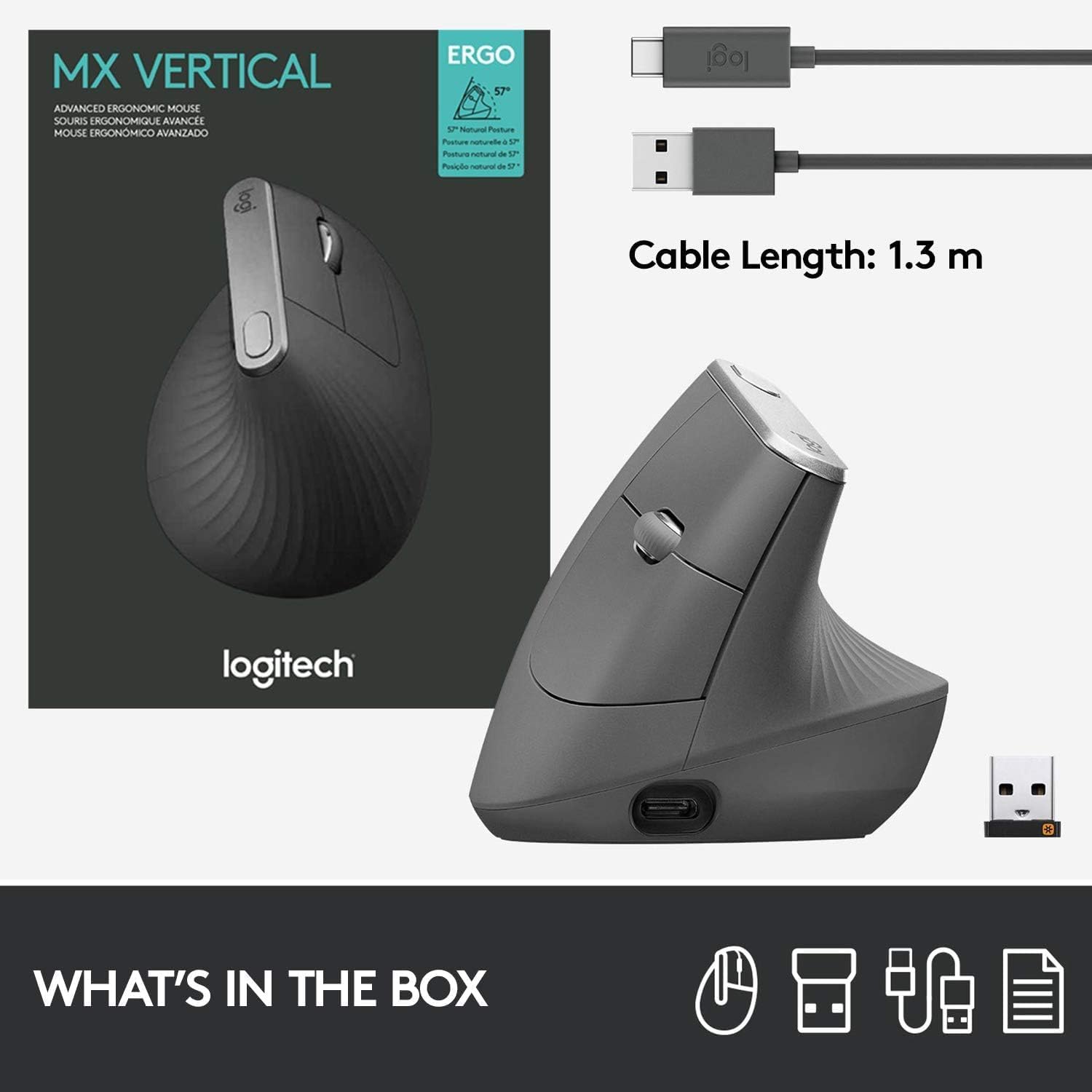
Image: A visual representation of the items included in the MX Vertical packaging: the mouse, a USB-C charging cable, and the Logitech Unifying receiver.
സജ്ജമാക്കുക
1. മൗസ് ചാർജ് ചെയ്യുന്നു
Before first use, it is recommended to fully charge your MX Vertical mouse. Connect the included USB-C cable to the charging port on the front of the mouse and the other end to a USB power source (e.g., computer USB port, USB wall adapter). A full charge can last up to four months, and a one-minute quick charge provides three hours of use.
2. നിങ്ങളുടെ ഉപകരണത്തിലേക്ക് കണക്റ്റുചെയ്യുന്നു
The MX Vertical offers three connection options:
- ലോജിടെക് യൂണിഫൈയിംഗ് റിസീവർ: Insert the USB-A Unifying receiver into an available USB port on your computer. The mouse should connect automatically.
- ബ്ലൂടൂത്ത്: Turn on Bluetooth on your computer or device. Press the Easy-Switch button on the bottom of the mouse to select an available channel (1, 2, or 3). Press and hold the Easy-Switch button for three seconds until the LED indicator blinks rapidly. Select 'MX Vertical' from your device's Bluetooth settings to pair.
- USB-C കേബിൾ: You can also use the mouse while it is connected via the USB-C charging cable.

Image: The MX Vertical mouse alongside its USB-A Unifying receiver, illustrating one of the primary connection methods.
3. ലോജിടെക് ഓപ്ഷൻസ് സോഫ്റ്റ്വെയർ ഇൻസ്റ്റാൾ ചെയ്യുന്നു (ശുപാർശ ചെയ്യുന്നത്)
For full customization of buttons, cursor speed, and Flow features, download and install the Logitech Options software from the official Logitech website. This software allows you to personalize your mouse experience across multiple devices and operating systems.
പ്രവർത്തന നിർദ്ദേശങ്ങൾ
Mouse Features Overview

Image: A detailed diagram labeling the key components of the MX Vertical mouse for easy identification and understanding of its functions.
- പ്രീമിയം സ്ക്രോൾ വീൽ: For smooth and precise scrolling.
- ദ്വീപ് കീകൾ: വിവിധ പ്രവർത്തനങ്ങൾക്കായി പ്രോഗ്രാം ചെയ്യാവുന്ന ബട്ടണുകൾ.
- USB-C ഫാസ്റ്റ് റീചാർജിംഗ് പോർട്ട്: For charging the mouse.
- കഴ്സർ സ്പീഡ് സ്വിച്ച്: Instantly adjust DPI speed and accuracy.
- ഇഷ്ടാനുസൃതമാക്കാവുന്ന കുറുക്കുവഴികൾ: Buttons that can be programmed via Logitech Options.
- സ്വാഭാവിക പിടി: The ergonomic shape designed for comfort.
- ടെക്സ്ചർ ചെയ്ത തമ്പ് ഏരിയ: Provides a comfortable resting place for the thumb.
- ഹൈ പ്രിസിഷൻ സെൻസർ: 4000 DPI sensor for accurate tracking.
Cursor Speed Adjustment
The MX Vertical features a 4000 DPI high-precision sensor. Use the cursor speed switch button (labeled 4 in the diagram) to toggle between different DPI settings, allowing you to adjust cursor speed and accuracy to your preference. This can reduce hand movement by up to 4 times compared to a standard 1000 DPI mouse.

Image: This image demonstrates how the high-precision sensor of the MX Vertical mouse minimizes hand movement, contributing to reduced muscle fatigue.
ഉപകരണങ്ങൾക്കിടയിൽ എളുപ്പത്തിൽ മാറുക
The MX Vertical mouse can be paired with up to three different devices. Use the Easy-Switch button on the bottom of the mouse to seamlessly switch between connected computers or devices. The corresponding LED indicator (1, 2, or 3) will light up to show which device is currently active.

Image: The bottom of the MX Vertical mouse, highlighting the Easy-Switch feature that allows users to quickly switch between up to three paired devices.
മെയിൻ്റനൻസ്
വൃത്തിയാക്കൽ
To clean your MX Vertical mouse, use a soft, damp, lint-free cloth. Avoid using abrasive cleaners, solvents, or aerosol sprays directly on the mouse. Ensure no moisture enters any openings.
ബാറ്ററി കെയർ
The mouse is powered by a rechargeable Lithium Polymer battery. For optimal battery life, avoid exposing the mouse to extreme temperatures. Recharge the mouse when the battery indicator light turns red or when prompted by the Logitech Options software.
ട്രബിൾഷൂട്ടിംഗ്
കണക്റ്റിവിറ്റി പ്രശ്നങ്ങൾ
- No connection via Unifying Receiver: Ensure the receiver is fully inserted into a working USB port. Try a different USB port or computer.
- No connection via Bluetooth: Ensure Bluetooth is enabled on your device. Re-pair the mouse by holding the Easy-Switch button until the LED blinks rapidly, then select 'MX Vertical' in your device's Bluetooth settings.
- ഇടപെടൽ: Move the mouse closer to the receiver or Bluetooth device. Avoid using the mouse near other wireless devices that may cause interference.
Cursor Erratic or Unresponsive
- സെൻസർ വൃത്തിയാക്കുക: മൗസിന്റെ അടിയിലുള്ള ഒപ്റ്റിക്കൽ സെൻസർ വൃത്തിയുള്ളതും അവശിഷ്ടങ്ങളില്ലാത്തതുമാണെന്ന് ഉറപ്പാക്കുക.
- ഉപരിതലം: Use the mouse on a suitable surface. Highly reflective or uneven surfaces may affect tracking.
- ബാറ്ററി നില: Check the battery level. A low battery can affect performance. Recharge the mouse if necessary.
Mouse Not Charging
- Check cable and port: Ensure the USB-C cable is securely connected to both the mouse and the power source. Try a different USB-C cable or USB port.
- പവർ ഉറവിടം: Ensure the USB power source is active and providing power.
സ്പെസിഫിക്കേഷനുകൾ
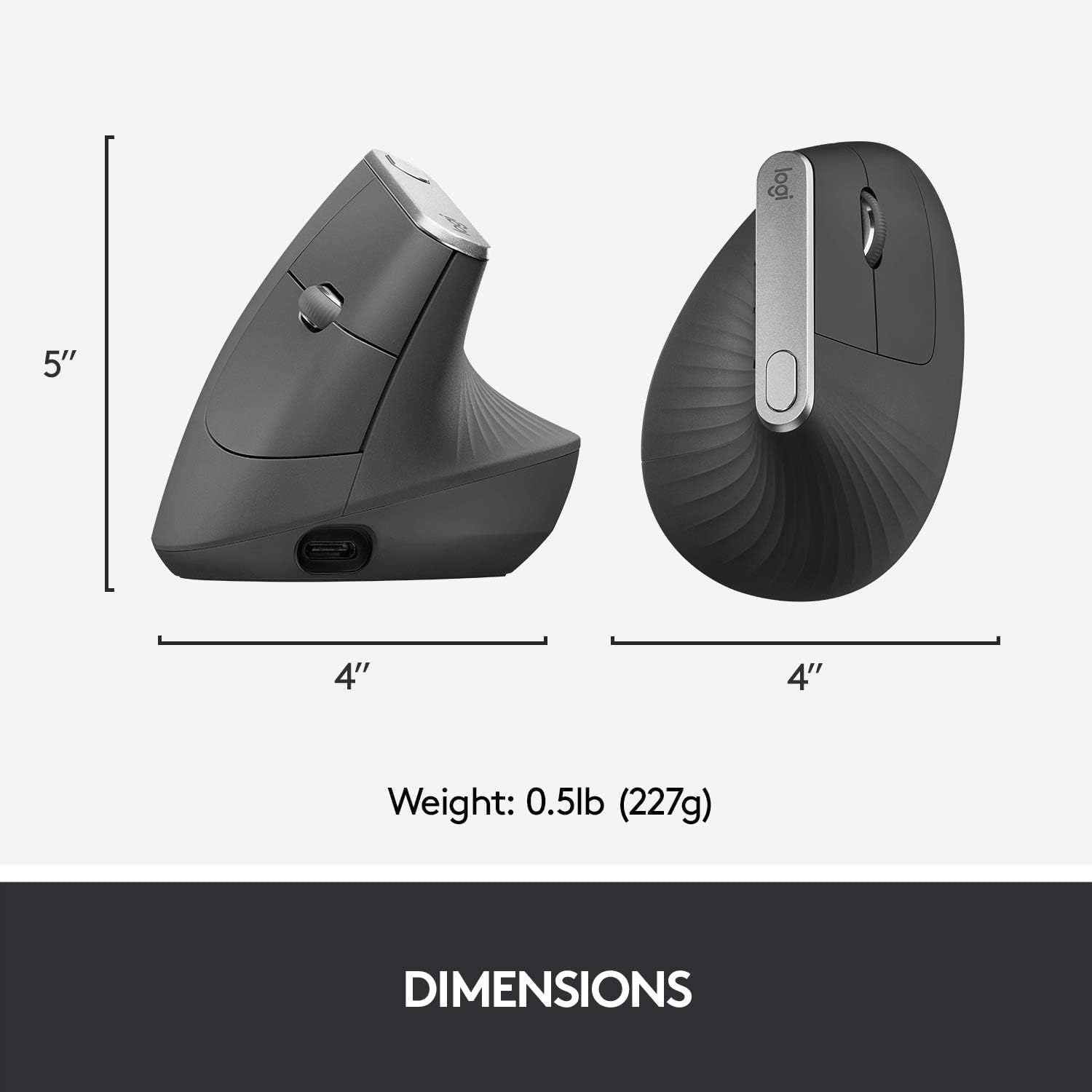
Image: A visual representation of the physical dimensions and weight of the MX Vertical mouse.
| ഫീച്ചർ | വിശദാംശങ്ങൾ |
|---|---|
| മോഡലിൻ്റെ പേര് | MX വെർട്ടിക്കൽ അഡ്വാൻസ്ഡ് എർഗണോമിക് മൗസ് |
| മോഡൽ നമ്പർ | 910-005447 |
| ബ്രാൻഡ് | ലോജിടെക് |
| കണക്റ്റിവിറ്റി ടെക്നോളജി | USB (Unifying Receiver), Bluetooth Low Energy |
| മൂവ്മെന്റ് ഡിറ്റക്ഷൻ ടെക്നോളജി | ഒപ്റ്റിക്കൽ |
| Mouse Maximum Sensitivity | 4000 ഡിപിഐ |
| ബട്ടണുകൾ | 4 (പ്രോഗ്രാം ചെയ്യാവുന്നത്) |
| കൈ ഓറിയൻ്റേഷൻ | ശരിയാണ് |
| അനുയോജ്യമായ ഉപകരണങ്ങൾ | Personal Computer (Laptop, PC) |
| ഓപ്പറേറ്റിംഗ് സിസ്റ്റം അനുയോജ്യത | Windows 10, 11 or later, macOS 10.15 or later, iPadOS 13.4 or later, Chrome OS, Linux, Android |
| ബാറ്ററി തരം | 1 ലിഥിയം പോളിമർ ബാറ്ററി (ഉൾപ്പെടുത്തിയിരിക്കുന്നു) |
| ബാറ്ററി ശരാശരി ആയുസ്സ് | Up to 4 months on a full charge |
| വയർലെസ് ശ്രേണി | 10 മീറ്റർ (33 അടി) |
| ഇനത്തിൻ്റെ ഭാരം | 0.29 പൗണ്ട് (ഏകദേശം 132 ഗ്രാം) |
| ഇനത്തിൻ്റെ അളവുകൾ (L x W) | 4.72"L x 0.91"W (approx. 120mm L x 23mm W) |
വാറൻ്റിയും പിന്തുണയും
വാറൻ്റി വിവരങ്ങൾ
The Logitech MX Vertical Wireless Mouse comes with a manufacturer's warranty. For specific details regarding the warranty period and coverage, please refer to the warranty documentation included with your product or contact Logitech customer service. Warranty claims can be requested from customer service.
ഉപഭോക്തൃ പിന്തുണ
കൂടുതൽ സഹായത്തിനോ സാങ്കേതിക പിന്തുണയ്ക്കോ ഏറ്റവും പുതിയ സോഫ്റ്റ്വെയറും ഡ്രൈവറുകളും ഡൗൺലോഡ് ചെയ്യുന്നതിനോ, ദയവായി ഔദ്യോഗിക ലോജിടെക് പിന്തുണ സന്ദർശിക്കുക. webസൈറ്റ്. നിങ്ങൾക്ക് പതിവുചോദ്യങ്ങൾ, ട്രബിൾഷൂട്ടിംഗ് ഗൈഡുകൾ, ഉപഭോക്തൃ സേവനത്തിനായുള്ള ബന്ധപ്പെടാനുള്ള വിവരങ്ങൾ എന്നിവ അവിടെ കണ്ടെത്താനാകും.