
1. ആമുഖം
This manual provides essential information for setting up, operating, and maintaining your KXD A07 Unlocked Android Phone. Please read this guide thoroughly to ensure proper use and to maximize the device's features.
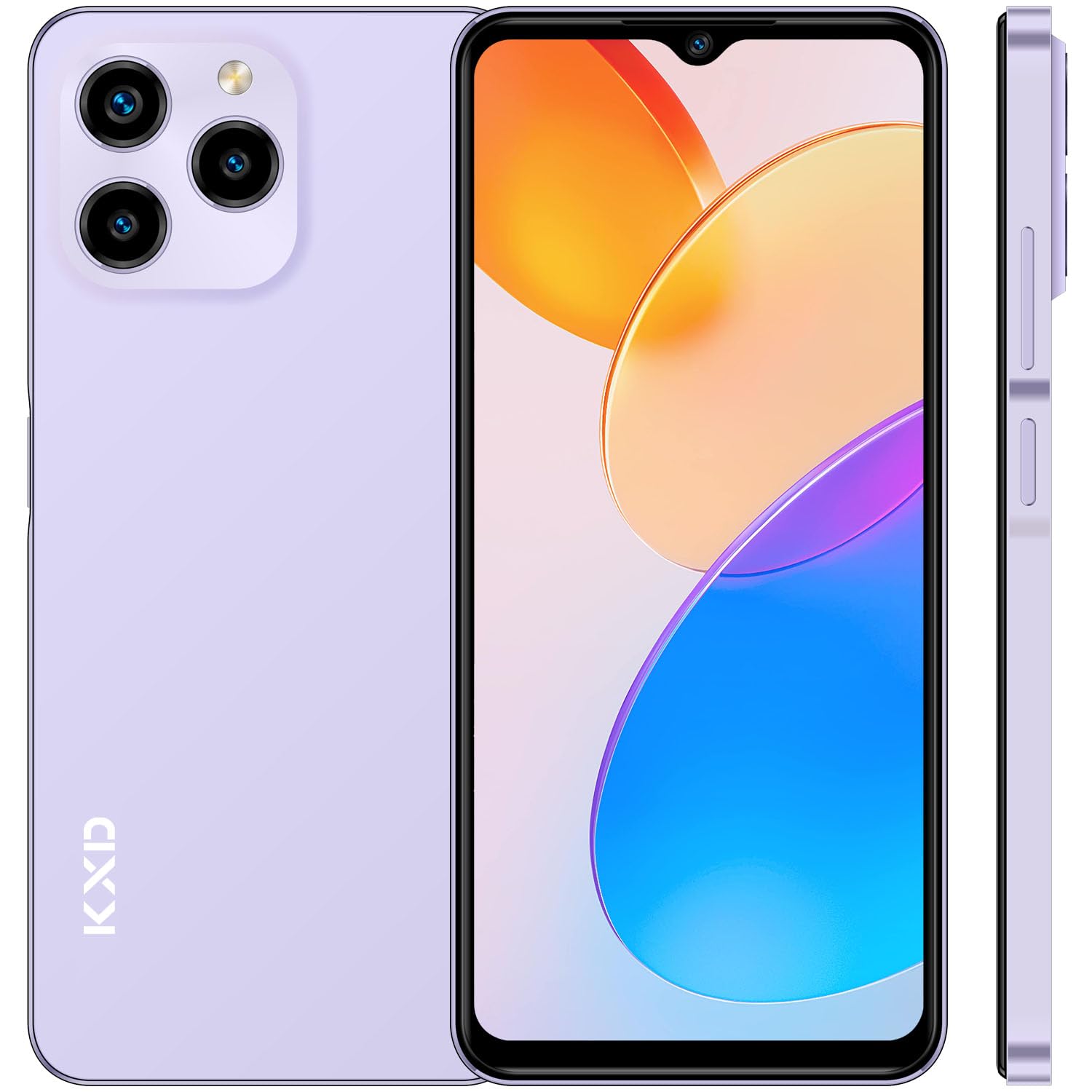
ചിത്രം: മുൻഭാഗം view of the KXD A07 Unlocked Android Phone.
2. ബോക്സിൽ എന്താണുള്ളത്?
Upon opening your KXD A07 package, you should find the following items:
- KXD A07 Smartphone
- പവർ അഡാപ്റ്റർ
- USB കേബിൾ
- ഫോൺ കേസ്
- സ്ക്രീൻ പ്രൊട്ടക്ടർ (മുമ്പ് പ്രയോഗിച്ചതോ വേറിട്ടതോ)
- സിം ട്രേ എജക്ടർ

Image: Contents included in the KXD A07 product box.
3. ഉപകരണ ലേഔട്ടും ഘടകങ്ങളും
Familiarize yourself with the physical layout of your KXD A07 phone:
- മുൻഭാഗം: 6.52-inch HD+ Waterdrop Screen, Front Camera (8MP).
- പിൻഭാഗം: Triple Camera System (13MP main, 5MP, 2MP), Flash.
- വശങ്ങൾ: Volume Up/Down buttons, Power On/Off button with integrated Fingerprint Sensor, SIM/TF card slot, USB Type-C port, 3.5mm Headphone Jack, Speakers, Microphone.

Image: Detailed diagram illustrating the KXD A07's dimensions, camera placement, and port locations.

Image: Close-up of the KXD A07's top, bottom, and side views, highlighting the front camera, audio jack, charging port, speakers, and rear camera details.
4. സിം കാർഡും സംഭരണ ഇൻസ്റ്റാളേഷനും
The KXD A07 supports dual Nano-SIM cards and a Micro SD card for expandable storage (up to 256GB).
- ഫോണിന്റെ വശത്ത് സിം ട്രേ കണ്ടെത്തുക.
- Insert the SIM tray ejector tool into the small hole next to the tray and gently push until the tray pops out.
- Place your Nano-SIM card(s) and/or Micro SD card into the designated slots on the tray. Ensure they are correctly oriented.
- ഉപകരണത്തിന്റെ വശവുമായി ഫ്ലഷ് ആകുന്നതുവരെ ട്രേ ഫോണിലേക്ക് ശ്രദ്ധാപൂർവ്വം വീണ്ടും തിരുകുക.

Image: Illustration of how to insert Nano SIM cards and a TF (Micro SD) card into the phone's triple slot.
5. പ്രാരംഭ സജ്ജീകരണം
- പവർ ഓൺ: Press and hold the Power button until the KXD logo appears.
- ഭാഷയും പ്രദേശവും: നിങ്ങളുടെ ഇഷ്ടപ്പെട്ട ഭാഷയും പ്രദേശവും തിരഞ്ഞെടുക്കാൻ ഓൺ-സ്ക്രീൻ നിർദ്ദേശങ്ങൾ പാലിക്കുക.
- Wi-Fi കണക്ഷൻ: സജ്ജീകരണവുമായി മുന്നോട്ട് പോകാനും ആവശ്യമായ അപ്ഡേറ്റുകൾ ഡൗൺലോഡ് ചെയ്യാനും ഒരു Wi-Fi നെറ്റ്വർക്കിലേക്ക് കണക്റ്റുചെയ്യുക.
- Google അക്കൗണ്ട്: നിങ്ങളുടെ ഗൂഗിൾ അക്കൗണ്ട് ഉപയോഗിച്ച് സൈൻ ഇൻ ചെയ്യുകയോ പുതിയൊരെണ്ണം സൃഷ്ടിക്കുകയോ ചെയ്യുക. ഗൂഗിൾ പ്ലേ സ്റ്റോറും മറ്റ് ഗൂഗിൾ സേവനങ്ങളും ആക്സസ് ചെയ്യുന്നതിന് ഇത് അത്യാവശ്യമാണ്.
- സുരക്ഷാ സജ്ജീകരണം: Configure your preferred screen lock method (PIN, pattern, password) and set up Fingerprint and Face ID for enhanced security.
- ഡാറ്റ കൈമാറ്റം: If you have a previous Android device, you may transfer your data during this step.
6. ഓപ്പറേറ്റിംഗ് സിസ്റ്റം (ആൻഡ്രോയിഡ് 12)
The KXD A07 runs on Android 12, offering a user-friendly interface and various features:
- ഇഷ്ടാനുസൃതമാക്കാവുന്ന ഇൻ്റർഫേസ്: Personalize your home screen with widgets, wallpapers, and themes.
- സ്വകാര്യതാ ഡാഷ്ബോർഡ്: Manage app permissions and see which apps have accessed your location, camera, or microphone.
- Enhanced Notifications: Grouped notifications and quick reply options.
- ഡിജിറ്റൽ ക്ഷേമം: നിങ്ങളുടെ സ്ക്രീൻ സമയവും ആപ്പ് ഉപയോഗവും നിരീക്ഷിക്കുകയും കൈകാര്യം ചെയ്യുകയും ചെയ്യുക.

Image: The KXD A07 showcasing the Android 12 operating system interface with its various features and applications.
7. ക്യാമറ സവിശേഷതകൾ
Capture moments with the KXD A07's dual camera system:
- പിൻ ക്യാമറ: 13MP main camera for clear photos.
- മുൻ ക്യാമറ: സെൽഫികൾക്കും വീഡിയോ കോളുകൾക്കും 8MP.
- ഒന്നിലധികം ഷൂട്ടിംഗ് മോഡുകൾ: Explore various modes for different scenarios.

ചിത്രം: ഉദാamples of photos taken with the KXD A07's 13MP rear camera and 8MP front camera.

Image: A collection of images showcasing the diverse shooting modes available on the KXD A07 camera.

ചിത്രം: ഉദാamples of vibrant selfies and group photos captured using the KXD A07's 8MP front camera.
8. സുരക്ഷാ സവിശേഷതകൾ
The KXD A07 offers multiple security options to protect your data:
- ഫിംഗർപ്രിന്റ് സെൻസർ: വേഗത്തിലും സുരക്ഷിതമായും അൺലോക്ക് ചെയ്യുന്നതിനായി പവർ ബട്ടണിൽ സ്ഥിതിചെയ്യുന്നു.
- മുഖം തിരിച്ചറിയൽ: Unlock your phone using facial recognition technology.
- പിൻ/പാറ്റേൺ/പാസ്വേഡ്: സ്റ്റാൻഡേർഡ് Android സുരക്ഷാ ഓപ്ഷനുകൾ.
9. ബാറ്ററി മാനേജ്മെന്റ്
The KXD A07 is equipped with a 4500 mAh battery for extended usage.
- ചാർജിംഗ്: Use the provided power adapter and USB cable to charge your device.
- ബാറ്ററി ഒപ്റ്റിമൈസേഷൻ: Android 12 includes features to optimize battery life. Access these settings in the 'Battery' section of your phone's settings.

Image: An infographic detailing the 4500mAh battery capacity and estimated usage times for various activities.

Image: The KXD A07 highlighting its 4500 mAh battery with estimated usage durations for music, video, calls, and standby.
Video: A demonstration of the KXD A07 phone, showcasing its features and design. This video is provided by the seller.
10. കണക്റ്റിവിറ്റി
The KXD A07 supports various connectivity options:
- വൈഫൈ: ഇന്റർനെറ്റ് ആക്സസ്സിനായി വയർലെസ് നെറ്റ്വർക്കുകളിലേക്ക് കണക്റ്റുചെയ്യുക.
- ബ്ലൂടൂത്ത്: വയർലെസ് ഹെഡ്ഫോണുകൾ, സ്പീക്കറുകൾ, മറ്റ് ബ്ലൂടൂത്ത് പ്രവർത്തനക്ഷമമാക്കിയ ഉപകരണങ്ങൾ എന്നിവയുമായി ജോടിയാക്കുക.
- USB: ചാർജിംഗിനും ഡാറ്റ കൈമാറ്റത്തിനും യുഎസ്ബി ടൈപ്പ്-സി പോർട്ട് ഉപയോഗിക്കുക.
- ജിപിഎസ്: നാവിഗേഷനും ലൊക്കേഷൻ സേവനങ്ങൾക്കുമായി ബിൽറ്റ്-ഇൻ ജിപിഎസ്.
- 4G Dual SIM: Supports 4G networks with dual SIM capability.
11. പരിപാലനവും പരിചരണവും
- Keep your phone dry and away from extreme temperatures.
- മൃദുവായ, ലിന്റ് രഹിത തുണി ഉപയോഗിച്ച് സ്ക്രീനും ബോഡിയും വൃത്തിയാക്കുക. കഠിനമായ രാസവസ്തുക്കൾ ഒഴിവാക്കുക.
- Protect the screen with the provided screen protector and use the phone case to prevent physical damage.
- നഷ്ടപ്പെടാതിരിക്കാൻ നിങ്ങളുടെ ഡാറ്റ പതിവായി ബാക്കപ്പ് ചെയ്യുക.
- Update the operating system and applications regularly for optimal performance and security.
12. പ്രശ്നപരിഹാരം
If you encounter issues with your KXD A07, try the following common solutions:
- ഫോൺ ഓണാക്കുന്നില്ല: ബാറ്ററി ചാർജ്ജ് ചെയ്തിട്ടുണ്ടെന്ന് ഉറപ്പാക്കുക. വീണ്ടും പവർ ഓൺ ചെയ്യാൻ ശ്രമിക്കുന്നതിന് മുമ്പ് കുറഞ്ഞത് 30 മിനിറ്റെങ്കിലും ചാർജറുമായി കണക്റ്റ് ചെയ്യുക.
- ആപ്പുകൾ ക്രാഷാകുകയോ മരവിക്കുകയോ ചെയ്യുന്നു: Close and restart the app. Clear the app's cache and data in settings. If the issue persists, uninstall and reinstall the app.
- മോശം ബാറ്ററി ലൈഫ്: സ്ക്രീൻ തെളിച്ചം കുറയ്ക്കുക, ഉപയോഗിക്കാത്ത ആപ്പുകൾ അടയ്ക്കുക, അനാവശ്യമായ പശ്ചാത്തല പ്രക്രിയകൾ പ്രവർത്തനരഹിതമാക്കുക, പവർ-ഹാൻഗറി ആപ്പുകൾ തിരിച്ചറിയാൻ ക്രമീകരണങ്ങളിൽ ബാറ്ററി ഉപയോഗം പരിശോധിക്കുക.
- നെറ്റ്വർക്ക് കണക്റ്റിവിറ്റി പ്രശ്നങ്ങൾ: Check if Airplane Mode is off. Restart your phone. Verify your SIM card is properly inserted. Contact your service provider if mobile data issues persist.
- ഫിംഗർപ്രിന്റ് സെൻസർ പ്രവർത്തിക്കുന്നില്ല: Ensure your finger is clean and dry. Re-register your fingerprints in the security settings.
- മന്ദഗതിയിലുള്ള പ്രകടനം: അനാവശ്യമായി മായ്ക്കുക files and apps to free up storage. Restart your phone regularly.
13 സ്പെസിഫിക്കേഷനുകൾ
| ഫീച്ചർ | വിശദാംശങ്ങൾ |
|---|---|
| മോഡലിൻ്റെ പേര് | KXD A07 |
| ഓപ്പറേറ്റിംഗ് സിസ്റ്റം | ആൻഡ്രോയിഡ് 12.0 |
| സ്ക്രീൻ വലിപ്പം | 6.52 ഇഞ്ച് |
| റെസലൂഷൻ | 1920 x 1080 |
| പുതുക്കിയ നിരക്ക് | 60 Hz |
| ഇൻസ്റ്റാൾ ചെയ്ത RAM മെമ്മറി വലുപ്പം | 4 GB (expandable with RAM expansion technology) |
| മെമ്മറി സ്റ്റോറേജ് കപ്പാസിറ്റി | 64 ജിബി (മൈക്രോ എസ്ഡി ഉപയോഗിച്ച് 256 ജിബി വരെ വികസിപ്പിക്കാം) |
| സിപിയു മോഡൽ | ഒക്ട കോർ പ്രോസസർ |
| സിപിയു വേഗത | 1.6 GHz |
| പിൻ ക്യാമറ | 13എംപി |
| മുൻ ക്യാമറ | 8എംപി |
| ബാറ്ററി ശേഷി | 4500 മില്ലിamp മണിക്കൂറുകൾ |
| കണക്റ്റിവിറ്റി ടെക്നോളജികൾ | ബ്ലൂടൂത്ത്, യുഎസ്ബി, വൈ-ഫൈ |
| പ്രത്യേക സവിശേഷതകൾ | Bluetooth Enabled, Built-In GPS, Dual SIM, Fingerprint Sensor, Octa Core Processor |
| ഓഡിയോ ജാക്ക് | 3.5 മി.മീ |
| ഇനത്തിൻ്റെ ഭാരം | 0.035 ഔൺസ് |
| പാക്കേജ് അളവുകൾ | 6.93 x 3.46 x 2.24 ഇഞ്ച് |
14. വാറന്റി, പിന്തുണ വിവരങ്ങൾ
For warranty information and customer support, please refer to the documentation included with your purchase or visit the official KXD webസൈറ്റ്. ഏതെങ്കിലും വാറന്റി ക്ലെയിമുകൾക്ക് നിങ്ങളുടെ വാങ്ങലിന്റെ തെളിവ് സൂക്ഷിക്കുക.