
NICRON D10
NICRON D10 EDC Flashlight Instruction Manual
മോഡൽ: ബി 10
1. ആമുഖം
The NICRON D10 is a compact, versatile EDC (Everyday Carry) flashlight designed for various applications, including outdoor activities, work, and emergency situations. It features multiple light sources, including white, RGB, and UV lights, along with a durable, water-resistant design and convenient charging capabilities.
2. ഉൽപ്പന്ന സവിശേഷതകൾ
- Compact EDC Design: Small and portable, ideal for daily carry.
- Triple Light Source: Features a main white light (up to 500 lumens), RGB lights (red, green, blue), and a 395nm UV light.
- നീണ്ടുനിൽക്കുന്ന നിർമ്മാണം: IP54 water-resistant rating and 1-meter drop test certified, made from aluminum.
- റീചാർജ് ചെയ്യാവുന്ന ബാറ്ററി: Built-in 450mAh lithium polymer battery with Type-C charging port, offering up to 23 hours runtime (depending on mode).
- ബഹുമുഖ ബീം: Projects light up to 72 meters with 1300cd max intensity.
- കാന്തിക അടിത്തറ: Allows for hands-free attachment to metal surfaces.
- ക്രമീകരിക്കാവുന്ന ഹെഡ്ബാൻഡ്: Included for headlamp use, providing hands-free operation.
- തല കറങ്ങുന്നു: The flashlight head can rotate 180 degrees horizontally and 360 degrees vertically for flexible illumination angles.
3. പാക്കേജ് ഉള്ളടക്കം
- NICRON D10 Flashlight
- ഹെഡ്ലൈറ്റ് അസംബ്ലി
- USB-C ചാർജിംഗ് കേബിൾ
- ഉപയോക്തൃ മാനുവൽ

Image: Package contents of the NICRON D10 flashlight, showing the flashlight unit, headband, USB-C cable, and user manual.
4. സജ്ജീകരണം
4.1. പ്രാരംഭ ചാർജിംഗ്
Before first use, fully charge the flashlight. The D10 uses a Type-C charging port for convenience.
- ഫ്ലാഷ്ലൈറ്റിൽ USB-C ചാർജിംഗ് പോർട്ട് കണ്ടെത്തുക.
- Open the waterproof plug covering the port.
- Connect the provided USB-C cable to the flashlight and a compatible USB power source (e.g., wall adapter, computer USB port).
- The charging indicator light will turn red during charging and green when fully charged.
- Once charging is complete, remove the cable and securely close the waterproof plug to maintain the IP54 rating.
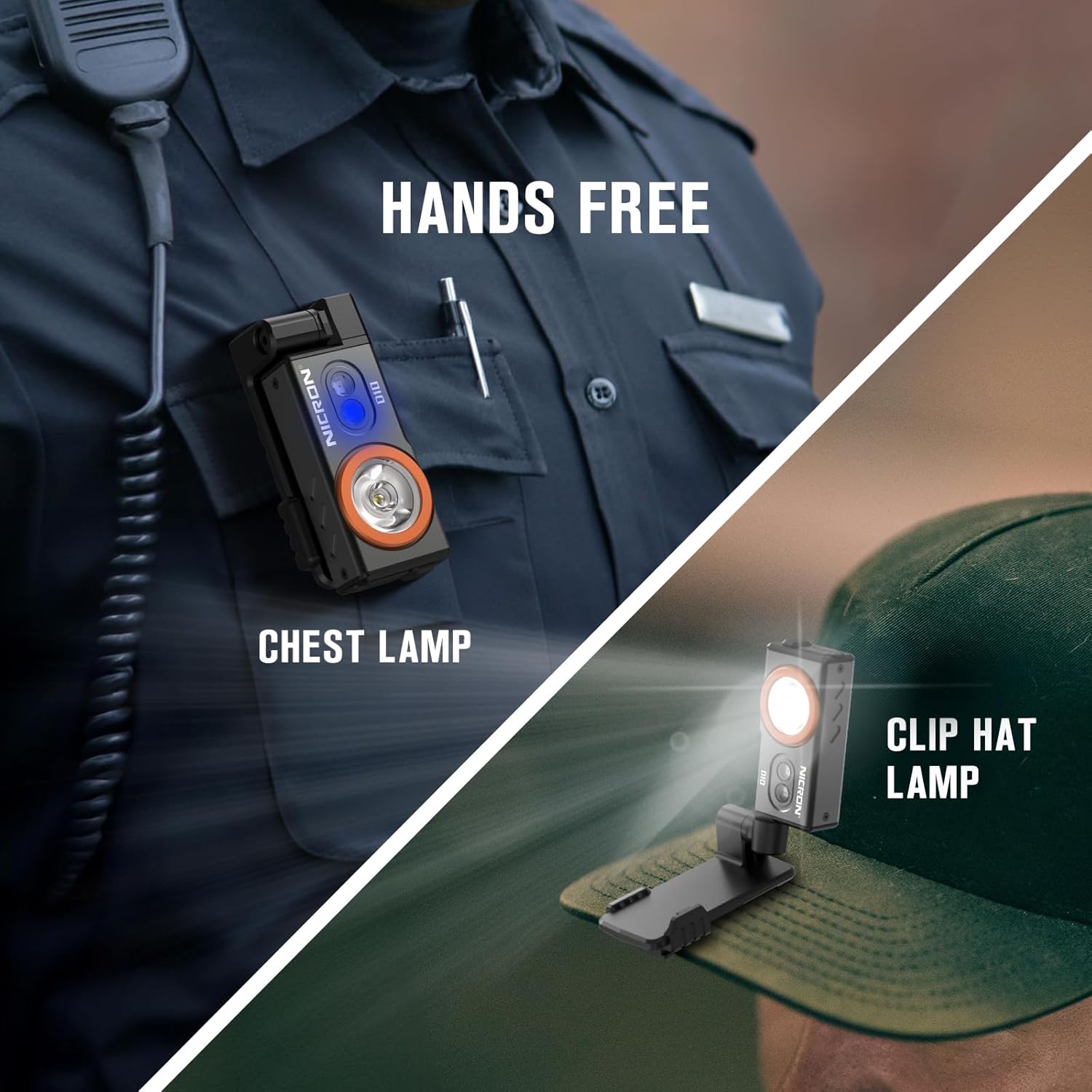
Image: The flashlight showing a red light indicating charging and a green light indicating a full charge.
4.2. ഹെഡ്ബാൻഡിൽ ഘടിപ്പിക്കുന്നു
To use the D10 as a headlamp, attach it to the provided headband assembly.
- Align the flashlight with the slide rail on the headband bracket, following the direction of the arrow.
- Squeeze the D10 and the headlight bracket together to slide them into place.
- Push firmly until it clicks into position, indicating secure installation.
- നിങ്ങളുടെ തലയിൽ സുഖകരവും സുരക്ഷിതവുമായ ഫിറ്റ് ലഭിക്കുന്നതിന് ഹെഡ്ബാൻഡ് ക്രമീകരിക്കുക.

Image: Step-by-step guide on attaching the flashlight to the headband bracket.
5. പ്രവർത്തന നിർദ്ദേശങ്ങൾ
5.1. Power On/Off and White Light Modes
- ഓൺ/ഓഫ് ചെയ്യുക: Click the power button once to turn the flashlight on or off.
- സ്വിച്ച് മോഡുകൾ: When the flashlight is on, press and hold the power button to cycle through High, Medium, and Low white light modes. The flashlight has intelligent memory, returning to the last used mode when turned on again.
- Max Light Mode: Double-click the power button when the flashlight is off to enter the Max mode directly.
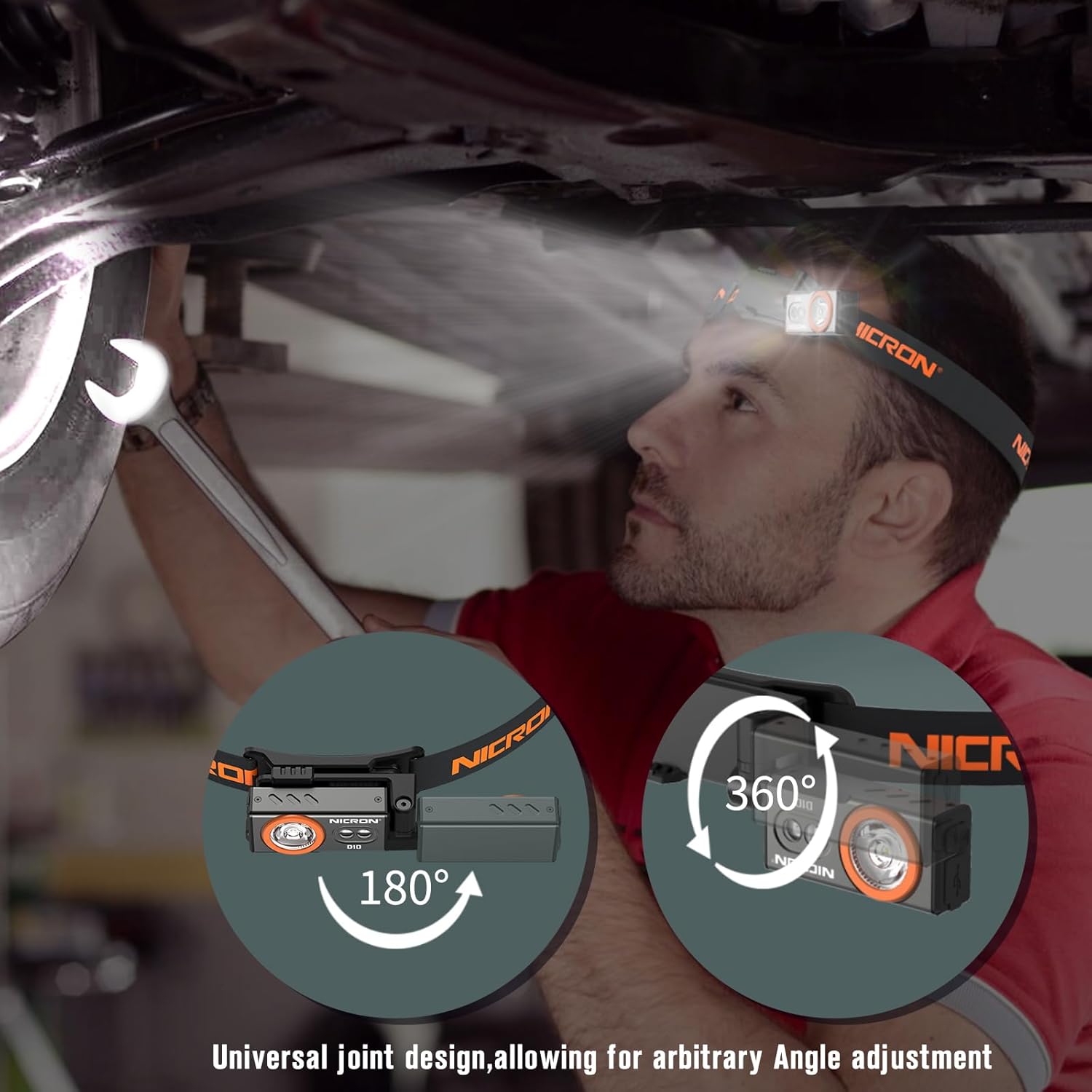
Image: Close-up of the flashlight's front, highlighting the main white LED and the two smaller RGB/UV LEDs.
5.2. RGB ലൈറ്റ് മോഡുകൾ
- Activate RGB: Triple-click the power button when the flashlight is off to enter the RGB mode.
- Cycle RGB Colors: Press and hold the power button to switch between red light, red flash, green light, green flash, blue light, and blue flash modes.

ചിത്രം: ഉദാamples of the flashlight's RGB modes in use, showing red for night vision, green for hunting, and blue for fishing.
5.3. UV Light Mode
- Activate UV: Press the power button for two seconds at any gear to enter the UV mode.
Image: The flashlight's UV mode illuminating a scorpion, demonstrating its use for observing insects or detecting pet stains.
5.4. വൈവിധ്യമാർന്ന ഉപയോഗം
- കാന്തിക അടിത്തറ: Use the strong magnetic base to attach the flashlight to metal surfaces for hands-free illumination, such as under a car hood or on a workbench.
- ക്രമീകരിക്കാവുന്ന ആംഗിൾ: The universal joint design allows for 180-degree horizontal and 360-degree vertical rotation, enabling precise light direction.
- Clip-on Function: The integrated clip allows you to attach the flashlight to clothing, hat brims, or pockets for chest lamp or clip hat lamp പ്രവർത്തനക്ഷമത.

Image: Demonstrates the flashlight's adaptability, showing it clipped to a hat, worn as a chest lamp, and attached magnetically.
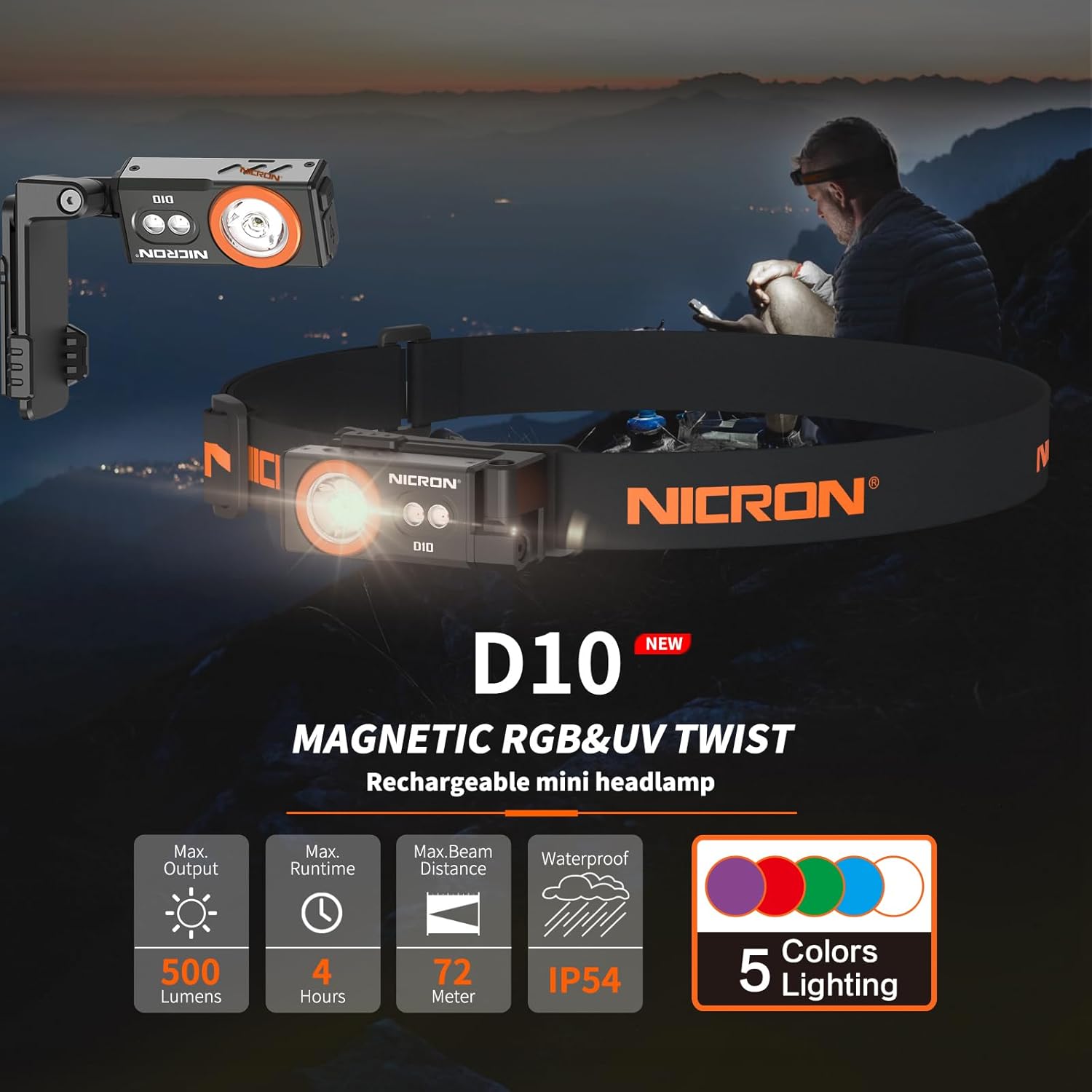
Image: The flashlight in headlamp mode, illustrating its 180-degree and 360-degree rotation for flexible lighting.
6. പരിപാലനം
- ചാർജിംഗ്: Recharge the battery at least every three months to extend battery life.
- വൃത്തിയാക്കൽ: ഫ്ലാഷ്ലൈറ്റ് ഒരു സോഫ്റ്റ് ഉപയോഗിച്ച് തുടയ്ക്കുക, ഡിamp തുണി. കഠിനമായ രാസവസ്തുക്കളോ ഉരച്ചിലുകളോ ഉപയോഗിക്കരുത്.
- സംഭരണം: നേരിട്ടുള്ള സൂര്യപ്രകാശത്തിൽ നിന്നും തീവ്രമായ താപനിലയിൽ നിന്നും അകലെ തണുത്തതും വരണ്ടതുമായ സ്ഥലത്ത് ഫ്ലാഷ്ലൈറ്റ് സൂക്ഷിക്കുക.
7. പ്രശ്നപരിഹാരം
- ഫ്ലാഷ്ലൈറ്റ് ഓണാക്കുന്നില്ല: ബാറ്ററി ചാർജ്ജ് ചെയ്തിട്ടുണ്ടെന്ന് ഉറപ്പാക്കുക. പ്രശ്നം നിലനിൽക്കുകയാണെങ്കിൽ, ഉപഭോക്തൃ പിന്തുണയുമായി ബന്ധപ്പെടുക.
- ചാർജിംഗ് പ്രശ്നങ്ങൾ: Verify the USB-C cable is properly connected and the power source is functional. Check the charging indicator light for status.
- വെള്ളം കയറുന്നത്: If the waterproof plug is not securely closed, water may enter the device. Ensure the plug is always sealed when not charging.
8 സ്പെസിഫിക്കേഷനുകൾ
| ഫീച്ചർ | സ്പെസിഫിക്കേഷൻ |
|---|---|
| ബ്രാൻഡ് | നിക്രോൺ |
| മോഡൽ | D10 |
| പ്രകാശ സ്രോതസ്സ് തരം | എൽഇഡി |
| മെറ്റീരിയൽ | അലുമിനിയം |
| വെളുത്ത തെളിച്ചം | 500 ല്യൂമെൻസ് |
| പരമാവധി ബീം ദൂരം | 72 മീറ്റർ |
| പരമാവധി തീവ്രത | 1300cd |
| ബാറ്ററി | ബിൽറ്റ്-ഇൻ 450mAh ലിഥിയം പോളിമർ |
| ചാർജിംഗ് പോർട്ട് | ടൈപ്പ്-സി |
| മുഴുവൻ ചാർജ്ജ് സമയം | 2 മണിക്കൂർ |
| പരമാവധി പ്രവർത്തനസമയം | 23 മണിക്കൂർ വരെ (മോഡ് അനുസരിച്ച്) |
| ജല പ്രതിരോധം | IP54 |
| Drop Test Certified | 1 മീറ്റർ |
| ഉൽപ്പന്ന അളവുകൾ | 73.5×32.2×36.8mm (2.89"D x 1.27"W x 1.45"H) |
| ഇനത്തിൻ്റെ ഭാരം | 88g (0.04 Pounds) |

Image: Detailed technical specifications table for the NICRON D10 flashlight.
9 സുരക്ഷാ വിവരങ്ങൾ
- Do not look directly at the flashlight when it is on, as high brightness can cause damage to your eyes.
- Do not throw the headlamp into fire or water.
- Keep batteries away from children. If swallowed, seek medical attention immediately.
- Ensure the waterproof plug is securely closed when not charging to prevent water damage.
10. വാറൻ്റിയും പിന്തുണയും
The NICRON D10 EDC Flashlight comes with a Limited Warranty. For warranty claims or technical support, please refer to the contact information provided in the product packaging or visit the official NICRON webസൈറ്റ്.
11. ഉൽപ്പന്ന വീഡിയോകൾ
Video: Official NICRON D10 EDC Flashlight demonstration, showcasing its features and compact size.
Ask a question about this manual
Ask about setup, troubleshooting, compatibility, parts, safety, or missing instructions. Manuals+ will review the question and use this page’s manual context to help answer it.