
ഓട്ടോൾ EM355
AUTOOL EM355 Flash Reprogramming Power Supply and Battery Charger Instruction Manual
Model: EM355 | Brand: AUTOOL
1. ഉൽപ്പന്നം കഴിഞ്ഞുview
The AUTOOL EM355 is a versatile Flash Reprogramming Power Supply and Car Battery Charger designed for automotive professionals. It provides stable voltage for ECU programming, offers multi-stage intelligent battery charging, and includes a battery repair mode to extend battery life. Equipped with advanced safety protections and an HD color display, it ensures reliable and safe operation for various automotive electrical tasks.
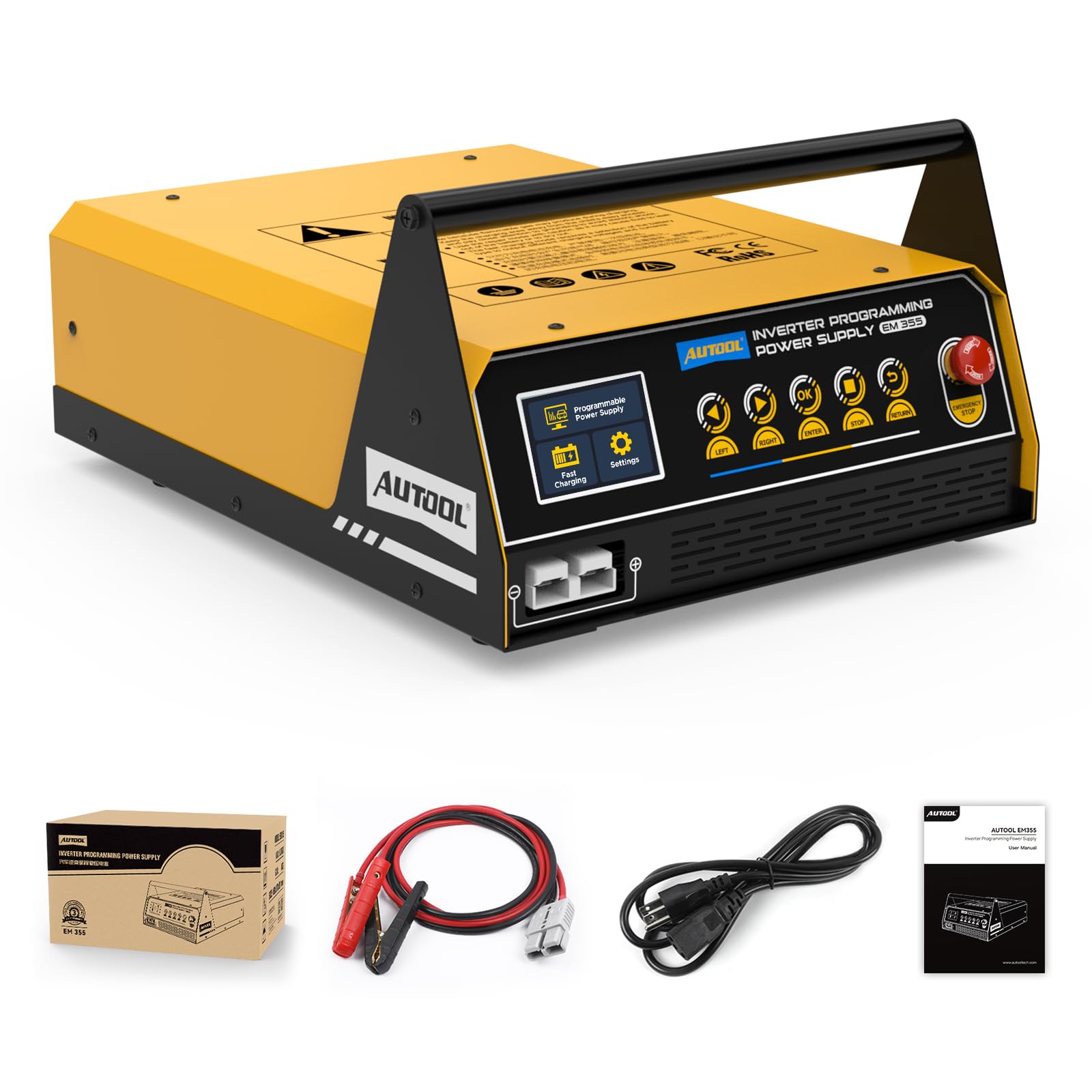
Figure 1: AUTOOL EM355 Flash Reprogramming Power Supply. This image shows the main unit with its control panel and carrying handle.
2 സുരക്ഷാ വിവരങ്ങൾ
Always observe the following safety precautions when operating the AUTOOL EM355 to prevent injury or damage to the device or vehicle:
- അമിതമായി ചൂടാക്കുന്നത് തടയാൻ ഓപ്പറേഷൻ സമയത്ത് ശരിയായ വെന്റിലേഷൻ ഉറപ്പാക്കുക.
- ബാറ്ററി cl കണക്ട് ചെയ്യുകamps correctly: red to positive (+), black to negative (-). Reverse polarity can cause damage.
- Avoid short circuits between the battery clamps.
- Do not expose the device to rain or moisture. The unit has an IP21S rating, protecting against dust and minor liquid splashes, but is not waterproof.
- Always disconnect the power supply from the AC outlet before disconnecting the battery clampവാഹനത്തിൽ നിന്ന് എസ്.
- തീപിടിക്കുന്ന വസ്തുക്കളിൽ നിന്ന് ഉപകരണം അകറ്റി നിർത്തുക.
- In case of emergency, press the red EMERGENCY STOP button immediately.
2.1 Advanced Safety Protections
The EM355 is equipped with 9 protection functions to ensure safe operation:
- എമർജൻസി സ്റ്റോപ്പ്
- ഷോർട്ട് സർക്യൂട്ട് സംരക്ഷണം
- അമിത ചൂട് സംരക്ഷണം
- ഓവർ വോൾtagഇ സംരക്ഷണം
- അണ്ടർവോൾtagഇ സംരക്ഷണം
- വിപരീത പോളാരിറ്റി പരിരക്ഷണം
- No-Load Protection
- Put ട്ട്പുട്ട് ഓവർകറന്റ് പരിരക്ഷണം
- ഔട്ട്പുട്ട് ഓവർവോൾtagഇ സംരക്ഷണം

Figure 2: Visual representation of the 9 advanced safety protections integrated into the AUTOOL EM355 unit.
3. ഉൽപ്പന്ന സവിശേഷതകൾ
3.1 High-Current Programming Mode
Delivers a stable 10.8V–16.0V adjustable output with a 120A max current (sustained for 3 minutes). This mode is ideal for ECU programming, module coding, and ADAS calibrations, ensuring stable voltage without drops that can damage ECUs.

Figure 3: Illustration of the high-current programming mode, showing adjustable voltage settings and stable output for ECU tasks.
3.2 Fast Charging & Smart Charge
Offers multiple charging options: 20A/12V for lead-acid batteries, 40A for in-vehicle battery charging, and 20A for external battery charging. Features a multi-stage intelligent charging mode:
- ആദ്യകാലങ്ങൾtagഇ ചാർജിംഗ്: Uses pulse charging, gradually increasing power for optimal efficiency.
- മധ്യഭാഗംtagഇ ചാർജിംഗ്: Quickly switches to high-power charging for rapid charging.
- വൈകി-എസ്tagഇ ചാർജിംഗ്: Automatically switches to trickle charging and stops when full to prevent overcharging.

Figure 4: Depicts the fast charging mode with indicators for voltage, current, and charging progress, highlighting the 20A/12V lead-acid battery charging capability.

Figure 5: A graph illustrating the multi-stage smart charging process, showing how power adjusts over time during charging.
3.3 ബാറ്ററി റിപ്പയർ
Revives deeply discharged or sulfated batteries, extending battery life and reducing replacement costs. Supports multiple battery types including standard lead-acid, AGM (flat/spiral), EFB, and gel batteries. The EM355 can repair batteries that have been discharged for a long time or suffered severe power loss.

Figure 6: Shows the battery restoration function, demonstrating how the device can revive batteries from 0% to 100% charge, applicable for aging, worn, or long-idle batteries.

Figure 7: Illustrates the various battery types supported by the EM355, including Standard Lead-Acid, AGM Flat Plate, AGM Spiral, EFB, and GEL batteries.
3.4 HD Color Display
The unit features an HD color display for real-time monitoring of voltage, current, and temperature. It provides an intuitive menu with quick-select modes for charging, programming, or maintenance. The auto-adjusting fan prevents overheating during prolonged use.

Figure 8: Close-up of the HD color display showing menu options for Programmable Power Supply, Fast Charging, and Settings.
4. സജ്ജീകരണം
4.1 പാക്കേജ് ഉള്ളടക്കം
- ഓട്ടോഓൾ EM355 മെയിൻ യൂണിറ്റ്
- 2-meter Pure Copper Cable with fully insulated battery clips
- പവർ ഇൻപുട്ട് കേബിൾ
- ഉപയോക്തൃ മാനുവൽ

Figure 9: Displays the main unit, its packaging, the 2-meter pure copper cables, and the user manual.
4.2 പ്രാരംഭ കണക്ഷൻ
- Connect the power input cable to the EM355 unit and then to a suitable AC power outlet (110 Volts).
- Ensure the main power switch on the unit is in the OFF position before connecting to the battery.
- Connect the red (+) battery clamp വാഹന ബാറ്ററിയുടെ പോസിറ്റീവ് ടെർമിനലിലേക്ക്.
- Connect the black (-) battery clamp വാഹന ബാറ്ററിയുടെ നെഗറ്റീവ് ടെർമിനലിലേക്ക്.
- Turn the main power switch on the EM355 unit to the ON position. The HD color display will illuminate.
Video 1: Demonstrates the initial setup and connection of the AUTOOL EM355 to a vehicle battery, showing the power-on sequence and display initialization.
5 ഓപ്പറേറ്റിംഗ് മോഡുകൾ
The AUTOOL EM355 offers several operating modes accessible via the HD color display and control buttons:
5.1 Programming Mode (High-Current)
This mode provides a stable, adjustable voltage output for sensitive ECU programming and diagnostic tasks.
- From the main menu, select "Programmable Power Supply".
- ബാറ്ററി cl ഉറപ്പാക്കുകamps are correctly connected (red to +, black to -).
- Choose between "Adjustable Mode" or "Fixed Mode" for voltagഇ നിയന്ത്രണം.
- വോളിയം ക്രമീകരിക്കുകtage within the 10.8V–16.0V range using the control buttons.
- The display will show real-time voltagഇ, നിലവിലെ ഔട്ട്പുട്ട്.
Video 2: Illustrates the selection and use of the programming mode, demonstrating how to set voltage and connect to the vehicle for ECU reprogramming.
5.2 ഫാസ്റ്റ് ചാർജിംഗ് മോഡ്
Use this mode for efficient charging of various battery types.
- From the main menu, select "Fast Charging".
- ബാറ്ററി cl കണക്ട് ചെയ്യുകampബാറ്ററിയിലേക്ക് എസ്.
- Select the appropriate charging option: "In-car Charging" (up to 40A) or "External Charging" (up to 20A).
- The unit will automatically adjust the charging power based on the battery's state and type.
- Charging will stop automatically once the battery is full to prevent overcharging.
5.3 Battery Repair Mode
This function helps to restore deeply discharged or sulfated batteries.
- From the main menu, select "Battery Restoration".
- For optimal results, the battery should be removed from the vehicle before restoration.
- ബാറ്ററി cl കണക്ട് ചെയ്യുകampബാറ്ററിയിലേക്ക് എസ്.
- The unit will apply a specialized charging cycle to desulfate and revive the battery.
- Monitor the display for progress. The repair process may take an extended period (e.g., 24 hours for severely depleted batteries).
5.4 വാഹന പ്രദർശന മോഡ്
This mode provides stable power for showroom vehicle demonstrations, ensuring uninterrupted power supply without draining the vehicle's battery.
- From the main menu, select "Vehicle Display Mode".
- പവർ cl കണക്ട് ചെയ്യുകamps to the vehicle's battery terminals.
- The unit will provide a continuous, stable power supply to the vehicle.
- Monitor the display for real-time voltagഇയും കറൻ്റും.
5.5 Forced Start Mode
This mode provides a high cranking current to start vehicles with low battery voltage.
- From the main menu, select "Forced Start".
- Connect the positive and negative terminals of the vehicle battery.
- The unit will prompt you to start the vehicle.
- Start the vehicle engine. The EM355 can provide up to 400A of cranking current.
6 സ്പെസിഫിക്കേഷനുകൾ
| ഫീച്ചർ | സ്പെസിഫിക്കേഷൻ |
|---|---|
| മോഡൽ നമ്പർ | EM355 |
| പ്രോഗ്രാമിംഗ് പവർ സപ്ലൈ കറന്റ് | 120A (max for 3 minutes) |
| പ്രോഗ്രാമിംഗ് പവർ സപ്ലൈ വോളിയംtagഇ റേഞ്ച് | 10.8V–16.0V (Adjustable) |
| ലെഡ്-ആസിഡ് ബാറ്ററി ചാർജിംഗ് കറന്റ്/വോളിയംtage | 20A/12V (External), 40A (In-Vehicle) |
| ഇൻപുട്ട് വോളിയംtage | 110 Volts (110V ±25%) |
| ഇൻപുട്ട് ഫ്രീക്വൻസി | 60Hz |
| റേറ്റുചെയ്ത ഇൻപുട്ട് പവർ | 1200W |
| ലോഡ് ഇല്ലാത്ത വൈദ്യുതി നഷ്ടം | 6W |
| കാര്യക്ഷമത | 81% |
| ഇൻസുലേഷൻ ഗ്രേഡ് | F |
| എൻക്ലോഷർ പ്രൊട്ടക്ഷൻ ലെവൽ | IP21S |
| ഉൽപ്പന്ന അളവുകൾ | 16"D x 12"W x 7"H (ഏകദേശം 417mm x 316mm x 188mm) |
| ഇനത്തിൻ്റെ ഭാരം | 21 പൗണ്ട് |

Figure 10: Detailed diagram showing the dimensions and key specifications of the AUTOOL EM355 unit.
7. പരിപാലനം
- യൂണിറ്റ് വൃത്തിയായി സൂക്ഷിക്കുക, പൊടിയും അവശിഷ്ടങ്ങളും ഒഴിവാക്കുക.
- ബാറ്ററി cl പതിവായി പരിശോധിക്കുകampതേയ്മാനത്തിന്റെയോ കേടുപാടുകളുടെയോ ലക്ഷണങ്ങൾക്കായി കേബിളുകളും കേബിളുകളും നീക്കം ചെയ്യുക. ആവശ്യമെങ്കിൽ മാറ്റിസ്ഥാപിക്കുക.
- ഉപയോഗത്തിലില്ലാത്തപ്പോൾ യൂണിറ്റ് വരണ്ടതും തണുത്തതുമായ സ്ഥലത്ത് സൂക്ഷിക്കുക.
- The auto-adjusting fan helps maintain optimal operating temperature; ensure its vents are not obstructed.
8. പ്രശ്നപരിഹാരം
If you encounter issues with your AUTOOL EM355, refer to the following common troubleshooting steps:
- യൂണിറ്റ് ഓണാക്കുന്നില്ല: Check the power input cable connection and the main power switch. Ensure the AC outlet is functional.
- ട്ട്പുട്ട് വോളിയം ഇല്ലtagഇ/കറന്റ്: ബാറ്ററി cl ആണെന്ന് ഉറപ്പാക്കുകamps are securely connected to the correct terminals. Check for any short circuits or reverse polarity.
- ഡിസ്പ്ലേയിൽ പിശക് സന്ദേശം: Refer to the specific error code in the full user manual for detailed instructions. Common errors include overvoltagഇ, അണ്ടർവോൾtage, or reverse polarity.
- ബാറ്ററി ചാർജ്ജുചെയ്യുന്നില്ല: Ensure the correct battery type and charging mode are selected. Check if the battery is severely damaged and requires repair mode.
- അമിത ചൂടാക്കൽ: Ensure the unit's vents are clear and the auto-adjusting fan is operating. Reduce the load if operating in extreme conditions.
9. വാറണ്ടിയും പിന്തുണയും
The AUTOOL EM355 comes with a Three Years Warranty for any quality problems. If the EM355 has any defect, AUTOOL will provide a new replacement or solutions to ensure customer satisfaction without delay. Lifetime technical support is also provided. For any needs, please contact AUTOOL customer service, and they will respond within 24 hours.
Ask a question about this manual
Ask about setup, troubleshooting, compatibility, parts, safety, or missing instructions. Manuals+ will review the question and use this page’s manual context to help answer it.