
1. ആമുഖം
The Aokeo AK-M1 is a professional XLR Bluetooth audio receiver designed to wirelessly transmit high-fidelity audio from your Bluetooth-enabled devices to active PA speakers, DJ equipment, and mixers. This manual provides comprehensive instructions for the safe and efficient use of your AK-M1 receiver, ensuring optimal performance and longevity.
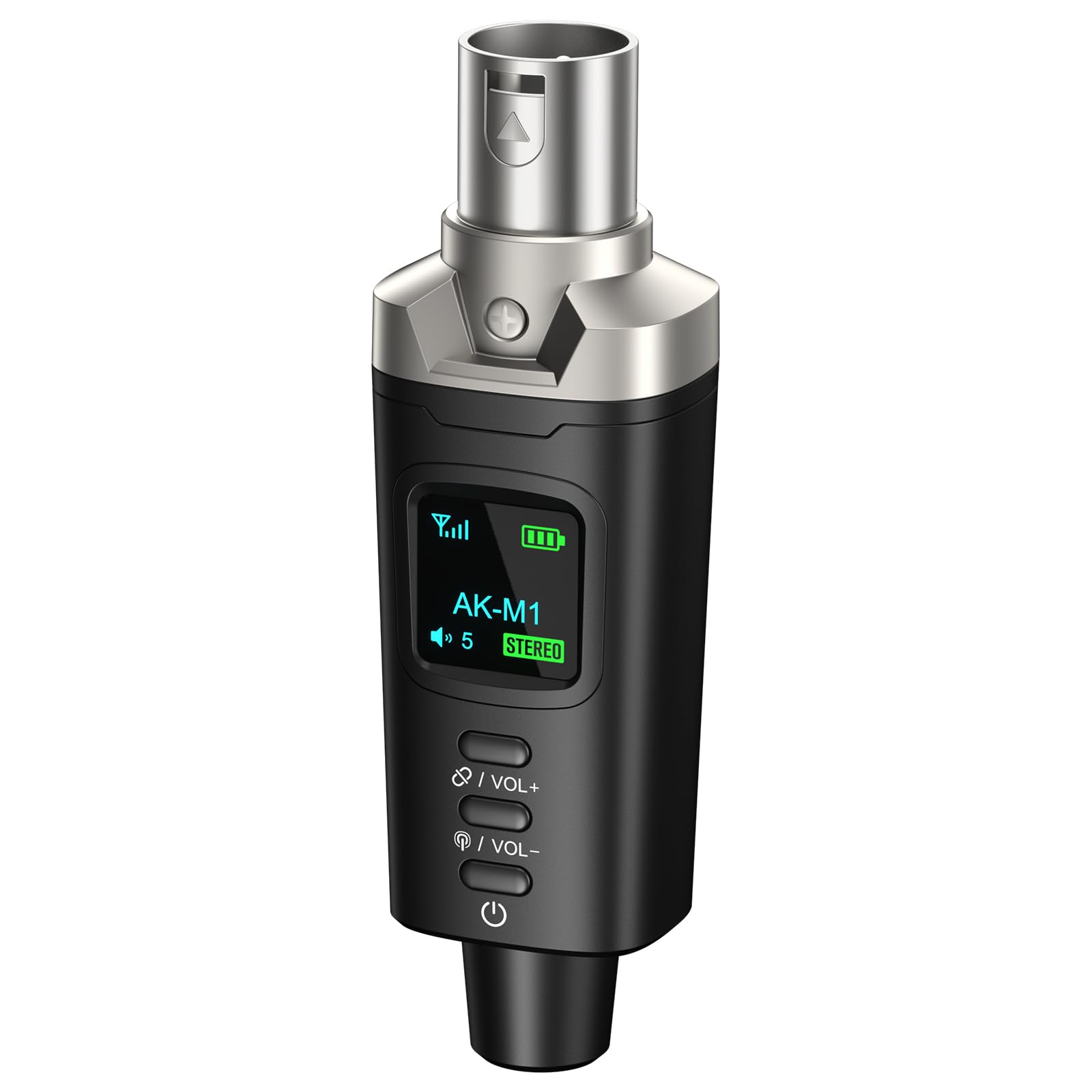
Image 1.1: Aokeo AK-M1 XLR Bluetooth Receiver.
2. ഉൽപ്പന്ന സവിശേഷതകൾ
- Wireless XLR Connectivity: Equipped with an XLR output for direct connection to mixers, PA speakers, and DJ equipment, enabling cable-free audio transmission.
- ഉയർന്ന വിശ്വാസ്യതയുള്ള ഓഡിയോ: Features a DAC resolution of 16-bit/48kHz for clear, distortion-free sound quality, comparable to wired connections.
- Extended Range & Stability: Utilizes Bluetooth 5.1, A2DP, and AVRCP technology for stable connectivity over a range of up to 100 feet (30 meters).
- Mono/Stereo Functionality: Supports mono audio with a single receiver. For stereo sound, two AK-M1 units (P3D dual) can be paired together.
- നീണ്ട ബാറ്ററി ലൈഫ്: Built-in rechargeable battery provides up to 8 hours of operation on a full charge.
- ദ്രുത ചാർജിംഗ്: USB Type-C port allows for a full charge in approximately 2 hours using any 5V USB power source.
- വിശാലമായ അനുയോജ്യത: Universally compatible with Bluetooth-enabled devices such as smartphones, tablets, and laptops, and audio equipment featuring XLR interfaces.
3. പാക്കേജ് ഉള്ളടക്കം
പാക്കേജിൽ ഇനിപ്പറയുന്ന ഇനങ്ങൾ ഉണ്ടോ എന്ന് പരിശോധിക്കുക:
- AK-M1 Receiver x1
- യുഎസ്ബി ടൈപ്പ്-സി ചാർജിംഗ് കേബിൾ x1
- ഉപയോക്തൃ മാനുവൽ x1

Image 3.1: Contents of the AK-M1 package, including the receiver, charging cable, and manual.
4. സജ്ജീകരണ ഗൈഡ്
4.1 ഉപകരണം ചാർജ് ചെയ്യുന്നു
- Connect the provided USB Type-C charging cable to the charging port on the AK-M1 receiver.
- Plug the other end of the cable into a 5V USB power source (e.g., wall adapter, computer USB port).
- ചാർജിംഗ് സ്റ്റാറ്റസ് എൽഇഡി ഡിസ്പ്ലേ സൂചിപ്പിക്കും. പൂർണ്ണമായി ചാർജ് ചെയ്യാൻ ഏകദേശം 2 മണിക്കൂർ എടുക്കും.

Image 4.1: The AK-M1 receiver connected to a USB-C charging cable, illustrating its charging process and battery life.
4.2 ഓഡിയോ ഉപകരണങ്ങളിലേക്ക് ബന്ധിപ്പിക്കുന്നു
- Ensure your audio equipment (mixer, PA speaker, DJ equipment) is powered off or its input gain is set to minimum.
- Insert the XLR connector of the AK-M1 receiver into an available XLR input on your audio equipment.
- Power on your audio equipment and adjust the input gain as needed after establishing a Bluetooth connection.

Image 4.2: The AK-M1 receiver connected to a mixer, demonstrating its compatibility with various audio devices.
5. പ്രവർത്തന നിർദ്ദേശങ്ങൾ
5.1 പവർ ഓൺ/ഓഫ്
- To power on, press and hold the power button (usually located at the bottom) until the LED display illuminates.
- To power off, press and hold the power button until the LED display turns off.
5.2 Bluetooth Pairing (Mono Mode)
- Ensure the AK-M1 receiver is powered on and within range of your Bluetooth audio source (smartphone, tablet, laptop).
- The AK-M1 will automatically enter pairing mode, indicated by a flashing Bluetooth icon on the LED display.
- On your audio source device, open Bluetooth settings and search for available devices.
- Select "AK-M1" from the list of devices to connect. Once connected, the Bluetooth icon on the AK-M1's display will become solid.
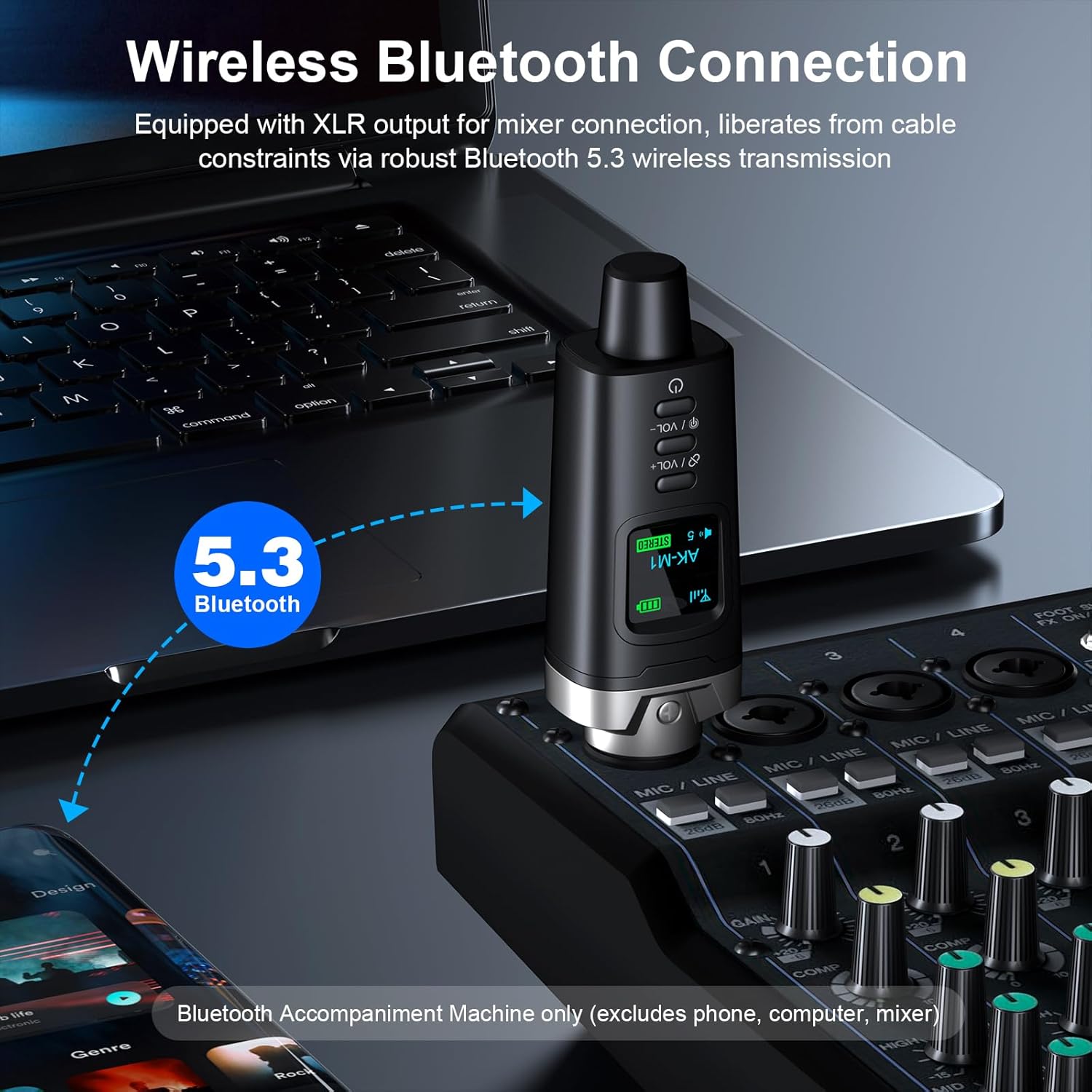
Image 5.1: The AK-M1 receiver establishing a wireless Bluetooth connection with source devices.
5.3 Stereo Pairing (with two AK-M1 units)
If you have two AK-M1 units (P3D dual), you can pair them for stereo audio output:
- Power on both AK-M1 receivers.
- Simultaneously press the "Stereo-Link" button on both units. The LED display will show "STEREO" and indicate Left/Right channel assignment.
- Once linked, proceed with Bluetooth pairing as described in Section 5.2 with your audio source device. The two AK-M1 units will appear as a single Bluetooth device.
5.4 വോളിയം നിയന്ത്രണം
ഉപയോഗിക്കുക VOL+ ഒപ്പം വോൾ- buttons on the AK-M1 receiver to adjust the output volume. The current volume level will be displayed on the LED screen.
5.5 LED ഡിസ്പ്ലേ പ്രവർത്തനങ്ങൾ
The LED display provides visual feedback on the device's status:
- സിഗ്നൽ ഐക്കൺ: Indicates Bluetooth signal strength.
- ബാറ്ററി നില: ശേഷിക്കുന്ന ബാറ്ററി ചാർജ് കാണിക്കുന്നു.
- വോളിയം നില: Displays the current output volume.
- STEREO (Green): Indicates Left or Right channel in stereo pairing mode.
- STEREO (Red): Indicates disconnected status in stereo pairing mode.
- ബ്ലൂടൂത്ത് ഐക്കൺ: Flashing when in pairing mode, solid when connected.
- പവർ ഐക്കൺ: പവർ സ്റ്റാറ്റസ് സൂചിപ്പിക്കുന്നു.

Image 5.2: Explanation of the icons and indicators on the AK-M1's LED display.
6. പരിപാലനം
- വൃത്തിയാക്കൽ: ഉപകരണത്തിന്റെ പുറംഭാഗം വൃത്തിയാക്കാൻ മൃദുവായതും ഉണങ്ങിയതുമായ തുണി ഉപയോഗിക്കുക. ലിക്വിഡ് ക്ലീനറുകളോ ലായകങ്ങളോ ഉപയോഗിക്കരുത്.
- സംഭരണം: നേരിട്ടുള്ള സൂര്യപ്രകാശത്തിൽ നിന്നും കടുത്ത താപനിലയിൽ നിന്നും മാറി തണുത്തതും വരണ്ടതുമായ സ്ഥലത്ത് ഉപകരണം സൂക്ഷിക്കുക.
- ബാറ്ററി കെയർ: ബാറ്ററി ലൈഫ് വർദ്ധിപ്പിക്കാൻ, ബാറ്ററി ഇടയ്ക്കിടെ പൂർണ്ണമായും ഡിസ്ചാർജ് ചെയ്യുന്നത് ഒഴിവാക്കുക. ദീർഘനേരം ഉപയോഗത്തിലില്ലെങ്കിൽ പോലും ഉപകരണം പതിവായി ചാർജ് ചെയ്യുക.
- കൈകാര്യം ചെയ്യൽ: ഉപകരണം ഉപേക്ഷിക്കുകയോ ശക്തമായ ആഘാതങ്ങൾക്ക് വിധേയമാക്കുകയോ ചെയ്യരുത്.
7. പ്രശ്നപരിഹാരം
| പ്രശ്നം | സാധ്യമായ കാരണം | പരിഹാരം |
|---|---|---|
| ശക്തിയില്ല | ബാറ്ററി ഡിസ്ചാർജ് ചെയ്തു. | നൽകിയിരിക്കുന്ന യുഎസ്ബി ടൈപ്പ്-സി കേബിൾ ഉപയോഗിച്ച് ഉപകരണം ചാർജ് ചെയ്യുക. |
| ബ്ലൂടൂത്ത് വഴി ജോടിയാക്കാൻ കഴിയില്ല | Bluetooth is off on the source device; device is out of range; device is already paired with another unit. | Ensure Bluetooth is enabled on your source device. Move the devices closer. Disconnect from other devices and try again. |
| ഓഡിയോ ഔട്ട്പുട്ട് ഇല്ല | Volume is too low; AK-M1 not properly connected to audio equipment; audio equipment input gain is too low. | Increase volume on AK-M1 and source device. Ensure AK-M1 is securely connected to the XLR input. Adjust input gain on your mixer/speaker. |
| മോശം ശബ്ദ നിലവാരം/ഇടപെടൽ | Too far from source device; obstacles blocking signal; interference from other wireless devices. | Move closer to the source device. Ensure a clear line of sight. Move away from other wireless devices. |
8 സ്പെസിഫിക്കേഷനുകൾ
| ഫീച്ചർ | വിശദാംശങ്ങൾ |
|---|---|
| മോഡൽ | AK-M1 |
| ബ്ലൂടൂത്ത് പതിപ്പ് | 5.1 (A2DP, AVRCP) |
| വയർലെസ് ശ്രേണി | 100 അടി വരെ (30 മീറ്റർ) |
| DAC റെസലൂഷൻ | 16-ബിറ്റ് / 48kHz |
| ലേറ്റൻസി | 5ms-ൽ കുറവ് |
| ബാറ്ററി ലൈഫ് | 8 മണിക്കൂർ വരെ |
| ചാർജിംഗ് സമയം | ഏകദേശം 2 മണിക്കൂർ |
| ചാർജിംഗ് പോർട്ട് | യുഎസ്ബി ടൈപ്പ്-സി (5V) |
| ഔട്ട്പുട്ട് ഇൻ്റർഫേസ് | 3-Pin XLR Male |
| അളവുകൾ | 105mm (4.13in) Length, 33mm (1.30in) Width (approximate) |
| ഇനത്തിൻ്റെ ഭാരം | 5.6 ഔൺസ് (ഏകദേശം) |

Image 8.1: Visual representation of AK-M1's stable transmission capabilities and key specifications.

ചിത്രം 8.2: വിശദമായത് view of the AK-M1's design, including its dimensions and interface.
9. വാറൻ്റിയും പിന്തുണയും
Aokeo products are designed for reliability and performance. For warranty information, technical support, or service inquiries, please refer to the contact information provided with your purchase or visit the official Aokeo webസൈറ്റ്. വാറന്റി ക്ലെയിമുകൾക്കായി നിങ്ങളുടെ വാങ്ങലിന്റെ തെളിവ് സൂക്ഷിക്കുക.