
1. ആമുഖം
This manual provides detailed instructions for the LIGE EF14-G Smartwatch. Please read this manual thoroughly before using your device to ensure proper operation and to fully utilize its features. Keep this manual for future reference.
2. ഉൽപ്പന്നം കഴിഞ്ഞുview
The LIGE EF14-G Smartwatch is a robust and versatile wearable device designed for daily use and active lifestyles. It features a 1.62-inch HD AMOLED display, Bluetooth calling capabilities, comprehensive health monitoring, and multiple sport modes. Its durable construction and long-lasting battery make it a reliable companion.
പ്രധാന സവിശേഷതകൾ:
- 1.62-ഇഞ്ച് AMOLED ഡിസ്പ്ലേ: 480x480 resolution with 850 nits brightness for clear visuals.
- 730mAh Polymer Battery: Provides 5-7 days of typical use and up to 50 days standby.
- നീണ്ടുനിൽക്കുന്ന നിർമ്മാണം: Zinc Alloy casing, Polycarbonate back, and soft silicone strap.
- 3ATM ജല പ്രതിരോധം: Suitable for rain, sweat, and swimming.
- 110+ Professional Sport Modes: Comprehensive activity tracking.
- 24/7 ആരോഗ്യ നിരീക്ഷണം: Heart Rate, Blood Oxygen (SpO2), Blood Pressure, Sleep Analysis.
- ബ്ലൂടൂത്ത് 5.3: For calls, notifications, and music control.
- Integrated LED Tactical Flashlight.
- ബഹുഭാഷാ പിന്തുണ: Compatible with Android 5.0+ and iOS 10.0+ via FitCloudPro app.

The LIGE EF14-G Smartwatch, showcasing അതിന്റെ രൂപകൽപ്പനയും ഉൾപ്പെടുത്തിയിരിക്കുന്ന അനുബന്ധ ഉപകരണങ്ങളും.

The LIGE EF14-G Smartwatch, highlighting its robust design for outdoor activities.
3. സജ്ജീകരണം
3.1 ഉപകരണം ചാർജ് ചെയ്യുന്നു
Before initial use, fully charge your smartwatch. Connect the magnetic charging cable to the charging points on the back of the watch. Connect the other end to a USB power adapter (not included) or a computer's USB port. A full charge takes approximately 2.5 hours.

The smartwatch connected to its magnetic charging cable, illustrating the charging process.

An illustration highlighting the 730mAh battery capacity, indicating extended usage time.
3.2 അപ്ലിക്കേഷൻ ഇൻസ്റ്റാളേഷൻ
ഡൗൺലോഡ് ചെയ്യുക FitCloudPro application on your smartphone. You can find it in the Apple App Store for iOS devices or the Google Play Store for Android devices. Alternatively, scan the QR code provided in the watch's packaging or on the watch screen to download the app.

The smartwatch displaying a QR code for easy FitCloudPro app download, shown alongside a smartphone with the app interface.
3.3 ഉപകരണ ജോടിയാക്കൽ
Ensure Bluetooth is enabled on your smartphone. Open the FitCloudPro app, register or log in, and follow the on-screen instructions to add your device. Select 'EF14-G' from the list of available devices to establish a Bluetooth 5.3 connection. Grant all necessary permissions for full functionality.
4. പ്രവർത്തന നിർദ്ദേശങ്ങൾ
4.1 അടിസ്ഥാന നാവിഗേഷൻ
The smartwatch features a full-touch AMOLED display and physical buttons for navigation. Swipe left/right, up/down to access different functions and menus. Press the side buttons to return to the home screen or access specific features.
4.2 Bluetooth Calls and Notifications
Once paired with your smartphone, the watch supports Bluetooth calls. You can answer, reject, or make calls directly from your wrist. The watch will also display notifications for messages, social media alerts, and other app updates.

A close-up of the smartwatch on a wrist, displaying an incoming call notification.

The smartwatch screen displaying multiple notification icons from various applications.
4.3 ആരോഗ്യ നിരീക്ഷണം
The EF14-G smartwatch continuously monitors your health metrics. Access the dedicated sections on the watch or in the FitCloudPro app for detailed data.
- ഹൃദയമിടിപ്പ്: തത്സമയ ഹൃദയമിടിപ്പ് ട്രാക്കിംഗ്.
- രക്ത ഓക്സിജൻ (SpO2): രക്തത്തിലെ ഓക്സിജൻ സാച്ചുറേഷൻ അളവ് അളക്കുന്നു.
- രക്തസമ്മർദ്ദം: രക്തസമ്മർദ്ദ വായനകൾ നൽകുന്നു.
- ഉറക്ക ട്രാക്കിംഗ്: Analyzes sleep stages (deep, light, awake) and duration.

The smartwatch screen displaying detailed heart rate monitoring data and a historical graph.

A visual representation of the smartwatch's wellness features, including heart rate, daily activity, sleep, and breathing exercise tracking.
4.4 Sport Modes and Activity Tracking
The watch supports over 110 professional sport modes. Select your desired activity to track steps, calories burned, distance, and other relevant metrics. All fitness data synchronizes with the FitCloudPro app for detailed analysis.

The smartwatch displaying an active sport mode, showing real-time metrics like duration, heart rate, and step count.

A man wearing the smartwatch while engaged in rock climbing, demonstrating its use during outdoor sports.
4.5 LED Tactical Flashlight
The smartwatch is equipped with a powerful LED flashlight for emergencies or low-light conditions. Activate this feature through the watch's menu.
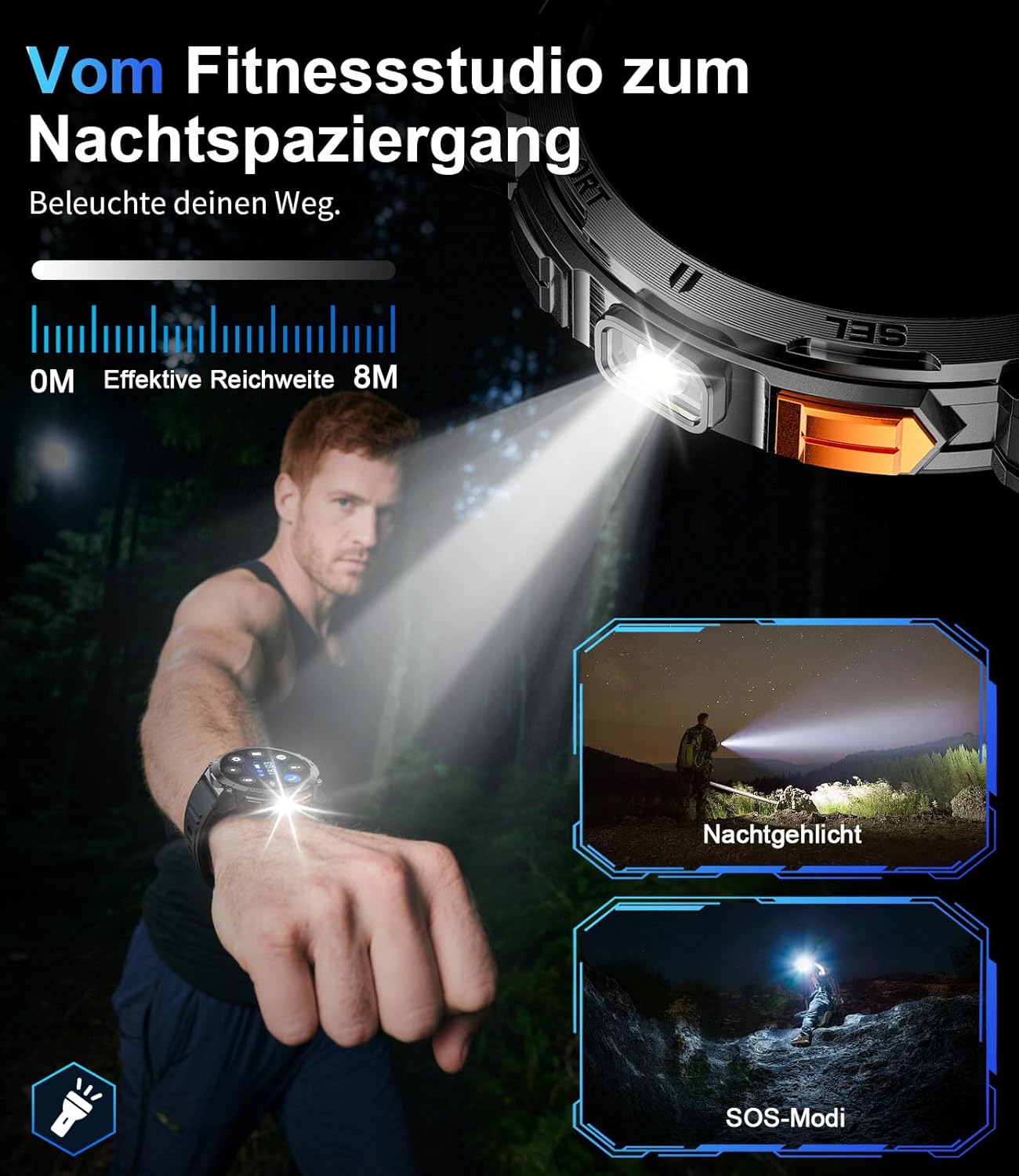
ഒരു ക്ലോസപ്പ് view of the smartwatch with its integrated LED flashlight activated.

A person using the smartwatch's LED light to navigate in a dark outdoor environment.
4.6 ഇഷ്ടാനുസൃതമാക്കൽ
Personalize your smartwatch experience. Choose from a variety of pre-installed watch faces or create custom ones through the FitCloudPro app. The 22mm interchangeable straps allow for further personalization.
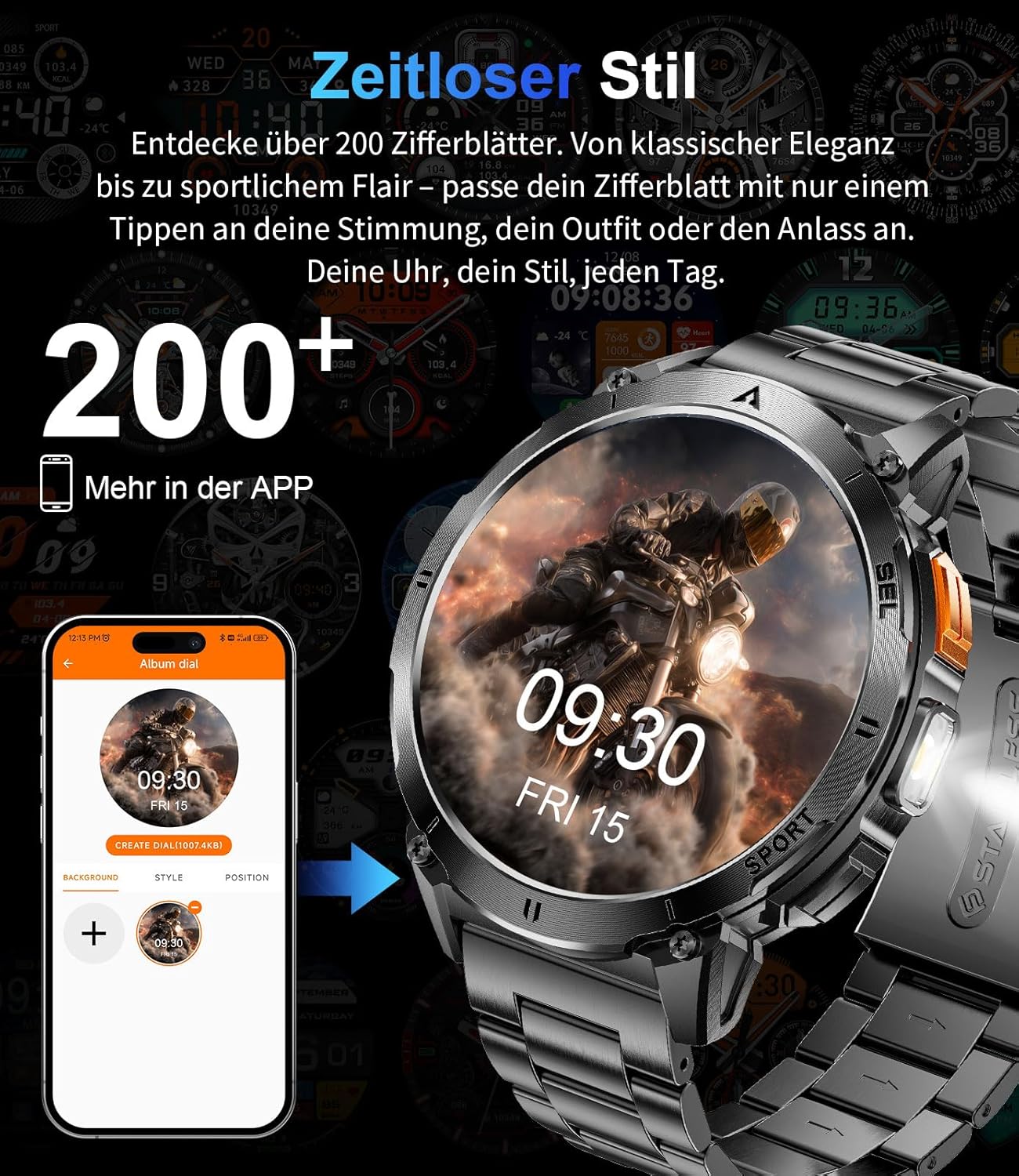
The smartwatch display showing various customizable watch face options.
5. പരിപാലനം
5.1 വൃത്തിയാക്കൽ
Regularly clean your smartwatch and strap to prevent skin irritation and maintain optimal performance. Use a soft, damp സ്ക്രീൻ തുടയ്ക്കാൻ തുണിയും സി.asing. കഠിനമായ രാസവസ്തുക്കളോ ഉരച്ചിലുകളോ ഉള്ള വസ്തുക്കൾ ഒഴിവാക്കുക.
5.2 ജല പ്രതിരോധം
The EF14-G smartwatch is 3ATM water-resistant, meaning it can withstand splashes, rain, and brief immersion in water, making it suitable for swimming. However, it is not recommended for diving or exposure to hot water, steam, or high-pressure water jets, as this may compromise the seals.

A visual representation highlighting the smartwatch's durability, including its waterproof, shockproof, and dustproof capabilities.
6. പ്രശ്നപരിഹാരം
If you encounter issues with your LIGE EF14-G Smartwatch, refer to the following common solutions:
- ഉപകരണം ഓണാക്കുന്നില്ല: വാച്ച് പൂർണ്ണമായും ചാർജ് ചെയ്തിട്ടുണ്ടെന്ന് ഉറപ്പാക്കുക. കുറഞ്ഞത് 30 മിനിറ്റെങ്കിലും ചാർജറുമായി ബന്ധിപ്പിക്കുക.
- സ്മാർട്ട്ഫോണുമായി ജോടിയാക്കാൻ കഴിയില്ല:
- നിങ്ങളുടെ ഫോണിൽ ബ്ലൂടൂത്ത് പ്രവർത്തനക്ഷമമാക്കിയിട്ടുണ്ടെന്ന് ഉറപ്പാക്കുക.
- വാച്ച് നിങ്ങളുടെ ഫോണിന്റെ പരിധിയിലാണെന്ന് ഉറപ്പാക്കുക.
- നിങ്ങളുടെ ഫോണും സ്മാർട്ട് വാച്ചും പുനരാരംഭിക്കുക.
- Check if the FitCloudPro app has all necessary permissions.
- ആപ്പിൽ ഉപകരണം ജോടി മാറ്റി വീണ്ടും ജോടിയാക്കാൻ ശ്രമിക്കുക.
- കൃത്യമല്ലാത്ത ആരോഗ്യ വായനകൾ:
- വാച്ച് നിങ്ങളുടെ കൈത്തണ്ടയിൽ നന്നായി ധരിക്കുന്നുണ്ടെന്ന് ഉറപ്പാക്കുക, അധികം ഇറുകിയതോ അധികം അയഞ്ഞതോ അല്ല.
- വാച്ചിന്റെ പിൻഭാഗത്തുള്ള സെൻസർ വൃത്തിയാക്കുക.
- അളക്കുമ്പോൾ അമിതമായ ചലനം ഒഴിവാക്കുക.
- ഹ്രസ്വ ബാറ്ററി ലൈഫ്:
- സ്ക്രീൻ തെളിച്ചം കുറയ്ക്കുക.
- Disable unnecessary notifications or features.
- ഓരോ തവണയും വാച്ച് പൂർണ്ണമായും ചാർജ് ചെയ്തിട്ടുണ്ടെന്ന് ഉറപ്പാക്കുക.
- ദൃശ്യമാകാത്ത അറിയിപ്പുകൾ:
- Check app permissions on your phone for FitCloudPro.
- Ensure notifications are enabled in both the phone's settings and the FitCloudPro app.
- ബ്ലൂടൂത്ത് കണക്ഷൻ സ്ഥിരതയുള്ളതാണെന്ന് ഉറപ്പാക്കുക.
7 സ്പെസിഫിക്കേഷനുകൾ
Detailed technical specifications for the LIGE EF14-G Smartwatch:
| ബ്രാൻഡ് | ലൈഗ് |
| മോഡൽ നമ്പർ | EF14-G |
| നിറം | കറുപ്പ് |
| ഓപ്പറേറ്റിംഗ് സിസ്റ്റം | Wear OS (Compatible with FitCloudPro app) |
| സ്ക്രീൻ വലിപ്പം | 1.62 ഇഞ്ച് |
| ഡിസ്പ്ലേ തരം | AMOLED, 480x480 pixels, 850 nits |
| കണക്റ്റിവിറ്റി | ബ്ലൂടൂത്ത് 5.3 |
| ബാറ്ററി ശേഷി | 730 mAh ലിഥിയം-പോളിമർ |
| ബാറ്ററി ലൈഫ് | 5-7 ദിവസം (സാധാരണ ഉപയോഗം), 50 ദിവസം വരെ (സ്റ്റാൻഡ്ബൈ) |
| ജല പ്രതിരോധം | 3 എ.ടി.എം |
| പ്രത്യേക സവിശേഷതകൾ | LED light, Pedometer, Fitness Tracker, Heart Rate Monitor, SpO2 Monitor, Sleep Tracker, Bluetooth Calls, Music Player, Voice Assistant, Reminders, Alarms, Notifications, Sedentary Reminder, Calculator |
| അനുയോജ്യമായ ഉപകരണങ്ങൾ | Smartphone (Android 5.0+ / iOS 10.0+) |
| മെമ്മറി സ്റ്റോറേജ് കപ്പാസിറ്റി | 256 MB |
| ജിപിഎസ് | GPS ഇല്ല |
8. വാറൻ്റിയും പിന്തുണയും
LIGE provides comprehensive support for your EF14-G Smartwatch.
- വാറൻ്റി: വാങ്ങിയ തീയതി മുതൽ 2 വർഷത്തെ വാറന്റി.
- തിരികെ നൽകൽ നയം: 30-day return service.
- കസ്റ്റമർ സർവീസ്: 24-hour customer support is available for any inquiries or assistance.

An illustration detailing the customer support services: 24-hour customer service, 6-month return policy, and 2-year warranty service.