
ആമുഖം
The ATK VXE Dragonfly R1 Wireless Gaming Mouse is engineered for high-performance gaming, offering a lightweight design, advanced sensor technology, and versatile connectivity. This manual provides detailed instructions for setting up, operating, and maintaining your R1 gaming mouse to ensure optimal performance.

ചിത്രം: മുകളിൽ view of the ATK VXE Dragonfly R1 Wireless Gaming Mouse in black, showcasing its ergonomic shape and button layout.
പാക്കേജ് ഉള്ളടക്കം
നിങ്ങളുടെ പാക്കേജിൽ എല്ലാ ഇനങ്ങളും ഉണ്ടെന്ന് ദയവായി പരിശോധിക്കുക:
- ATK VXE Dragonfly R1 Wireless Gaming Mouse
- USB-C ചാർജിംഗ്/ഡാറ്റ കേബിൾ
- 2.4GHz വയർലെസ് റിസീവർ (USB ഡോംഗിൾ)
- ഉപയോക്തൃ മാനുവൽ (ഈ പ്രമാണം)
- Nonstandard Battery (pre-installed)
സജ്ജമാക്കുക
1. മൗസ് ചാർജ് ചെയ്യുന്നു
Before first use, it is recommended to fully charge the mouse. Connect the supplied USB-C cable to the mouse's charging port and the other end to a USB power source (e.g., computer USB port, USB wall adapter).
2. കണക്റ്റിവിറ്റി ഓപ്ഷനുകൾ
The ATK VXE Dragonfly R1 supports multiple connection modes:
- 2.4GHz വയർലെസ്: For optimal gaming performance. Insert the 2.4GHz USB receiver into an available USB port on your computer. The mouse should automatically connect.
- ബ്ലൂടൂത്ത്: For general use and compatibility with various devices. Activate Bluetooth pairing mode on the mouse (refer to operating instructions for specific button combinations) and select "ATK VXE R1" from your device's Bluetooth settings.
- വയേർഡ് (USB-C): Connect the mouse directly to your computer using the USB-C cable. This mode also charges the mouse.

Image: Diagram illustrating the Tri-Mode connectivity options: Bluetooth, 2.4GHz wireless, and wired USB-C connection for the ATK VXE Dragonfly R1 mouse.
പ്രവർത്തന നിർദ്ദേശങ്ങൾ
1. പവർ ഓൺ/ഓഫ്
Locate the power switch on the underside of the mouse. Slide it to the "ON" position to power on and "OFF" to power off.
2. ഡിപിഐ ക്രമീകരണം
The mouse features adjustable DPI settings. Press the DPI button (usually located on the underside or top of the mouse, depending on the model) to cycle through preset DPI levels. An indicator light may change color to show the current DPI setting.
3. Programmable Macro Keys
The ATK VXE Dragonfly R1 includes programmable macro keys. To customize these keys, download and install the official ATKGEAR software from the manufacturer's website. The software allows you to assign functions, macros, and adjust other mouse settings.
പ്രധാന സവിശേഷതകൾ
- Lightweight Design (48g): The R1 mouse is designed for agility and comfort during extended gaming sessions.
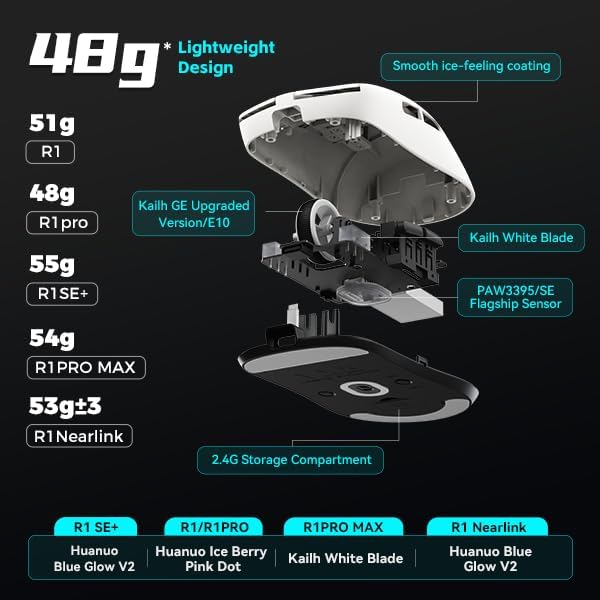
ചിത്രം: പൊട്ടിത്തെറിച്ചു view of the ATK VXE Dragonfly R1 mouse highlighting its lightweight internal components and showing weight comparisons for different R1 series models.
- PAW3395/SE Flagship Sensor: Equipped with a high-end optical sensor for precise tracking and accuracy, essential for competitive gaming.
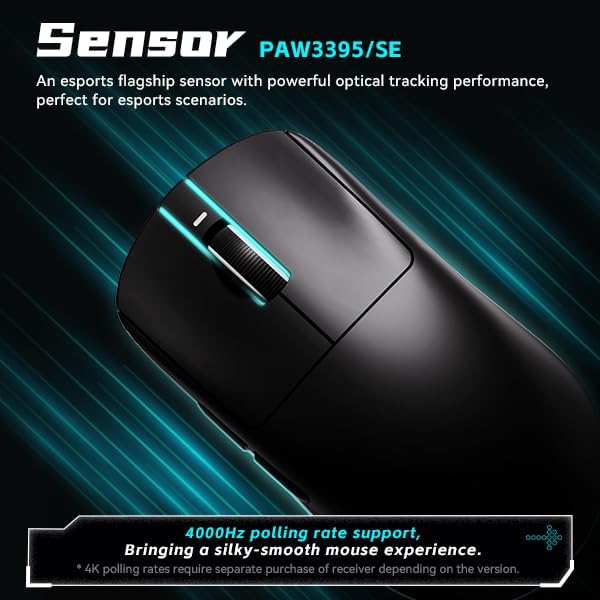
Image: Close-up of the ATK VXE Dragonfly R1 mouse, emphasizing the PAW3395/SE sensor and indicating 4000Hz polling rate support.
- Smart Speed X Transmission Technology: VXE's proprietary wireless technology ensures ultra-low latency and enhanced signal stability, even in environments with interference.

Image: Depiction of the ATK VXE Dragonfly R1 mouse with text highlighting "Smart Speed X" wireless transmission technology for low latency.
- Nordic/BEKEN(compx)/Hisilicon Nearlink MCU: Features a flagship-level chip for powerful performance, low power consumption, and improved interference resistance.

Image: Graphic showing the ATK VXE Dragonfly R1 mouse and its MCU, emphasizing 4K polling rate capability for both office and gaming.
- ATK Micro Switches (Kailh White Blade / Ice Berry Pink Dot): Designed for a consistent click feel and long lifespan.
- Kailh White Blade: 100 Million Click Lifespan, balanced feel.
- Ice Berry Pink Dot: 90 Million Click Lifespan, soft bounce feel.

Image: Detailed illustration comparing Kailh White Blade and Ice Berry Pink Dot micro switches, showing their click lifespan and feel characteristics.
- Smooth Ice-Feeling Coating: A dirt-resistant and easy-to-clean surface that provides a comfortable and grippy feel.

Image: Visual representation of the smooth ice-feeling coating on the ATK VXE Dragonfly R1 mouse, contrasting smooth and matte textures available on different R1 series models.
മെയിൻ്റനൻസ്
- വൃത്തിയാക്കൽ: മൗസിന്റെ പ്രതലം തുടയ്ക്കാൻ മൃദുവായതും ഉണങ്ങിയതുമായ ഒരു തുണി ഉപയോഗിക്കുക. കഠിനമായ അഴുക്കിന്, അല്പം ഡി.amp cloth with mild soap can be used, ensuring no liquid enters the mouse. The "Ice-Feel" coating is designed to be dirt-resistant and easy to clean.
- ബാറ്ററി കെയർ: ബാറ്ററി ലൈഫ് ദീർഘിപ്പിക്കാൻ, മൗസ് ഇടയ്ക്കിടെ പൂർണ്ണമായും ഡിസ്ചാർജ് ചെയ്യുന്നത് ഒഴിവാക്കുക. ബാറ്ററി ഇൻഡിക്കേറ്റർ കുറവായിരിക്കുമ്പോൾ മൗസ് ചാർജ് ചെയ്യുക. ദീർഘനേരം ഉപയോഗിക്കാത്തപ്പോൾ തണുത്തതും വരണ്ടതുമായ സ്ഥലത്ത് മൗസ് സൂക്ഷിക്കുക.
- സെൻസർ പരിപാലനം: കൃത്യമായ ട്രാക്കിംഗിനായി മൗസിന്റെ അടിവശത്തുള്ള ഒപ്റ്റിക്കൽ സെൻസർ വൃത്തിയുള്ളതും പൊടിയോ അവശിഷ്ടങ്ങളോ ഇല്ലാതെ സൂക്ഷിക്കുക.
ട്രബിൾഷൂട്ടിംഗ്
- മൗസ് പ്രതികരിക്കുന്നില്ല:
- മൗസ് ഓണാണെന്ന് ഉറപ്പാക്കുക.
- ബാറ്ററി ലെവൽ പരിശോധിച്ച് ആവശ്യമെങ്കിൽ ചാർജ് ചെയ്യുക.
- For 2.4GHz wireless, ensure the USB receiver is securely plugged in and within range.
- ബ്ലൂടൂത്തിന്, നിങ്ങളുടെ ഉപകരണത്തിൽ ബ്ലൂടൂത്ത് പ്രവർത്തനക്ഷമമാക്കിയിട്ടുണ്ടെന്നും മൗസ് ജോടിയാക്കിയിട്ടുണ്ടെന്നും ഉറപ്പാക്കുക.
- വയർലെസ് പ്രശ്നങ്ങൾ ഒഴിവാക്കാൻ USB-C കേബിൾ വഴി കണക്റ്റുചെയ്യാൻ ശ്രമിക്കുക.
- പൊരുത്തമില്ലാത്ത ട്രാക്കിംഗ്:
- മൗസിന്റെ അടിവശത്തുള്ള ഒപ്റ്റിക്കൽ സെൻസർ വൃത്തിയാക്കുക.
- മൗസ് അനുയോജ്യമായ ഒരു പ്രതലത്തിലാണ് ഉപയോഗിക്കുന്നതെന്ന് ഉറപ്പാക്കുക (ഉദാ. ഒരു മൗസ് പാഡ്).
- Check for software updates for the mouse driver or ATKGEAR software.
- കണക്റ്റിവിറ്റി പ്രശ്നങ്ങൾ:
- Move the mouse closer to the 2.4GHz receiver or Bluetooth device.
- Avoid sources of strong electromagnetic interference (e.g., Wi-Fi routers, other wireless devices).
- Re-pair the Bluetooth connection or re-insert the 2.4GHz receiver.
സ്പെസിഫിക്കേഷനുകൾ
| ഫീച്ചർ | വിശദാംശങ്ങൾ |
|---|---|
| മോഡൽ | R1 |
| അളവുകൾ | 6.3 x 4.72 x 2.36 ഇഞ്ച് (പാക്കേജ്) |
| ഇനത്തിൻ്റെ ഭാരം | 7 ounces (approx. 48g for mouse only) |
| സെൻസർ | PAW3395/SE Optical |
| കണക്റ്റിവിറ്റി | ബ്ലൂടൂത്ത്, 2.4GHz വയർലെസ്, USB-C വയേർഡ് |
| പോളിംഗ് നിരക്ക് | Up to 4000Hz (requires separate receiver for some versions) |
| മൈക്രോ സ്വിച്ചുകൾ | Kailh White Blade (100M clicks) / Ice Berry Pink Dot (90M clicks) |
| പൂശുന്നു | Smooth Ice-Feeling |
| ബാറ്ററി | നിലവാരമില്ലാത്ത ബാറ്ററി (ഉൾപ്പെടുത്തിയിരിക്കുന്നു) |
| നിർമ്മാതാവ് | ATKGEAR |

Image: Detailed table outlining specifications for various models within the VXE Dragonfly R1 series, including dimensions, coating, sensor, chip, polling rate, battery life, weight, microswitches, scroll wheel, mouse feet, and connection methods.
വാറൻ്റിയും പിന്തുണയും
For warranty information and technical support, please refer to the official ATKGEAR website or contact their customer service. Specific warranty terms may vary by region and retailer. Keep your proof of purchase for warranty claims.
Manufacturer: ATKGEAR