
1. ആമുഖം
This manual provides detailed instructions for the setup, operation, and maintenance of your Cillso IDW26 Smart Watch. Please read this manual thoroughly before using your device to ensure proper functionality and to maximize your user experience.

Image: The Cillso IDW26 Smart Watch, showcasing its main display with various metrics and a separate screen illustrating an incoming call.
2. ബോക്സിൽ എന്താണുള്ളത്?
- 1x Cillso IDW26 Smart Watch
- 1x Type-C Magnetic Charging Cable
- 1x ഉപയോക്തൃ മാനുവൽ
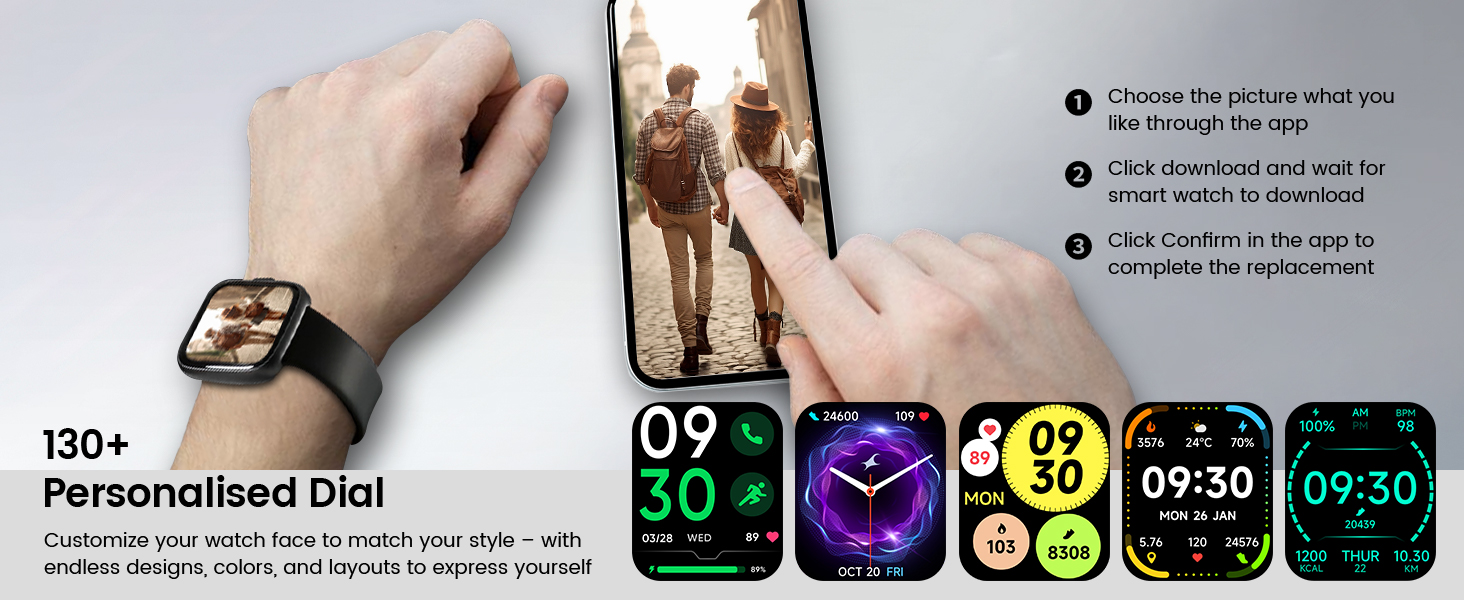
Image: A visual representation of the Cillso IDW26 Smart Watch packaging contents, showing the watch, its magnetic charging cable, and the included user manual.
3. സജ്ജീകരണവും പ്രാരംഭ ഉപയോഗവും
3.1 ഉപകരണം ചാർജ് ചെയ്യുന്നു
Before first use, fully charge your Cillso IDW26 Smart Watch. Connect the magnetic charging cable to the charging points on the back of the watch and plug the USB end into a power adapter (not included) or a computer's USB port. A full charge typically takes approximately 1.5 to 2 hours.

ചിത്രം: പിൻഭാഗം view of the Cillso IDW26 Smart Watch, highlighting the optical sensor for health monitoring and the two metallic contacts for magnetic charging.
3.2 ആപ്പ് ഇൻസ്റ്റാളേഷനും ജോടിയാക്കലും
To unlock the full functionality of your Cillso IDW26 Smart Watch, you need to install the companion application on your smartphone. The watch is compatible with smartphones running iOS 9.0+ and Android 5.0+ (or later versions).
- ആപ്പ് ഡൗൺലോഡ് ചെയ്യുക: Scan the QR code provided in the watch's packaging or search for "VeryFit" in your smartphone's app store (App Store for iOS, Google Play Store for Android).
- ബ്ലൂടൂത്ത് പ്രവർത്തനക്ഷമമാക്കുക: നിങ്ങളുടെ സ്മാർട്ട്ഫോണിൽ ബ്ലൂടൂത്ത് പ്രവർത്തനക്ഷമമാക്കിയിട്ടുണ്ടെന്ന് ഉറപ്പാക്കുക.
- ആപ്പ് തുറക്കുക: Launch the "VeryFit" app and follow the on-screen instructions to create an account or log in.
- ഉപകരണം ചേർക്കുക: Within the app, navigate to the "Add Device" section. The app will search for nearby devices.
- നിങ്ങളുടെ വാച്ച് തിരഞ്ഞെടുക്കുക: Select "IDW26" from the list of found devices.
- ജോടിയാക്കൽ സ്ഥിരീകരിക്കുക: നിങ്ങളുടെ ഫോണിലും വാച്ചിലും ഒരു ജോടിയാക്കൽ അഭ്യർത്ഥന ദൃശ്യമാകും. രണ്ട് ഉപകരണങ്ങളിലും ജോടിയാക്കൽ സ്ഥിരീകരിക്കുക.
- അറിയിപ്പുകൾ അനുവദിക്കുക: Grant the app necessary permissions, especially for notifications, to ensure messages and calls are displayed on your smartwatch.
For certain message notifications, the "GloryFit" app may also be mentioned in some contexts. If you encounter issues with specific message types, verify settings within both "VeryFit" and "GloryFit" if both are installed, or consult the app's help section.

Image: A visual guide demonstrating the pairing process for the Cillso IDW26 Smart Watch, from enabling Bluetooth to confirming the connection and allowing notifications.
For further assistance with app installation and pairing, you can visit the official support page: https://t.ido.ink/eAriqu
4. സ്മാർട്ട് വാച്ച് പ്രവർത്തിപ്പിക്കൽ
4.1 ടച്ച്സ്ക്രീൻ നാവിഗേഷൻ
- മുകളിലേക്കും താഴേക്കും സ്വൈപ്പ് ചെയ്യുക: മെനുകളിലൂടെയും അറിയിപ്പുകളിലൂടെയും സ്ക്രോൾ ചെയ്യുക.
- ഇടത്തേക്ക്/വലത്തേക്ക് സ്വൈപ്പ് ചെയ്യുക: Access quick widgets or different feature screens.
- ടാപ്പ് ചെയ്യുക: ഒരു ഇനം തിരഞ്ഞെടുക്കുക അല്ലെങ്കിൽ ഒരു പ്രവർത്തനം സ്ഥിരീകരിക്കുക.
- അമർത്തിപ്പിടിക്കുക: വാച്ച് ഫെയ്സുകൾ ഇഷ്ടാനുസൃതമാക്കുക (ഹോം സ്ക്രീനിൽ).
4.2 Side Button Functionality
The physical button on the side of the watch typically serves the following functions:
- ഷോർട്ട് പ്രസ്സ്: Wake up the screen, return to the previous screen, or go back to the home screen.
- ലോംഗ് പ്രസ്സ്: Power on/off the device, or access a quick menu (e.g., restart, power off).
5 പ്രധാന സവിശേഷതകൾ
5.1 Bluetooth Calling and Message Notifications
The Cillso IDW26 Smart Watch features Bluetooth 5.3 for stable connectivity, allowing you to make and answer calls directly from your wrist. It includes a sensitive microphone and speaker for clear communication. Once paired with the "GloryFit" or "VeryFit" app, you will receive notifications for incoming calls, SMS messages, and alerts from various social media applications (e.g., Facebook, Twitter, WhatsApp, Instagram). Notifications are delivered via intuitive customizable vibrations.

Image: The Cillso IDW26 Smart Watch showing a message notification from WeChat and an incoming call interface with options to answer or decline.
5.2 Built-in Alexa Voice Control
Access Amazon Alexa's intelligent voice assistant directly from your wrist. Speak commands to check news, weather, calendar updates, set reminders, control smart home devices, and manage music playback. This feature enhances hands-free operation and daily efficiency.

Image: A user interacting with the Cillso IDW26 Smart Watch's built-in AI voice assistant, asking questions like "What time is it?" and "Weather today?".
5.3 1.83" HD Display and Customization
The smartwatch features a 1.83-inch HD display with 3D tempered glass, offering a resolution of 320x385 pixels for clear visuals and high touch sensitivity. The 4-level adjustable brightness ensures readability in various lighting conditions. Through the "VeryFit" app, you can choose from over 130 watch faces or create custom designs using your own photos.

ചിത്രം: വിശദമായ ഒരു ചിത്രം view of the Cillso IDW26 Smart Watch's 1.83-inch HD screen, emphasizing its clarity and display technology.

Image: A demonstration of the Cillso IDW26 Smart Watch's customization options, showing multiple watch face designs and the process of selecting or creating a personalized dial through the app.
5.4 24/7 Health Monitoring
Equipped with a high-precision optical sensor, the IDW26 Smart Watch provides continuous health monitoring:
- ഹൃദയമിടിപ്പ് നിരീക്ഷണം: Tracks your heart rate in real-time, providing insights into your cardiovascular health.
- ഉറക്ക നിരീക്ഷണം: Analyzes sleep quality by identifying deep sleep, light sleep, and awake phases, offering suggestions for improved sleep habits.
- രക്ത ഓക്സിജൻ (SpO2) ട്രാക്കിംഗ്: Monitors your blood oxygen levels for essential wellness insights.
- ശ്വസന പരിശീലനം: Guides you through breathing exercises with gentle vibrations and visual cues to help calm your mind and body.

Image: A composite image illustrating the 24/7 health monitoring capabilities of the Cillso IDW26 Smart Watch, including heart rate, sleep tracking, blood oxygen measurement, and guided breath training.
5.5 120+ Sports Modes
The fitness tracker supports over 120 professional sport modes, covering a wide range of indoor and outdoor activities such as running, cycling, soccer, and more. High-precision sensors accurately track steps, distance, calories burned, and workout duration, assisting in performance analysis and training plan optimization.

Image: A person hiking with the Cillso IDW26 Smart Watch, alongside graphics illustrating the watch's 24-hour activity tracking and icons representing over 120 sports modes.
5.6 IP68 വാട്ടർപ്രൂഫ് റേറ്റിംഗ്
With an IP68 rating, the smartwatch is resistant to sweat, rain, and can be worn during handwashing. It is not suitable for swimming or hot showers.

Image: The Cillso IDW26 Smart Watch shown with water droplets, visually representing its IP68 waterproof capabilities for daily activities like hand washing, exposure to rain, and perspiration.
5.7 അധിക പ്രവർത്തനങ്ങൾ
The Cillso IDW26 Smart Watch includes several practical features to enhance daily convenience:
- അലാറം ക്ലോക്ക്: ഒന്നിലധികം അലാറങ്ങൾ സജ്ജമാക്കുക.
- സ്റ്റോപ്പ് വാച്ച് & ടൈമർ: പ്രവർത്തനങ്ങൾക്കിടയിൽ കൃത്യമായ സമയപാലനത്തിനായി.
- Phone Locator: Helps find your paired smartphone.
- ക്യാമറ നിയന്ത്രണം: Remotely control your phone's camera.
- സംഗീത നിയന്ത്രണം: നിങ്ങളുടെ സ്മാർട്ട്ഫോണിൽ സംഗീത പ്ലേബാക്ക് നിയന്ത്രിക്കുക.
- കാലാവസ്ഥാ പ്രവചനം: തത്സമയ കാലാവസ്ഥാ അപ്ഡേറ്റുകൾ നേടുക.
- ഉദാസീനമായ ഓർമ്മപ്പെടുത്തൽ: നിഷ്ക്രിയത്വ കാലയളവുകൾക്ക് ശേഷം നീങ്ങാൻ നിങ്ങളെ പ്രേരിപ്പിക്കുന്നു.

Image: A collage of images depicting various practical functions of the Cillso IDW26 Smart Watch, including stopwatch, alarm clock, camera control, music control, weather forecast, and sedentary reminder.
6. ബാറ്ററി ലൈഫും ചാർജിംഗും
The Cillso IDW26 Smart Watch is powered by a 300mAh battery designed for low power consumption.
- ഉപയോഗ സമയം: Up to 5-7 days with typical use.
- സ്റ്റാൻഡ്ബൈ സമയം: 30 ദിവസം വരെ.
- ചാർജിംഗ് സമയം: ഫുൾ ചാർജിനായി ഏകദേശം 1.5 മണിക്കൂർ.
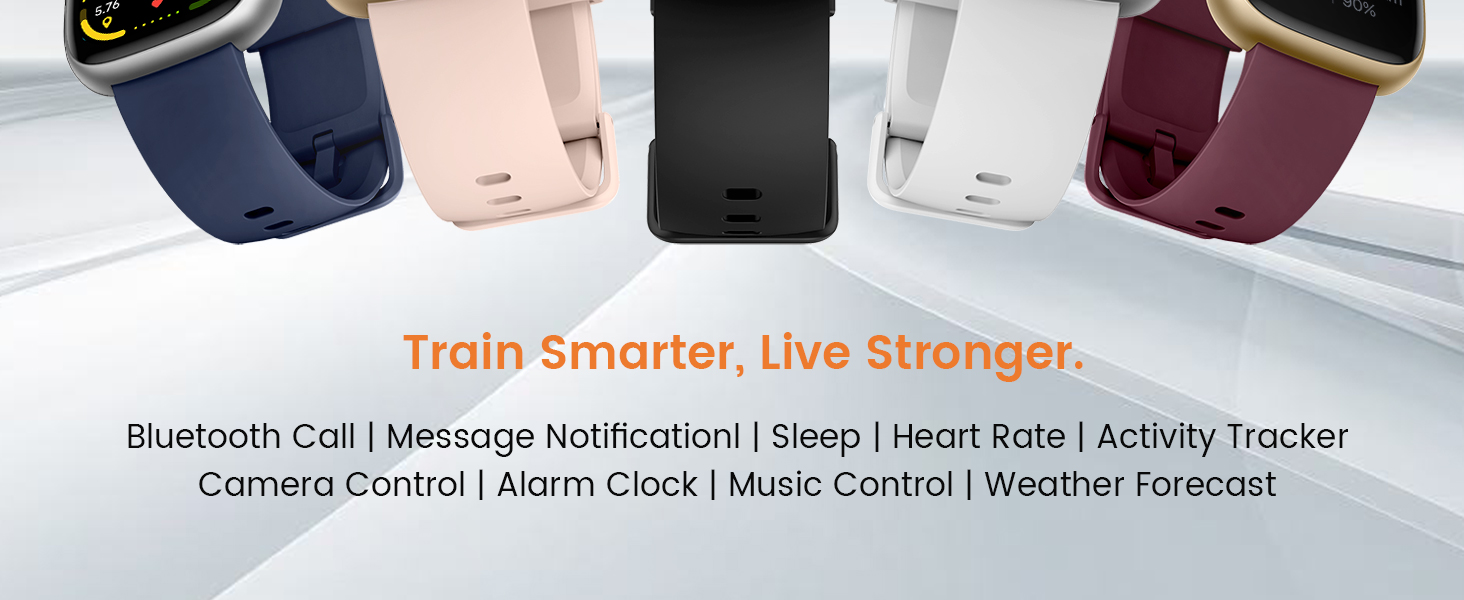
Image: A graphic illustrating the battery performance of the Cillso IDW26 Smart Watch, detailing its 2-hour charging time, 7 days of normal use, and 30 days of standby time.
7. പരിപാലനവും പരിചരണവും
- വൃത്തിയാക്കൽ: മൃദുവായതും ഉണങ്ങിയതുമായ തുണി ഉപയോഗിച്ച് വാച്ചും സ്ട്രാപ്പും പതിവായി തുടയ്ക്കുക. ആവശ്യമെങ്കിൽ, അല്പം ഡി-ക്ലിപ്പർ ഉപയോഗിക്കുക.amp തുണി പിന്നീട് നന്നായി ഉണക്കുക.
- രാസവസ്തുക്കൾ ഒഴിവാക്കുക: Do not use harsh chemicals, cleaning solvents, or strong detergents, as these can damage the watch's finish and seals.
- വാട്ടർ എക്സ്പോഷർ: While IP68 rated, avoid prolonged submersion, hot water, or steam. Dry the watch thoroughly if it gets wet.
- താപനില: Avoid exposing the watch to extreme temperatures (very hot or very cold) or direct sunlight for extended periods.
- ആഘാതം: ശക്തമായ ആഘാതങ്ങളിൽ നിന്നോ വീഴ്ചകളിൽ നിന്നോ വാച്ചിനെ സംരക്ഷിക്കുക.
8. പ്രശ്നപരിഹാരം
If you encounter issues with your Cillso IDW26 Smart Watch, please refer to the following common solutions:
- വാച്ച് ഓണാകുന്നില്ല: വാച്ച് പൂർണ്ണമായും ചാർജ് ചെയ്തിട്ടുണ്ടെന്ന് ഉറപ്പാക്കുക. കുറഞ്ഞത് 10 മിനിറ്റെങ്കിലും ചാർജറുമായി ബന്ധിപ്പിക്കുക.
- ഫോണുമായി ജോടിയാക്കാൻ കഴിയില്ല:
- നിങ്ങളുടെ ഫോണിലും വാച്ചിലും ബ്ലൂടൂത്ത് പ്രവർത്തനക്ഷമമാക്കിയിട്ടുണ്ടെന്ന് ഉറപ്പാക്കുക.
- വാച്ച് നിങ്ങളുടെ ഫോണിന്റെ പരിധിയിലാണെന്ന് ഉറപ്പാക്കുക.
- നിങ്ങളുടെ ഫോണും വാച്ചും പുനരാരംഭിക്കുക.
- Try unpairing and re-pairing the device through the "VeryFit" app.
- Check if the "VeryFit" app has all necessary permissions enabled on your phone.
- അറിയിപ്പുകൾ ദൃശ്യമാകുന്നില്ല:
- Ensure the watch is successfully paired and connected to the app.
- Verify that notification permissions are granted to the "VeryFit" app in your phone's settings.
- Check the notification settings within the "VeryFit" app to ensure specific app notifications are enabled.
- Ensure your phone's notification bar displays the messages; if not, the watch cannot receive them.
- കൃത്യമല്ലാത്ത ആരോഗ്യ ഡാറ്റ:
- വാച്ച് നിങ്ങളുടെ കൈത്തണ്ടയിൽ നന്നായി ധരിക്കുന്നുണ്ടെന്ന് ഉറപ്പാക്കുക, അധികം ഇറുകിയതോ അധികം അയഞ്ഞതോ അല്ല.
- വാച്ചിന്റെ പിൻഭാഗത്തുള്ള സെൻസർ വൃത്തിയാക്കുക.
- അളക്കുമ്പോൾ അമിതമായ ചലനം ഒഴിവാക്കുക.
- ഹ്രസ്വ ബാറ്ററി ലൈഫ്:
- സ്ക്രീൻ തെളിച്ചം കുറയ്ക്കുക.
- ആവശ്യമില്ലെങ്കിൽ തുടർച്ചയായ ഹൃദയമിടിപ്പ് നിരീക്ഷണം പ്രവർത്തനരഹിതമാക്കുക.
- വാച്ചിലേക്ക് അറിയിപ്പുകൾ അയയ്ക്കുന്ന ആപ്പുകളുടെ എണ്ണം പരിമിതപ്പെടുത്തുക.
- ഓരോ തവണയും വാച്ച് പൂർണ്ണമായും ചാർജ് ചെയ്തിട്ടുണ്ടെന്ന് ഉറപ്പാക്കുക.
If these steps do not resolve your issue, please contact Cillso customer support.
9 സ്പെസിഫിക്കേഷനുകൾ
| ഫീച്ചർ | വിശദാംശങ്ങൾ |
|---|---|
| മോഡലിൻ്റെ പേര് | IDW26 |
| ബ്രാൻഡ് | Cillso |
| സ്ക്രീൻ വലിപ്പം | 1.83 ഇഞ്ച് |
| സ്ക്രീൻ റെസല്യൂഷൻ | 320x385 പിക്സലുകൾ |
| ആകൃതി | സമചതുരം |
| ജിപിഎസ് | സ്മാർട്ട്ഫോൺ വഴി ജിപിഎസ് |
| ബാറ്ററി സെൽ കോമ്പോസിഷൻ | ലിഥിയം പോളിമർ |
| കണക്റ്റിവിറ്റി ടെക്നോളജി | ബ്ലൂടൂത്ത് 5.3 |
| ബാറ്ററി ശേഷി | 300 മില്ലിamp മണിക്കൂറുകൾ |
| പ്രത്യേക സവിശേഷതകൾ | Activity Tracker, Alarm Clock, Camera Control, Touchscreen, Weather Forecast, Alexa Built-in, Bluetooth Calling, Heart Rate/Sleep Monitor, 120+ Sports Modes, IP68 Waterproof |
| ഓപ്പറേറ്റിംഗ് സിസ്റ്റം അനുയോജ്യത | iOS 9.0+, Android 5.0+ |
| ഇനത്തിൻ്റെ ഭാരം | 10 ഗ്രാം (0.353 ഔൺസ്) |
| ജല പ്രതിരോധം | IP68 (Resistant to sweat, rain, handwashing) |
10. വാറൻ്റിയും പിന്തുണയും
Cillso is committed to providing quality products and customer service.
10.1 ഉപഭോക്തൃ പിന്തുണ
If you have any questions about the product, encounter problems, or require assistance, please contact Cillso customer service through the platform where you purchased the product (e.g., Amazon). Cillso offers 24-hour customer service to help resolve any issues promptly.

Image: A graphic indicating customer support availability, prompting users to contact for assistance with product issues.